
What Should You Test Before Changing AI Receptionist Hours?
Author
Business Boomer StaffEditorial Team
The Business Boomer Staff profile is used for general guides, announcements, and educational resources created or maintained by the Business Boomer editorial workflow.
Before changing AI receptionist hours, test the caller experience before opening, at close, after hours, and through the human-handoff path—not only the schedule setting.
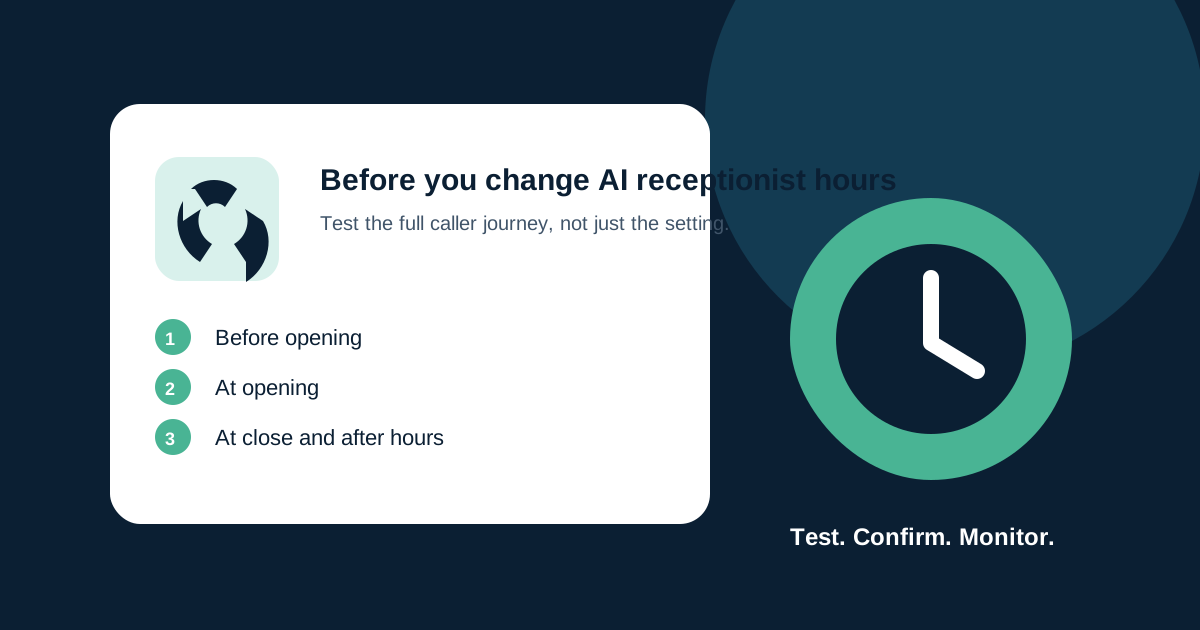
Before changing an AI receptionist’s hours, test the caller experience at the edges of the schedule: just before open, at opening time, just before close, after close, and during an exception such as a holiday. The point is not merely to confirm that the schedule saved. It is to confirm what the caller hears, where the call goes, what information is collected, and who owns the next step.
Hours changes are easy to underestimate. A new closing time can affect the greeting, human-transfer rule, calendar availability, missed-call message, escalation path, and staff expectations. If those pieces disagree, a caller can receive an answer that sounds plausible but leads nowhere.
Quick answer: Write down the new schedule and ownership first. Then test calls before opening, at open, during the day, at close, and after close—plus the human-handoff and exception paths your business actually supports.
Define the change before touching the system
Write a short change note before editing anything. Include the current schedule, desired schedule, effective date, timezone, affected locations or phone numbers, and who will handle exceptions. Make the note specific enough that a staff member can compare the configured behavior with the intended behavior.
For example, “open later on Saturdays” is incomplete. A useful instruction states what happens at 8:45 a.m., 9:00 a.m., and 9:15 a.m.; whether callers can leave a message; whether urgent requests go to an on-call person; and when staff expect the resulting follow-up.
This does not require a large governance project. It prevents a common problem: a caller reaches an after-hours experience while the team assumes normal routing is active.
Test the caller journey at five moments
Use an authorized internal test number or a safe test route, never a customer’s contact information. Record only the outcomes you need to verify.
- Before opening: Does the assistant accurately state that the business is closed? Does it offer the intended next step without making an unsupported promise?
- At opening: Does the normal greeting and permitted routing start when expected in the correct timezone?
- During normal hours: Can a routine caller reach the intended booking, intake, or human-handoff path?
- At closing: Does the system change behavior at the intended moment rather than leaving callers in an ambiguous path?
- After closing: Is the message, callback expectation, escalation route, and captured information consistent with the team’s actual process?
If the business serves more than one market, repeat the test for each affected phone number or location. Do not assume a global hours change reaches every route, calendar, or knowledge source.
Test the exception paths, not just the greeting
The greeting is only the beginning. A caller who asks for a person, reports an urgent issue, or has a question outside the assistant’s approved knowledge needs a clear route. Before changing hours, test the exceptions your business has already chosen to support.
For a local service company, that might include an urgent repair request, a reschedule request, a caller outside the service area, and a request for a human. For another business, the relevant categories may differ. The team should decide the approved scenarios; the AI receptionist should not invent a policy when the situation is unclear.
Check that staff receive enough information to act: caller name, callback method, stated need, location when relevant, and a timestamp. Collect only information that is appropriate for the business and its privacy obligations. If the handoff does not reach anyone, treat that as a real failure to correct—not as a successful test because the assistant spoke politely.
Compare the automation to the real team schedule
An AI receptionist cannot create staff coverage. Before activating a schedule change, confirm the human side: who receives transfers, who monitors after-hours messages, what happens when the on-call person is unavailable, and how quickly the team intends to respond.
Avoid saying “someone will call you right back” unless the business has an actual, supported process for that commitment. A safer message can say that the team will follow up during the stated operating period, if that is true. Review the text with the person responsible for fulfillment, not only the person configuring the assistant.
For a narrower guide on defining when the assistant should stop and involve a person, read when an AI receptionist should transfer a call to a human.
Keep a short release record
After the test, record the date, version or change made, test cases, observed outcomes, any corrected issue, and the person who confirmed the release. This is not paperwork for its own sake. It makes it possible to investigate a missed handoff later without relying on memory.
NIST’s voluntary AI Risk Management Framework Core includes documented testing and evaluation, post-deployment monitoring, incident response, recovery, and change management as parts of managing AI risk. NIST’s 2026 report on monitoring deployed AI systems also notes that real-world monitoring matters because deployed AI can behave variably under dynamic conditions.
Those are cross-sector references, not a prescriptive small-business phone-system checklist. The practical lesson is to test the change, observe the live outcome, and keep enough evidence to improve the next change.
Monitor more closely after the change
For the first few days after an hours update, review all exception calls and a sample of routine calls. Look for calls that ended without a next step, callers who asked for a person but did not get a handoff, messages delivered to the wrong team member, or unexpected mentions of closed hours.
Make one correction at a time when possible, then retest the affected path. Do not repeatedly change scripts and routing together until it becomes impossible to tell which change fixed—or caused—the problem.
If the assistant cannot understand a caller, the team needs a fallback that respects the customer and gets them to help. Our guide to what to do when an AI receptionist cannot understand a caller covers that narrower scenario.
A final pre-change checklist
Before you publish new hours to the assistant, confirm:
- The effective date, timezone, and affected phone numbers are written down.
- The open, close, and after-hours caller journeys have been tested.
- Human-handoff and urgent-exception owners are available.
- No message promises a callback or service the team cannot provide.
- Staff know where intake records appear and how to respond.
- A short monitoring review is scheduled for after the change.
This is operational guidance, not legal advice or a promise that automation will handle every caller correctly. If you want help mapping the hours, handoff, and follow-up process around your team’s actual workflow, contact AIBB.
Keep building the system
Recommended next Business Boomer guides
These links are selected by topic and search intent so this guide connects to the most relevant service pages, industry pages, and supporting blog posts.
Service and setup pages
Use these when you are ready to turn the idea into an implementation path.
Industry-specific pages
See how the same workflow changes for specific business types.
Related blog posts
Read the connected guides that support this topic cluster.
Related AI automation guides
Keep going with the connected Business Boomer guides in this automation cluster.
Missed lead cost calculator
A calculator page for estimating the monthly revenue lost when calls, forms, chat, and messages sit too long before follow-up.
Automatic invoicing setup for business
Map the trigger, template, payment link, reminders, overdue task, and testing for a focused invoicing setup.
AI automation services for local small business
The main Business Boomer service page for lead response, missed-call follow-up, invoice reminders, reviews, CRM updates, scheduling, and OpenClaw setup.
AI automation for local service businesses
Practical lead, scheduling, review, CRM, invoice, and admin automation for plumbers, HVAC companies, roofers, landscapers, cleaners, contractors, and other local operators.
Frequently Asked Questions
FAQ
Quick answers about this guide and how to put the idea into practice.
What should I test before changing AI receptionist hours?
Test the caller journey before opening, at opening, during normal hours, at closing, and after closing. Also test human handoff and any urgent or out-of-scope path your business supports.
Should an AI receptionist promise a callback after hours?
Only if your team has an actual process and coverage to provide that callback. Otherwise state the next supported follow-up period clearly.
How long should I monitor an AI receptionist after changing its schedule?
Review exception calls and a sample of routine calls more closely for the first few days, then correct and retest any affected path.
Stop letting leads sit without a next action.
Business Boomer can install lead capture, first-response drafts, quote follow-up reminders, and a simple owner handoff.
See Lead Follow-Up Automation