
Best AI Website Builders for Small Businesses
The best AI website builder for a small business depends on the job: Wix for flexible business sites, Squarespace for polished service brands, Hostinger for budget launches, Shopify for ecommerce, and Webflow or Framer for more design control.


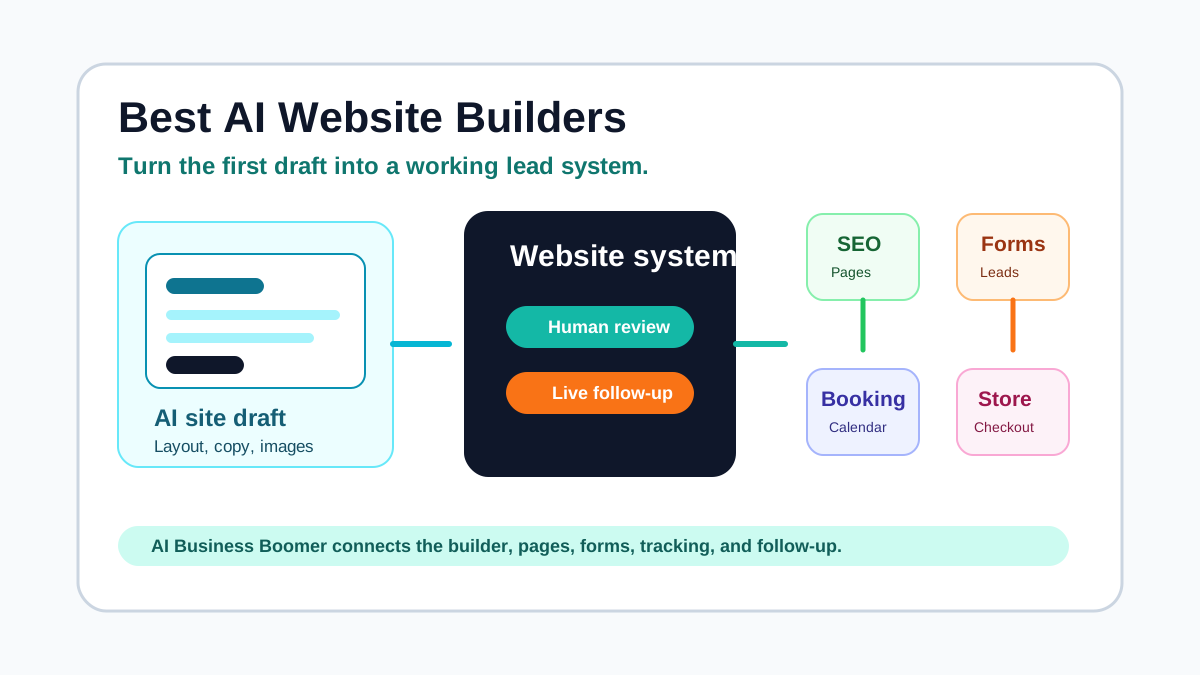
Small businesses use AI website builders for one reason: they need a usable website without a long design project. The hard part comes after the first draft. The site still needs a clear offer, local trust signals, service pages, forms, tracking, booking, SEO, and follow-up.
Quick answer: Wix is the safest general AI website builder for many small businesses, Squarespace is strong for polished service brands, Hostinger is a good budget launch option, Shopify fits ecommerce, and Webflow or Framer fit teams that want more design control. AI Business Boomer helps small businesses choose, set up, connect, and maintain the right AI website tools so the site turns into a working lead system.
Use this guide if you want a business website that can help with calls, forms, appointments, quotes, payments, content, and follow-up. If you want hands-on setup, start with AI website services for service businesses or request a free website preview.
Quick recommendation
| Business need | Best first pick |
|---|---|
| Flexible all-purpose small business site | Wix |
| Polished service brand or appointment-based business | Squarespace |
| Low-cost site with fast AI setup | Hostinger |
| Fast local business launch with domain support | GoDaddy |
| Solo owner who wants a quick AI business site | Durable |
| Online store and product sales | Shopify |
| Design-led marketing site with CMS control | Webflow |
| Modern landing pages and startup-style sites | Framer |
| WordPress site with AI generation and managed hosting | 10Web |
| Content-heavy site on a WordPress foundation | WordPress.com |
The best builder is the one your business can keep current. A beautiful site that nobody updates will not help with slow lead response, outdated service pages, weak calls to action, or quote follow-up.
Comparison table
Pricing changes often. Treat these notes as fit guidance and check each platform's current pricing page before buying.
| Platform | Best fit | AI strengths | Pricing and fit note |
|---|---|---|---|
| Wix | General small business sites | AI site creation, copy support, layouts, app suggestions, business tools | Free start available; paid plans are usually needed for a custom domain and business features |
| Squarespace | Polished service brands, portfolios, appointments | Blueprint AI, design guidance, copy suggestions, strong templates | Paid account needed to publish; strong fit when design consistency matters |
| Hostinger | Budget-conscious launches | Prompt-based site generation, hosting, AI tools, mobile-friendly editing | Strong low-cost option; check renewal pricing and ecommerce limits |
| GoDaddy | Fast local business launch | Airo and website builder tools for sites, domains, marketing, appointments, stores | Useful when domain, website, email, and support should live in one vendor |
| Durable | Solo service owners | Very fast AI site draft, business tools, simple editing | Good for speed; review SEO depth, customization, and long-term ownership needs |
| Shopify | Ecommerce businesses | Shopify Magic, Sidekick, product copy, store tasks, merchandising help | Best when selling products is the core job; too much for a simple brochure site |
| Webflow | Design-led teams and marketing sites | AI site builder, CMS, SEO and AEO support, design system foundation | More control and more learning curve; paid plans needed for custom domains and larger sites |
| Framer | Modern landing pages and startup sites | AI agents, page generation, CMS, SEO, localization, visual editing | Strong design speed; confirm CMS, bandwidth, and team needs before choosing |
| 10Web | WordPress users who want AI setup | AI WordPress site generation, managed hosting, performance tools | Good when WordPress flexibility matters; review plan limits by site and traffic |
| WordPress.com | Blogs and content-rich business sites | AI website builder on a WordPress foundation | Strong for content ownership and publishing; advanced plugins usually need higher plans |
1. Wix
Wix is the best first option for many small businesses because it combines AI site creation, templates, app integrations, bookings, ecommerce options, SEO tools, forms, and support in one place.
Wix fits:
- Local service businesses
- Restaurants and retail shops
- Contractors and home services
- Consultants and coaches
- Salons, spas, and appointment businesses
- Small ecommerce tests
The AI builder can help you move from idea to first draft fast. The owner still needs to review the service pages, headline, calls to action, photos, testimonials, local keywords, and form routing.
Use Wix when you want flexibility without hiring a developer. Avoid treating the first generated draft as the finished site. A good small business site needs specific service pages, proof, a clear booking path, and follow-up after someone submits a form.
2. Squarespace
Squarespace is a strong pick for businesses that care about design quality and a polished brand impression. Its Blueprint AI system guides the starting structure, page layout, brand direction, colors, fonts, and copy.
Squarespace fits:
- Med spas
- Salons and beauty businesses
- Consultants
- Coaches
- Boutique service businesses
- Designers, photographers, and creative professionals
- Appointment-based local businesses
The platform works well when the business needs the site to look trustworthy on day one. It also supports appointments, ecommerce, email campaigns, and content publishing.
The main constraint is workflow complexity. If your site needs custom lead routing, advanced CRM logic, multi-location SEO, or heavy integrations, plan the follow-up system before choosing a template.
3. Hostinger
Hostinger is a practical AI website builder for owners who care about budget and speed. Its AI builder can create a site from a prompt, and the broader Hostinger stack includes hosting, domain support, email, and other web tools.
Hostinger fits:
- New local businesses
- Side businesses
- Simple service sites
- Budget-conscious owners
- Businesses that need a fast first web presence
The value is speed. You can get a mobile-friendly site online without a large project. The risk is publishing a generic site with weak service copy and no lead system.
Before launching, check four items: the homepage offer, the service page structure, the contact form destination, and the call-to-action wording. Those details decide whether the website helps the business or just exists.
4. GoDaddy
GoDaddy makes sense when the owner wants domain registration, website setup, business email, marketing tools, appointments, ecommerce, and support in one familiar account. Its Airo products add AI-assisted setup for websites and business assets.
GoDaddy fits:
- Owners buying a domain and launching a site at the same time
- Local businesses that want a fast website and support
- Appointment businesses
- Small online stores
- Owners who want a simple vendor stack
The strongest reason to use GoDaddy is convenience. The tradeoff is depth. A simple setup can work well for a starter site, but serious SEO, local pages, service-area pages, conversion tracking, and lead follow-up still need a plan.
Use it when simplicity beats design control. Bring in help when the business needs the website to become a lead-generation system.
5. Durable
Durable focuses on fast AI-generated websites for small businesses. It can create a first version quickly and includes business tools around the website experience.
Durable fits:
- Solo service providers
- New businesses validating an offer
- Owners who need a site this week
- Simple local businesses with a narrow service list
Durable works best when speed matters more than deep customization. It can help an owner stop delaying the launch.
Review the site before you send traffic to it. Check whether the copy sounds like your business, the services match what you sell, the local terms are accurate, and the form creates a real next action.
6. Shopify
Shopify belongs on this list because many small business websites are stores. Shopify is the best fit when product sales, checkout, inventory, payments, shipping, discounts, and product content matter more than a brochure site.
Shopify's AI features can help with product descriptions, store tasks, commerce workflows, and business analysis through Shopify Magic and Sidekick.
Shopify fits:
- Retail brands
- Ecommerce stores
- Makers and product businesses
- Local shops selling online
- Businesses that need inventory, checkout, shipping, and payments
Do not choose Shopify for a simple service website unless commerce will become central. Choose it when the website needs to sell products and manage the store behind those products.
7. Webflow
Webflow fits businesses that want more design control, CMS structure, and room to grow. Webflow's AI site builder can generate a complete starting site, and its platform supports CMS content, SEO, AEO, design systems, hosting, and more advanced site management.
Webflow fits:
- Design-led service businesses
- Agencies
- SaaS and startup-style marketing sites
- Businesses planning a large content library
- Teams with a marketer, designer, or web partner
The benefit is control. The cost is complexity. A non-technical owner may publish faster on Wix, Squarespace, Hostinger, or GoDaddy.
Use Webflow when the business cares about custom layouts, scalable content, performance, and marketing control. Pair it with a clear maintenance owner.
8. Framer
Framer is strong for modern landing pages, sleek marketing sites, startup-style pages, and teams that want a visual canvas with AI assistance. Its AI features can generate pages, refine layouts, translate content, review SEO, and support publishing workflows.
Framer fits:
- Startups
- Consultants with a strong personal brand
- Productized service offers
- Landing pages
- Design-forward small businesses
Framer can move fast when the offer is clear. It is less ideal when the business needs a traditional local SEO structure with many service-area pages, complex forms, or heavy operational integrations.
Choose Framer for speed and design polish. Choose a more traditional builder if the site needs broad local SEO pages and owner-friendly editing.
9. 10Web
10Web is a useful option when the business wants WordPress but does not want to start from a blank theme. It uses AI to create WordPress websites and pairs that with managed hosting, performance tools, and WordPress flexibility.
10Web fits:
- Businesses that want WordPress
- Agencies building multiple sites
- Owners who want AI setup with plugin flexibility
- Content and SEO-focused businesses
- Businesses that may outgrow a closed website builder
The main question is maintenance. WordPress gives you room to customize, but someone needs to manage updates, plugins, content quality, forms, backups, and tracking.
Use 10Web when WordPress ownership matters and you have a plan for ongoing care.
10. WordPress.com
WordPress.com now offers AI website building on a managed WordPress foundation. That matters for small businesses that want content publishing, ownership, blogging, SEO pages, and long-term flexibility.
WordPress.com fits:
- Content-heavy local businesses
- Consultants and coaches
- Businesses that publish guides
- Owners who want WordPress without managing hosting
- Sites that may grow into larger content libraries
The benefit is the WordPress ecosystem. The constraint is plan selection. Some advanced features, plugins, and monetization options depend on the plan.
Use WordPress.com when content and ownership matter more than instant visual polish.
How to choose the right AI website builder
Start with the business job.
| Question | Why it matters |
|---|---|
| Do you sell services, products, appointments, or subscriptions? | The answer changes the builder shortlist |
| Do you need local SEO pages? | Local service businesses need service pages, city pages, reviews, and schema |
| Who will edit the site every month? | A site needs an owner after launch |
| Where should form leads go? | Email alone often causes missed follow-up |
| Do you need booking or payment links? | The builder must support the customer action |
| Do you need a blog or resource library? | CMS quality matters for long-term SEO |
| Do you need CRM or automation connections? | Forms should connect to follow-up, reminders, and reporting |
A small business website should do five jobs:
- Explain who you help and what you sell
- Build trust with proof, reviews, photos, and local signals
- Make the next step easy
- Capture the lead cleanly
- Trigger follow-up after the lead submits
The AI builder can help with the first draft. The business still needs the system behind the website.
Verify one inquiry from the page to the receiving person
Download the website inquiry handoff test (CSV). Record the actual builder, plan, form URL and receiving inbox before testing. Use a controlled test identity and obtain permission before submitting anything that could trigger messages, bookings or CRM activity.
Check required fields and the phone layout first. During the authorized submission, record a unique test reference, the page’s response and whether the intended inbox receives the same reference. If the setup includes CRM ingestion, verify that record separately. A success message alone does not prove delivery or follow-up.
Keep synthetic tests out of lead and revenue counts. Preserve failure details and confirm who owns the next action. The worksheet starts at “Not run”; neither this guide nor a vendor’s feature list establishes that a particular account passed the test.
Mistakes small businesses make with AI website builders
The first mistake is publishing generic copy. AI builders often create clean language that could describe any business in any city. Replace vague claims with service names, local details, proof, photos, pricing cues, and owner-specific language.
The second mistake is stopping at the homepage. A contractor, med spa, pest control company, or consultant needs specific service pages. Google and customers both need a page that matches the problem they searched for.
The third mistake is forgetting follow-up. If the contact form sends one email to the owner and nobody tracks the lead, the website will leak revenue. Connect forms to a CRM, sheet, booking flow, or lead follow-up workflow.
The fourth mistake is ignoring tracking. Install analytics, conversion events, call tracking where appropriate, and Search Console. You need to know which pages get impressions, which leads submit, and which pages need work.
DIY vs done-for-you website setup
DIY works when the site is simple and the owner has time to edit, test, and maintain it.
Good DIY projects:
- One-page coming soon site
- Basic portfolio
- Simple local brochure site
- Event page
- Small test offer
Done-for-you setup makes more sense when the website needs to produce leads or revenue.
| Website requirement | Why done-for-you helps |
|---|---|
| Local service SEO | Service pages, location signals, reviews, internal links, schema, and Search Console setup need structure |
| Lead forms | Fields, notifications, CRM records, spam control, and follow-up need testing |
| Booking | Calendar rules, confirmation messages, reminders, and owner alerts need setup |
| Ecommerce | Product data, checkout, taxes, shipping, returns, and emails need care |
| Blog and content system | Titles, metadata, internal links, FAQs, schema, publishing cadence, and QA need a repeatable process |
| Existing weak website | The owner needs diagnosis before picking a tool |
AI Business Boomer helps small businesses choose the right AI website builder, shape the offer, build the first useful pages, connect the forms, set up tracking, and add follow-up so the website supports the business after launch.
AI Business Boomer recommendation
Choose the builder based on the first business outcome:
| Outcome | Practical builder shortlist |
|---|---|
| Launch a simple local business site | Wix, Squarespace, Hostinger, GoDaddy, Durable |
| Improve a service business website | Wix, Squarespace, Webflow, WordPress.com |
| Sell products online | Shopify, Squarespace, Wix, Hostinger |
| Build a content and SEO hub | WordPress.com, Webflow, 10Web |
| Build a design-led landing page | Framer, Webflow, Squarespace |
| Build a WordPress site faster | 10Web, WordPress.com |
For most local service businesses, the best first project is not a full redesign. It is a clearer homepage, three to five core service pages, a better contact path, and lead follow-up that catches form submissions before they go cold.
If the site already exists, get a review before switching platforms. The problem may be the offer, the pages, the lead path, or the follow-up process rather than the builder.
Review a concept before rebuilding
Have a local business website and want a clearer direction before rebuilding? See what AIBB’s free website preview includes and how to request a reviewable concept.
What is the best AI website builder for a small business?
Wix is the safest general pick for many small businesses, Squarespace is strong for polished service brands, Hostinger is a good budget option, Shopify fits ecommerce, and Webflow or Framer fit teams that want more design control.
The best choice depends on the business outcome. A roofer needs service pages, calls, quote requests, reviews, and local SEO. A boutique store needs product pages, checkout, shipping, and email. A consultant may need a polished offer page and a strong booking path.
Can an AI website builder replace a web designer?
An AI website builder can create a useful first draft, but most small businesses still need human review for positioning, offers, proof, local SEO, tracking, forms, booking, and follow-up workflows.
The AI builder can speed up production. A person still needs to decide what the business sells, which page matters most, and how a new lead gets handled.
Are AI-generated websites good for SEO?
AI-generated websites can work for SEO when the owner improves the page structure, service pages, local signals, internal links, schema, title tags, content depth, and conversion path.
A generated draft alone is usually too thin. Add specific service pages, local proof, FAQs, original photos, useful examples, and a clear internal linking plan.
Which AI website builder is best for local service businesses?
Wix, Squarespace, GoDaddy, Durable, and Hostinger are common fits for local service businesses. The right choice depends on booking needs, forms, reviews, local pages, ease of editing, and who will maintain the site.
If the business wants a more custom marketing site, Webflow or WordPress can make sense with the right support.
Should I build my small business website myself or use done-for-you setup?
DIY works for a simple brochure site when the owner has time to edit and test it. Done-for-you setup makes more sense when the website must generate leads, connect to a CRM, support booking, track calls, publish SEO pages, or improve an existing weak site.
If the website is tied to revenue, treat it like a business system, not a one-time design task.
FAQ
Quick answers about this guide and how to put the idea into practice.
What is the best AI website builder for a small business?
Wix is the safest general pick for many small businesses, Squarespace is strong for polished service brands, Hostinger is a good budget option, Shopify fits ecommerce, and Webflow or Framer fit teams that want more design control.
Can an AI website builder replace a web designer?
An AI website builder can create a useful first draft, but most small businesses still need human review for positioning, offers, proof, local SEO, tracking, forms, booking, and follow-up workflows.
Are AI-generated websites good for SEO?
AI-generated websites can work for SEO when the owner improves the page structure, service pages, local signals, internal links, schema, title tags, content depth, and conversion path. A generated draft alone is usually too thin.
Which AI website builder is best for local service businesses?
Wix, Squarespace, GoDaddy, Durable, and Hostinger are common fits for local service businesses. The right choice depends on booking needs, forms, reviews, local pages, ease of editing, and who will maintain the site.
Should I build my small business website myself or use done-for-you setup?
DIY works for a simple brochure site when the owner has time to edit and test it. Done-for-you setup makes more sense when the website must generate leads, connect to a CRM, support booking, track calls, publish SEO pages, or improve an existing weak site.