
Website Phone Link Not Working on Mobile? Test the Tap-to-Call Route
Trace a website phone link from the visible number to the dialer and the real call route, using a safe test and a short fault log.
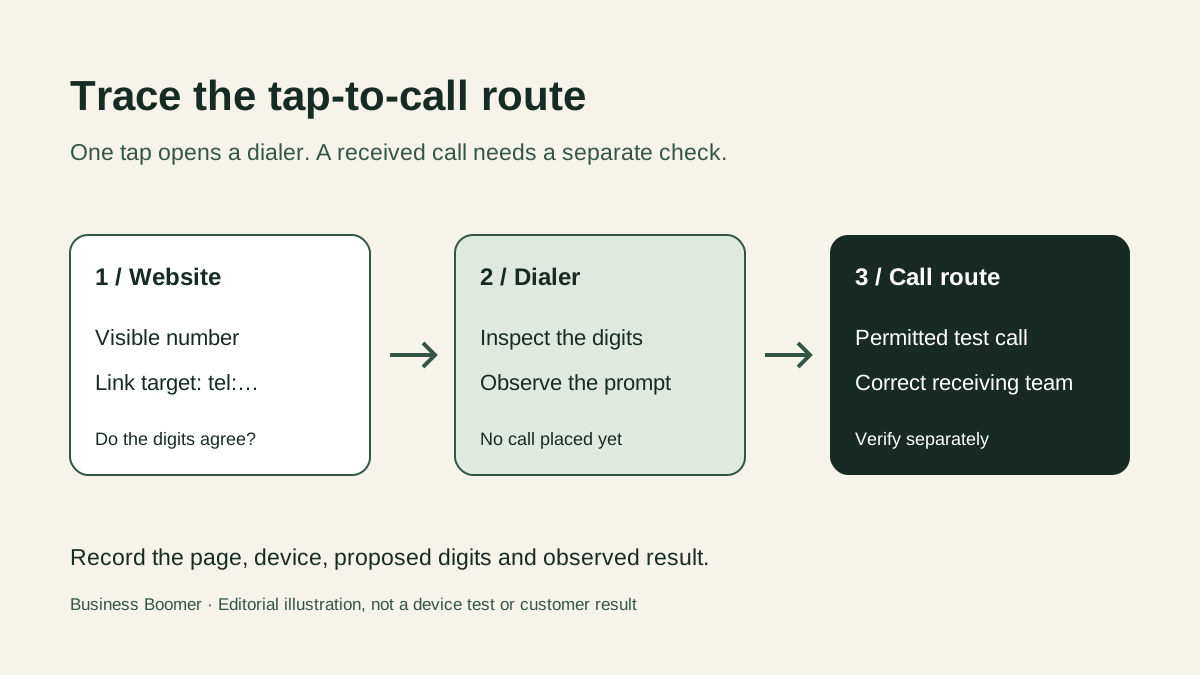
Your website shows the right phone number, but a customer says tapping it did nothing—or opened the wrong number. Check the website before changing your phone service. The printed number, the link behind it and the call route can disagree.
Start with the live page on a real phone. Do not rely only on an editor preview or a desktop browser. Record the page URL, the visible number, the device and browser, and what happened after the tap. You can then give the site owner a specific fault instead of “the phone number is broken.”
1. Compare the visible number with the link target
Have the website owner inspect the link behind the number. An HTML telephone link uses a tel: destination, such as tel:+12025550147 for an illustrative, non-business example. The digits after tel: should represent the intended number, even if the page displays spaces or dashes for readability. The telephone URI standard describes the tel: format and recommends a global form for public HTML pages.
A common failure is a copy update that changes the visible text but leaves the old link target in place. Check each place the number appears: header, mobile menu, footer, contact page and any sticky Call button. Do not assume one edit changed every instance.
If the visible number and link target disagree, record both and have the site owner correct the mismatch in the authoritative site source. Do not change call forwarding or the business's actual phone service to compensate for a website typo.
2. Test what happens after one tap
On a phone you control, open the published page, tap the number once and observe the next screen. Did it open the phone app or an app-choice prompt? Are the proposed digits the business number you expected? Stop before placing a call if they are wrong.
The HTML link itself is not a promise that every browser will dial automatically. Mozilla's HTML anchor documentation notes that tel: behavior varies with device capabilities. Apple's iOS phone-link documentation describes a confirmation alert for a phone link in Safari. A prompt can therefore be normal behavior, not a broken site.
If nothing responds, note whether the visible number is actually a link. Try the same page in the phone's regular browser, not only an in-app browser. Ask the site owner to check whether an overlay, menu, disabled button or script prevents the tap. That is a troubleshooting hypothesis, not a diagnosis until the live page is inspected.
3. Separate the dialer test from the call-route test
Opening a dialer with the correct digits proves only that the link handed a number to a calling app. It does not prove the call connected, rang the intended business line, reached staff or followed your after-hours rules. The telephone URI standard explicitly says a tel: identifier does not define the steps needed to reach the number.
When your team permits a test call, use a business-controlled phone and tell the receiving person it is a test. Check the route you actually promise to customers: office line, answering team or an approved AI Voice Receptionist. If the digits are right but the call goes to the wrong place, ask the phone-service or forwarding owner to investigate. The unanswered-call forwarding checklist covers that separate route.
Do not place repeated calls to an emergency line, customer number or unapproved destination. A failed or uncertain test is a reason to pause and investigate, not to create a burst of artificial calls.
4. Give the owner a short fault log
| What you saw | First owner to ask | What is still unproven |
|---|---|---|
| Number is plain text, not a link | Website owner | Whether a calling app could open from the page |
Visible digits and tel: digits differ | Website owner | Whether the correct number is reachable |
| Link opens a prompt with correct digits | Device user or tester | Whether a call was placed and received |
| Call is placed but reaches the wrong destination | Phone-service or forwarding owner | Whether the business route is configured correctly |
| One page works but another does not | Website owner | Whether all number placements use the same current target |
Keep the log to one line per device and page. For example: “Contact page, iPhone Safari, visible office number correct, tap opened a different number; no call placed.” That is an illustrative observation, not a result from Business Boomer's site or a customer case. It tells the site owner exactly what to compare.
5. Recheck the live page after a fix
After the owner changes the website link, open the public URL again on a phone and repeat the tap. Confirm the visible number and proposed dialer digits. If the original problem included wrong routing, run the separate permitted call test too. A code change or successful deployment is not the same as a verified mobile experience.
Recheck the prominent number placements after a redesign, new location, number change or call-forwarding change. This is an operational recommendation, not a guarantee that every future device and calling app will behave identically.
If you need help separating a website tap problem from an answering-route problem, talk with Business Boomer about a scoped call-capture review. We can help map and test the handoff. We cannot promise a call volume or booking result.
Keep building the system
Recommended next Business Boomer guides
These links are selected by topic and search intent so this guide connects to the most relevant service pages, industry pages, and supporting blog posts.
Service and setup pages
Use these when you are ready to turn the idea into an implementation path.
Industry-specific pages
See how the same workflow changes for specific business types.
Related blog posts
Read the connected guides that support this topic cluster.
Related AI automation guides
Keep going with the connected Business Boomer guides in this automation cluster.
AI website for service businesses
Clearer service pages, lead paths, FAQs, reviews, and AI-assisted follow-up for service businesses.
AI website cost for local business
Compare free previews, focused improvement sprints, full rebuilds, and AI assistant setup.
Free website preview for local businesses
A local-business offer page for owner-review-safe website previews, better lead paths, review ideas, FAQs, and AI assistant support.
Website chat automation
Owner-approved website chat, intake questions, lead capture, CRM routing, and follow-up tasks.
FAQ
Quick answers about this guide and how to put the idea into practice.
Why does a website phone number look right but dial the wrong number?
The number displayed to visitors and the destination in the link can differ. Ask the site owner to compare both, then test the live page on a phone.
Does a tap on the phone number prove the business received a call?
No. Opening a dialer is one step. A person must confirm the digits, place a permitted test call and check the business's receiving route separately.
Should every desktop browser open a phone dialer?
No. Handling of telephone links depends on the device and available calling application. Test the main mobile route first, then inspect desktop behavior separately.
Stop letting leads sit without a next action.
Business Boomer can install lead capture, first-response drafts, quote follow-up reminders, and a simple owner handoff.
See Lead Follow-Up Automation