
Best Content Marketing Tools in 2026: The Lean Stack for Growth Teams
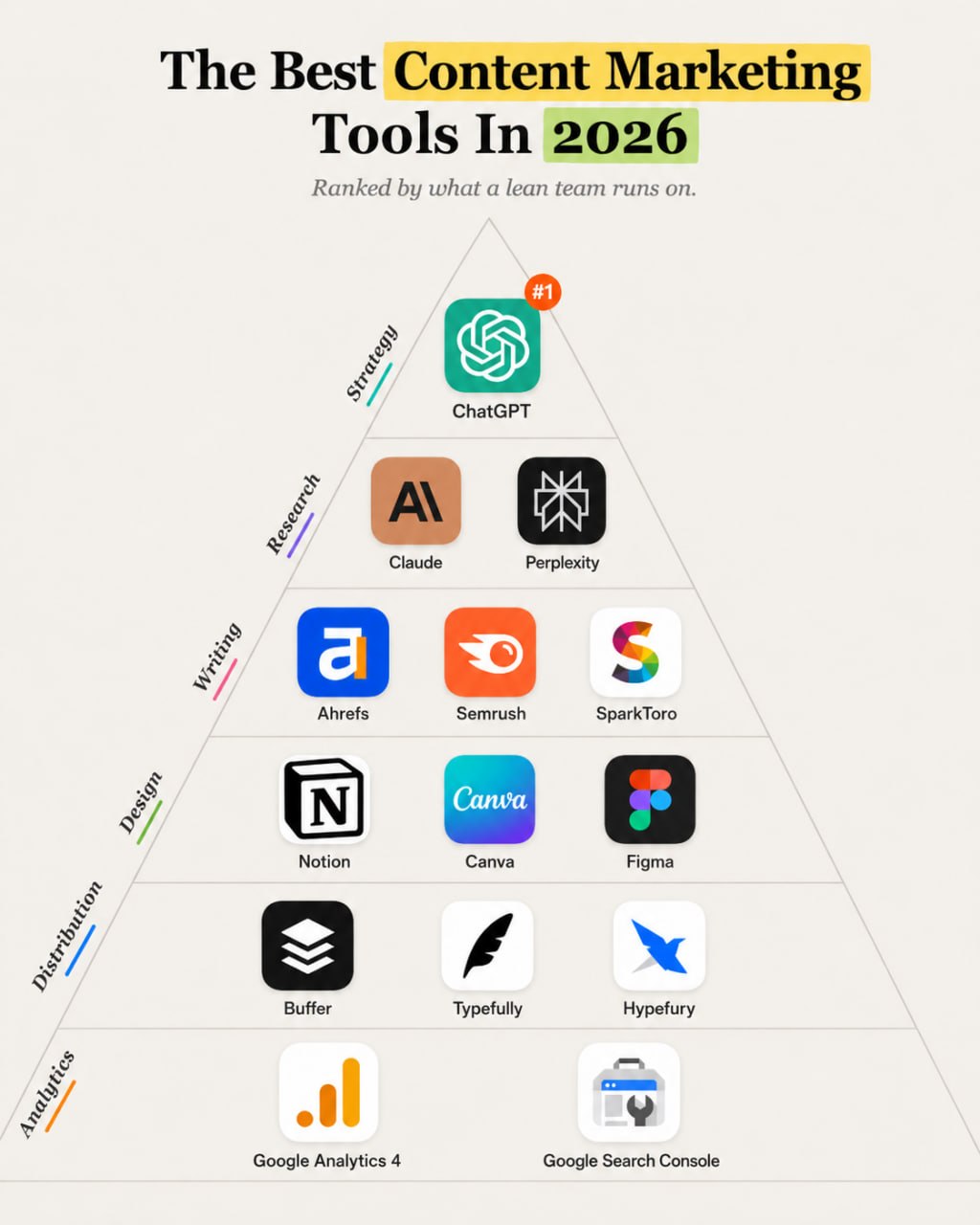
The best content marketing stack in 2026 is a workflow: ChatGPT or Claude for drafting and analysis, Perplexity and SEO tools for research, Notion for planning, Canva or Figma for design, Buffer or Typefully for distribution, and GA4 plus Search Console for measurement.


Content marketing fails when the team treats posting as the strategy. A useful content system starts with customer questions, search intent, product positioning, original proof, a publishing calendar, distribution, and measurement.
Quick answer: Most lean teams should start with ChatGPT or Claude for drafting and editing, Perplexity for source discovery, Ahrefs or Semrush for SEO research, Notion for planning, Canva for fast design, Buffer for scheduling, and Google Search Console plus GA4 for measurement. Add Figma when design systems matter, SparkToro when audience research matters, and Typefully or Hypefury when X or LinkedIn-style writing becomes a serious channel.
The category includes research tools, AI writing assistants, editorial planning tools, design tools, social distribution tools, and analytics. No single tool owns the whole process. The stack works only when each tool has a clear job.
If your content program needs SEO depth first, read AI SEO tools. If video matters, pair this with video editing tools. If marketing needs workflow automation, start with AI marketing automation.
Quick verdict
| Need | Best first choice |
|---|---|
| Best overall AI content assistant | ChatGPT |
| Best long-form editor | Claude |
| Best source discovery assistant | Perplexity |
| Best SEO research layer | Ahrefs or Semrush |
| Best audience research tool | SparkToro |
| Best lightweight editorial hub | Notion |
| Best fast design tool | Canva |
| Best design-system tool | Figma |
| Best general social scheduler | Buffer |
| Best writing-led social scheduler | Typefully or Hypefury |
| Best measurement baseline | Google Search Console and GA4 |
The lean default is ChatGPT, Notion, Canva, Buffer, Search Console, and GA4. Add specialized tools only after the bottleneck is clear.
Best content marketing tools at a glance
Pricing changes often. Check the current vendor pricing page before subscribing.
| Tool | Best for | Category | Starting price | Key strength | Main limitation |
|---|---|---|---|---|---|
| ChatGPT | Drafting, outlines, repurposing, and content analysis | AI writing assistant | Free and paid plans | Flexible across many content jobs | Needs source material and review |
| Claude | Long-form editing, cleanup, and content review | AI writing assistant | Free and paid plans | Strong prose and long-context review | Not a planning or analytics platform |
| Perplexity | Source discovery and research checks | Research | Free and paid plans | Fast path to sources | Must verify primary sources |
| Ahrefs | SEO research, content gaps, and competitor analysis | SEO research | Paid plans | Strong SEO and backlink research | Cost can be high for casual teams |
| Semrush | Broad SEO and content marketing research | SEO platform | Paid plans | Wide marketing toolkit | Can feel broad for a narrow content need |
| SparkToro | Audience research and channel discovery | Audience research | Free and paid plans | Helps understand where an audience pays attention | Not a publishing tool |
| Notion | Editorial calendars, briefs, docs, and content operations | Planning | Free and paid plans | Flexible planning hub | Can become messy without structure |
| Canva | Social graphics, simple videos, templates, and brand kits | Design | Free and paid plans | Fast design for non-designers | Less precise than Figma for systems |
| Figma | Product visuals, design systems, and collaborative creative work | Design | Free and paid plans | Strong collaborative design environment | More learning curve for non-designers |
| Buffer | Scheduling and social distribution | Distribution | Free and paid plans | Simple social publishing workflow | Less deep than platform-specific tools |
| Typefully | Writing and scheduling text-led posts | Distribution | Free and paid plans | Strong writing workflow for X and LinkedIn-style content | Narrower than a broad scheduler |
| Hypefury | Social posting and creator workflows | Distribution | Paid plans | Good for writing-led social growth | Channel fit matters |
| Google Search Console | Organic search performance | Analytics | Free | Real Google query and page data | Limited conversion context |
| Google Analytics 4 | Site behavior and conversion tracking | Analytics | Free core product | Connects traffic to behavior | Requires proper setup |
How we evaluated the tools
The tools were evaluated by workflow layer:
| Criterion | Weight |
|---|---|
| Use-case fit | 25% |
| Capability and output quality | 20% |
| Ease of use | 15% |
| Integrations and workflow fit | 15% |
| Price-to-value | 15% |
| Scalability and reliability | 10% |
Research, writing, design, publishing, and analytics are different jobs. ChatGPT and Claude help create and edit. Ahrefs and Semrush support SEO decisions. SparkToro supports audience decisions. Notion holds the plan. Canva and Figma produce assets. Buffer, Typefully, and Hypefury distribute. Search Console and GA4 measure.
Tools were excluded when they duplicated another layer, fit enterprise teams better than lean teams, or worked better in another article category.
The best content marketing tools in 2026
ChatGPT: Best overall AI content assistant
ChatGPT is the most flexible first AI content tool for lean teams. It can help turn customer questions into article outlines, convert a blog post into social copy, draft newsletter angles, summarize research, rewrite intros, and create content briefs.
It made the list because most content teams have many small writing tasks, not one giant generation task.
Important capabilities include:
- outlines and content briefs
- first drafts and rewrites
- repurposing across social, email, and blog
- metadata, FAQs, and CTA drafts
- analysis of content exports and notes
ChatGPT still needs source material and human review. Choose it as a content assistant. Avoid using it to publish unverified articles. The closest alternative is Claude.
Claude: Best long-form editor
Claude is strong for editing longer drafts, tightening vague sections, turning notes into usable prose, and reviewing articles against a brief.
It made the list because content quality often breaks during editing. Teams need help cutting repetition, finding weak claims, and making a draft easier to read.
Important capabilities include:
- long-form editing
- source-note organization
- draft cleanup
- tone and clarity review
- content gap checks against a brief
Claude is not a keyword tool, publishing tool, or design tool. Choose it when the bottleneck is editorial quality. Avoid it if you need analytics or scheduling. The closest alternative is ChatGPT.
Perplexity: Best source discovery assistant
Perplexity can help content teams find sources, compare current pages, and collect research paths quickly. It is useful early in the content process.
It made the list because research speed matters, especially when a team writes about software, AI, regulation, or fast-changing categories.
Important capabilities include:
- source discovery
- summarized research paths
- follow-up questions
- citation-oriented exploration
- quick topic scanning
Perplexity should not be the final citation when an official source is available. Choose it for discovery. Avoid treating summaries as verified facts. The closest alternative is standard search plus manual source review.
Ahrefs: Best SEO content research layer
Ahrefs helps teams research keywords, competitors, backlinks, content gaps, and ranking pages. It is useful when organic search is a serious channel.
It made the list because SEO content should start with demand and competition, not only brainstormed topics.
Important capabilities include:
- keyword research
- competitor content analysis
- backlink and referring domain research
- content gap workflows
- rank tracking and reporting
Ahrefs may cost more than a casual content program can justify. Choose it when SEO matters. Avoid it if you only need social content. The closest alternative is Semrush.
Semrush: Best broad content and SEO platform
Semrush covers SEO research, competitor analysis, content topics, site audits, rank tracking, PPC research, and reporting. It is useful when content sits inside a broader growth program.
It made the list because many marketing teams want SEO, content, and competitive research in one place.
Important capabilities include:
- keyword and competitor research
- topic and content workflow support
- site audits
- rank tracking
- broader marketing research
Semrush can be too broad for a tiny content team. Choose it when the team will use several parts of the platform. Avoid it when a narrower tool will do. The closest alternative is Ahrefs.
SparkToro: Best audience research tool
SparkToro helps teams understand what an audience reads, watches, listens to, and follows. That makes it useful before planning distribution.
It made the list because content marketing is not only SEO. A team also needs to know where the audience pays attention.
Important capabilities include:
- audience behavior research
- website, social, podcast, and YouTube discovery
- influencer and publication research
- channel planning support
- messaging context
SparkToro does not create content or schedule posts. Choose it when audience research matters. Avoid it if your immediate need is execution. The closest alternative is manual audience research across platforms.
Notion: Best lightweight editorial hub
Notion is a flexible planning tool for content calendars, briefs, research notes, status tracking, templates, and editorial operations.
It made the list because a lean team needs a source of truth. Without one, ideas disappear, briefs live in random docs, and publishing gets inconsistent.
Important capabilities include:
- content calendars
- briefs and templates
- research databases
- team notes
- status and owner tracking
Notion can become messy if nobody owns the structure. Choose it for lightweight content ops. Avoid using it without a clear content pipeline. The closest alternatives are Airtable, Trello, Asana, and ClickUp.
Canva: Best fast design tool
Canva is the easiest design layer for most non-designers. It helps teams create social graphics, carousel slides, simple videos, presentations, thumbnails, and brand templates quickly.
It made the list because content needs packaging. A good article often needs a featured image, social carousel, newsletter graphic, or thumbnail.
Important capabilities include:
- social graphics and templates
- brand kits
- simple video and presentation assets
- team collaboration
- fast export workflows
Canva is less precise than Figma for complex design systems. Choose it for speed. Avoid it if your content design depends on product UI fidelity or a tight component system. The closest alternative is Figma.
Figma: Best for design systems and product visuals
Figma is a collaborative design platform that works well for product visuals, reusable components, diagrams, templates, and design systems.
It made the list because SaaS and product-led teams often need content visuals that match the product and brand.
Important capabilities include:
- collaborative design files
- reusable components
- product mockups and diagrams
- design-system workflows
- handoff to web and creative teams
Figma may be too much for a simple social calendar. Choose it when design quality and consistency matter. Avoid it when Canva templates are enough. The closest alternative is Canva for lightweight work.
Buffer: Best general social scheduler for lean teams
Buffer helps teams plan and schedule social posts across platforms. It is useful when distribution is part of the weekly content rhythm.
It made the list because publishing manually creates inconsistency. A scheduler helps the team turn blog, email, video, and social assets into a repeatable calendar.
Important capabilities include:
- social scheduling
- queue and calendar workflows
- channel-specific drafts
- basic analytics
- team collaboration on paid plans
Buffer is not the deepest platform for every network. Choose it for simple multichannel scheduling. Avoid it if you need advanced social listening or deep creator workflows. The closest alternatives are Later, Metricool, Typefully, and Hypefury.
Typefully: Best writing-led social workflow
Typefully helps writers draft, schedule, and improve text-led posts, especially for X and LinkedIn-style content.
It made the list because some content programs grow through founder-led writing. The workflow is different from a broad visual social calendar.
Important capabilities include:
- thread and post drafting
- scheduling
- writing workspace
- repurposing support
- analytics and iteration features
Typefully is narrower than Buffer. Choose it when text-led social is a real channel. Avoid it for broad visual scheduling. The closest alternative is Hypefury.
Hypefury: Best creator-style social publishing
Hypefury supports social scheduling and creator workflows. It can help teams that publish frequent text-led posts and want repeatable distribution habits.
It made the list because creator-led marketing needs a different rhythm from corporate posting.
Important capabilities include:
- social post scheduling
- repeat and recycle workflows
- creator-oriented posting support
- templates and queue features
- analytics
Hypefury should not duplicate Buffer unless the team has a clear text-led channel. Choose it for creator-style social growth. Avoid it if a general scheduler covers the job. The closest alternative is Typefully.
Google Search Console: Best organic search source of truth
Search Console shows query, page, impression, click, indexing, and sitemap data from Google. It belongs in every SEO-driven content workflow.
It made the list because content teams often chase new ideas while ignoring pages that already have impressions.
Important capabilities include:
- query and page performance
- indexing and sitemap checks
- URL inspection
- search visibility trends
- content refresh signals
Search Console does not tell the full conversion story. Pair it with GA4. Choose it for every site. There is no good replacement for Google's own search performance data.
Google Analytics 4: Best for content behavior and conversion tracking
GA4 helps teams understand what users do after they land on a page. It can connect blog content to events, conversions, lead paths, and channel behavior.
It made the list because traffic alone is not the goal. Content should move people toward a next step.
Important capabilities include:
- landing page reporting
- event and conversion tracking
- channel analysis
- exploration reports
- Google Ads and Search Console integrations
GA4 needs setup. Choose it when you care about content impact. Avoid making decisions from broken events or unconfigured reports. The closest alternatives are privacy-focused analytics tools.
Recommended stacks by team type
Solo operator
Use ChatGPT, Notion, Canva, Buffer, Search Console, and GA4. This covers ideas, drafts, planning, design, scheduling, and measurement without overbuying.
Lean startup
Use ChatGPT or Claude, Ahrefs or Semrush, Notion, Figma or Canva, Buffer, Search Console, and GA4. Add SparkToro when audience discovery matters.
Agency
Use Semrush or Ahrefs, ChatGPT and Claude, Notion or Airtable, Figma, Canva, Buffer or Metricool, Search Console, GA4, and client reporting. Agencies need repeatable briefs, approvals, and proof.
Creator business
Use ChatGPT, Claude, Canva, Typefully or Hypefury, Buffer, YouTube Studio if video is central, Search Console, and GA4. The stack should turn one idea into several assets.
Product-led SaaS team
Use Ahrefs or Semrush, SparkToro, Notion, Figma, ChatGPT or Claude, Buffer, Search Console, GA4, and product analytics. Product visuals and message consistency matter more here.
How to choose the right content marketing tool
Start with the layer:
| Buying question | What to decide |
|---|---|
| Team size | Solo teams need speed. Larger teams need approvals, roles, templates, and analytics. |
| Primary channel | SEO, LinkedIn, X, YouTube, newsletter, and paid social need different workflows. |
| Existing stack | Do not add a tool that duplicates your planning, design, or scheduling system. |
| Required integrations | Check CMS, Google Docs, Slack, GA4, Search Console, social platforms, and CRM. |
| Budget | One good workflow beats six disconnected subscriptions. |
| Learning curve | The tool has to fit the person doing the work every week. |
| Data ownership | Keep source notes, research, customer proof, and analytics organized. |
| Scalability | Content teams need reusable briefs, design templates, and review stages. |
| Switching costs | Calendars, templates, design files, and analytics history can become hard to migrate. |
The practical workflow looks like this:
- Gather customer questions, search data, and audience signals.
- Plan the topic in Notion or a similar hub.
- Use ChatGPT or Claude to draft from real source material.
- Create supporting visuals in Canva or Figma.
- Publish the long-form asset.
- Repurpose into social posts, email, and video scripts.
- Schedule distribution.
- Review Search Console, GA4, and platform analytics.
Tools we considered but did not rank
Airtable is excellent for structured editorial operations, but many lean teams can start in Notion.
ClickUp, Asana, and Trello can manage content workflows, but they are broader project management tools rather than content-specific defaults.
Later and Metricool are strong social scheduling options. Buffer stayed in the default stack because it is simple for lean teams, but Metricool may be the better choice when platform analytics and scheduling depth matter.
Jasper and Copy.ai can support content teams, but they fit the AI marketing tools category more directly than this lean content stack.
CoSchedule is useful for larger editorial teams, but many small teams will not need that level of planning software.
Final recommendation
Most lean growth teams should start with this stack:
- ChatGPT or Claude for drafting, editing, and repurposing
- Ahrefs or Semrush for SEO research if organic search matters
- Notion for editorial planning
- Canva for fast design
- Buffer for social distribution
- Google Search Console and GA4 for measurement
Add Figma when design quality matters. Add SparkToro when audience research matters. Add Typefully or Hypefury when founder-led social writing becomes a serious acquisition channel.
The goal is not to post more. The goal is to build a system that turns customer insight into useful assets, ships them consistently, and learns from the results.
Sources to check before buying
- Google Search Console documentation
- Google Analytics 4 documentation
- ChatGPT
- Claude
- Ahrefs pricing
- Semrush pricing
- SparkToro
- Notion pricing
- Canva pricing
- Buffer pricing
AI automation next step
Find the workflow worth fixing first.
Use the Free 30-Minute AI Consultation to map where leads, reviews, content, or follow-ups are slipping and choose the smallest useful next step.
FAQ
Quick answers about this guide and how to put the idea into practice.
What is the best content marketing tool in 2026?
For most lean teams, ChatGPT is the best flexible content assistant, Notion is the best lightweight planning layer, Canva is the easiest design layer, Buffer is a practical distribution tool, and Google Search Console plus GA4 remain the measurement baseline.
What content marketing tools should a small team start with?
Start with ChatGPT or Claude, Perplexity for source discovery, Notion for planning, Canva for design, Buffer for scheduling, and Google Search Console plus GA4 for performance review.
Do AI tools replace content strategy?
No. AI tools can speed up research, outlines, drafts, repurposing, and editing, but the team still needs positioning, customer insight, original examples, source checks, distribution, and review.
Should teams use Canva or Figma for content marketing?
Use Canva for fast social graphics, simple visuals, templates, and non-designers. Use Figma when the team needs stronger design systems, product visuals, collaboration, and reusable brand components.
How do you avoid buying too many content tools?
Assign one tool to each workflow layer: research, planning, writing, design, distribution, and analytics. If two tools do the same job, pick one owner.