
AI Marketing Automation for Small Business
AI marketing automation helps small businesses turn repeat marketing work into reviewed workflows: lead nurture, content drafts, review requests, segmentation, and reporting.


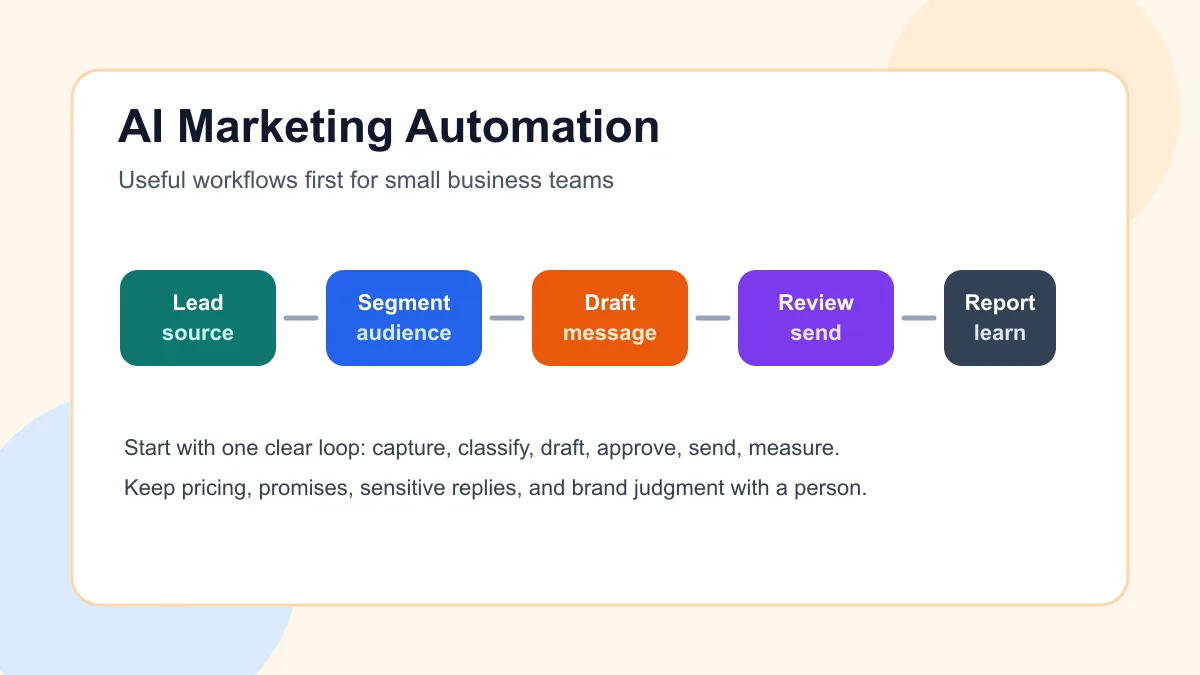
AI marketing automation for small business means using AI and automation to move repeat marketing work through a clear system: capture a lead, segment the audience, draft the right message, route risky work for review, send or schedule the campaign, and report what happened.
The best first build is not a fully automated marketing machine. It is one useful workflow that helps a small team follow up faster, reuse good ideas, request reviews at the right moment, or see which campaigns are creating real sales conversations.
Search intent and SERP pattern
People searching this topic usually want a tool shortlist, workflow ideas, or a practical guide for using AI inside marketing automation. Current U.S. results lean heavily toward vendor articles, tool comparisons, CRM/email platform guides, and broad examples such as segmentation, personalization, lead scoring, cross-channel campaigns, content drafting, and reporting.
The recurring gap is implementation order. A service business owner can read ten tool lists and still not know what should happen after a website form, missed call, estimate, appointment, review, or email reply. This article focuses on the smaller operating system: which workflow to automate first, where AI belongs, and where a person should stay in control.
If marketing is not yet connected to sales follow-up, start with the lead follow-up workflow guide before adding more campaign tools.
What AI marketing automation should actually do
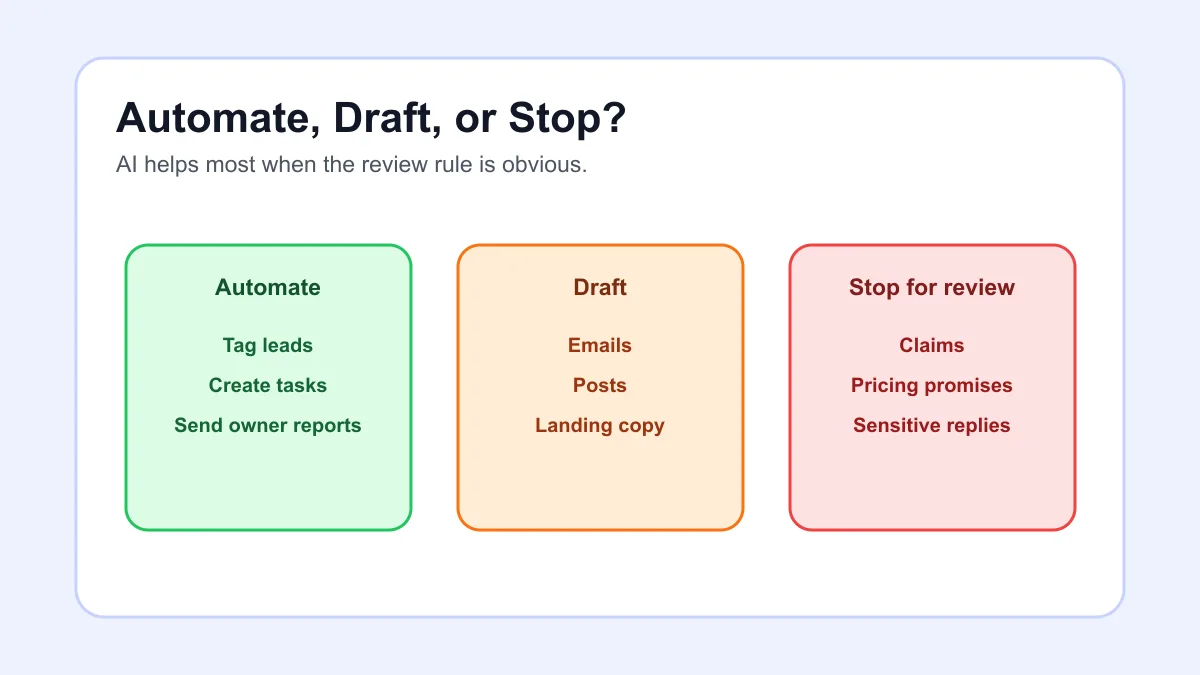
For a small business, AI marketing automation should handle repeatable support work around marketing, not replace the business owner's judgment. Good systems can tag new leads by source, summarize what a prospect asked for, draft a nurture email, turn a service explanation into a short post, create a review request task, and prepare a weekly campaign summary.
Human judgment should still own offers, pricing, sensitive claims, brand promises, angry customer replies, ad budget decisions, and final approval for anything that could mislead a prospect. The U.S. Small Business Administration's marketing and sales guidance is a useful reminder that marketing still starts with customers, positioning, pricing, and channels, not just software.
A practical automation build usually belongs inside the broader Business Boomer services conversation because the workflow has to connect forms, email, CRM records, calendar events, review requests, and owner reporting.
Start with one marketing loop
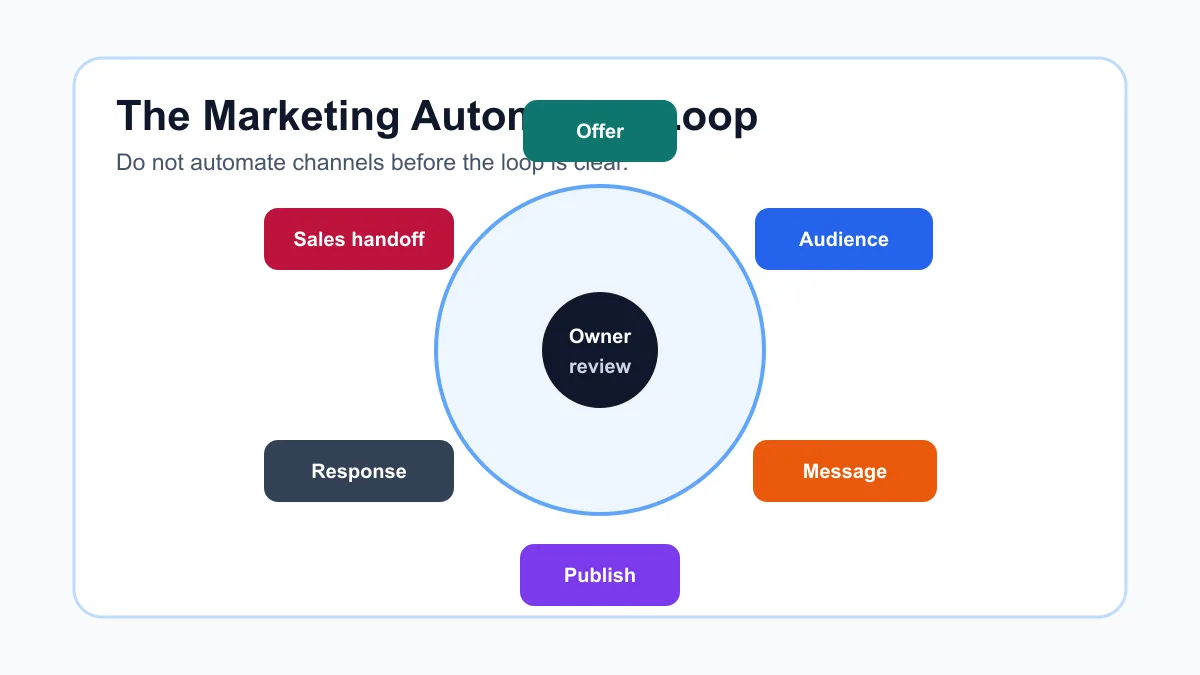
Most failed marketing automation projects try to automate too many channels at once. The owner connects email, ads, social posts, web forms, CRM stages, and reporting before the business has a clear loop for one audience and one offer.
Start smaller. Pick one offer, one audience, one lead source, one message sequence, one handoff rule, and one weekly report. That is enough to prove whether automation is helping or simply creating more noise.
This is the same implementation logic as AI workflow automation for small business: define the trigger, source of truth, AI task, review point, and success check before buying more tools.
Example: local service lead nurture
A home service company gets a website inquiry from someone who is not ready to book. The workflow tags the lead source, summarizes the need, adds the person to a short nurture sequence, drafts a helpful reply, and creates a follow-up task if the lead clicks or replies.
The sequence should be short and useful. One educational email, one proof or checklist email, one booking reminder, and one close-the-loop note will usually beat a long generic campaign. If the lead becomes sales-ready, the handoff should move into lead response automation instead of staying trapped in marketing.
If the lead is not clearly qualified yet, add one simple question before the booking push. The lead qualification guide explains how to collect the details that make routing and follow-up less messy.
Example: content repurposing with review
A business owner records a short voice note after a customer question. AI turns it into a blog outline, a social post draft, and an email idea. A person edits the claim, adds the real service context, and decides where it should publish.
That workflow is useful because it reduces blank-page work without pretending AI knows the business. It also pairs naturally with AI automation examples for small businesses when the team is choosing which repeated task deserves a system.
Choose the first workflow with a scorecard
The best first marketing automation workflow is frequent, easy to review, connected to revenue, and low enough risk that the owner can test it quickly. Review requests, lead nurture, post-appointment follow-up, and weekly campaign reporting usually fit that standard better than complex ad optimization.
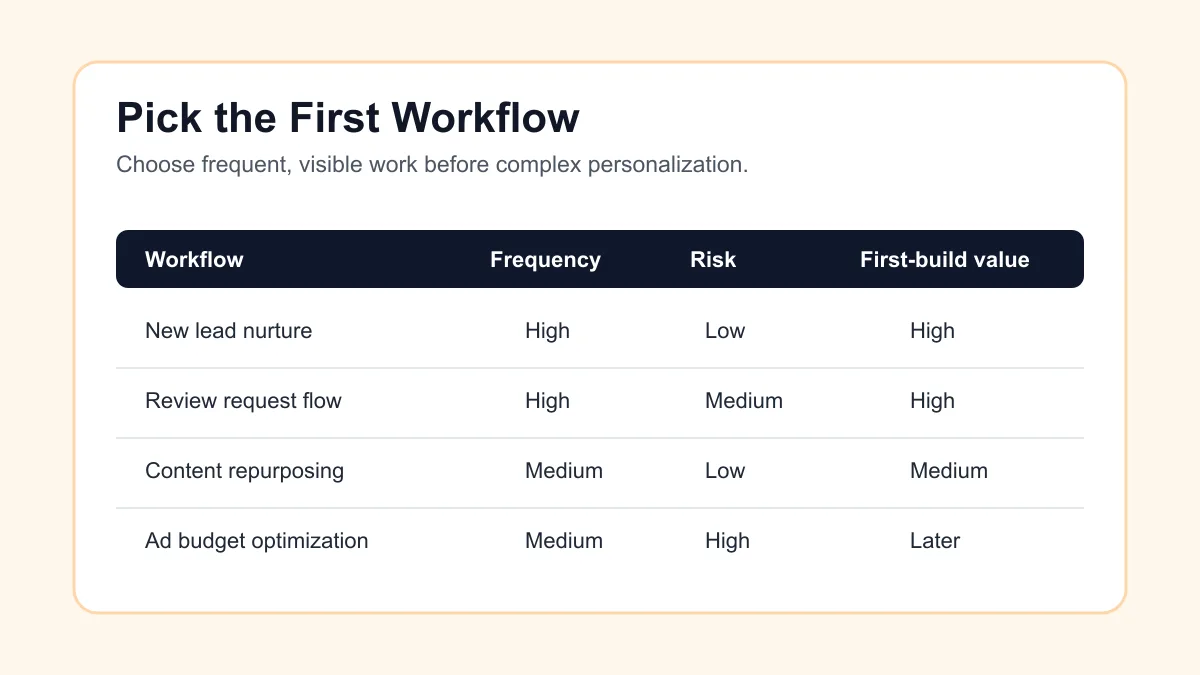
| Workflow | Good first use | Human review point | What to measure |
|---|---|---|---|
| New lead nurture | Website form, quote request, lead magnet, event inquiry | Offer, tone, opt-out handling | Replies, booked calls, stuck leads |
| Review request flow | Completed job, appointment, project milestone | Customer sensitivity and timing | Review requests sent, responses, complaints |
| Content repurposing | Owner notes, FAQs, sales calls, service explanations | Claims, accuracy, brand voice | Published drafts, edits needed, leads assisted |
| Segment cleanup | Tags by service, location, source, or lifecycle | Incorrect routing and outdated data | Cleaner lists, fewer irrelevant sends |
| Weekly reporting | Campaign activity, leads, replies, booked calls | Interpretation and next action | Owner decisions made from the report |
If the business already has a simple CRM, connect the first marketing workflow there. If not, use what a CRM is for small business to decide whether the source of truth should be a CRM, job-management tool, booking platform, or clean spreadsheet.
Use AI for drafting and classification
AI is useful in marketing when the input is messy and the output needs a draft, summary, tag, or recommendation. Examples include classifying new leads by service interest, rewriting a technical explanation in plain English, drafting an email from a customer question, summarizing campaign replies, and creating a first-pass weekly report.
AI is risky when it acts as the final authority. Do not let it invent testimonials, guarantee results, make unsupported claims, change pricing, promise availability, or decide that a person should stop hearing from the business. Those decisions need policy and review.
For sales-adjacent workflows, the AI sales automation guide is the cleaner place to map pipeline stages, estimate follow-up, and qualification rules after marketing creates the conversation.
Keep the marketing stack simple
A small business marketing automation stack does not need to be fancy. It needs a capture point, contact record, message tool, automation builder, AI drafting layer, and reporting habit. Many teams can start with the tools they already use.
| Layer | Simple option | Upgrade when |
|---|---|---|
| Capture | Website form, booking form, phone transcript, lead magnet | Leads arrive from several sources |
| Contact record | CRM, job tool, Airtable, spreadsheet | The team loses track of source and status |
| Messaging | Email platform, CRM sequence, SMS with consent | More segments or approvals are needed |
| Automation | Native rules, Zapier, Make, n8n, custom workflow | The workflow crosses several tools |
| AI support | Drafting, tagging, summaries, report notes | Inputs are frequent enough to standardize |
| Review | Owner approval and weekly report | More people need shared accountability |
If tool selection is the current blocker, compare categories in best AI automation tools for small business before buying a marketing platform that duplicates work already handled elsewhere.
Build the workflow before scaling channels
Marketing automation feels more impressive when it touches more channels, but channel count is not the goal. The goal is a clean path from campaign activity to a useful customer or prospect action.
For a service business, that path might be: form inquiry, AI summary, CRM tag, short nurture email, booking link, owner alert, booked call, follow-up task, and weekly report. For a contractor, it might be estimate sent, reminder task, helpful project planning email, review request after completion, and future seasonal reminder.
Contractor workflows are a good example because marketing, sales, and operations overlap quickly. The contractor automation guide is useful when the same lead source needs estimating, scheduling, field-note, and follow-up support.
This is why marketing automation should connect to how to follow up with leads for small business. Campaigns that generate replies but do not create next steps are not really automated; they are just scheduled messages.
Avoid common mistakes
The first mistake is automating vague messaging. If the offer is unclear manually, AI will usually create more words around the same confusion.
The second mistake is using the same sequence for every lead. A booked appointment, old customer, cold website visitor, estimate request, and referral should not all receive the same message.
The third mistake is skipping consent and opt-out handling. Email and SMS automation should be easy for customers to stop, and promotional messages should not pretend to be personal service updates.
The fourth mistake is measuring vanity activity only. Open rates and post volume can be useful, but a small business should also track replies, booked calls, quote requests, completed follow-ups, and sales conversations that came from the workflow.
The fifth mistake is adding AI before the business has a review rule. The workflow should say which tasks can be automated, which can be drafted, and which must stop for a person.
A practical 14-day rollout
Use two weeks to prove one workflow instead of building a complicated campaign engine.
| Day range | Work | Proof to check |
|---|---|---|
| Days 1-2 | Pick one offer, audience, and lead source | The trigger and owner are clear |
| Days 3-4 | Map the contact record and tags | Test leads land in the right place |
| Days 5-6 | Draft the short message sequence | Owner approves tone, claim, and CTA |
| Days 7-8 | Add AI summary or classification | Outputs are accurate enough for review |
| Days 9-10 | Add the handoff task or booking step | No qualified reply sits without a next action |
| Days 11-12 | Add weekly reporting | Owner can see source, replies, and stuck leads |
| Days 13-14 | Review failures and tighten rules | Exceptions are documented before scaling |
For a local operator, this can sit beside AI automation for service businesses when the real need is an implemented system rather than a collection of prompts.
What Business Boomer would build first
For most small/service businesses, Business Boomer would start with a lead nurture and follow-up workflow. It is close to revenue, easy to test, and connected to the owner's daily bottleneck. The first version would capture the lead, classify the request, draft a useful response, add a short follow-up sequence, create a task for sales-ready replies, and send a weekly summary.
The second layer would usually be review requests or content repurposing from real customer questions. Both workflows help marketing without forcing the business into a huge platform migration.
For businesses that want a reviewed AI operating layer around tasks, drafts, and approvals, OpenClaw onboarding can be a better fit than scattered prompt use.
If you want help choosing and building the first marketing workflow, book a Free 30-Minute AI Consultation and bring one current lead source, one offer, and the tool where prospects currently get lost.
If marketing brings in leads but follow-up lags, route the next step through lead follow-up automation.
AI automation next step
Find the workflow worth fixing first.
Use the Free 30-Minute AI Consultation to map where leads, reviews, content, or follow-ups are slipping and choose the smallest useful next step.
Keep building the system
Recommended next Business Boomer guides
These links are selected by topic and search intent so this guide connects to the most relevant service pages, industry pages, and supporting blog posts.
Service and setup pages
Use these when you are ready to turn the idea into an implementation path.
Industry-specific pages
See how the same workflow changes for specific business types.
Related blog posts
Read the connected guides that support this topic cluster.
Related AI automation guides
Keep going with the connected Business Boomer guides in this automation cluster.
AI automation services for local small business
Planning examples for broader automation. Compare current managed calls and reviews on the Services page; confirm other work in a separate scope.
Lead follow-up automation for small business
Turn form fills, missed calls, quote requests, emails, and voice notes into reply drafts, CRM updates, reminders, and next steps.
How to automate invoices for small business
A practical guide to invoice creation, reminders, payment tracking, and cash-flow follow-up.
Best invoicing automation tools for small business
A comparison of QuickBooks, FreshBooks, Stripe Billing, Wave, Jobber, Housecall Pro, Zapier, and Make.
FAQ
Quick answers about this guide and how to put the idea into practice.
What is the main takeaway from AI Marketing Automation for Small Business?
AI marketing automation helps small businesses turn repeat marketing work into reviewed workflows: lead nurture, content drafts, review requests, segmentation, and reporting.
How does AI marketing automation for small business help a small business?
AI marketing automation for small business can help a small business reduce manual work, improve follow-up, organize repetitive tasks, and create a clearer operating process when it is tied to a real bottleneck.
Can Business Boomer help implement AI marketing automation for small business?
Yes. Business Boomer can help turn the idea into a practical workflow, page, checklist, or automation system depending on what the business needs first.
Find the workflow worth fixing first.
Use the Free 30-Minute AI Consultation to map where leads, reviews, content, or follow-ups are slipping and choose the smallest useful next step.
Book a Free 30-Minute AI Consultation