
Best AI Automation Tools: What to Use First
The best AI automation tools for small business are the ones that fix one repeated workflow first: lead follow-up, scheduling, CRM cleanup, invoicing, admin notes, customer support, or reporting. Start with the bottleneck, then choose the tool category.


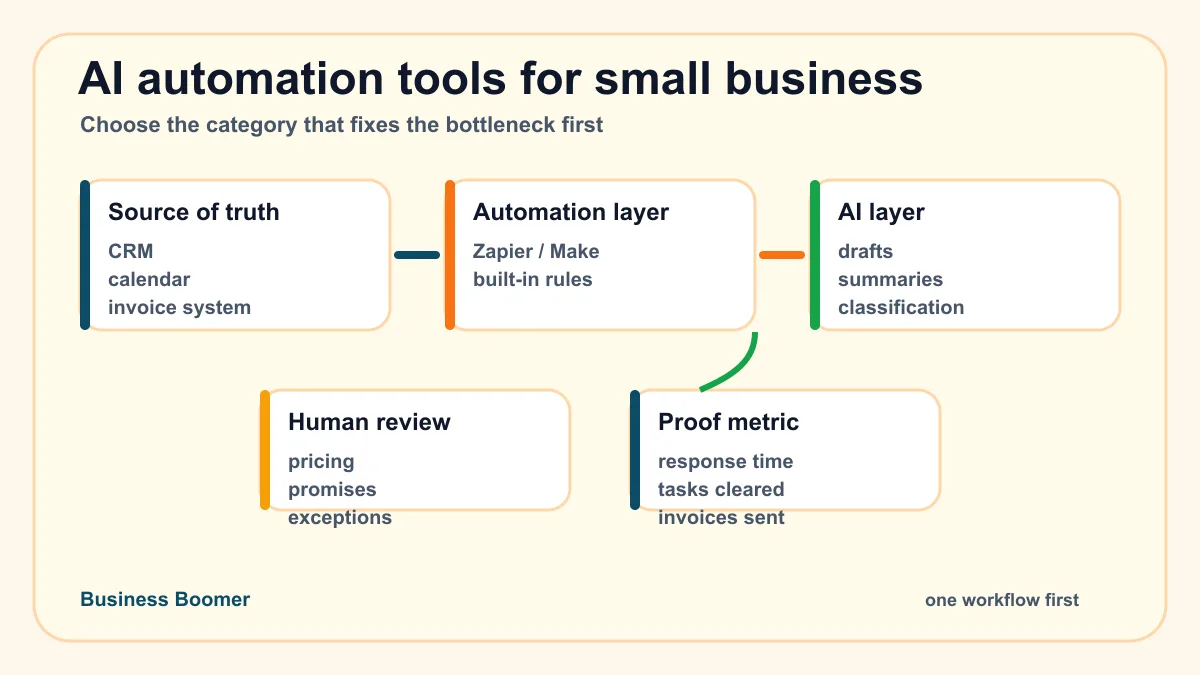
The best AI automation tools for small business are not the tools with the longest feature list. They are the tools that help one repeated business workflow move faster with less owner follow-up: lead response, scheduling, CRM cleanup, invoicing, customer support, admin capture, or reporting.
For most U.S. service businesses, the right first move is a simple stack: one system of record, one automation layer, one AI writing or summarizing layer, and one human review point. Buy tools after you know which workflow is worth fixing.
Search intent and top-result pattern
People searching for this topic are usually comparing tools before they buy. Current U.S. results lean toward software roundups, vendor blog lists, no-code setup guides, AI agent comparisons, and broad productivity articles. Common tools mentioned include Zapier, Make, ChatGPT, Claude, Microsoft Copilot, HubSpot, Asana, Notion AI, Mailchimp, Zendesk, ClickUp, Lindy, Gumloop, and workflow builders.
The recurring headings are “best for,” “features,” “pricing,” “use cases,” “integrations,” and “how to choose.” The gap is that many results rank brands before helping an owner decide which workflow should be automated first. This guide compares tool categories by business bottleneck so a small team can choose the smallest useful setup.
The short answer: start with the workflow, then the tool
If your business has slow lead response, start with CRM and lead follow-up automation. If appointments are chaotic, start with scheduling automation. If billing is the bottleneck, start with invoicing and payment follow-up. If the owner is the bottleneck, start with admin capture and task routing.
That order matters because buying five AI tools before you map the process usually creates more inboxes. A better first step is to name the trigger, the source of truth, the action, the review point, and the result. The AI workflow automation guide is the foundation if the business has not mapped those pieces yet.
Quick comparison: best AI automation tool categories
| Tool category | Best first use | Example tools | Watch out for |
|---|---|---|---|
| AI assistant | Drafting, summarizing, classifying, research | ChatGPT, Claude, Gemini, Copilot | No connection to business systems unless integrated |
| Automation builder | Moving data between apps | Zapier, Make, n8n, Relay | Brittle workflows if triggers are unclear |
| CRM automation | Lead capture, pipeline reminders, follow-up tasks | HubSpot, Pipedrive, Zoho, Jobber CRM features | Messy data makes automation worse |
| Scheduling automation | Booking, reminders, intake forms, prep packets | Calendly, Acuity, Google Calendar, field-service schedulers | Overbooking or unclear routing rules |
| Invoice automation | Payment links, reminders, status tracking | QuickBooks, FreshBooks, Stripe, Wave, Jobber | Automating reminders before billing terms are clean |
| Support automation | Triage, reply drafts, knowledge-base lookup | Zendesk, Intercom, Help Scout, Freshdesk | Answering policy questions without review |
| Operations workspace | Tasks, docs, SOPs, weekly reports | ClickUp, Asana, Notion, Airtable | Becoming another place work gets lost |
| AI agent layer | Multi-step tool use with human approval | Lindy, Relevance AI, OpenClaw-style operators | Too much autonomy before proof |
Use this table as a filter, not a shopping list. A small business should not install all of these at once. Choose the row that matches the bottleneck hurting the business this month.
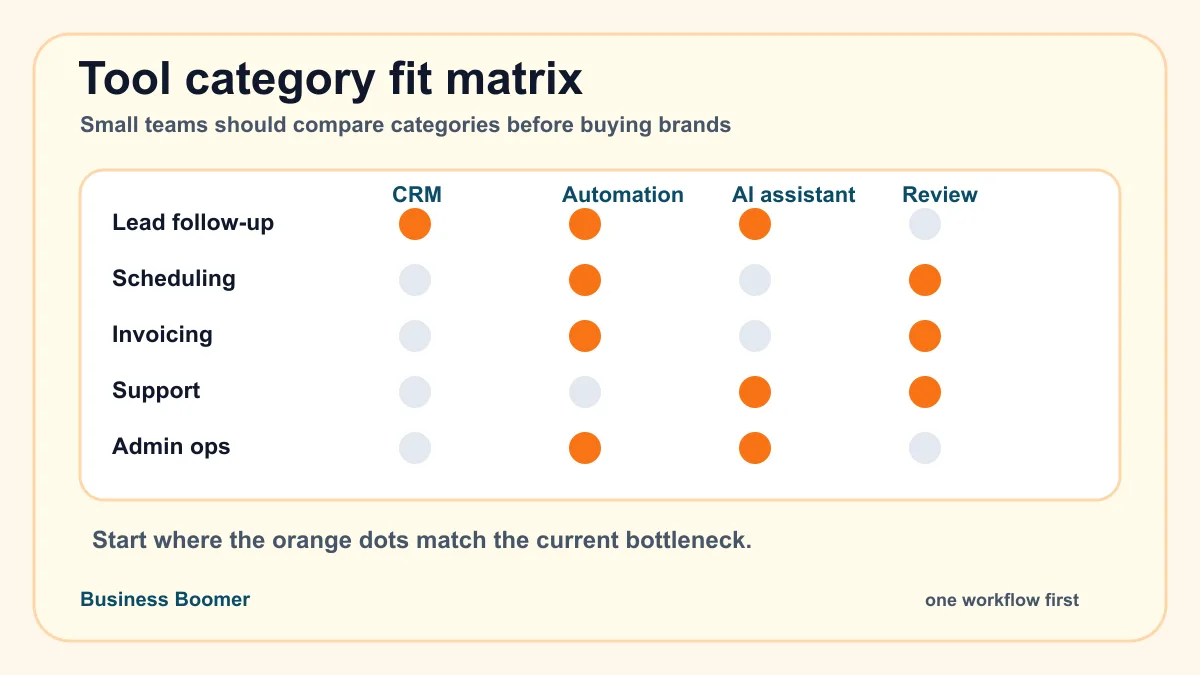
1. AI assistants for drafting, summarizing, and decision support
AI assistants are the easiest tools to start with because they do not require a full integration project. A business can use ChatGPT, Claude, Gemini, or Microsoft Copilot to draft emails, summarize notes, clean up customer messages, prepare call briefs, turn meeting notes into tasks, or create first-pass SOPs.
This is useful when the owner has repeatable thinking work but does not yet have a clean workflow. For example, a pest control owner can paste a customer inquiry and ask for a polite response draft. A med spa can summarize consultation notes into a follow-up checklist. A contractor can turn a site visit note into a scope outline.
If the team is still separating normal automation from AI-assisted work, the plain-English AI automation definition for small business owners is a useful checkpoint before comparing assistant subscriptions.
The limitation is that a standalone assistant does not automatically know where the lead came from, what happened in the CRM, or whether the invoice was paid. If the business needs connected follow-up, compare this with the broader AI automation services path instead of treating prompts as the whole system.
2. Automation builders for connecting apps
Automation builders move data between tools. Zapier, Make, n8n, Relay, and similar platforms can watch for a form submission, create a CRM record, send a Slack or email alert, add a task, update a spreadsheet, or trigger an AI summary step.
This category is often the best first real automation layer for small businesses because it connects tools the team already uses. A lead form can become a CRM task. A booked appointment can create a prep checklist. A completed job can trigger invoice creation or a reminder to review the file.
The risk is wiring up a confusing process exactly as it exists. If nobody owns the next step, the automation just moves confusion faster. Start with one workflow and one proof metric, like response time, invoices sent, calls booked, or open tasks cleared. The AI automation examples for small businesses article can help pick a practical first use case.
If the process is not ready for AI yet, the broader guide to business automation for small business can help clean up the trigger, owner, and handoff first.
3. CRM and lead follow-up tools
CRM automation is the right place to start when leads are being missed, followed up late, or tracked in email threads. HubSpot, Pipedrive, Zoho, Jobber, Housecall Pro, ServiceTitan, and industry CRMs can capture inquiries, assign stages, create tasks, and trigger follow-up reminders.
AI can improve this layer by summarizing inquiries, classifying urgency, drafting replies, and preparing the owner before a call. For a local service business, this is often more valuable than a generic AI writing tool because it protects the revenue path.
The CRM needs clean stages and ownership before automation gets fancy. If your team still needs a plain-language foundation, start with what a CRM does for small businesses before adding AI rules or lead scoring.
4. Lead response automation
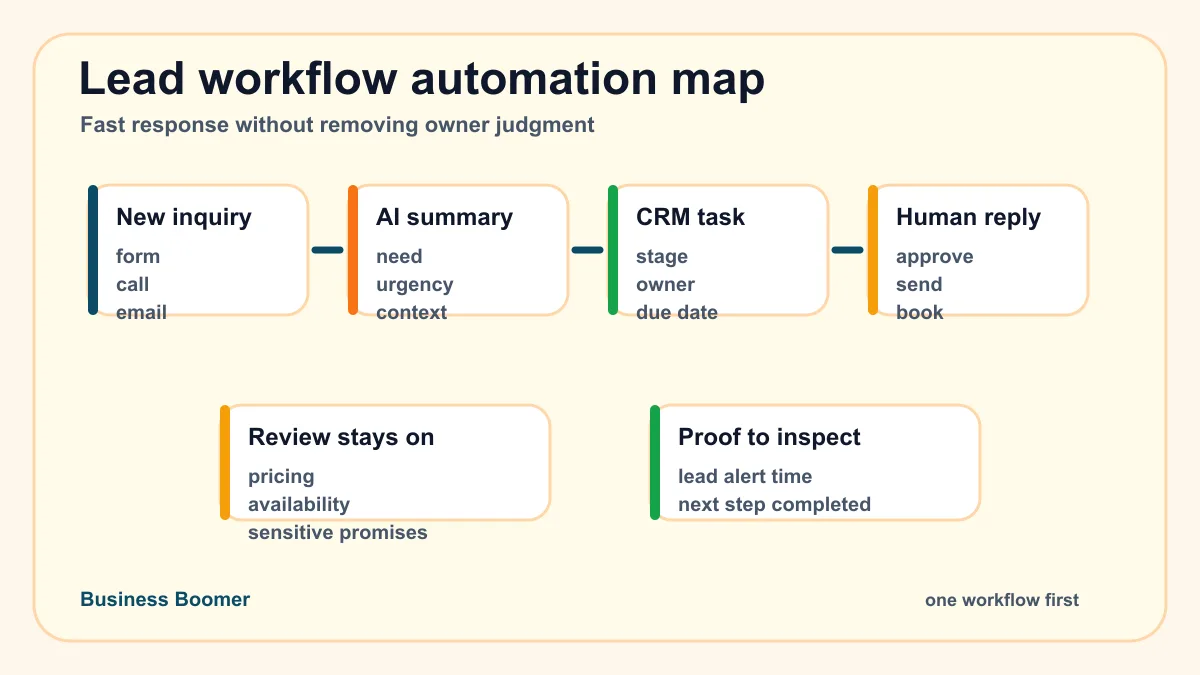
Lead response tools are a narrower but high-value category. They help a business acknowledge new inquiries, route urgent leads, send intake questions, alert the owner, draft a reply, and create the next task.
A roofing company might flag storm damage leads. A law firm might route urgent intake differently from general questions. A real estate team might summarize buyer criteria and remind the agent to respond. The automation should make the first response faster while keeping pricing, legal advice, and unusual promises under human review.
This is a strong first project because the trigger is clear and the business impact is easy to inspect: did the lead get acknowledged, did the owner see it, and did the next step happen? The lead follow-up workflow guide shows a practical build map.
5. Scheduling and appointment automation
Scheduling automation is best when the team spends too much time coordinating availability, reminders, prep details, and reschedules. Calendly, Acuity, Google Calendar workflows, CRM booking tools, and field-service schedulers can reduce back-and-forth if the rules are clear.
AI helps around the edges: summarizing intake forms, preparing appointment briefs, drafting reminder copy, or flagging appointments that need special prep. It should not silently decide eligibility, pricing, or sensitive next steps unless those rules are documented and reviewed.
For home services, clinics, med spas, consultants, and sales teams, scheduling automation is often a cleaner first project than a broad AI agent. If this is your bottleneck, the appointment scheduling automation guide is the more detailed next read.
6. Invoice and payment follow-up tools
Invoice automation tools are best when work gets completed but billing lags behind. QuickBooks, FreshBooks, Stripe, Wave, Square, Jobber, Housecall Pro, and related systems can create invoices, add payment links, trigger reminders, and show open balances.
AI can help draft customer-friendly reminder messages, summarize account status, and flag exceptions for review. It should not change terms, waive balances, or make collection decisions without a person approving the rule.
This is a practical category because the workflow usually has a visible trigger: job complete, milestone approved, recurring period ended, or invoice overdue. If billing is the current pain, compare software plus setup expectations in invoice automation services for small business.
For a direct commercial path, Business Boomer also has an invoice automation setup page for owners who want the billing workflow mapped, connected, and tested.
7. Customer support and inbox triage
Support automation helps when customer questions pile up in email, chat, website forms, or social messages. Tools like Zendesk, Intercom, Help Scout, Freshdesk, and inbox AI features can classify requests, suggest replies, find help articles, and escalate urgent issues.
The first use should be triage and draft support, not unsupervised answers to sensitive questions. A small business can safely start by having AI label messages, summarize context, suggest a response, and route anything involving refunds, policies, medical details, legal issues, or angry customers to a human.
Support automation works best when the business has consistent policies and a simple knowledge base. Without that, the tool has nothing reliable to retrieve.
8. Operations workspaces for tasks, SOPs, and reports
ClickUp, Asana, Notion, Airtable, Trello, and similar tools can become the operating center for a small team. AI features can summarize project updates, turn notes into tasks, draft SOPs, and prepare weekly reports.
This category is useful when work is scattered across text messages, email, notes, spreadsheets, and memory. The first win is often not a complex AI workflow. It is getting tasks, owners, due dates, and status into one place so automation has somewhere to put the next action.
For owner-led businesses, this can pair well with voice-to-task capture, weekly summary prompts, and simple routing rules. If the goal is a broader operating layer with memory, tools, and approval gates, compare this with the OpenClaw onboarding option.
9. AI agents for multi-step workflows
AI agents are useful when the workflow needs more than one step: read context, decide the next action, use a tool, draft output, create a task, and wait for approval. They can help with lead prep, admin routing, research, support triage, reporting, and operations follow-up.
For a small business, the best agent is usually not the most autonomous one. It is the agent that can work inside a narrow process with clear permissions and a human review point. Start with drafts, summaries, task creation, and alerts before letting an agent touch customer promises or financial decisions.
If you are comparing this category, use the AI agents for business automation guide to separate agent types by workflow fit.
What should a small business use first?
Use this order if you are choosing without a consultant:
| If the bottleneck is... | Start with... | First proof metric |
|---|---|---|
| Leads are missed or slow | CRM plus lead response automation | Time from inquiry to owner alert |
| Appointments are messy | Scheduling automation plus intake summary | Fewer manual scheduling touches |
| Invoices go out late | Invoice automation plus payment reminders | Jobs completed but not invoiced |
| Owner notes get lost | AI assistant plus task workspace | Notes converted into assigned tasks |
| Customer emails pile up | Support triage plus draft replies | Messages labeled and routed |
| Weekly reporting is manual | Workspace plus AI summary | Report prepared from source data |
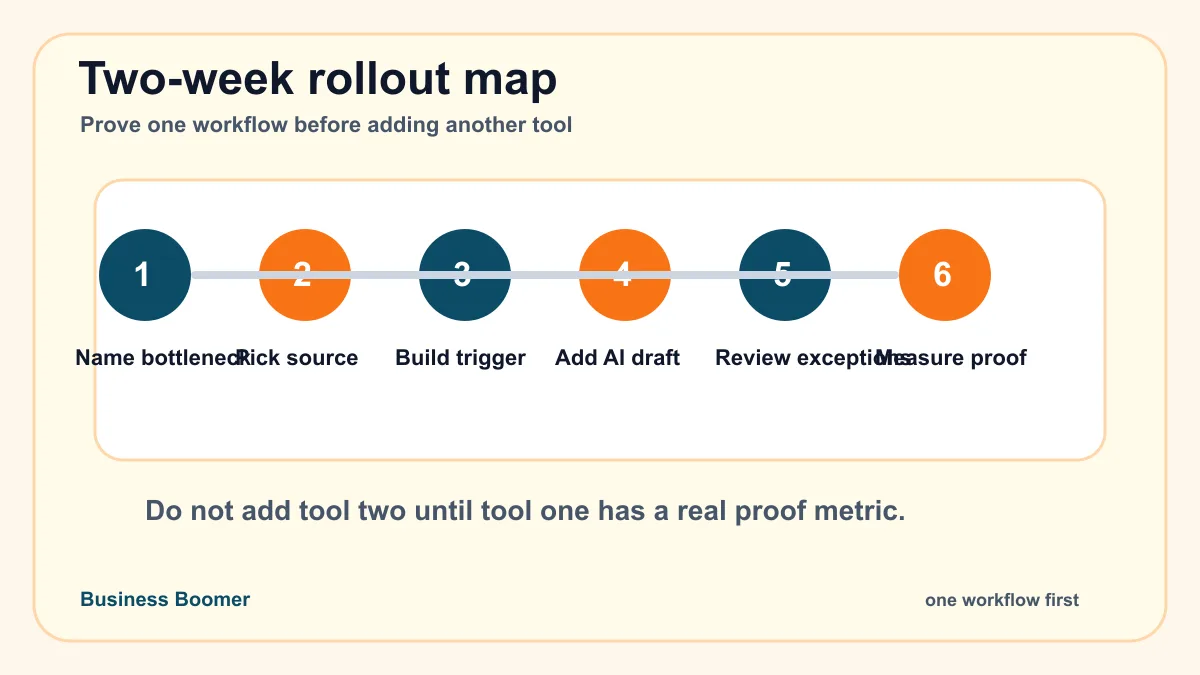
Most service businesses should choose one row and run it for two weeks before adding the next layer. That keeps the setup inspectable.
A practical starter stack
A simple starter stack can look like this:
- CRM or source of truth: HubSpot, Pipedrive, Jobber, Housecall Pro, Airtable, or a clean spreadsheet.
- Automation layer: Zapier, Make, n8n, Relay, or built-in CRM automation.
- AI layer: ChatGPT, Claude, Gemini, Copilot, or an AI step inside the automation tool.
- Review layer: task, email draft, Slack alert, approval checklist, or owner dashboard.
- Documentation: one SOP that explains the trigger, owner, exceptions, and what to do when the tool fails.
This stack is enough to handle many first projects. It can power a lead follow-up workflow, invoice reminder workflow, intake prep workflow, or weekly admin summary without forcing the business into a full platform rebuild.
For more paths by workflow type, the automation guides hub keeps the related Business Boomer setup guides in one place.
Common mistakes when choosing AI automation tools
The first mistake is buying by feature list instead of workflow fit. A tool that can automate everything is still the wrong choice if the business only needs faster lead routing.
Another common mistake is treating AI and automation as the same thing. The AI vs automation guide explains where a rule-based workflow is enough and where AI should help with language, judgment support, or messy inputs.
The second mistake is skipping the source of truth. AI cannot reliably improve a workflow when customer records, invoices, appointment details, and task ownership are scattered across five places.
The third mistake is removing human review too early. Keep approval on pricing, legal or medical language, billing exceptions, unhappy customers, and anything that could damage trust.
The fourth mistake is letting every tool become another inbox. Automation should reduce places to check, not create more dashboards.
The fifth mistake is expecting the owner to maintain a fragile setup with no documentation. Any useful automation needs an SOP, a test example, and a person who owns it.
When done-for-you setup makes sense
DIY is reasonable when the workflow is simple, the team already knows its tools, and the risk is low. A basic form-to-CRM-to-task workflow can often be tested with a no-code builder.
Done-for-you setup makes more sense when the workflow crosses multiple tools, touches customers, involves money, needs staff adoption, or has exceptions that could break trust. That is where a provider should map the workflow, build the first version, test it with real examples, and document the handoff.
If you are deciding whether to buy software or implementation help, compare this with best AI automation services for small business.
If you are comparing outside help, use the AI automation agency selection guide to vet whether the provider is building a working system or just reselling generic tool advice.
Bottom line
The best AI automation tool for a small business is the tool category that fixes the next repeated bottleneck. Start with the workflow that is costing the owner time, delaying revenue, or creating customer confusion. Then choose the simplest stack that can capture the trigger, move the data, draft or route the next step, and pause for review.
If you want help choosing the first workflow, start with the 25-Minute AI Workflow Audit Kit.
You can also book a Free 30-Minute AI Consultation. Bring one messy process, the tools you already use, and a few real examples. That is enough to decide what to automate first.
Tools matter less than the workflow; for local companies, start with an AI assistant for local business.
Next step
Find the workflow worth fixing first.
Use the Free 30-Minute AI Consultation to map where leads, invoices, notes, or follow-ups are slipping and choose the smallest useful system.
Keep building the system
Recommended next Business Boomer guides
These links are selected by topic and search intent so this guide connects to the most relevant service pages, industry pages, and supporting blog posts.
Service and setup pages
Use these when you are ready to turn the idea into an implementation path.
Industry-specific pages
See how the same workflow changes for specific business types.
Related blog posts
Read the connected guides that support this topic cluster.
Related AI automation guides
Keep going with the connected Business Boomer guides in this automation cluster.
AI automation services for local small business
Planning examples for broader automation. Compare current managed calls and reviews on the Services page; confirm other work in a separate scope.
Best invoicing automation tools for small business
A comparison of QuickBooks, FreshBooks, Stripe Billing, Wave, Jobber, Housecall Pro, Zapier, and Make.
Lead follow-up automation for small business
Turn form fills, missed calls, quote requests, emails, and voice notes into reply drafts, CRM updates, reminders, and next steps.
How to automate invoices for small business
A practical guide to invoice creation, reminders, payment tracking, and cash-flow follow-up.
FAQ
Quick answers about this guide and how to put the idea into practice.
What is the main takeaway from Best AI Automation Tools: What to Use First?
The best AI automation tools for small business are the ones that fix one repeated workflow first: lead follow-up, scheduling, CRM cleanup, invoicing, admin notes, customer support, or reporting. Start with the bottleneck, then choose the tool category.
How does best AI automation tools for small business help a small business?
best AI automation tools for small business can help a small business reduce manual work, improve follow-up, organize repetitive tasks, and create a clearer operating process when it is tied to a real bottleneck.
Can Business Boomer help implement best AI automation tools for small business?
Yes. Business Boomer can help turn the idea into a practical workflow, page, checklist, or automation system depending on what the business needs first.
Find the workflow worth fixing first.
Use the Free 30-Minute AI Consultation to map where leads, invoices, notes, or follow-ups are slipping and choose the smallest useful system.
Book a Free 30-Minute AI Consultation