
What Is AI Automation? A Small Business Owner’s Guide
AI automation combines AI judgment with workflow automation so small businesses can handle repetitive tasks like lead response, intake, follow-up, scheduling, and invoice reminders more consistently.

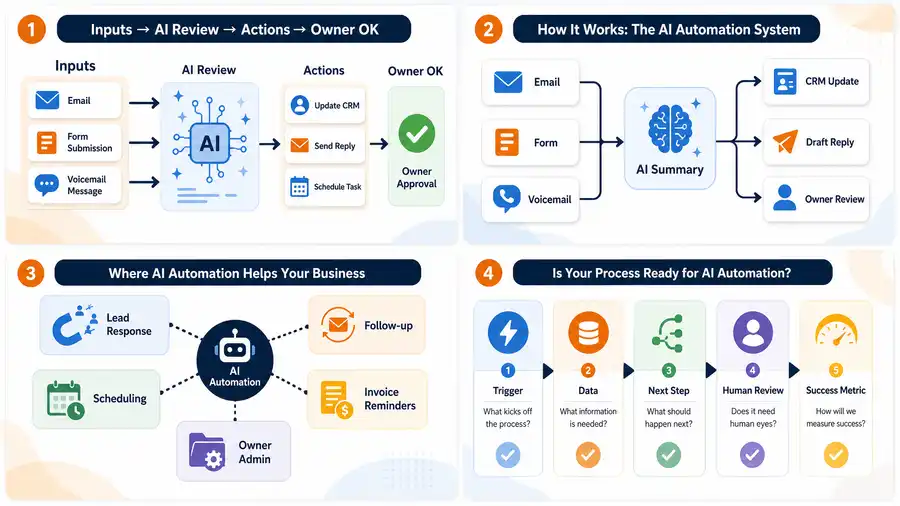
AI automation uses artificial intelligence plus workflow rules to help a business handle repetitive work with less manual effort. For a small business, that usually means capturing information, summarizing it, deciding the next step, sending reminders, updating records, or alerting a person when judgment is still needed.
The simplest way to think about it: regular automation follows fixed instructions, while AI automation can read, classify, draft, summarize, and route messy real-world information. It should not replace the owner’s judgment on important decisions. It should make the next step clearer and faster.
What does AI automation mean in plain English?
AI automation is a working system where AI handles part of a business process and software moves the work forward. It might read a form submission, summarize a customer request, create a CRM note, draft a reply, schedule a reminder, or flag a lead for human review.
That makes it different from simply opening ChatGPT and asking for help. A chat tool can answer a question. An AI automation workflow runs when something happens in the business. If you need the broader foundation first, start with what business automation means for small business.
For example, a contractor might receive a website inquiry with photos and a short description. AI can summarize the job, classify the service type, draft a first response, and notify the owner. The owner still decides whether the job is a fit, but the admin work around the lead is already organized.
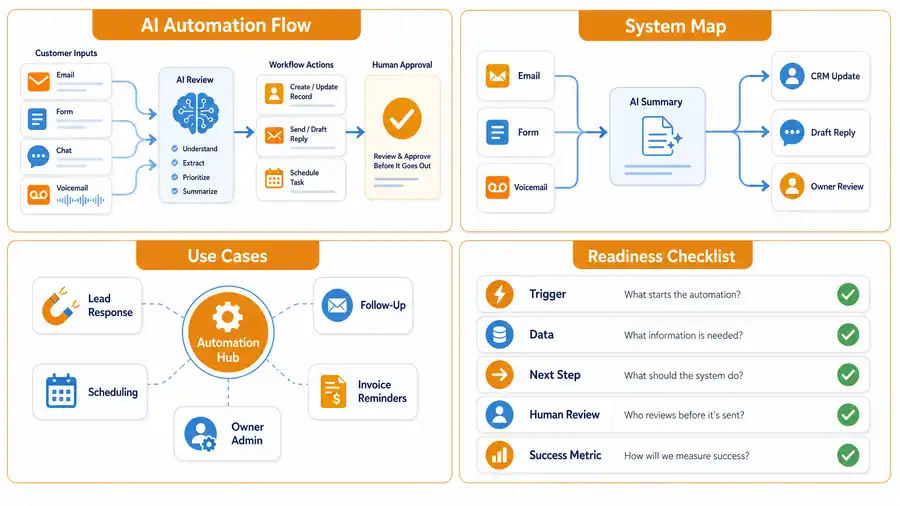
AI automation vs regular automation
Regular automation is best when the inputs are predictable. AI automation is useful when the input is messy, written in natural language, or needs light interpretation before the next step.
| Business task | Regular automation can help when | AI automation can help when |
|---|---|---|
| Lead response | A form has fixed fields | A message needs to be summarized and routed |
| Scheduling | A customer picks a time | A request needs urgency or service type classified |
| Invoicing | A due date passes | A reminder needs to be drafted in a customer-aware tone |
| Intake | Every customer answers the same questions | Notes, emails, or calls need to be turned into structured details |
| Reporting | Data is already clean | Notes and activity need to be summarized for the owner |
The best small-business systems often use both. A rule starts the workflow, AI handles the fuzzy part, and automation updates the tool where the work should live. If you are comparing hands-on help, this pairs naturally with AI automation services for small business.
Where small businesses should use AI automation first
Most owners should not begin with a huge AI project. Start where work is repetitive, visible, and tied to revenue speed or owner time.
1. New lead response
Lead response is one of the clearest first uses. AI can summarize the inquiry, detect what the prospect wants, create a short internal note, and draft a reply for the owner or team to approve.
This is especially useful when leads arrive from website forms, voicemail transcripts, email, chat, or social messages. If speed-to-lead is the main bottleneck, read what lead response automation is before building a more complex system.
2. Follow-up after estimates or calls
Many small businesses do the first conversation well and then lose track of the follow-up. AI automation can draft polite follow-up messages, remind the right person, and keep notes attached to the customer record.
A good follow-up workflow should still sound human. It should use reasonable timing, stop when a customer replies, and let the owner pause the sequence when the situation is sensitive. For a practical next step, use how to follow up with leads for small business.
3. Scheduling and intake
AI automation can make booking cleaner by turning scattered customer details into structured intake notes. That helps the team understand the service request, location, urgency, budget, photos, and preparation steps before the appointment.
A booking link by itself only solves part of the problem. The bigger win is connecting scheduling with useful customer context. Appointment-heavy businesses can compare this with how to automate appointment scheduling.
4. Invoice reminders and payment admin
AI automation can help draft reminder language, flag overdue accounts, summarize unpaid balances, and alert the owner when a customer needs personal attention. This is useful because invoice follow-up is repetitive but relationship-sensitive.
For billing-heavy businesses, the workflow should connect to existing tools rather than create another spreadsheet. If that is the current pain, start with the main invoice automation setup page.
For the customer-message side of billing, use the guide on how to automate invoice reminders.
5. Owner notes and daily admin
Owner-led businesses often run on voice notes, screenshots, call recaps, and half-finished reminders. AI automation can turn those fragments into tasks, summaries, email drafts, CRM notes, or weekly reports.
This is where AI can be genuinely helpful without pretending to run the business. It catches the loose ends and puts them somewhere the team can act on. If the owner needs a broader operator-style setup, see OpenClaw onboarding for business owners.
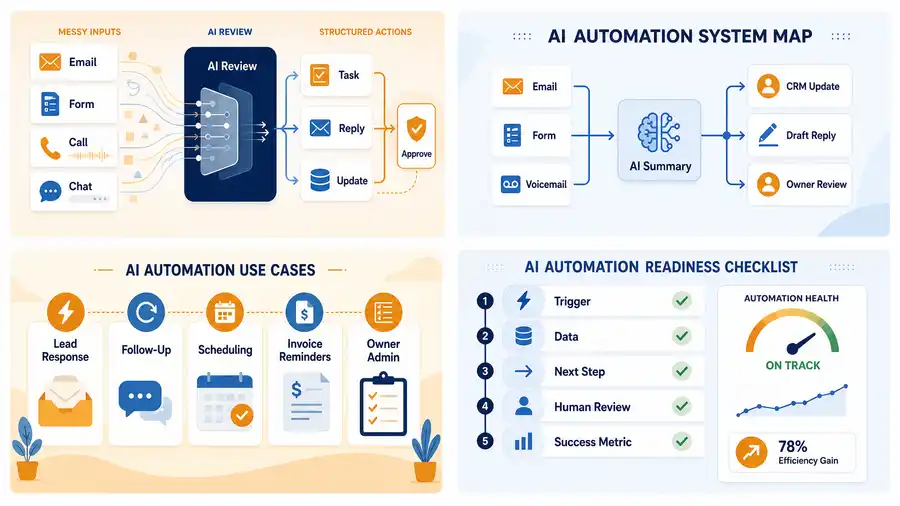
What AI automation should not do
AI automation should not make high-stakes decisions without a person involved. It should not approve refunds, give legal or medical advice, change payroll, fire employees, or send sensitive customer messages without review.
The U.S. Small Business Administration notes that businesses using AI should understand risks and have people review AI output when needed. Its AI for small business guidance is a useful baseline for owners who want practical examples without hype.
Use AI automation for repeatable support work. Keep a human in the loop when the decision affects trust, safety, money, privacy, or a customer relationship.
A simple AI automation workflow example
Here is a practical example for a home service business that gets website leads:
- A prospect submits a website form.
- AI summarizes the request and classifies the service type.
- The system creates or updates the contact record.
- The prospect receives a fast acknowledgment.
- The owner gets a short lead brief with suggested next steps.
- A follow-up reminder is created if nobody responds.
That workflow is not futuristic. It is just a cleaner way to handle a common handoff. If the business does not already have a clean place for customer information, fix that before adding more AI. The plain-English CRM guide explains what a CRM is for small business.
How to decide if a workflow is ready for AI automation
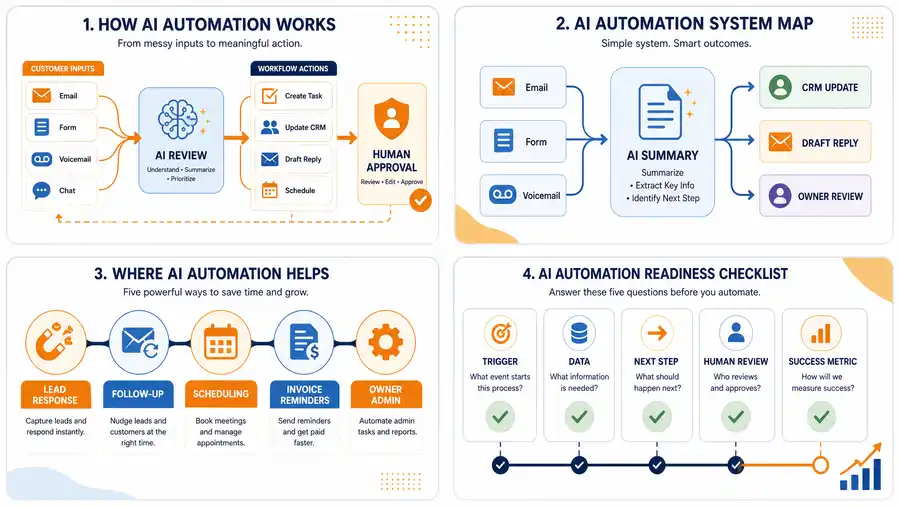
Before building anything, answer five questions:
| Question | Why it matters |
|---|---|
| What starts the workflow? | Every automation needs a clear trigger. |
| What information does the system need? | AI works better when the input is clear. |
| What should happen automatically? | The next step must be specific. |
| Where does a human review it? | Review protects customers and the business. |
| How will we know it worked? | The owner needs a visible result, not just a demo. |
A good first project is narrow enough to test in a week or two. It might be one lead form, one invoice reminder sequence, one intake process, or one owner-note workflow. If you need implementation help, the AI automation consulting guide explains when outside support makes sense.
Common mistakes to avoid
The most common mistake is buying tools before mapping the workflow. AI automation does not fix a process that nobody can explain.
Other mistakes include:
- automating too many workflows at once
- sending AI-written customer messages without review
- connecting tools before cleaning customer data
- using generic templates that do not fit the business
- ignoring privacy, permissions, and staff training
- measuring setup completion instead of whether the workflow improved
Google’s small-business AI training also frames AI as a way to delegate tasks and improve productivity, not as a magic replacement for business judgment. Its Grow with Google AI resources are a helpful education source for owners who want a beginner-friendly overview.
What Business Boomer would automate first
For most U.S. service businesses, Business Boomer would start with one of four workflows: lead response, follow-up, invoice reminders, or owner admin capture. Those areas are concrete enough to map, test, and improve without turning the business upside down.
The right first workflow depends on the bottleneck. If new inquiries sit too long, start with lead response. If estimates go cold, start with follow-up. If cash collection is painful, start with invoice reminders. If the owner is the bottleneck, start by turning notes and calls into organized actions.
If you want a concrete first build for a local company, compare the concept with AI automation for local service businesses.
Business Boomer services
Choose the next step for calls or reviews.
Compare AI Voice Receptionist and Google Reputation Management, then bring one customer handoff to a consultation.
Choose one first workflow
Use a sample request to choose the first handoff. For an inquiry, name the person who calls back. For a voice note, decide who checks the draft task. For a customer-facing answer, write down the approved wording and the point where a person takes over. Keep one expected result and inspect the destination before expanding the setup.
For the services Business Boomer currently offers, compare AI Voice Receptionist and Google Reputation Management. Use the consultation preparation guide for work that needs a separate scope.
Keep building the system
Recommended next Business Boomer guides
These links are selected by topic and search intent so this guide connects to the most relevant service pages, industry pages, and supporting blog posts.
Service and setup pages
Use these when you are ready to turn the idea into an implementation path.
Industry-specific pages
See how the same workflow changes for specific business types.
Related blog posts
Read the connected guides that support this topic cluster.
Recommended next steps
These pages connect this guide to the Business Boomer offer, related workflow, and next implementation path.
Related AI automation guides
Keep going with the connected Business Boomer guides in this automation cluster.
AI automation services for local small business
Planning examples for broader automation. Compare current managed calls and reviews on the Services page; confirm other work in a separate scope.
How to automate invoices for small business
A practical guide to invoice creation, reminders, payment tracking, and cash-flow follow-up.
What is lead response automation?
Why response speed matters and how small businesses can stop leads from slipping away.
Lead follow-up automation for small business
Turn form fills, missed calls, quote requests, emails, and voice notes into reply drafts, CRM updates, reminders, and next steps.
FAQ
Quick answers about this guide and how to put the idea into practice.
What is the main takeaway from What Is AI Automation? A Small Business Owner’s Guide?
AI automation combines AI judgment with workflow automation so small businesses can handle repetitive tasks like lead response, intake, follow-up, scheduling, and invoice reminders more consistently.
How does what is AI automation help a small business?
what is AI automation can help a small business reduce manual work, improve follow-up, organize repetitive tasks, and create a clearer operating process when it is tied to a real bottleneck.
Can Business Boomer help implement what is AI automation?
Yes. Business Boomer can help turn the idea into a practical workflow, page, checklist, or automation system depending on what the business needs first.
Choose the next step for calls or reviews.
Compare AI Voice Receptionist and Google Reputation Management, then bring one customer handoff to a consultation.
Compare the two services