
Best AI Automation Services: What to Buy First
The best AI automation services for small business are practical implementation services that fix lead response, follow-up, invoicing, scheduling, and owner admin first.


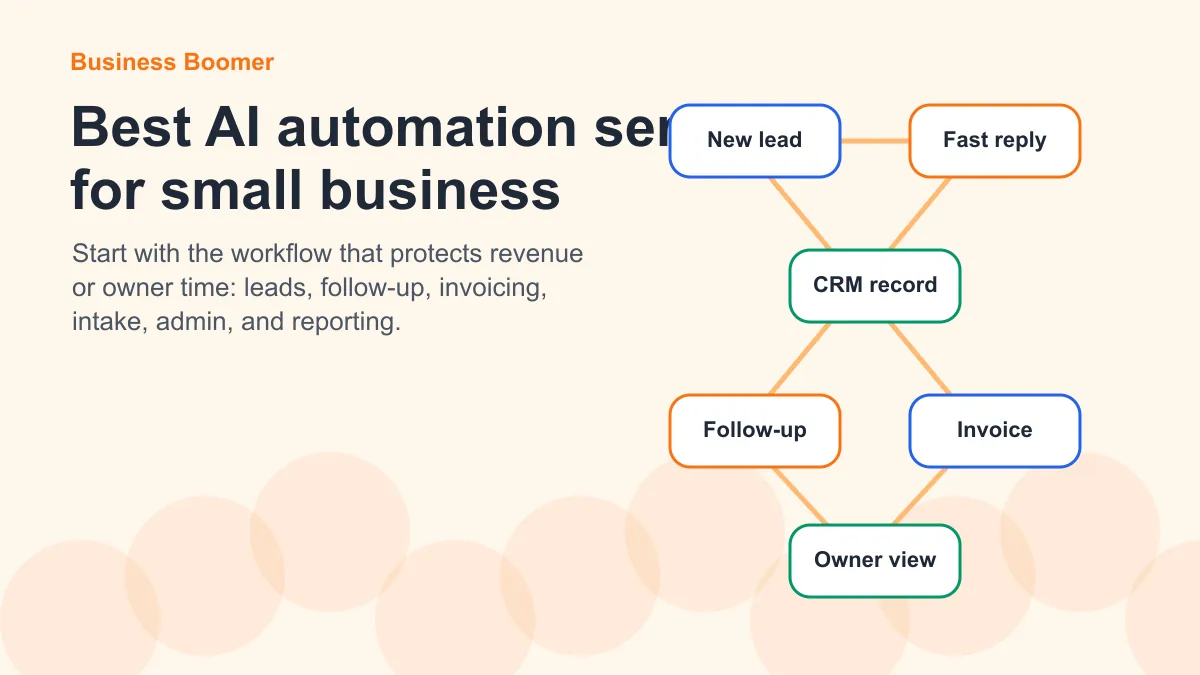
The best AI automation services for small business are not the flashiest AI tools. They are the services that remove real bottlenecks: slow lead response, missed follow-up, manual invoicing, scattered customer details, scheduling friction, and owner admin that never ends.
Quick answer: For most U.S. small businesses, the best AI automation service is a done-for-you workflow that improves one revenue or time bottleneck before adding more software.
That matters because the search results for AI automation are crowded with tool lists, agency claims, and broad AI promises. A small business owner does not need a giant AI transformation project on day one. They need a practical system that makes the next lead, invoice, appointment, or handoff easier to manage.
What counts as an AI automation service?
An AI automation service helps a business design, install, connect, or improve a workflow using AI and automation tools. At Business Boomer, that usually means turning a messy process into one of the practical AI automation services we build for small businesses, such as lead follow-up, invoice reminders, intake, scheduling, or owner admin capture.
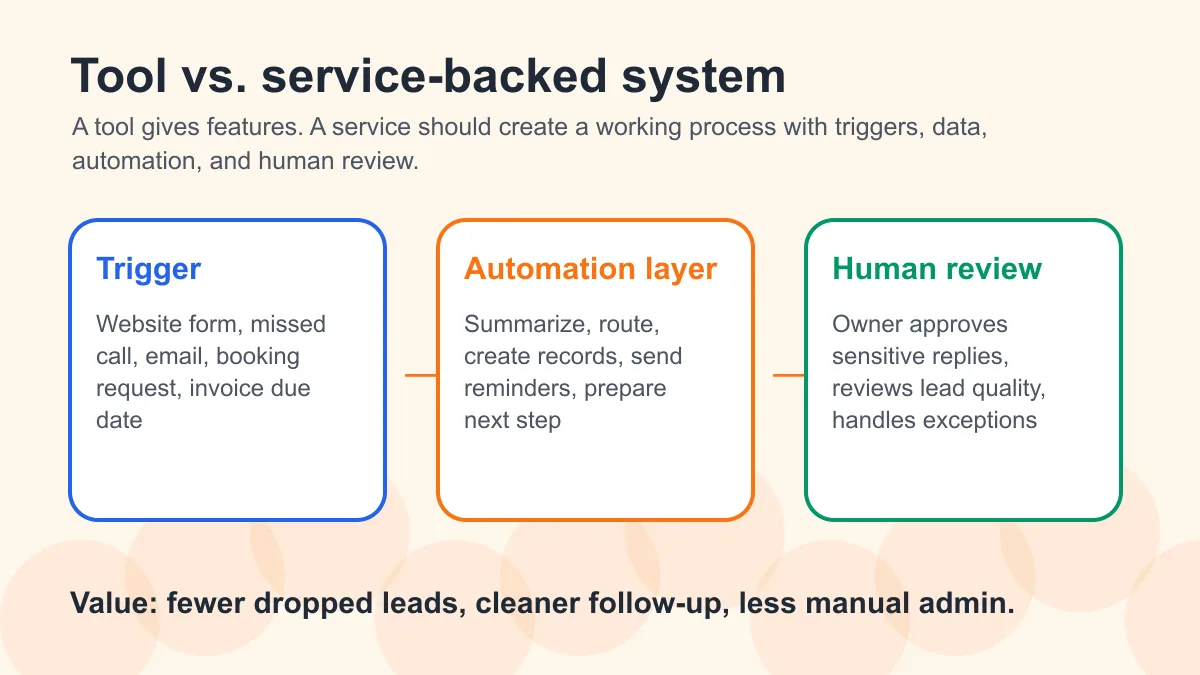
That is different from simply buying an AI tool. A tool gives you features. A service should give you a working process. If your business is still defining the basics, start with what business automation for small business means before comparing providers.
For example, a chatbot subscription is a tool. A lead response automation workflow that captures a website inquiry, summarizes the request, routes it to the right person, creates a CRM record, sends a fast reply, and reminds the owner to follow up is a service-backed system.
If you want the broader service-business foundation first, read AI automation for service businesses.
If the bottleneck is billing instead of sales, compare that with the main invoice automation setup page.
The best AI automation services to consider first
Here are the most useful AI automation services for small businesses, ranked by practical value rather than hype.
| Service | Best for | Why it matters |
|---|---|---|
| Lead response automation | Local service businesses, agencies, real estate teams, contractors | Speed-to-lead affects whether prospects hear from you before they call someone else |
| Follow-up automation | Any business with estimates, consults, or open opportunities | Most revenue leaks happen after the first conversation |
| Invoice and payment automation | Contractors, consultants, home services, agencies | Faster billing and reminders can improve cash flow and reduce admin |
| Scheduling and intake automation | Appointment-based businesses | Cleaner intake makes appointments easier to book and prepare for |
| CRM cleanup and workflow setup | Businesses with messy spreadsheets or scattered contacts | Automation fails when customer data is disorganized |
| Voice-note and admin automation | Owner-led businesses | Turns owner thoughts, calls, and notes into organized tasks |
| Reporting and owner dashboard setup | Growing teams | Gives the owner a clear view of leads, follow-up, unpaid invoices, and stuck work |
The right first service is usually the one tied to revenue speed or owner time. If the system does not make a real weekly workflow easier, it is probably not the first thing to buy.
1. Lead response automation
Lead response automation helps a business reply to new inquiries faster and more consistently. It can connect website forms, missed calls, emails, chat, CRM records, text replies, and internal reminders.
This is usually one of the best first AI automation services for small business because new leads are fragile. If a prospect fills out a form and waits too long, the business may never get a second chance. If the sales process is still loose, pair this with how to qualify leads for a small business so automation does not push weak-fit inquiries into the same pipeline as serious buyers.
A practical lead response setup might include:
- website form cleanup
- instant acknowledgment email or SMS
- AI lead summary for the owner or sales person
- CRM record creation
- appointment link or next-step routing
- follow-up reminder if nobody responds
For businesses that depend on inquiries, a response-speed workflow is usually more valuable than an impressive but disconnected AI demo.
2. Follow-up automation
Follow-up automation keeps opportunities from going cold after the first touch. This can apply to sales calls, estimates, proposals, consultations, old leads, past customers, or unpaid invoices.
A good follow-up service does not blast generic messages. It creates a reasonable sequence based on the customer situation and gives the business a way to pause, adjust, or personalize when needed. For relationship-driven verticals, the workflow can look different: AI follow-up systems for real estate teams need different timing and context than a contractor estimate sequence.
For example, a home service business might use automation to follow up on estimates after two days, seven days, and fourteen days. A consultant might use it to remind prospects after a discovery call. A real estate team might use it to re-engage leads who asked a question but never booked a showing. If this is the biggest leak, use how to follow up with leads for small business as the next operational guide.
Business Boomer usually looks for the point where follow-up is currently living in someone’s memory. That is where automation can create an immediate operational win.
3. Invoice and payment automation
Invoice automation is one of the clearest money-related AI automation services for small business. It can help create invoices faster, send reminders, track unpaid balances, and keep the owner from manually chasing every payment. Business owners who already know billing is the bottleneck should review the main invoice automation service page before comparing tools.
The U.S. Small Business Administration emphasizes that basic financial management depends on tracking revenue, expenses, and cash flow clearly. Its small business finance guidance is a useful reminder that billing systems are not just admin; they affect business health.
A practical invoice automation service can include:
- invoice trigger mapping
- payment link setup
- reminder timing
- customer status tracking
- QuickBooks, Stripe, FreshBooks, Wave, or spreadsheet workflow cleanup
- owner alerts for overdue invoices
- reporting on unpaid work
If invoicing is the bottleneck, start with how to automate invoices for small business.
For reminder timing, use the guide on how to automate invoice reminders.
If your billing already runs through QuickBooks, read QuickBooks invoice automation for small business.
You can also use the invoice automation ROI calculator to estimate whether the time savings justify implementation.
4. Scheduling and intake automation
Scheduling automation is useful when a business spends too much time coordinating appointments, collecting details, or preparing for calls. Intake automation is the layer that makes scheduling useful.
A booking link alone is not enough. The business also needs the right information before the appointment. That might include service type, location, urgency, budget, photos, existing tools, or the customer’s main problem.
A strong scheduling and intake service can:
- clean up appointment types
- ask better intake questions
- route urgent leads differently
- send preparation instructions
- create internal notes
- remind the business before and after the appointment
For service teams that already lose time to missed appointments, this should connect to the same system used to reduce no-shows for small business appointments.
For appointment-heavy businesses, automating appointment scheduling can save time and reduce dropped handoffs.
5. CRM cleanup and workflow setup
Many small businesses ask for AI automation before their customer data is ready. That is risky. If the CRM is messy, automation may simply move bad information faster.
A CRM cleanup service usually includes contact organization, pipeline stages, lead source tracking, ownership rules, status definitions, and follow-up triggers. It is less exciting than a new AI agent, but it is often what makes the AI agent useful.
If your business still tracks leads across texts, inboxes, sticky notes, and spreadsheets, do not start with a complex AI system. Start by deciding where leads live, who owns them, what stage they are in, and what should happen next. If you need implementation help instead of another planning doc, Business Boomer focuses on practical systems that can be built and maintained first.
For a plain-English foundation, see what a CRM is for small business.
6. Voice-note and owner admin automation
Owner-led businesses often have one hidden bottleneck: the owner’s brain. Important details live in voice notes, call recaps, texts, screenshots, or quick ideas that never become tasks.
AI can help turn that messy input into organized action. A voice-note workflow might summarize a call, pull out next steps, create tasks, draft follow-up messages, and route notes into the right project or customer record.
This is especially useful for businesses where the owner is still selling, managing customers, reviewing work, and making operational decisions every day. If the business needs an always-available operator-style workflow, OpenClaw onboarding for business owners is the deeper setup guide.
The goal is not to remove the owner from the business. The goal is to stop making the owner manually translate every thought into a system.
7. Reporting and owner dashboards
A small business does not need enterprise analytics. It does need clear visibility into the work that matters.
A practical dashboard might show:
- new leads this week
- leads waiting on response
- estimates sent but not accepted
- unpaid invoices
- appointments booked
- follow-ups due
- tasks stuck without an owner
For invoice-heavy businesses, this dashboard should also connect to invoice reminder templates so reporting turns into action, not just another chart.
This type of reporting is valuable because it makes automation measurable. If the business cannot see what improved, it is hard to know whether the system is working.
Services vs tools: what should a small business buy?
A tool is best when the business already knows the workflow. A service is best when the workflow is unclear, messy, or spread across multiple systems.
| If this is true | Buy a tool | Hire an automation service |
|---|---|---|
| You already know exactly what needs to happen | Yes | Maybe |
| Your process changes every week | No | Yes |
| Customer data is messy | No | Yes |
| You need several apps connected | Maybe | Yes |
| Your team can maintain automations internally | Yes | Maybe |
| The owner is the bottleneck | Maybe | Yes |
Tools like Zapier, Make, HubSpot, QuickBooks, Stripe, and Jobber can be useful. But the tool choice should come after the process decision. Otherwise, the business ends up with more software and the same old bottleneck. For a broader implementation lens, compare this with AI consulting for small business.
How to choose an AI automation service provider
When comparing providers, look for practical workflow thinking instead of vague AI language.
Use this checklist:
- Do they ask about your actual process before recommending tools?
- Can they explain the first workflow in plain English?
- Do they focus on one measurable bottleneck first?
- Do they understand small-business constraints?
- Can they work with the tools you already use?
- Do they include testing and handoff, not just setup?
- Do they tell you what should not be automated?
- Do they avoid unsupported promises about revenue or savings?
The best AI automation services for small business should feel specific. If every example sounds like it could apply to any company, the provider probably has not gone deep enough.
A simple first-project framework
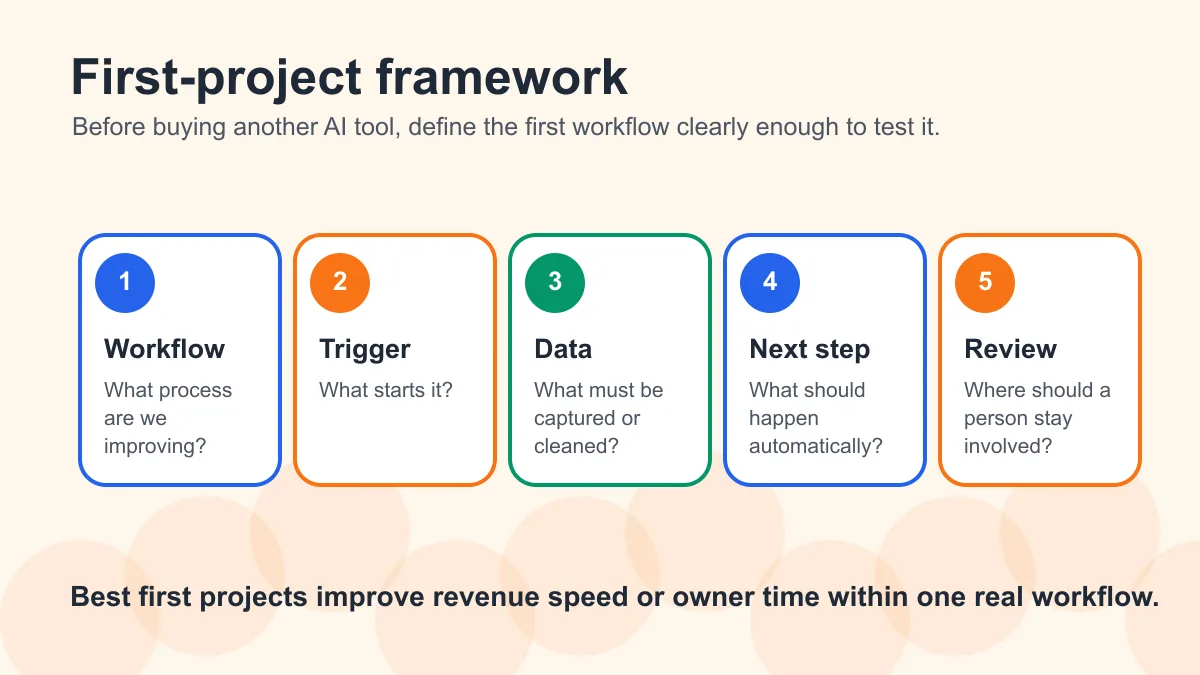
Before hiring anyone, define the first project with this five-part framework:
- Workflow: What process are we improving?
- Trigger: What starts the workflow?
- Data: What information must be captured or cleaned?
- Next step: What should happen automatically?
- Human review: Where should a person stay involved?
Here is a simple example:
| Workflow | Trigger | Automation | Human review |
|---|---|---|---|
| New website lead | Form submitted | Create CRM record, summarize request, send acknowledgment, alert owner | Owner reviews lead quality and replies personally when needed |
| Estimate follow-up | Estimate sent | Send polite reminder after two days and create follow-up task | Owner pauses sequence if customer needs a custom conversation |
| Invoice reminder | Invoice due date passes | Send reminder and update unpaid invoice list | Owner reviews sensitive or disputed accounts |
This keeps the project grounded. AI should support the process, not replace judgment where judgment matters.
Common mistakes to avoid
The biggest mistake is trying to automate everything at once. Small businesses usually get better results from one working workflow than from ten half-built ones.
Other mistakes include:
- buying software before mapping the process
- automating bad data
- using generic AI messages with customers
- ignoring privacy and permission issues
- skipping testing
- failing to assign a human owner
- measuring setup completion instead of business impact
A good automation service should help you avoid these mistakes. If the provider only talks about tools, agents, or AI models, slow down.
What Business Boomer would automate first
For most small businesses, Business Boomer would start with one of four workflows:
- lead response
- follow-up
- invoice reminders
- owner admin capture
Those areas usually connect directly to revenue, cash flow, or owner time. They also create a clear foundation for future automation.
Business Boomer helps small businesses turn AI automation into practical systems: better lead handling, cleaner follow-up, invoice workflows, dashboards, and operational support that fit the way the business actually runs.
For local operators, the most focused offer page is AI automation for local service businesses.
Next step
Find the workflow worth fixing first.
Use the Free 30-Minute AI Consultation to map where leads, invoices, notes, or follow-ups are slipping and choose the smallest useful system.
Keep building the system
Recommended next Business Boomer guides
These links are selected by topic and search intent so this guide connects to the most relevant service pages, industry pages, and supporting blog posts.
Service and setup pages
Use these when you are ready to turn the idea into an implementation path.
Industry-specific pages
See how the same workflow changes for specific business types.
Related blog posts
Read the connected guides that support this topic cluster.
Recommended next steps
These pages connect this guide to the Business Boomer offer, related workflow, and next implementation path.
AI automation for local service businesses
Use the local-service page when the business needs implementation, not just a tool list.
Lead follow-up automation
Ask any service provider how they will fix slow replies and stale estimates.
Website redesign for contractors
For contractors, connect the website path to quote follow-up.
Related AI automation guides
Keep going with the connected Business Boomer guides in this automation cluster.
AI automation services for local small business
Planning examples for broader automation. Compare current managed calls and reviews on the Services page; confirm other work in a separate scope.
Best invoicing automation tools for small business
A comparison of QuickBooks, FreshBooks, Stripe Billing, Wave, Jobber, Housecall Pro, Zapier, and Make.
Lead follow-up automation for small business
Turn form fills, missed calls, quote requests, emails, and voice notes into reply drafts, CRM updates, reminders, and next steps.
How to automate invoices for small business
A practical guide to invoice creation, reminders, payment tracking, and cash-flow follow-up.
FAQ
Quick answers about this guide and how to put the idea into practice.
What is the main takeaway from Best AI Automation Services: What to Buy First?
The best AI automation services for small business are practical implementation services that fix lead response, follow-up, invoicing, scheduling, and owner admin first.
How does best AI automation services for small business help a small business?
best AI automation services for small business can help a small business reduce manual work, improve follow-up, organize repetitive tasks, and create a clearer operating process when it is tied to a real bottleneck.
Can Business Boomer help implement best AI automation services for small business?
Yes. Business Boomer can help turn the idea into a practical workflow, page, checklist, or automation system depending on what the business needs first.
Find the workflow worth fixing first.
Use the Free 30-Minute AI Consultation to map where leads, invoices, notes, or follow-ups are slipping and choose the smallest useful system.
Book a Free 30-Minute AI Consultation