← Back to Blog
Small Business AutomationMay 20, 20269 min read

Invoice Automation Services for Small Business: What to Expect

Sam Monac profile image

Author

Sam Monac

Founder, Business Boomer | AI Operator & Growth Strategist

Sam Monac is a product and AI operator who helped scale Token Metrics to $7M+ ARR and supported more than $6M in capital raises. Through Business Boomer and his portfolio of AI-enabled businesses, Sam writes from hands-on experience building automation systems, growth workflows, and practical AI tools for real operators.

S. Vishwa profile image

Fact Checked By

S. Vishwa

SEO Specialist & Blog Writer, Business Boomer

S. Vishwa is an experienced SEO specialist and blog writer with 10+ years of experience across digital marketing and fintech. He is passionate about crafting high-quality content that informs and engages readers in the finance and marketing sectors.

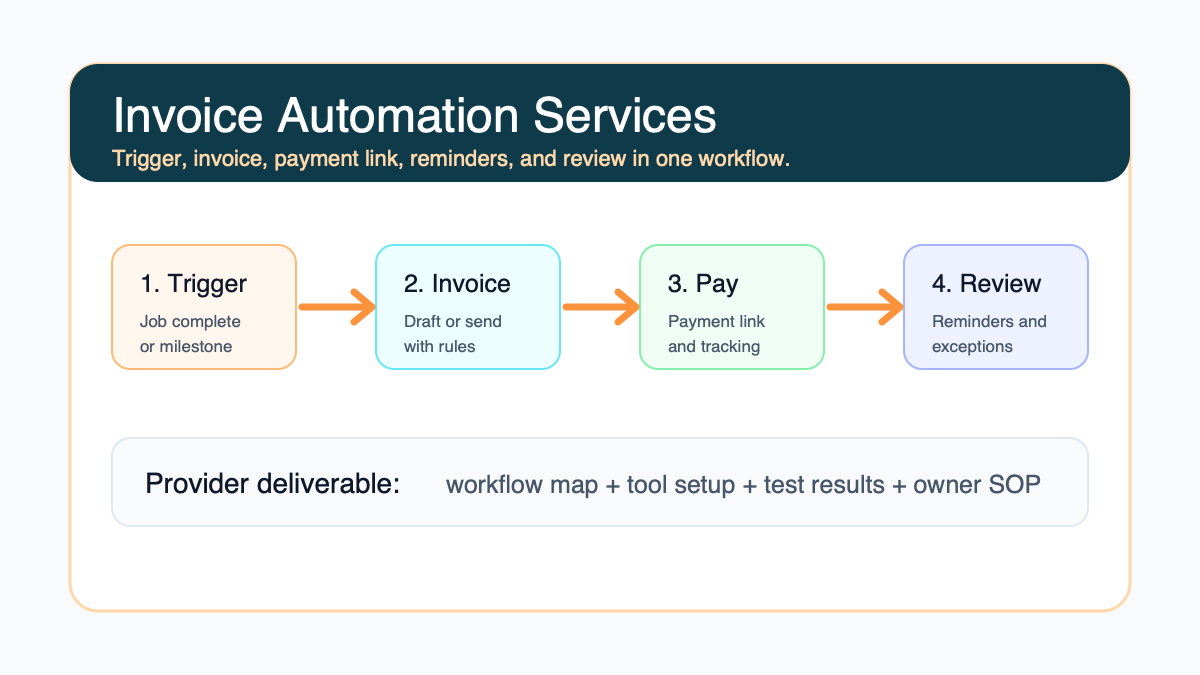
Invoice automation services should turn billing into a clear workflow: the right trigger, invoice draft or send rule, payment link, reminder cadence, overdue follow-up, and owner-friendly reporting.

Invoice automation services workflow for a small business showing billing trigger, invoice setup, reminders, and review

Invoice automation services for small business should help you turn billing from a manual chore into a repeatable workflow. A useful provider does more than turn on software. They map when an invoice should be created, who reviews it, how the customer pays, when reminders go out, and what happens when payment is still missing.

The best first project is usually narrow: one billing trigger, one invoice template, one payment link flow, one reminder sequence, and one owner review dashboard. That gives a service business a system it can trust before adding more locations, teams, job types, or accounting rules.

Search intent and top-result pattern

People searching for invoice automation services are usually comparing options, trying to understand what a provider actually does, or deciding whether software alone is enough. Current U.S. results lean toward invoice software pages, broad automation guides, AP processing tools, and payment platforms. The gap for small service businesses is plain-English implementation guidance: what the setup should include, what should stay human, and how to avoid buying a tool that does not match the real billing workflow.

This guide focuses on done-for-you setup expectations, not a generic software roundup. If you need the software comparison first, start with best invoicing automation tools for small business.

What an invoice automation service should actually set up

A good invoice automation service connects the business event that proves work is ready to bill with the invoice, payment option, reminder schedule, and follow-up task. For a contractor, that event might be a job marked complete. For a consultant, it might be an approved milestone. For a cleaning company, it might be the end of a recurring service visit.

If you are still defining that event, review how invoice automation works for small business before paying for a larger setup. The trigger is the foundation. If the trigger is vague, the automation will keep creating exceptions.

Invoice automation services workflow showing trigger, invoice review, payment link, reminders, and exception handling

At a practical level, the setup should include:

  • billing trigger and source system
  • invoice template and required fields
  • draft-versus-send rule
  • payment link or payment method
  • reminder timing and message tone
  • overdue escalation rule
  • reporting view for open invoices
  • owner or admin SOP

Software setup is only one part of the job

Many search results make invoice automation look like a software choice. Software matters, but the bigger issue is workflow design. QuickBooks, Stripe, Square, FreshBooks, Wave, Jobber, Housecall Pro, Zapier, Make, and spreadsheets can all be useful depending on how the business already runs.

If QuickBooks is already the bookkeeping source, compare the provider's plan with QuickBooks invoice automation for small business. If the business mainly needs payment links and recurring billing, Stripe or Square may be part of the stack. If invoices depend on field jobs, the job management tool may need to trigger the billing step.

The provider should explain which system owns the customer record, which system owns the invoice, and which system owns follow-up. Without that clarity, the business can end up with duplicate records and reminders that do not match payment status.

If the project is specifically about configuring QuickBooks around your existing billing process, the QuickBooks invoice automation setup page is the more focused service path.

The first discovery call should be specific

The first call should not be a vague AI consultation. It should identify where invoices slow down today and what proof tells the system to act. Expect questions about how invoices are created, how payments are accepted, what gets paid late, and who currently follows up.

A useful provider will ask for real examples: a recent completed job, an invoice that went out late, a reminder email that worked, a payment that needed manual chasing, and the tool where the team checks open balances. That is the raw material for a working setup.

For service businesses that want a broader operational review, Business Boomer's AI automation services can connect invoice work with lead follow-up, intake, scheduling, and admin handoffs.

What should be included in the scope

The scope should describe the exact workflow being built. Avoid scopes that only say "invoice automation" without naming the trigger, tool stack, approval step, and launch test.

Scope itemWhat it should answerWhy it matters
TriggerWhat event starts the invoice workflow?Prevents invoices from relying on memory
TemplateWhat fields must appear on every invoice?Reduces customer confusion and edits
Review ruleWhich invoices send automatically versus draft first?Keeps judgment in the right place
Payment methodHow does the customer pay?Makes payment easy and trackable
Reminder cadenceWhen do reminders go out?Keeps follow-up consistent
EscalationWhen does a human step in?Protects customer relationships
ReportingWhere does the owner see open invoices?Makes stuck payments visible

Use the invoice automation checklist to sanity-check the scope before you approve it.

If accepted estimates are the real trigger, compare the scope with automating invoices from accepted estimates so the provider does not skip approval, pricing, or change-order details.

What should stay human

Invoice automation should not remove judgment from every billing decision. Keep a human involved when the invoice has unusual scope, a disputed amount, a change order, a sensitive customer, a refund issue, or a high-value relationship. Automation should make those exceptions visible, not hide them.

For a first version, many businesses should use draft invoices. The system prepares the invoice and reminder plan, then the owner or admin reviews before sending. Once the pattern is stable, some invoices can move to automatic sending.

If the business is deciding where AI belongs versus simple rules, use AI vs automation for small business owners as a guardrail. A reminder schedule may only need rules. A messy customer email may benefit from AI summarization and a draft response.

A simple implementation timeline

Most small businesses do not need a massive finance transformation. They need a clean first workflow. A reasonable provider timeline looks like this:

  1. Map the billing workflow and choose the first trigger.
  2. Audit current invoice templates, terms, payment links, and reminder language.
  3. Connect the tools or build the manual-to-automated handoff.
  4. Create the invoice draft/send rule and reminder cadence.
  5. Test with sample invoices and one real low-risk invoice.
  6. Train the owner or admin on exceptions, reporting, and edits.
  7. Review the first week of open invoices and fix friction.

That first version pairs well with Business Boomer's invoice automation setup, which is built around one practical billing workflow rather than a full accounting overhaul.

Invoice automation implementation timeline from workflow map to launch review

What the provider should deliver

Ask for deliverables you can inspect. At minimum, you should leave with a workflow map, tool configuration notes, templates, reminder copy, test results, and a short SOP for the person who owns billing.

The provider should also document what they did not automate. That matters because the owner needs to know which invoices still require review, what to do when a customer disputes payment, and where to check if a reminder fails.

If reminders are the biggest bottleneck, compare the scope with how to automate invoice reminders. Reminder setup should include timing, tone, payment status checks, and a human follow-up task after the automation reaches its limit.

For customer-facing copy, use invoice reminder templates as a starting point before the provider turns messages into automated emails or SMS steps.

Red flags when comparing providers

Be careful if a provider promises that one tool will fix every billing problem, skips discovery, ignores your existing accounting process, or cannot explain how payment status syncs back into the reminder sequence. That is where automated invoicing becomes noisy.

Other red flags include no launch test, no exception rules, no owner dashboard, no rollback plan, and no documentation. A small business should be able to understand the workflow after the provider leaves.

If you are comparing agencies or implementation partners, use invoice automation companies for small business to evaluate whether they are selling software, strategy, or actual setup work.

How to measure whether the service worked

Do not judge the project only by whether the automation fired. Judge whether the business can bill with less chasing and more visibility.

Useful measures include invoice send delay, number of invoices waiting on review, reminders sent, overdue invoices that need human attention, payment link usage, disputed invoices, and owner/admin time spent checking payment status. Keep the first scorecard simple enough to review weekly.

For a rough financial model, use the invoice automation ROI calculator. The goal is not to invent a guaranteed savings number. The goal is to decide whether the setup is worth prioritizing over another operational bottleneck.

Invoice automation services scorecard showing send delay, open invoices, reminder status, and exceptions

Example: local service business

Imagine a home service company that completes jobs in Housecall Pro, keeps books in QuickBooks, and sends payment links manually. The owner wants fewer end-of-week billing sessions.

The first setup could mark a completed job as the trigger, create a draft invoice in QuickBooks, attach the right payment link, send a reminder before and after the due date, and create a task when an invoice is still unpaid after the second reminder. The owner still reviews unusual jobs before sending.

Contractors with field-to-office billing gaps can compare this with invoice automation for contractors. The workflow should respect job status, change orders, materials, and customer communication.

Example: professional services firm

A consultant, agency, or professional service firm may need a different workflow. The trigger might be a monthly retainer date, signed agreement, accepted proposal, or approved project milestone. The invoice may need a draft review because scope and hours can change.

In that case, automation can prepare the invoice, summarize what changed during the month, attach a payment link, and remind the account owner when approval is needed. The final customer-facing invoice still gets reviewed.

For a consulting or agency setup, invoice automation for consultants and agencies is a useful next guide.

Questions to ask before hiring

Ask these before you approve the work:

  • Which exact workflow are we automating first?
  • What tool will own the invoice record?
  • What event triggers invoice creation?
  • Which invoices will still need human review?
  • How will payment status stop future reminders?
  • What happens when an invoice is disputed or partially paid?
  • What will you test before launch?
  • What documentation will my team receive?

If the provider cannot answer these plainly, the project is probably not scoped tightly enough.

When to buy services instead of doing it yourself

Do it yourself if you use one invoicing tool, send simple recurring invoices, and only need basic automatic reminders. Many small businesses can turn that on without outside help.

Buy invoice automation services when billing depends on several tools, invoices need review rules, jobs or milestones trigger billing, reminders must stop when payment status changes, or the owner needs a clean dashboard and SOP. The more handoffs involved, the more valuable setup help becomes.

Business Boomer usually starts with one workflow close to cash flow, tests it, and leaves the owner with a process they can run. That is the point of invoice automation: not more software, but a billing system that works when the owner is busy.

Next step

Ready to turn this into a working system?

Get a practical review of where AI automation, lead follow-up, CRM cleanup, or invoice workflows can create the fastest win in your business.

Book a Free Bottleneck Audit

Keep building the system

Recommended next Business Boomer guides

These links are selected by topic and search intent so this guide connects to the most relevant service pages, industry pages, and supporting blog posts.

Related AI automation guides

Keep going with the connected Business Boomer guides in this automation cluster.

Frequently Asked Questions

FAQ

Quick answers about this guide and how to put the idea into practice.

What is the main takeaway from Invoice Automation Services for Small Business: What to Expect?

Invoice automation services should turn billing into a clear workflow: the right trigger, invoice draft or send rule, payment link, reminder cadence, overdue follow-up, and owner-friendly reporting.

How does invoice automation services for small business help a small business?

invoice automation services for small business can help a small business reduce manual work, improve follow-up, organize repetitive tasks, and create a clearer operating process when it is tied to a real bottleneck.

Can Business Boomer help implement invoice automation services for small business?

Yes. Business Boomer can help turn the idea into a practical workflow, page, checklist, or automation system depending on what the business needs first.

Want help putting this into practice?

Business Boomer helps real businesses install better systems, not just read about them.

Talk to Sam →