
AI Automation Examples for Small Business Workflows
The best AI automation examples for small businesses are practical workflows: lead follow-up, appointment scheduling, invoice reminders, intake triage, customer updates, reporting, and owner admin capture.


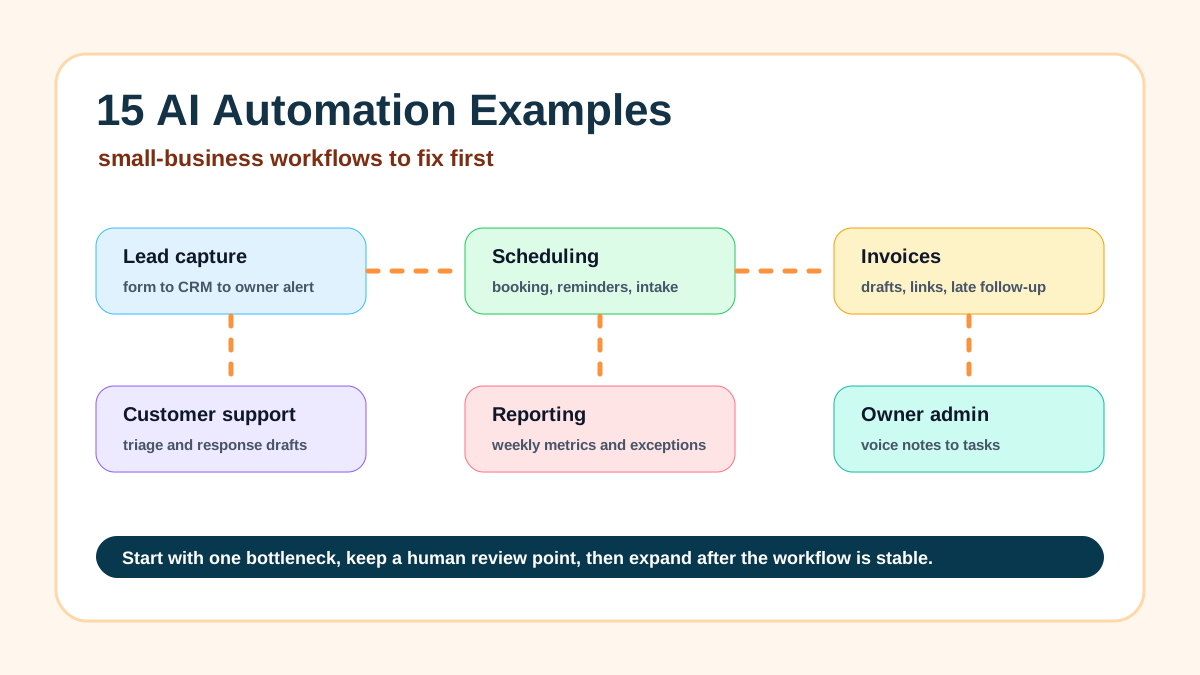
The best AI automation examples for small businesses are focused workflows: lead follow-up, appointment scheduling, quote intake, invoice reminders, review requests, customer updates, weekly reporting, and owner admin capture. For a local service business, AI should help the team respond faster, organize messy details, and keep the next step from getting lost.
Start with one workflow close to revenue or customer experience. A plumber might start with missed-call text-back. A roofer might start with estimate follow-up. A salon might start with rebooking and review requests. A contractor might start with invoice reminders.
If the website is still unclear, claim a free website preview so the automation starts from a better customer path.
For service companies ready to build, use AI automation for local service businesses.
| Workflow type | Trigger | AI task | Human review |
|---|---|---|---|
| Lead follow-up | New form, call, email, or chat | Summarize, draft, classify, and create a next-step task | Pricing, timing, scope, and unusual requests |
| Invoice reminder | Due date or overdue status | Draft a reminder and summarize account context | Disputes, payment terms, and sensitive accounts |
| Review request | Completed job or positive customer outcome | Draft a short request or response | Final wording and customer relationship |
Search intent and top-result pattern
People searching for AI automation examples want a practical list they can scan, not a technical definition. Current U.S. search results are dominated by list posts and broad practical guides. The recurring examples are lead intake, email follow-up, scheduling, invoicing, customer support, reporting, hiring, content, and internal operations.
The gap is that many results describe automation in general terms, then jump straight to tools or impressive-sounding use cases. A small service business needs a clearer answer: what starts the workflow, what AI should actually do, where the owner reviews the output, and which examples are worth building first.
How to choose the right example first
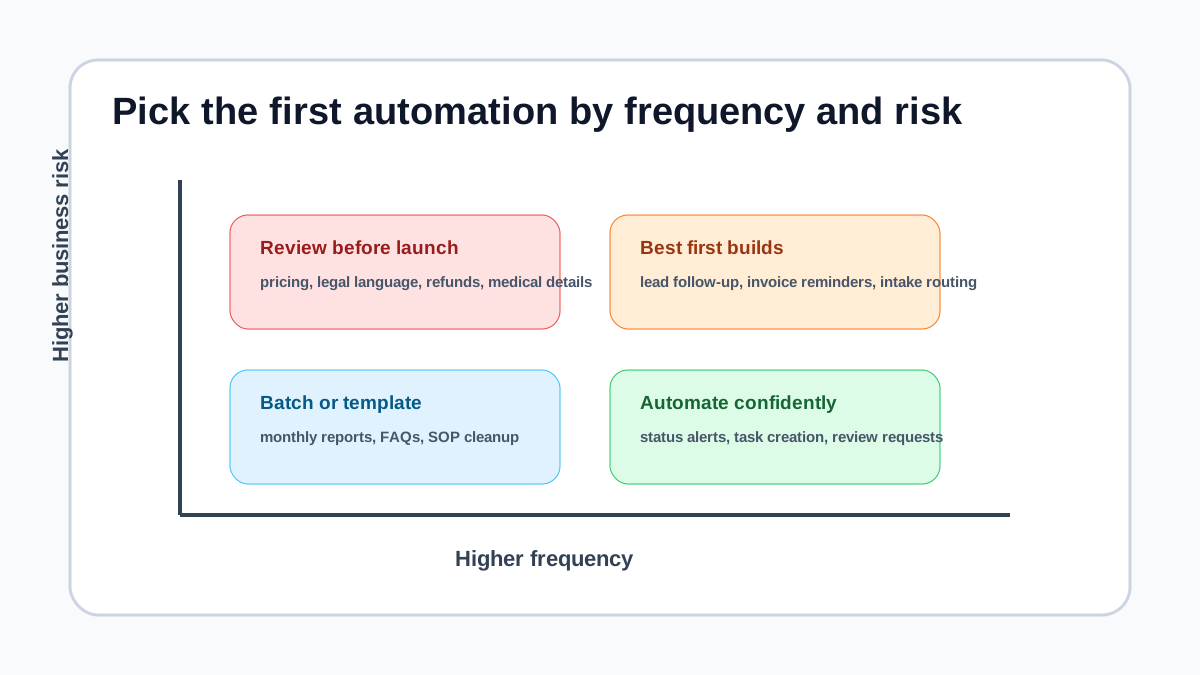
Pick the workflow that is frequent, easy to test, and close to money or customer trust. A slow lead response, missed estimate follow-up, manual invoice reminder, or scattered intake process is usually a better first project than a complicated all-in-one AI operating system.
If you need help ranking the first workflow, Business Boomer's AI automation services are built around the same sequence: map one bottleneck, build the smallest reliable system, test it, document it, and expand only after the business can run it.
1. New lead capture to CRM
This workflow starts when someone fills out a website form, calls through a tracked number, or sends a quote request. The automation creates or updates a CRM record, stores the lead source, summarizes the request, tags the service type, and alerts the right person.
AI helps when the lead writes messy details like "we need someone next week for the back patio and maybe the front walk too." It can summarize the job, flag urgency, and draft the next task, while the CRM remains the source of truth. If your lead tracking is still scattered, compare this with what a CRM does for a small business before adding AI.
2. Instant lead follow-up draft
A new lead should not wait until the owner checks email at night. An automation can draft a fast response that references the request, confirms the next step, and offers a booking link or a short question.
For example, a home service business might send an acknowledgment immediately, then create an owner review task before any quote or pricing language goes out. The full lead response workflow is covered in lead response automation.
If your site does not make the next step obvious, improve that before adding more tools. A free website preview can show where quote forms, service pages, proof, and follow-up should connect.
3. Lead qualification and routing
AI can read a lead form, estimate fit, and route the inquiry based on service area, job type, budget signal, urgency, or missing details. The goal is not to reject people automatically. The goal is to help a small team see which inquiries need fast human attention.
A contractor might flag emergency repairs, a consultant might separate sales calls from support questions, and a law firm might route intake by practice area. Use how to qualify leads for a small business as the non-AI foundation before adding routing logic.
4. Appointment scheduling with intake prep
Scheduling automation can connect a booking page, calendar rules, reminders, intake questions, and pre-call notes. AI adds value by turning the customer's answers into a short prep brief for the owner or staff member.
For a med spa, salon, real estate team, or professional service firm, the workflow might confirm the appointment, collect intake details, summarize preferences, and create a prep note. The booking rules still matter, so use appointment scheduling automation to keep the calendar side clean.
5. No-show reduction reminders
AI is not always needed for reminders, but it can help personalize reminder language based on appointment type, customer history, or missing prep steps. The automation sends the message on a fixed schedule and logs the result.
This works best when the business already knows the reminder windows that reduce missed appointments without annoying customers. For timing and message examples, see how to reduce appointment no-shows.
6. Intake form cleanup
Many businesses collect intake forms that are technically complete but hard to use. AI can summarize the intake, flag missing fields, extract dates or addresses, and prepare a checklist for the next human step.
This is especially useful for service businesses with detail-heavy intake, such as legal, medical-adjacent, home services, real estate, and consulting workflows. A law firm should keep review controls in place; AI intake automation for law firms shows how to keep sensitive intake from becoming an unsupervised customer-facing workflow.
7. Estimate follow-up
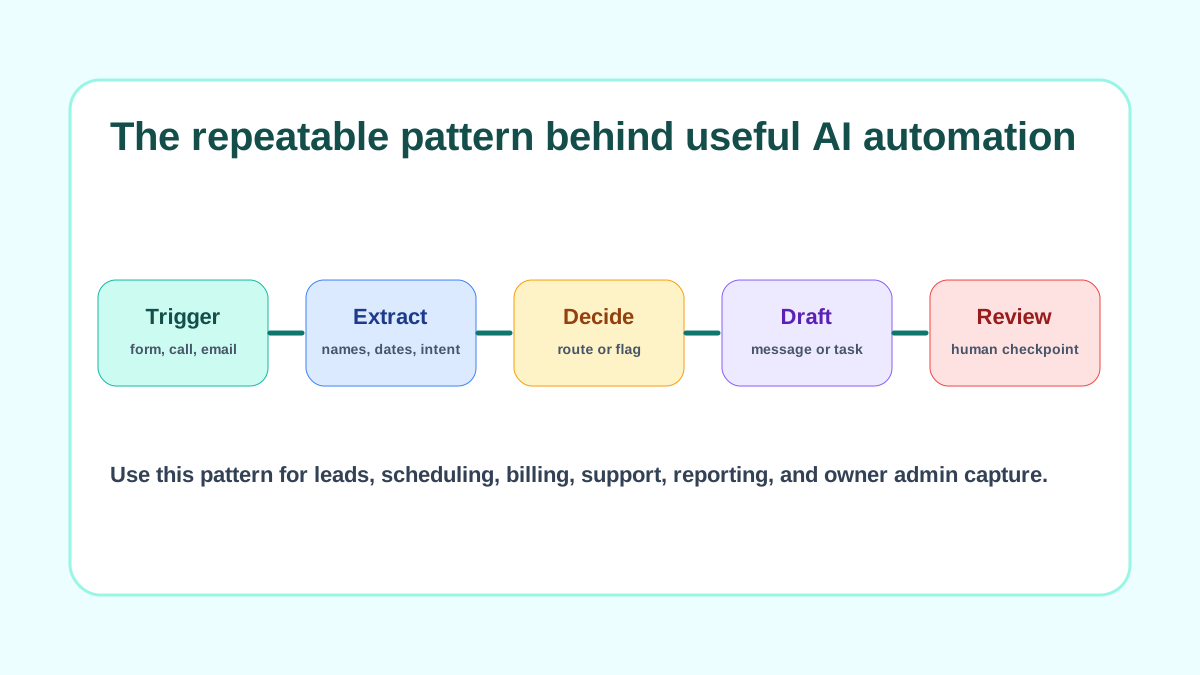
After an estimate is sent, an automation can wait a set number of days, check whether the prospect responded, draft a follow-up, and create a task for the owner if the deal is large or urgent. AI can tailor the draft to the original request without inventing terms.
This works well for contractors, remodelers, landscapers, agencies, consultants, and other businesses where opportunities go quiet after a proposal. Keep pricing, discounts, and scope changes under human approval.
8. Invoice creation from approved work
When a job is marked complete, an automation can prepare an invoice draft, pull customer details, add payment links, and notify the owner or admin for review. AI can summarize line items from job notes, but it should not guess pricing.
Billing workflows are a strong first automation because they are repetitive and easy to test. If this is the bottleneck, start with invoice automation setup before trying broader operational workflows.
9. Payment reminders and overdue follow-up
Payment reminder automation watches due dates and payment status, then sends friendly reminders or creates follow-up tasks. AI can adjust tone based on whether the reminder is before due, due today, overdue, or final notice.
For small businesses, the safest setup is usually a template plus approval rules for sensitive accounts. The step-by-step version lives in how to automate invoice reminders.
10. Customer support triage
AI can read inbound support emails, classify the issue, suggest a reply, and route the message to the right person. The automation can tag billing, scheduling, complaint, refund, urgent, or general questions.
The business should decide which replies can send automatically and which require review. The U.S. Small Business Administration notes that owners should understand the risks and responsibilities of AI adoption, especially when customer communication and business decisions are involved: AI for small business.
11. Customer update messages
Customers often want simple updates: appointment confirmed, technician delayed, document received, order shipped, job completed, next step pending. Automation can send the predictable parts, while AI drafts clearer messages when the update depends on context.
This example works best when the business writes approved message templates first. AI should help adapt the message, not decide what the business is allowed to promise.
12. Review request workflow
After a completed job, appointment, project, or paid invoice, an automation can wait for the right moment, send a review request, and log whether the customer responded. AI can help write a short thank-you note that matches the service.
The important guardrail is timing. Do not ask for reviews before the customer has a good reason to be satisfied, and do not use AI to create fake reviews, fake screenshots, or fake testimonials.
13. Weekly owner dashboard
AI can turn CRM activity, invoice status, lead sources, appointment volume, overdue tasks, and customer messages into a short weekly owner summary. The automation pulls the data; AI explains what changed and what needs attention.
This is useful for owners who do not want another dashboard to check every day. For broader workflow design, AI workflow automation for small business explains how to define triggers, systems of record, review points, and measurement.
14. Voice notes to tasks
Owners often capture important work in voice memos, text messages, or scattered notes. An AI automation can transcribe the note, extract tasks, assign due dates, and create follow-up items in a task tool or CRM.
This is a strong fit for owner-operated businesses because the first version can stay internal. If you want a more capable operator layer around recurring notes and handoffs, OpenClaw onboarding is the better path than another disconnected note app.
15. Content repurposing for local marketing
AI can turn a completed job note, customer question, or owner voice memo into a draft FAQ, social post, email outline, or blog brief. The automation can collect the raw material and create a draft, while a human reviews accuracy and tone.
This is useful for businesses that know what they do well but do not have time to document it. A practical content workflow can also connect to AI automation for local service businesses when examples need to match the buyer's trade.
A quick checklist before you launch
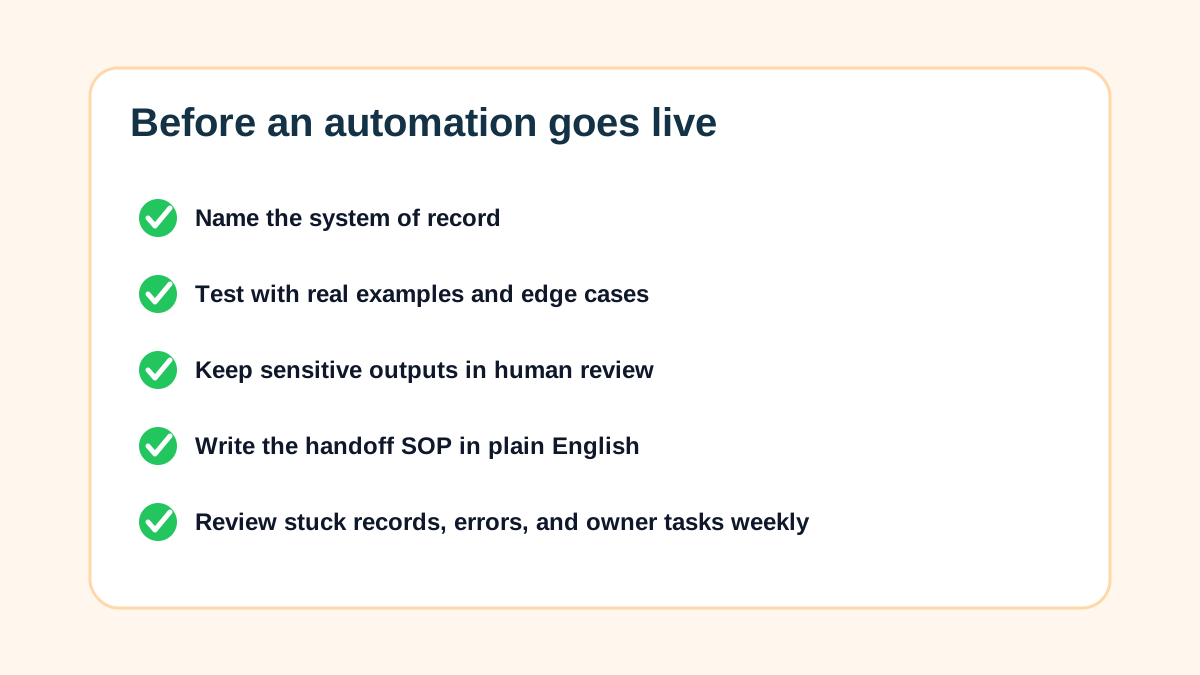
Every example above should pass a simple launch checklist. Name the trigger, system of record, AI task, human review point, failure path, and success measure before the workflow touches real customers.
The National Institute of Standards and Technology's AI Risk Management Framework is a useful reference for thinking about governance, measurement, and risk. A small business does not need enterprise paperwork, but it does need clear boundaries for what AI can and cannot do.
| Launch question | Good answer | Risky answer |
|---|---|---|
| What starts it? | A named form, email, call, status change, or payment event | "Whenever AI notices something" |
| Where is the record? | CRM, calendar, accounting tool, job system, or task app | A private chat thread |
| What does AI do? | Summarize, classify, extract, draft, or flag | Decide pricing or policy alone |
| Who reviews it? | Named owner, admin, salesperson, or manager | Nobody unless a customer complains |
| How is it tested? | Real examples, edge cases, and a launch checklist | One happy-path demo |
What Business Boomer would build first
For most small service businesses, Business Boomer would start with the workflow closest to revenue leakage or owner time: slow lead follow-up, manual estimate follow-up, invoice reminders, intake cleanup, scheduling reminders, or owner admin capture.
The first build should be small enough to test in a week, useful enough that the owner feels the difference, and documented enough that the team can run it without guessing.
If you want help picking the right first example, book a Free 30-Minute AI Consultation and bring one messy process plus the tools you already use.
If the website is part of the leak, claim a free website preview first.
Next step
Find the workflow worth fixing first.
Use the Free 30-Minute AI Consultation to map where leads, invoices, notes, or follow-ups are slipping and choose the smallest useful system.
Keep building the system
Recommended next Business Boomer guides
These links are selected by topic and search intent so this guide connects to the most relevant service pages, industry pages, and supporting blog posts.
Service and setup pages
Use these when you are ready to turn the idea into an implementation path.
Industry-specific pages
See how the same workflow changes for specific business types.
Related blog posts
Read the connected guides that support this topic cluster.
Recommended next steps
These pages connect this guide to the Business Boomer offer, related workflow, and next implementation path.
Related AI automation guides
Keep going with the connected Business Boomer guides in this automation cluster.
AI automation services for local small business
Planning examples for broader automation. Compare current managed calls and reviews on the Services page; confirm other work in a separate scope.
What is lead response automation?
Why response speed matters and how small businesses can stop leads from slipping away.
AI automation for local service businesses
Practical lead, scheduling, review, CRM, invoice, and admin automation for plumbers, HVAC companies, roofers, landscapers, cleaners, contractors, and other local operators.
Lead follow-up automation for small business
Turn form fills, missed calls, quote requests, emails, and voice notes into reply drafts, CRM updates, reminders, and next steps.
FAQ
Quick answers about this guide and how to put the idea into practice.
What are the best AI automation examples for small businesses?
The best examples are narrow workflows tied to revenue or customer experience, such as lead follow-up, missed-call response, appointment prep, invoice reminders, review requests, customer updates, and weekly reporting.
What should a small business automate first with AI?
Start with the workflow that happens often, has a clear trigger, and affects leads, cash flow, or customer trust. For many service businesses, that means lead follow-up or invoice reminders.
Does every AI automation need a chatbot?
No. Many useful automations never become a public chatbot. AI can summarize, classify, draft, route, and prepare work for a human to approve.
How do you keep AI automation safe for customer-facing work?
Keep human review on pricing, promises, refunds, sensitive customer issues, and anything the business cannot afford to get wrong.
Find the workflow worth fixing first.
Use the Free 30-Minute AI Consultation to map where leads, invoices, notes, or follow-ups are slipping and choose the smallest useful system.
Book a Free 30-Minute AI Consultation