
How to Use AI in Your Small Business: 10 Practical Ways to Start
The best way to use AI in your small business is to choose one repeated workflow, let AI prepare the next step, and keep a person responsible for review. Start with leads, scheduling, billing, customer service, admin notes, or weekly reporting before you try to automate the whole company.


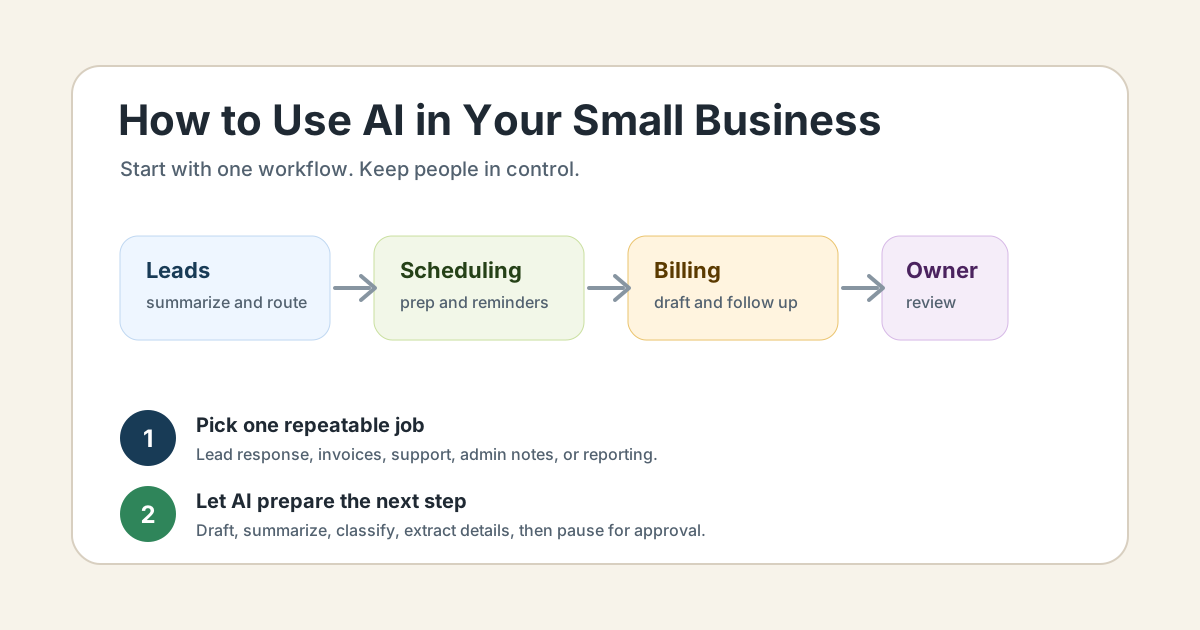
The best way to use AI in your small business is to choose one repeated workflow, let AI prepare the next step, and keep a person responsible for review. Start with leads, scheduling, billing, customer service, admin notes, or weekly reporting before you try to automate the whole company.
AI works best in a small business when it handles language-heavy support work: summarizing, drafting, classifying, extracting details, organizing notes, and flagging exceptions. Automation should then move the approved work into your CRM, calendar, invoice tool, task list, or email system.
The Small Business Administration frames AI as a practical tool for efficiency, customer service, marketing, data analysis, and competitiveness: AI for small business. That is the right lens. AI should make the business easier to run, not create another dashboard for the owner to babysit.
The Simple Rule: Pick One Workflow First
Do not start with "we need AI." Start with a process that repeats every week and already costs time, money, or attention.
Good first workflows include:
- new lead response
- missed-call follow-up
- appointment scheduling
- customer email triage
- estimate follow-up
- invoice reminders
- owner voice notes
- weekly reporting
- review requests
- content repurposing
For each workflow, write down the trigger, the source of truth, the AI task, the human review rule, and the final action. If you cannot name those five pieces, the workflow is not ready yet.
The AI workflow automation guide explains that structure in more detail. Use it before buying tools.
1. Respond to New Leads Faster
New leads often arrive while the owner is in a job, meeting, appointment, or vehicle. AI can help by reading the form submission, voicemail transcript, email, or chat message and preparing the next step.
A practical setup might:
- summarize what the customer needs
- detect urgency
- identify the service category
- create a CRM task
- draft a first reply
- alert the owner or sales person
Keep the reply under review if it mentions pricing, availability, guarantees, legal language, medical information, or scope. AI can prepare the response. A person should own the promise.
For a deeper lead workflow, read what lead response automation is.
2. Turn Missed Calls Into Follow-Up Tasks
Many local businesses lose opportunities because missed calls turn into voicemail piles. AI can transcribe a voicemail, summarize the request, pull out the phone number, classify the inquiry, and create a follow-up task.
This works well for contractors, med spas, clinics, real estate teams, law firms, pest control companies, property managers, and home service businesses. The value is not fancy AI. The value is that the lead no longer disappears because nobody had time to listen to every message.
A simple missed-call workflow can send the owner a clean summary:
"New inquiry from Brian. Needs a roof leak estimate after last night's storm. Asked for a call today. Phone number included. Suggested next step: call back and offer inspection window."
That is enough to move faster.
3. Prepare Appointment Notes Before a Call
AI can help your team walk into appointments with context. Before a sales call, consultation, inspection, or service visit, the system can summarize the intake form, prior emails, customer history, open tasks, and known concerns.
For example:
- a med spa can prepare consultation notes from an intake form
- a contractor can summarize project details before an estimate
- a law firm can prepare intake questions before a consult
- a property manager can summarize tenant issues before a call
The goal is not to remove the person from the appointment. The goal is to stop the person from scrambling through five tools right before the appointment starts.
If scheduling itself is the problem, use the appointment scheduling automation guide.
4. Draft Customer Replies Without Sending Them Automatically
AI can draft replies to common customer questions: scheduling updates, document requests, appointment reminders, estimate follow-ups, invoice questions, review requests, and service explanations.
The safer setup creates drafts, not automatic sends. A team member reviews the message, adjusts tone, checks details, then sends it.
This matters because customer trust lives in details. A message about a refund, scope change, appointment conflict, medical concern, legal issue, or complaint needs judgment. AI can save the blank-page work. It should not silently decide what the business promises.
The FTC has warned businesses not to overstate AI capabilities or use AI claims in ways that mislead customers: Keep your AI claims in check. The same principle applies inside the business. Keep claims, promises, and sensitive replies under human control.
5. Follow Up on Estimates and Proposals
Estimate follow-up is one of the easiest AI use cases for service businesses because the workflow is clear. The customer requested work, the business prepared an estimate, and the next step often depends on timing.
AI can help by:
- summarizing the estimate
- drafting a polite follow-up
- adjusting tone based on the customer's original request
- creating a reminder if there is no reply
- flagging high-value estimates for owner review
Do not let AI discount, change scope, or promise a timeline without approval. Let it prepare the message and keep the business consistent.
If this is the bottleneck, the lead follow-up workflow guide is the best next read.
6. Automate Invoice Reminders and Payment Follow-Up
Billing is a strong first AI automation project because the trigger and outcome are easy to define. Work was completed, an invoice was sent, a due date passed, or a payment link needs to go out.
AI can draft reminder language, summarize the account status, and flag exceptions for review. Automation can move the reminder into email, SMS, a task list, or your invoicing platform.
Keep people involved for disputes, refunds, credits, payment plans, final notices, and unusual customer situations.
For QuickBooks-heavy businesses, start with QuickBooks invoice automation.
For a broader setup, Business Boomer's invoice automation service maps the billing workflow and tests the follow-up path.
7. Turn Owner Voice Notes Into Tasks
Owners capture important context while driving, walking a job site, leaving a meeting, or closing up for the day. That context often stays trapped in voice memos, text messages, or memory.
AI can turn a spoken note into:
- a cleaned-up summary
- assigned tasks
- customer follow-up drafts
- CRM notes
- a project update
- a weekly owner brief
This is a good first workflow for owner-led companies because it does not require a full software rebuild. It just needs a reliable place for tasks and notes to land.
If the business needs a private operator layer around daily context, see OpenClaw onboarding.
8. Triage Customer Emails and Support Requests
AI can sort incoming messages by topic, urgency, customer type, and next action. It can also draft a reply or route the message to the right person.
Useful labels include:
- urgent service issue
- billing question
- scheduling request
- quote request
- complaint
- document needed
- owner review
Start with triage before automatic replies. AI can help your team see the queue faster. Once the labels and routing are reliable, you can add draft responses for common messages.
The key is to give AI real source material: service policies, FAQs, pricing boundaries, scheduling rules, and escalation rules. Without that, it guesses.
9. Create Marketing Content From Real Business Work
AI can help a small business turn real work into useful content. A job note can become a service page outline. A customer question can become a FAQ. A before-and-after project can become a short post. A founder voice note can become a newsletter draft.
The business still needs to provide truth. AI should not invent case studies, fake customer outcomes, fake reviews, fake local expertise, or unsupported claims.
A practical marketing workflow might:
- collect real customer questions
- group them by service
- draft plain-English answers
- add local or industry context from the business
- review before publishing
For more detail, read the AI marketing automation guide.
10. Build a Weekly Owner Report
A weekly report is one of the most useful AI workflows for a busy owner. AI can summarize what happened across leads, appointments, invoices, open tasks, customer issues, and follow-ups.
The report should not dump every detail. It should answer:
- Which leads need attention?
- Which estimates have no next step?
- Which invoices are overdue?
- Which appointments need prep?
- Which customer issues need owner review?
- Which tasks are stuck?
This turns AI into an operating assistant instead of a novelty. The owner gets the exceptions that matter and can decide what to fix.
What AI Should Not Do Without Review
Small businesses should keep human approval on work that affects trust, money, safety, privacy, or legal risk.
Keep review on:
- pricing and discounts
- refunds and credits
- medical, legal, financial, or hiring decisions
- complaint responses
- collection messages
- scope changes
- employment decisions
- public claims about results
- anything involving sensitive customer information
AI can prepare the work. People should own the decision.
A Simple 30-Day Starter Plan
Use the first 30 days to prove one workflow.
Week 1: Choose the bottleneck. Pick one workflow that repeats every week and creates visible friction. Leads, invoices, scheduling, and owner notes are usually good choices.
Week 2: Map the handoff. Write the trigger, source of truth, AI task, review rule, and final action. Decide where the output should land.
Week 3: Build the smallest version. Start with drafts, summaries, labels, and task creation. Do not start with full autonomy.
Week 4: Test with real examples. Use real inquiries, invoices, appointments, or support messages. Measure whether the workflow saves time, catches missed work, or speeds up response.
If it works, document the rule and add the next workflow. If it does not, fix the source data or review step before adding more tools.
Bottom Line
Use AI where your small business already repeats language-heavy work: leads, scheduling, billing, customer questions, notes, follow-up, marketing, and reporting. Start small. Keep people in control. Connect AI to the tools where work actually happens.
Business Boomer helps small businesses choose one bottleneck and turn it into a reviewed AI workflow. Start with a Free 30-Minute AI Consultation.
Next step
Find the workflow worth fixing first.
Use the Free 30-Minute AI Consultation to map where leads, invoices, notes, or follow-ups are slipping and choose the smallest useful system.
Keep building the system
Recommended next Business Boomer guides
These links are selected by topic and search intent so this guide connects to the most relevant service pages, industry pages, and supporting blog posts.
Service and setup pages
Use these when you are ready to turn the idea into an implementation path.
Industry-specific pages
See how the same workflow changes for specific business types.
Related blog posts
Read the connected guides that support this topic cluster.
Related AI automation guides
Keep going with the connected Business Boomer guides in this automation cluster.
AI automation services for local small business
Planning examples for broader automation. Compare current managed calls and reviews on the Services page; confirm other work in a separate scope.
Lead follow-up automation for small business
Turn form fills, missed calls, quote requests, emails, and voice notes into reply drafts, CRM updates, reminders, and next steps.
How to automate invoices for small business
A practical guide to invoice creation, reminders, payment tracking, and cash-flow follow-up.
Best invoicing automation tools for small business
A comparison of QuickBooks, FreshBooks, Stripe Billing, Wave, Jobber, Housecall Pro, Zapier, and Make.
FAQ
Quick answers about this guide and how to put the idea into practice.
What is the main takeaway from How to Use AI in Your Small Business: 10 Practical Ways to Start?
The best way to use AI in your small business is to choose one repeated workflow, let AI prepare the next step, and keep a person responsible for review. Start with leads, scheduling, billing, customer service, admin notes, or weekly reporting before you try to automate the whole company.
How does how to use AI in your small business help a small business?
how to use AI in your small business can help a small business reduce manual work, improve follow-up, organize repetitive tasks, and create a clearer operating process when it is tied to a real bottleneck.
Can Business Boomer help implement how to use AI in your small business?
Yes. Business Boomer can help turn the idea into a practical workflow, page, checklist, or automation system depending on what the business needs first.
Find the workflow worth fixing first.
Use the Free 30-Minute AI Consultation to map where leads, invoices, notes, or follow-ups are slipping and choose the smallest useful system.
Book a Free 30-Minute AI Consultation