
Generative AI for Business Automation: Small Business Workflows
Generative AI for business automation helps small businesses turn messy customer messages, notes, calls, invoices, and follow-up work into reviewed workflows.


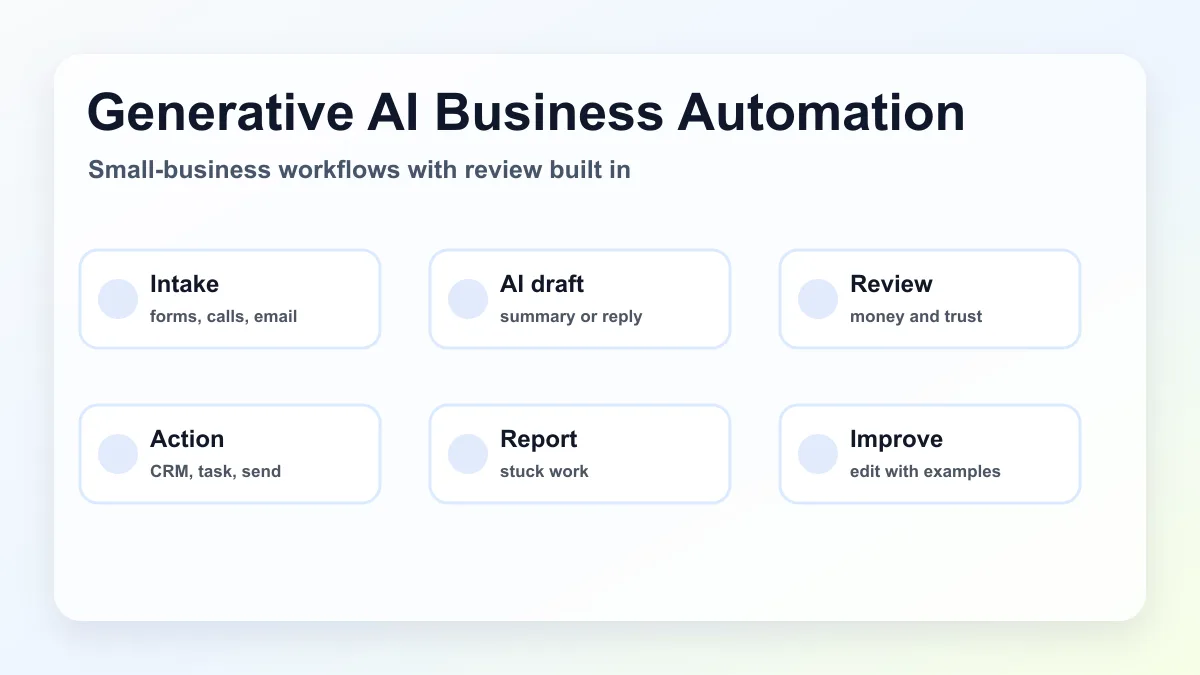
Generative AI for business automation means using AI to read, summarize, classify, draft, and explain business information inside a repeatable workflow. For a small business, the useful version is not a chatbot sitting off to the side. It is a reviewed system that helps move leads, customer messages, invoices, appointments, notes, and reports through the business with less manual copying.
The best first project is usually one narrow workflow: lead intake, estimate follow-up, invoice reminders, appointment prep, customer service triage, or owner admin capture. Generative AI should handle the messy language step, while automation moves the task to the right tool and a person reviews anything that affects money, trust, or customer relationships.
For local service businesses, the strongest starting point is usually lead follow-up automation.
If the owner needs help across messages, notes, and internal tasks, start with AI assistant setup for a local business.
If the leak is cash flow, start with an invoice automation workflow. These projects have clear triggers and visible review points.
Search intent and SERP pattern
People searching this topic usually want a beginner-friendly guide, practical use cases, or help deciding whether generative AI belongs in their operations. Current U.S. results lean toward broad vendor guides, enterprise strategy articles, tool explainers, and small-business AI use case lists. Common themes include content creation, customer service, sales support, document handling, marketing, data analysis, and productivity.
The gap is implementation order for service businesses. A contractor, med spa, agency, property manager, law firm, or home services company does not need a vague transformation plan. It needs a clear answer to three questions: which workflow should start, what should generative AI do inside that workflow, and where should human review stop bad output before it reaches a customer.
Where generative AI fits in business automation
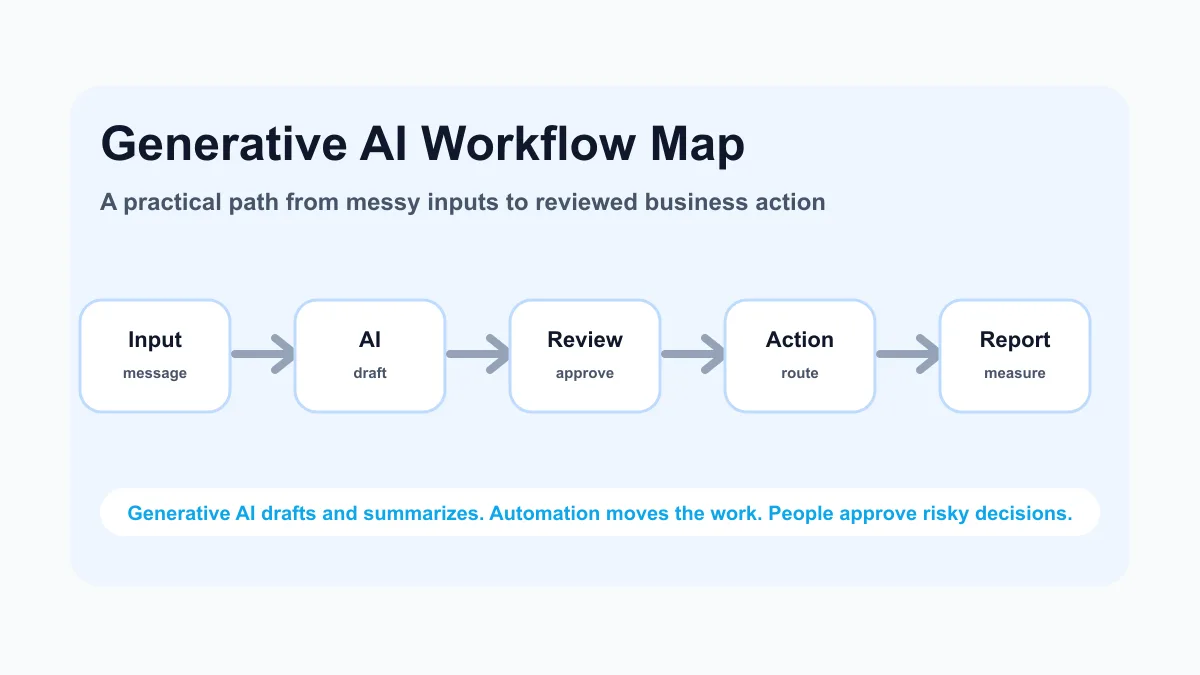
Traditional automation is strongest when the rules are clear: if an invoice is overdue, send a reminder; if a form is submitted, create a record; if a customer books an appointment, send a confirmation. Generative AI is useful when the input is messy and the next step needs language or judgment support.
That is why generative AI works best as one layer inside a broader AI workflow automation setup. It can summarize a voicemail, classify a lead, draft a follow-up email, turn field notes into a job summary, rewrite a payment reminder, or prepare a weekly exception report. The automation around it should still define the trigger, source of truth, review rule, and final action.
Good first workflows for small service businesses
Start where the business already repeats the same manual work every week. The workflow should be frequent, specific, and easy to review before it touches customers.
| Workflow | What generative AI does | What automation does | Human review point |
|---|---|---|---|
| New lead intake | Summarizes need, urgency, location, and service type | Creates CRM record and task | Pricing, fit, and edge cases |
| Estimate follow-up | Drafts a customer-aware follow-up | Schedules reminders and pauses on reply | Tone and discount decisions |
| Invoice reminders | Drafts polite reminders based on account status | Sends or queues reminders from billing data | Disputes, refunds, or exceptions |
| Appointment prep | Condenses intake notes into a team brief | Adds prep notes to calendar or job system | Special requests or sensitive details |
| Owner admin | Turns voice notes into tasks and summaries | Routes tasks to the right list or tool | Priority and final wording |
| Weekly reporting | Explains stuck work and exceptions | Pulls data into a weekly summary | Decisions and next actions |
| Local-service situation | Useful generative AI role | Safer automation action |
|---|---|---|
| Missed call | Summarize transcript and draft reply | Create owner task and first-response draft |
| New estimate request | Extract location, job type, urgency, and missing fields | Add CRM record and follow-up reminder |
| Overdue invoice | Draft a polite reminder from approved fields | Queue reminder or assign human follow-up |
| Field note | Turn voice note into office summary | Add job note or customer update draft |
| Weekly owner review | Summarize stuck leads, estimates, and invoices | Send owner report with next actions |
For many companies, the first useful project is still lead response. If leads wait in email, voicemail, texts, and forms, use generative AI to create a short lead brief and a reviewed reply, then pair it with a lead follow-up workflow.
How to choose the first generative AI automation project
Use this filter before buying tools or building prompts.
- The task happens often enough to matter.
- The current process has obvious copying, rewriting, summarizing, or classifying.
- The business already knows what a good output looks like.
- The workflow can be tested with real examples.
- A person can review risky output before it reaches a customer.
- The result connects to revenue, cash flow, customer experience, or owner time.
This filter keeps the project practical. A broad "AI assistant for everything" sounds exciting but is hard to measure. A focused estimate follow-up workflow, invoice reminder workflow, or appointment prep workflow is easier to test and improve.
If the team is still comparing broad categories, the AI automation examples guide can help narrow the first use case before the build starts.
If the business serves a local market and needs the whole operating path mapped, use AI automation for local service businesses.
The small-business setup model
A generative AI business automation should have six parts.
| Part | Why it matters | Example |
|---|---|---|
| Trigger | Starts the workflow without someone remembering | New form, missed call transcript, invoice due date |
| Source of truth | Keeps customer or job data in one place | CRM, job software, accounting tool, spreadsheet |
| AI task | Defines what the model reads or creates | Summary, classification, draft, checklist, report |
| Review rule | Protects customer trust and business risk | Owner approval before sending |
| Action | Moves the work forward | Email draft, task, CRM note, calendar prep |
| Measurement | Shows whether the workflow helped | Faster response, fewer missed follow-ups, fewer stuck invoices |
For a local service business, this could look like: a website form triggers the workflow, the customer record is created in the CRM, generative AI summarizes the request, the owner reviews the draft reply, the system creates a follow-up task, and a weekly report shows leads that still need action.
If the biggest operational leak is billing, the same model can start from the invoice automation setup page and focus on reminders, customer replies, overdue summaries, and exception handling instead of sales messages.
What generative AI should and should not automate
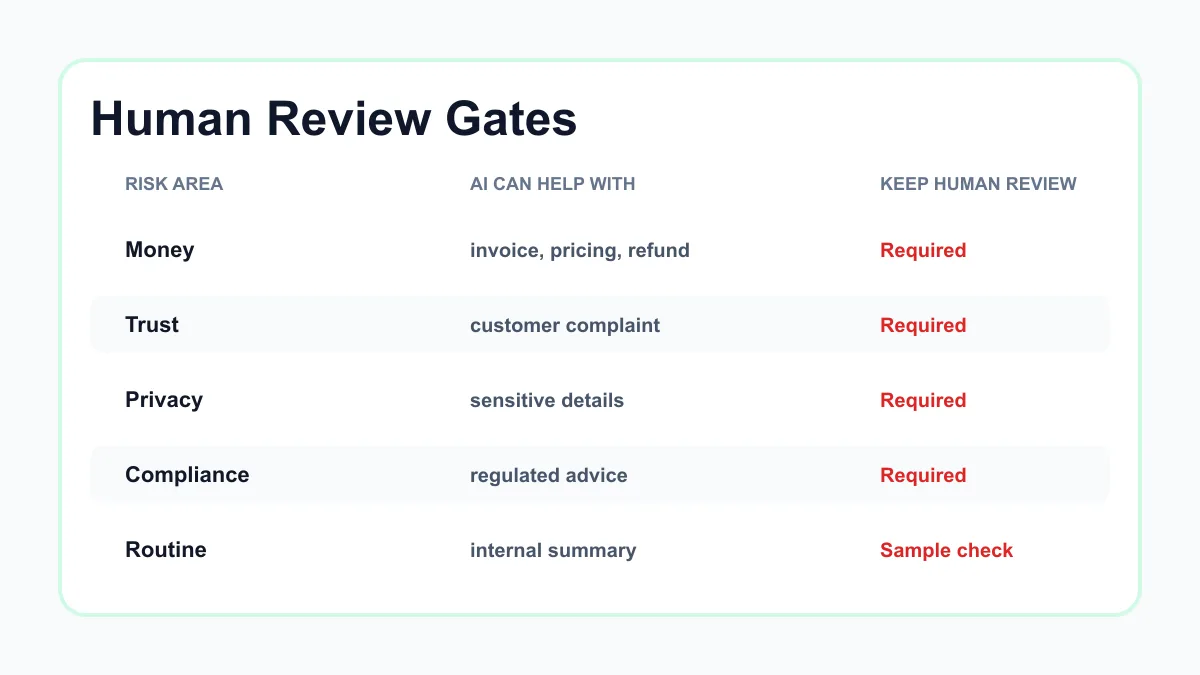
Generative AI is good at language support. It can help with first drafts, summaries, classification, internal explanations, message rewriting, call recap extraction, FAQ drafts, service descriptions, and report narratives.
It should not be treated as the final decision maker for pricing, legal advice, medical advice, tax advice, hiring decisions, refunds, contracts, insurance coverage, or sensitive customer disputes. The U.S. Small Business Administration's AI for small business guidance is a useful starting point for thinking about benefits and risks, and NIST's AI Risk Management Framework is helpful when a company wants a more formal risk lens.
Practical examples by business type
Home services company
A home services company can use generative AI to summarize calls, classify job type, draft first replies, prepare tech notes, and create follow-up messages after estimates. The automation should connect the intake source to the job system or CRM, not leave the summary in a chat thread.
For contractors, this often overlaps with estimate follow-up, scheduling, and field-note cleanup. The contractor automation guide is a good next read if the workflow needs to connect sales and operations.
Med spa or appointment-based service
A med spa, clinic, or appointment-heavy service can use generative AI to summarize intake forms, prepare visit notes, draft reminders, and flag missing information before an appointment. The business should keep a person involved for sensitive customer details and anything that sounds like medical, legal, or financial advice.
If no-shows and booking friction are the current pain, pair the generative AI step with appointment scheduling automation instead of starting with a broad assistant.
Agency or consultant
An agency or consultant can use generative AI to summarize discovery calls, turn meeting notes into tasks, draft follow-up emails, create project recaps, and prepare invoice or scope-change notes. This is usually valuable because the work is language-heavy and owner time is limited.
For consulting and agency workflows, the AI sales automation guide is useful when the main goal is cleaner pipeline movement after the first conversation.
Property management or local operator
A property manager can use generative AI to triage tenant messages, summarize maintenance requests, route urgency, prepare vendor notes, and create owner updates. The automation should tag the request, add the right record, and create a clear next action.
This is a good example of why AI and automation are different. The AI vs automation guide explains when simple rules are enough and when language support is worth adding.
Tool stack: keep it boring at first
The first setup does not need to be complex. Most small businesses need five layers: an intake source, a source of truth, a workflow connector, an AI step, and a review/reporting layer.
| Layer | Examples | Setup question |
|---|---|---|
| Intake | Forms, phone transcripts, email, booking tools | What starts the work? |
| Source of truth | CRM, spreadsheet, Jobber, QuickBooks, Housecall Pro | Where should the record live? |
| Connector | Zapier, Make, native integrations, custom scripts | How does the work move? |
| AI layer | ChatGPT, Claude, Gemini, tool-native AI, custom prompt | What should AI read or draft? |
| Review and reporting | Approval queue, task list, weekly summary | Who checks exceptions? |
If the business is choosing between apps, start with the best AI automation tools guide and choose tools after the workflow is mapped.
A simple rollout plan
Do not launch generative AI automation across the whole business at once. Use a short rollout that makes mistakes visible while they are cheap.
- Collect 20 to 50 real examples from the current workflow.
- Write the ideal output in plain English.
- Create one prompt or AI step for that output.
- Run the examples manually and inspect the results.
- Add the workflow trigger and destination.
- Require human review before anything customer-facing sends.
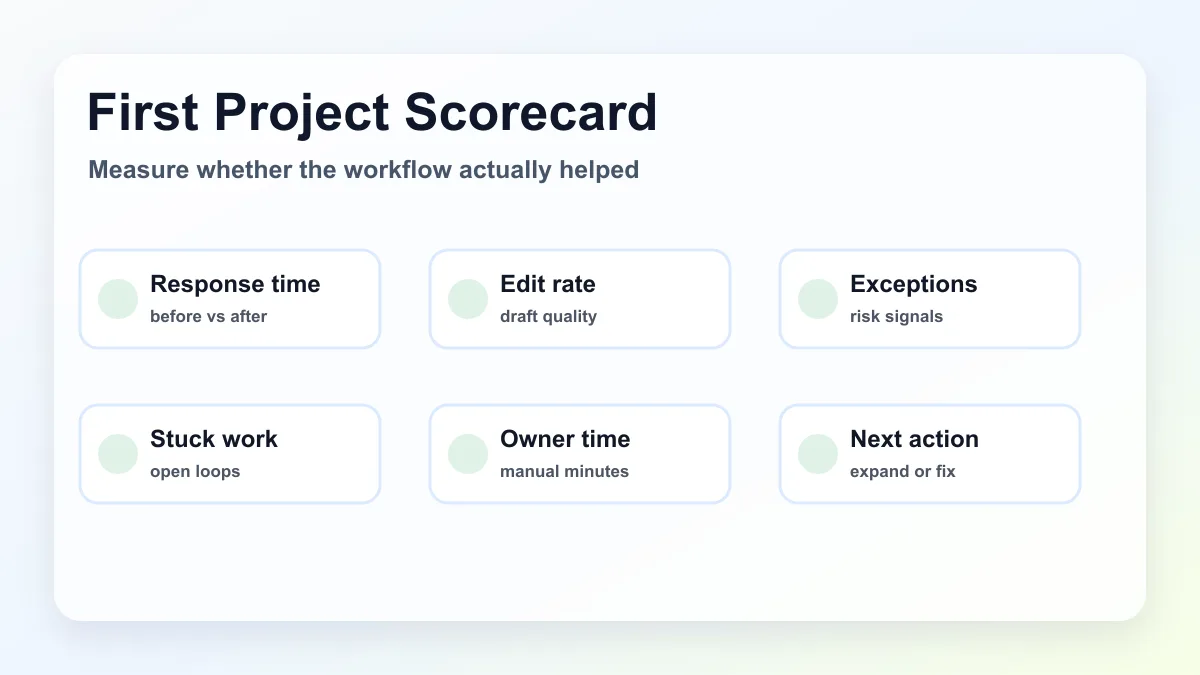
- Track response time, stuck work, manual edits, and exceptions.
- Improve the prompt, fields, and review rules before expanding.
This is also where outside help can make sense. A provider should not start by selling a giant platform. A good AI automation service should map the workflow, define review points, connect the tools, and leave the team with a process it can actually run.
Common mistakes to avoid
The most common mistake is confusing output with operations. A nice AI-written email does not fix the business if nobody knows when it sends, where the customer record lives, who reviews it, or what happens when the customer replies.
Other mistakes include:
- building around a tool before mapping the workflow
- letting AI send sensitive messages without review
- using vague prompts instead of real examples
- ignoring bad source data
- trying to automate every department at once
- failing to pause the workflow when a customer replies
- measuring setup completion instead of business usefulness
If the business wants a more agent-like setup, read the AI agents for business automation guide before giving an agent tool access.
What Business Boomer would build first
For most small/service businesses, Business Boomer would start with one reviewed generative AI workflow tied to revenue or owner time. The strongest first candidates are lead intake summaries, estimate follow-up drafts, invoice reminder handling, appointment prep briefs, and owner voice-note capture.
The project should end with a working workflow, not a pile of AI ideas. That means a trigger, a destination, a reviewed AI step, a reporting view, and a simple way for the owner to know whether the workflow made the work easier.
If you want help choosing the right first workflow, book a Free 30-Minute AI Consultation. Business Boomer will look for one practical automation that can be mapped, tested, and improved before anything bigger gets built.
Keep building the system
Recommended next Business Boomer guides
These links are selected by topic and search intent so this guide connects to the most relevant service pages, industry pages, and supporting blog posts.
Service and setup pages
Use these when you are ready to turn the idea into an implementation path.
Industry-specific pages
See how the same workflow changes for specific business types.
Related blog posts
Read the connected guides that support this topic cluster.
Related AI automation guides
Keep going with the connected Business Boomer guides in this automation cluster.
AI automation services for local small business
Planning examples for broader automation. Compare current managed calls and reviews on the Services page; confirm other work in a separate scope.
How to automate invoices for small business
A practical guide to invoice creation, reminders, payment tracking, and cash-flow follow-up.
Lead follow-up automation for small business
Turn form fills, missed calls, quote requests, emails, and voice notes into reply drafts, CRM updates, reminders, and next steps.
Best invoicing automation tools for small business
A comparison of QuickBooks, FreshBooks, Stripe Billing, Wave, Jobber, Housecall Pro, Zapier, and Make.
FAQ
Quick answers about this guide and how to put the idea into practice.
What is generative AI for business automation?
Generative AI for business automation uses AI to summarize, classify, draft, and explain business information inside a workflow, while automation moves the work to the right tool or person.
What should a small business automate first with generative AI?
Start with one reviewed workflow close to revenue or owner time, such as lead intake, estimate follow-up, invoice reminders, appointment prep, or owner voice-note capture.
Should generative AI send customer messages automatically?
Not at first. Use AI to draft or summarize, then keep human review for pricing, promises, disputes, legal or medical language, refunds, and sensitive customer situations.
Find the workflow worth fixing first.
Use the Free 30-Minute AI Consultation to map where leads, invoices, notes, or follow-ups are slipping and choose the smallest useful system.
Book a Free 30-Minute AI Consultation