
AI Billing Systems for Small Business
AI billing systems help small businesses improve cash-flow follow-up when they connect billing triggers, invoice status, payment links, reminders, exception tasks, and weekly owner review.


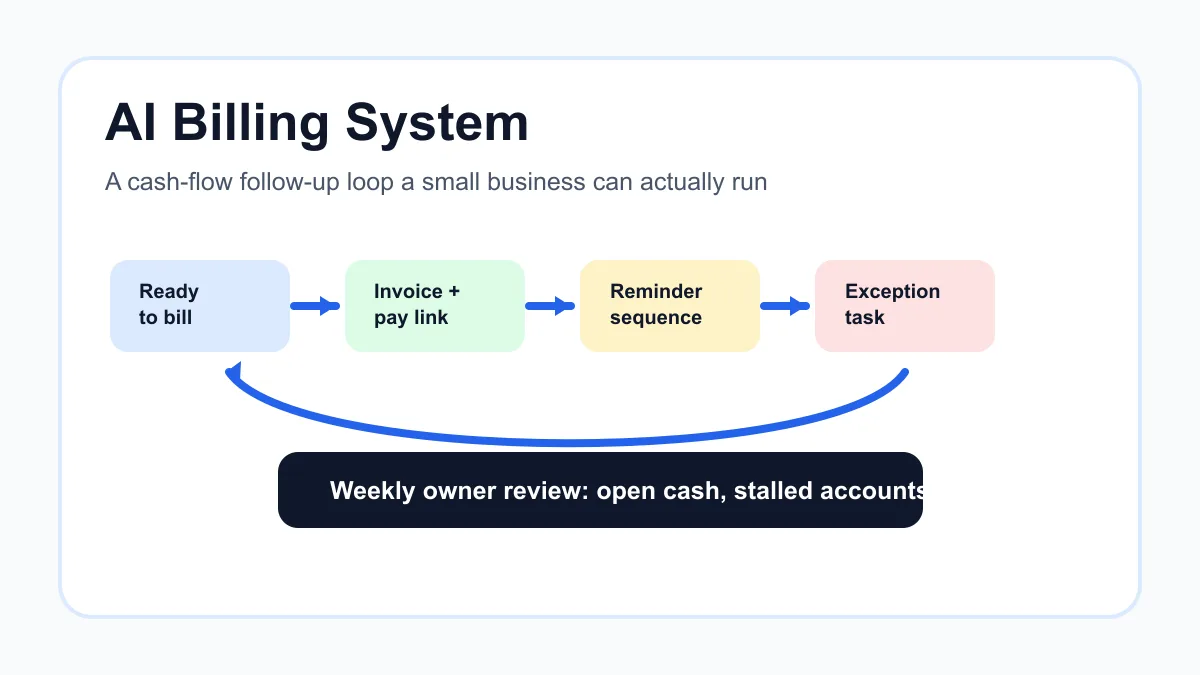
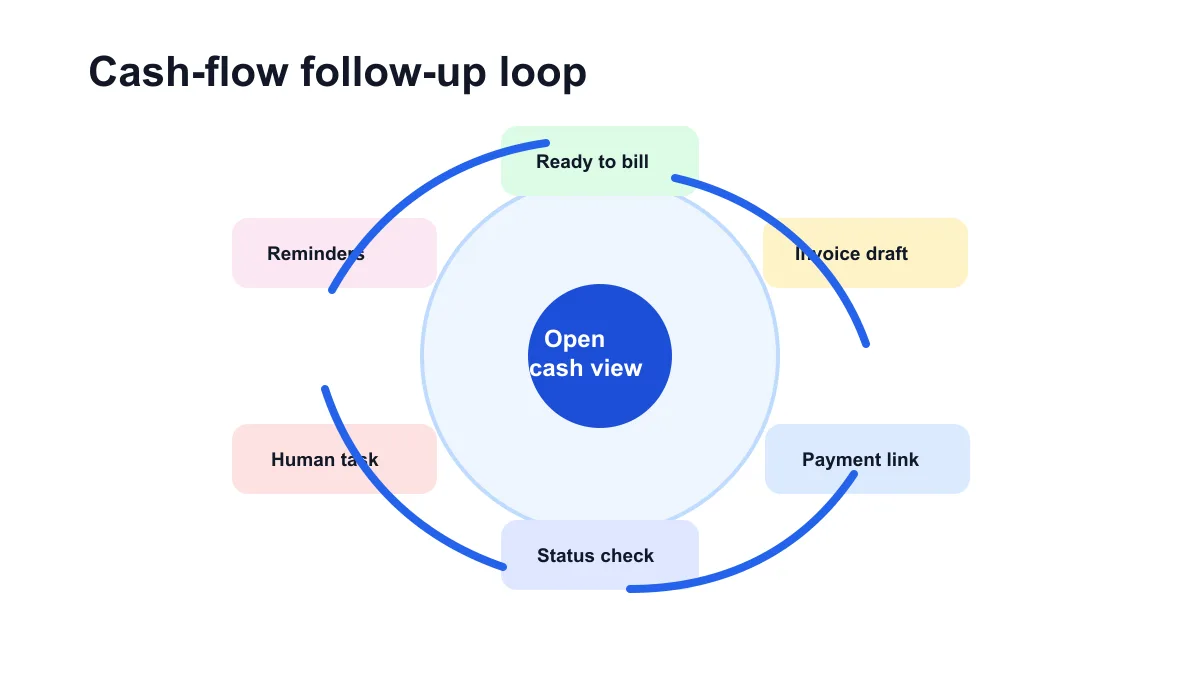
AI billing systems for small business work best when they make the whole billing loop visible: work ready to bill, invoice created or reviewed, payment link sent, reminders scheduled, payment status checked, exceptions routed to a person, and open cash reviewed every week.
The goal is not to let AI run finance on autopilot. The practical goal is to stop earned money from getting stuck in memory, scattered tools, missed reminders, unclear customer replies, or invoices that no one has checked since they were sent.
Search intent and top-result pattern
People searching for AI billing systems usually want a mix of software options, invoice automation ideas, accounts receivable help, and cash-flow improvement tactics. Current U.S. results lean toward AI invoicing tools, billing software roundups, accounts receivable platforms, finance software articles, and vendor pages about payment tracking.
Recurring topics include automated invoice creation, payment links, reminder sequences, payment status tracking, cash-flow forecasting, integrations with QuickBooks or Stripe, and prioritizing overdue follow-up. The gap for small service businesses is practical setup advice: how to connect the steps into one owner-friendly billing system without buying an oversized finance platform.
What an AI billing system should actually do
An AI billing system should help a small business move from completed work to paid invoice with fewer manual gaps. It should not guess prices, change payment terms, approve refunds, or decide how to handle a sensitive customer without review.
For a local service business, contractor, agency, consultant, clinic, or home service company, the first useful system is usually close to invoice automation setup: one billing lane, one source of truth, clear reminder rules, and a short human review step before anything risky goes to a customer.
Think of the system in five jobs:
- Capture the trigger that means something may be billable.
- Prepare the invoice or draft the customer-facing billing note.
- Send a clear payment link with plain terms.
- Follow up while the invoice is unpaid.
- Alert a person when the workflow needs judgment.
That is different from installing another dashboard. The system is valuable only if it makes payment status easier to trust and follow-up easier to run.
Why cash flow follow-up breaks
Small businesses often have a billing problem before they have a software problem. Work gets marked complete in one tool, invoices get created in another, payments happen through a processor, and overdue follow-up lives in an inbox or spreadsheet.
The result is familiar. The job is done, but the invoice is late. The invoice is sent, but the reminder never goes out. The reminder goes out, but the customer already paid by check. Or the customer replies with a question and the automation keeps sending reminders because no one paused it.
The U.S. Small Business Administration notes that managing finances includes tracking revenue, expenses, and cash flow clearly. Its small business finance guidance is a useful reminder that billing follow-up is not just admin. It affects how predictable the business feels.
If the business still needs the basics, start with how to automate invoices for small business. A billing system should grow out of a clear invoice workflow, not replace it.
The billing system map
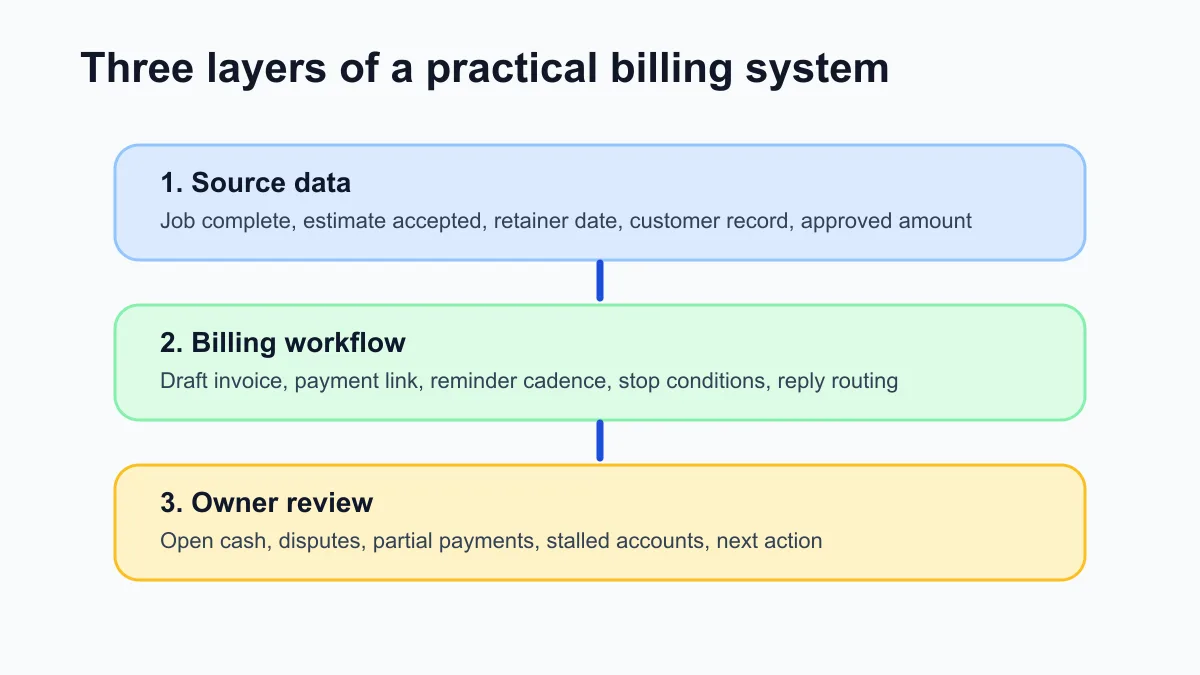
A practical AI billing system has three layers: source data, billing workflow, and owner review. Each layer answers a different question.
| Layer | Question it answers | Example |
|---|---|---|
| Source data | What happened and what is billable? | Job complete, estimate accepted, retainer date, milestone approved |
| Billing workflow | What should happen next? | Draft invoice, send payment link, schedule reminder, pause on reply |
| Owner review | What still needs judgment? | Dispute, partial payment, wrong contact, changed scope, overdue account |
For many service businesses, this map is easier to install than it sounds. The source data may already live in QuickBooks, Stripe, Square, Jobber, Housecall Pro, a CRM, a calendar, or a spreadsheet. The important part is choosing one place to own invoice status.
If the billing process starts from job completion, compare this map with the best invoice automation workflow for service businesses. That workflow covers the job-complete-to-paid-invoice path in more detail.
Where AI helps and where it should stay out
AI is useful around the edges of the billing process. It can summarize work notes into a cleaner invoice description, classify a customer reply, draft a polite reminder, flag missing invoice fields, or prepare a weekly summary of open invoices.
AI should stay out of final money decisions unless a person reviews them. It should not invent amounts, decide tax treatment, apply discounts, write off balances, or send aggressive collection language without approval.
For a safer first setup, keep AI in one of these roles:
- Summarize: turn job notes into a short invoice description.
- Classify: tag a reply as paid, disputed, wrong contact, promise to pay, or needs owner.
- Draft: prepare reminder language for review.
- Route: create the right task for the right person.
- Report: summarize open invoices and stalled accounts.
If reminders are the immediate pain, use how to automate invoice reminders as the narrow version. Reminder automation is often the simplest first win because it has clear timing, clear stop conditions, and visible payment status.
A simple cash-flow follow-up workflow
The most useful version is usually a hybrid. Automation handles the repeatable steps, AI helps with wording and classification, and a person handles exceptions.
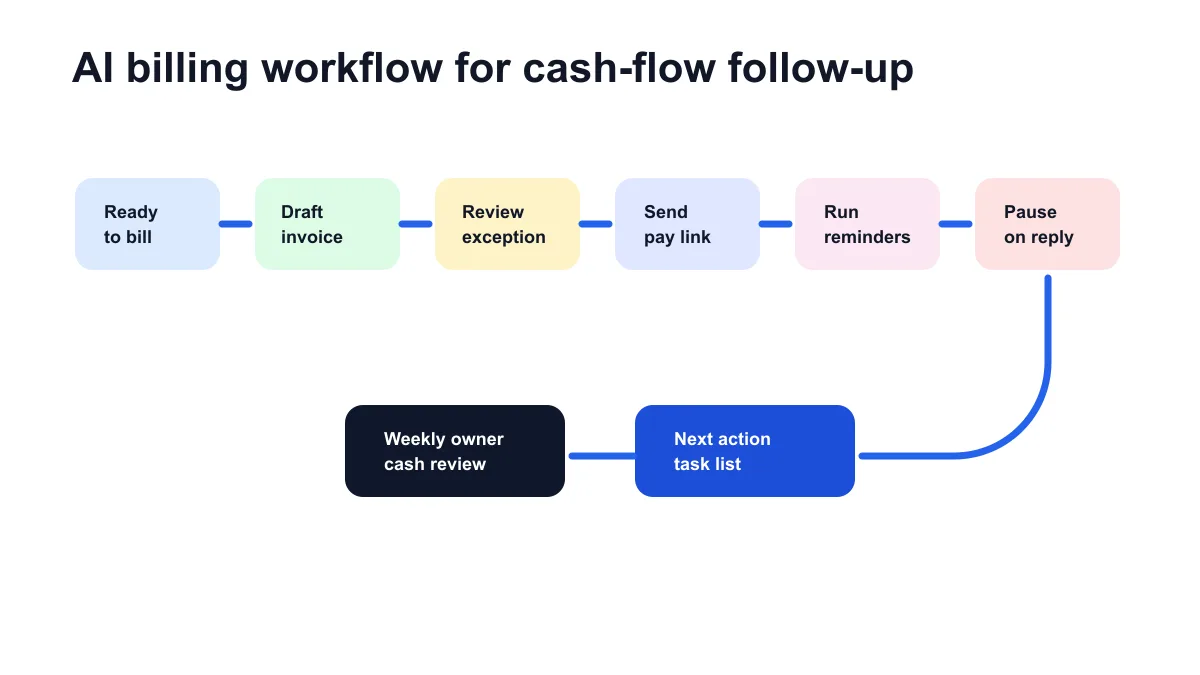
Start with this workflow:
- Work is marked ready to bill.
- The system gathers customer, amount, due date, line items, and approved notes.
- AI drafts a plain billing summary if needed.
- The invoice is created as a draft or sent automatically for routine work.
- The customer receives a payment link.
- Reminders run before and after the due date.
- Payment status stops future reminders.
- Replies, disputes, partial payments, and corrections create a task.
- The owner reviews open invoices every week.
If QuickBooks is the accounting source of truth, keep the system close to QuickBooks invoice automation. Moving invoice status into too many places creates the same mess under a more modern label.
What the owner should see each week
The owner does not need a complex finance cockpit. A useful weekly billing view should show what cash is open, what needs action, and which workflow rule is causing friction.
Useful weekly fields include invoice number, customer, amount, due date, status, last reminder, customer reply, owner task, and next action. A small business should be able to answer three questions in a few minutes:
- What invoices are open?
- Which ones are waiting on us?
- Which ones need customer follow-up?
For businesses that want a planning estimate before building, the invoice automation ROI calculator can help model time saved and faster invoice movement. Treat it as a planning tool, not a guaranteed result.
Example: home service company
A home service company may finish work in a field service app, invoice through QuickBooks, and take payments through card or ACH links. The billing system should listen for a completed job, prepare the invoice, route changed-scope jobs for review, send a payment link, and create an overdue task if the customer does not pay or reply.
AI can summarize technician notes into a customer-friendly line item, but it should not decide whether a warranty visit is billable. That decision belongs to the owner or admin.
If your billing starts from field work, compare the setup with invoice automation for home services. Field notes, deposits, job status, and customer history usually shape the review rules.
Example: agency or consultant
An agency, consultant, bookkeeper, or design studio may bill from retainers, milestones, approved hours, or completed deliverables. In that environment, the safest system often creates draft invoices and routes them to the account owner before sending.
AI can summarize project notes, classify customer replies, and prepare a concise overdue follow-up. It should not rewrite a statement of work, alter a retainer, or apply a discount without approval.
Agencies and consultants can pair the system with invoice automation for consultants when retainers, deposits, and milestone approvals make billing less automatic.
What to automate first
Do not start by trying to automate every invoice. Pick the billing lane with the clearest trigger and the least relationship risk. Good first lanes include recurring retainers, completed service calls, accepted estimates, monthly maintenance visits, standard inspection fees, or overdue reminder tasks.
Use this decision table:
| Billing lane | Good first automation | Keep human review for |
|---|---|---|
| Recurring retainer | Draft or send monthly invoice | Scope changes and discounts |
| Completed service call | Draft invoice from job status | Warranty, complaint, changed work |
| Accepted estimate | Prepare invoice from approved quote | Deposits and change orders |
| Overdue invoices | Reminder plus owner task | Disputes and relationship issues |
If you are choosing between manual cleanup and automation, use manual invoicing vs AI automation to decide where control still matters.
Stop conditions matter
The difference between a helpful billing system and an annoying one is stop conditions. Reminders should stop or pause when the customer pays, replies, disputes the invoice, asks for a correction, makes a partial payment, changes the billing contact, or needs a conversation.
That means the system needs a reliable way to read status from the accounting tool or payment processor. If payment status is not trustworthy, automate less and route more to a person.
For the overdue handoff, the overdue invoice follow-up workflow is the right next layer. The goal is not endless reminders. The goal is a clear human task with context.
Tool stack examples
Small businesses can build this with tools they already use. The stack might be QuickBooks plus Stripe payment links, FreshBooks plus reminder rules, Wave plus a spreadsheet review, Jobber plus QuickBooks, or a CRM connected to an accounting system.
The specific software matters less than the handoff. Choose the tool that owns invoice status, then connect the workflow around it. If payment links are the weak point, review QuickBooks payment links for small business and apply the same idea to the payment tool you use.
Implementation checklist
Before turning on an AI billing system, confirm the basics.
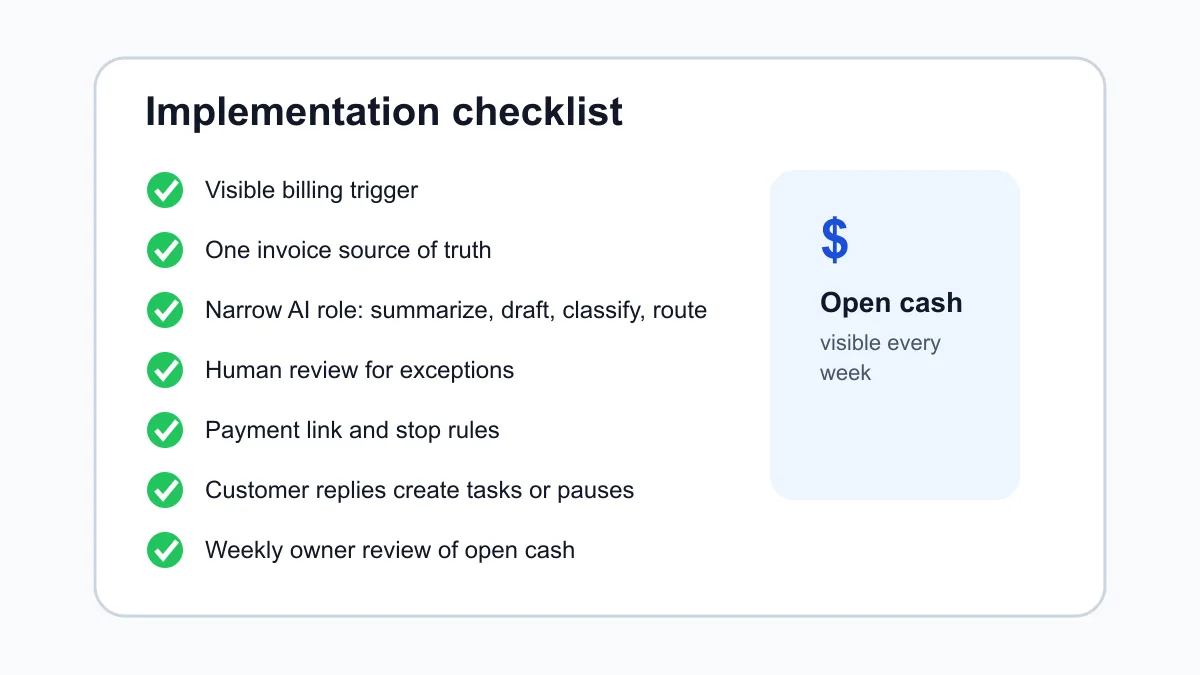
| Checklist item | Pass condition |
|---|---|
| Billing trigger | The workflow starts from a visible event |
| Invoice source | One tool owns invoice status |
| AI role | AI summarizes, drafts, classifies, routes, or reports |
| Human review | Exceptions go to a person before customer damage |
| Payment link | The invoice makes payment easy |
| Reminder cadence | Timing, tone, and stop rules are documented |
| Reply handling | Customer replies create tasks or pause automation |
| Weekly review | Owner sees open cash and stalled accounts |
If a business cannot pass this checklist, it is not ready for a broad AI billing system. It may still be ready for one small automation, such as reminder templates, payment links, or a weekly open-invoice report.
Commercially useful next step
The best first AI billing system is usually one narrow cash-flow follow-up workflow. Start with one billing lane, keep invoice status close to the accounting tool, add reminders that stop correctly, and give the owner a weekly view of open money.
Business Boomer helps small service businesses turn messy admin into practical systems. If billing is the bottleneck, start with AI automation services.
You can also book through the contact page with one real invoice workflow you want fixed.
Turn the guide into a working setup
Business Boomer sets up one invoice workflow in 7 days.
We map the billing trigger, build the invoice template, add the payment link, create the reminder sequence, test overdue follow-up, and hand you a simple owner/admin SOP.
Invoice workflow next step
Turn invoice follow-up into a working setup.
Business Boomer can map the billing trigger, payment link, reminder timing, and overdue handoff for one focused invoice workflow.
Keep building the system
Recommended next Business Boomer guides
These links are selected by topic and search intent so this guide connects to the most relevant service pages, industry pages, and supporting blog posts.
Service and setup pages
Use these when you are ready to turn the idea into an implementation path.
Industry-specific pages
See how the same workflow changes for specific business types.
Related blog posts
Read the connected guides that support this topic cluster.
Related AI automation guides
Keep going with the connected Business Boomer guides in this automation cluster.
Lead follow-up automation for small business
Turn form fills, missed calls, quote requests, emails, and voice notes into reply drafts, CRM updates, reminders, and next steps.
AI sales team and lead follow-up setup
Turn sales calls, form fills, quote requests, and owner notes into follow-up emails, calendar invites, CRM updates, and next-step reminders.
How to automate invoices for small business
A practical guide to invoice creation, reminders, payment tracking, and cash-flow follow-up.
How to follow up with leads for small business
A practical workflow for CRM stages, reminders, email, text, and human follow-up tasks.
FAQ
Quick answers about this guide and how to put the idea into practice.
What is the main takeaway from AI Billing Systems for Small Business?
AI billing systems help small businesses improve cash-flow follow-up when they connect billing triggers, invoice status, payment links, reminders, exception tasks, and weekly owner review.
How does AI billing systems for small business help a small business?
AI billing systems for small business can help a small business reduce manual work, improve follow-up, organize repetitive tasks, and create a clearer operating process when it is tied to a real bottleneck.
Can Business Boomer help implement AI billing systems for small business?
Yes. Business Boomer can help turn the idea into a practical workflow, page, checklist, or automation system depending on what the business needs first.
Turn invoice follow-up into a working setup.
Business Boomer can map the billing trigger, payment link, reminder timing, and overdue handoff for one focused invoice workflow.
See Invoice Automation Setup