
Manual Invoicing vs AI Automation
Manual invoicing is better when every invoice needs judgment or the business sends only a few simple bills. AI automation is better when invoices are repeatable, late, hard to track, or dependent on reminders, payment links, and owner follow-up.


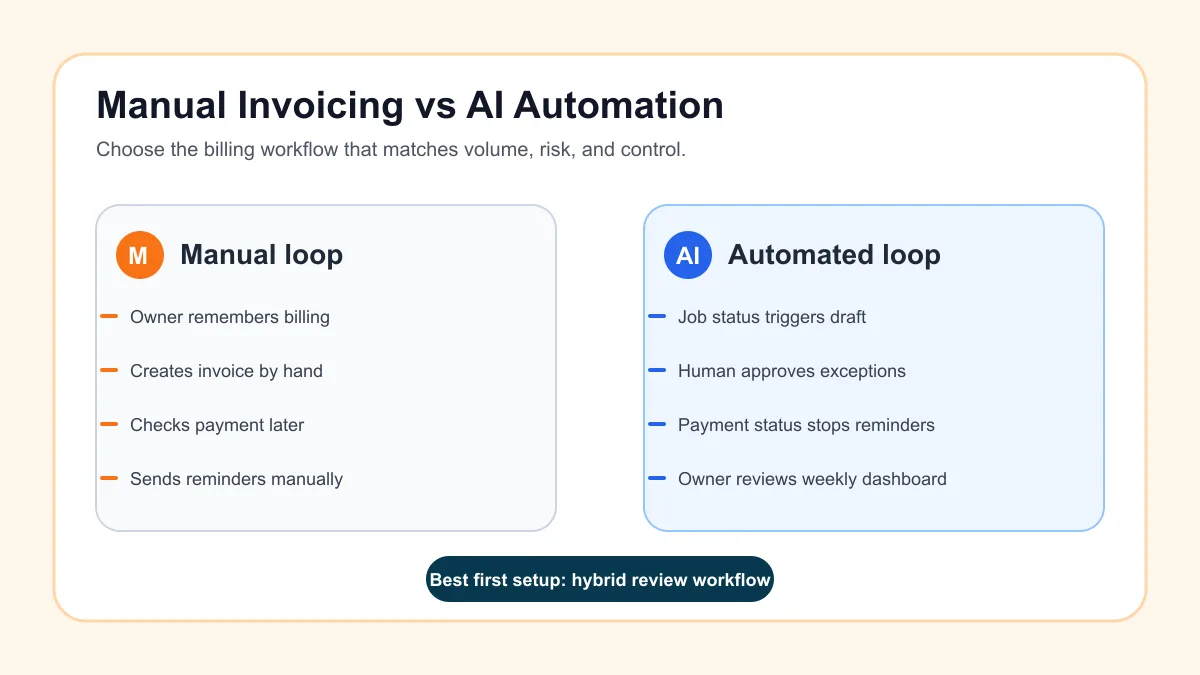
Manual invoicing is better when a small business sends only a few invoices, each invoice needs judgment, and the owner can reliably track payment without dropping follow-up. AI automation is better when billing depends on repeatable triggers, payment links, reminders, status checks, and owner visibility.
For most U.S. service businesses, the best answer is not fully manual or fully automated. The practical setup is a hybrid workflow: automate the routine steps, keep a human review point for exceptions, and make sure the system stops when a customer pays, replies, disputes, or needs a correction.
Search intent and top-result pattern
People searching for manual invoicing vs AI automation are usually comparing a familiar spreadsheet, PDF, or accounting-tool routine against automated billing software. Current U.S. results lean toward accounting software guides, invoicing software comparisons, automated invoice processing pages, and vendor articles explaining why businesses move away from manual billing.
Recurring themes include invoice creation time, payment links, reminders, error reduction, integrations, approval workflows, and scaling as invoice volume grows. The content gap is practical implementation advice for small service businesses that do not want a giant finance system. This guide focuses on the workflow decision: what to keep manual, what to automate, and where AI should assist without guessing money details.
The short answer
Manual invoicing works when the billing process is low-volume, relationship-sensitive, and easy to remember. A solo consultant with three monthly clients may not need automation beyond a recurring invoice template and a calendar reminder.
AI automation works when the process has a clear trigger and repeatable follow-up. A home service company, contractor, clinic, agency, property manager, or local service team usually benefits when invoices are created from job status, estimates, appointments, retainers, or milestones instead of memory.
If the business is already missing billing handoffs, start with one narrow invoice automation setup instead of trying to redesign every finance workflow at once.
Manual invoicing vs AI automation at a glance
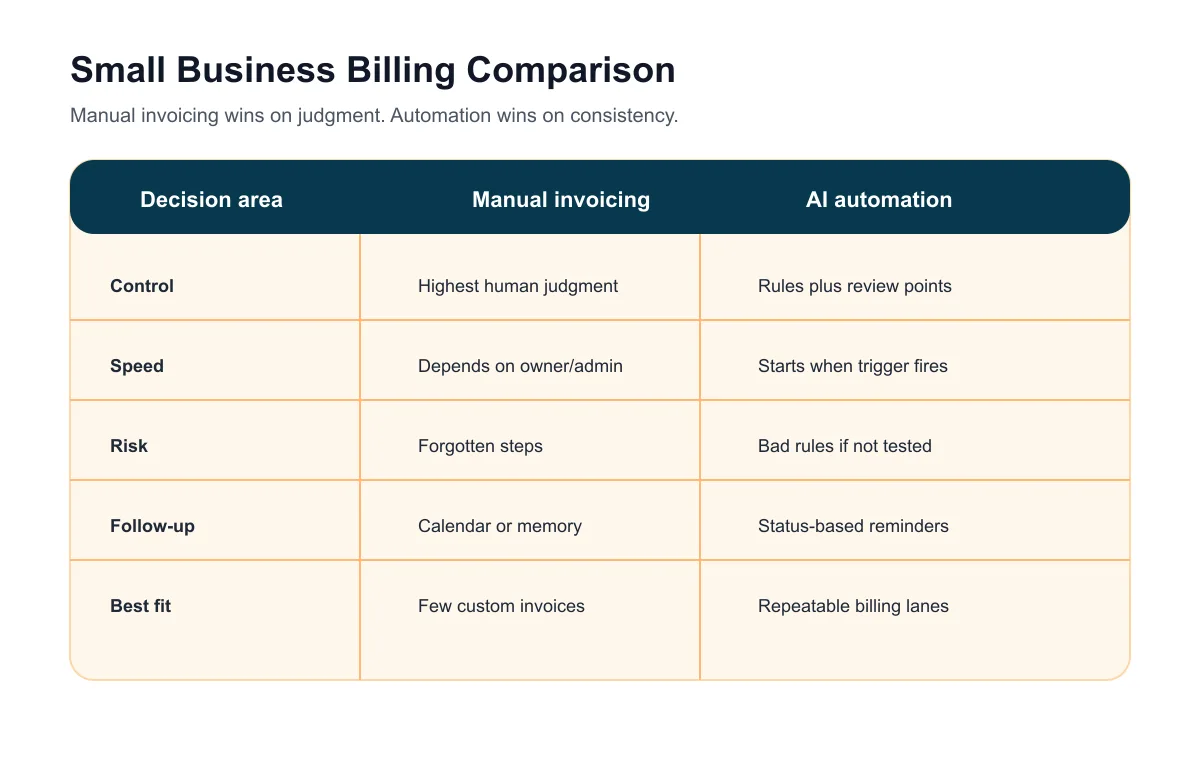
The comparison is less about software labels and more about control. Manual invoicing gives the owner maximum control but depends on memory and discipline. AI automation gives the workflow more consistency but needs clear rules, review points, and clean source data.
| Area | Manual invoicing | AI automation |
|---|---|---|
| Best fit | Few invoices, custom work, sensitive accounts | Repeatable jobs, recurring billing, overdue follow-up |
| Main strength | Full human judgment on every invoice | Faster handoff from work complete to invoice sent |
| Main risk | Forgotten invoices, late reminders, inconsistent records | Bad rules can send the wrong invoice or reminder |
| Owner role | Create, send, track, and chase payment | Approve exceptions, review dashboard, handle judgment calls |
| First safe move | Standardize templates and due dates | Draft invoices before automatic sending |
If you need a planning checklist before choosing tools, use the invoice automation checklist to map triggers, payment links, reminders, owners, and stop conditions.
When manual invoicing is still the better choice
Manual invoicing can be the right choice when the owner sends a small number of high-touch invoices and every customer situation is different. That includes custom consulting, complex projects, dispute-heavy accounts, unusual retainers, partial deposits, credits, or jobs where the invoice amount changes after a conversation.
It also fits a business that has not standardized line items, payment terms, customer records, or job completion status. Automating a messy process can make confusion faster. The first job may be documentation, not software.
If you are unsure whether the current process is expensive enough to fix, compare the admin drag with the invoice automation ROI calculator. Treat the result as a planning estimate, not a guaranteed savings claim.
Where manual invoicing breaks down
Manual invoicing usually breaks when volume, timing, and follow-up increase. The owner finishes the work, tells someone to send the invoice, forgets to check whether it went out, and then realizes two weeks later that money is still sitting in an unbilled job.
The same pattern shows up in overdue follow-up. A team may send the invoice but skip the reminder. Or it may send a reminder after payment because the spreadsheet, payment processor, and accounting tool do not agree.
For a fuller workflow example, read the best invoice automation workflow for service businesses. The useful version starts with a real billing trigger, not with a vague goal to automate finance.
What AI automation should actually do
AI automation should not invent prices, decide whether a disputed job is billable, or rewrite payment terms on its own. It should assist the repeatable parts of the billing loop and make exceptions easier to review.
Useful AI-assisted tasks include summarizing job notes into invoice descriptions, checking whether required fields are missing, drafting a polite payment reminder, classifying a customer reply, creating an overdue task, and preparing a weekly owner summary.
If QuickBooks is the source of truth, the QuickBooks invoice automation path is usually better than building a separate shadow billing system.
The safest hybrid workflow
The safest first workflow keeps human approval where trust and money are at stake. It automates the handoff, not the owner’s judgment.
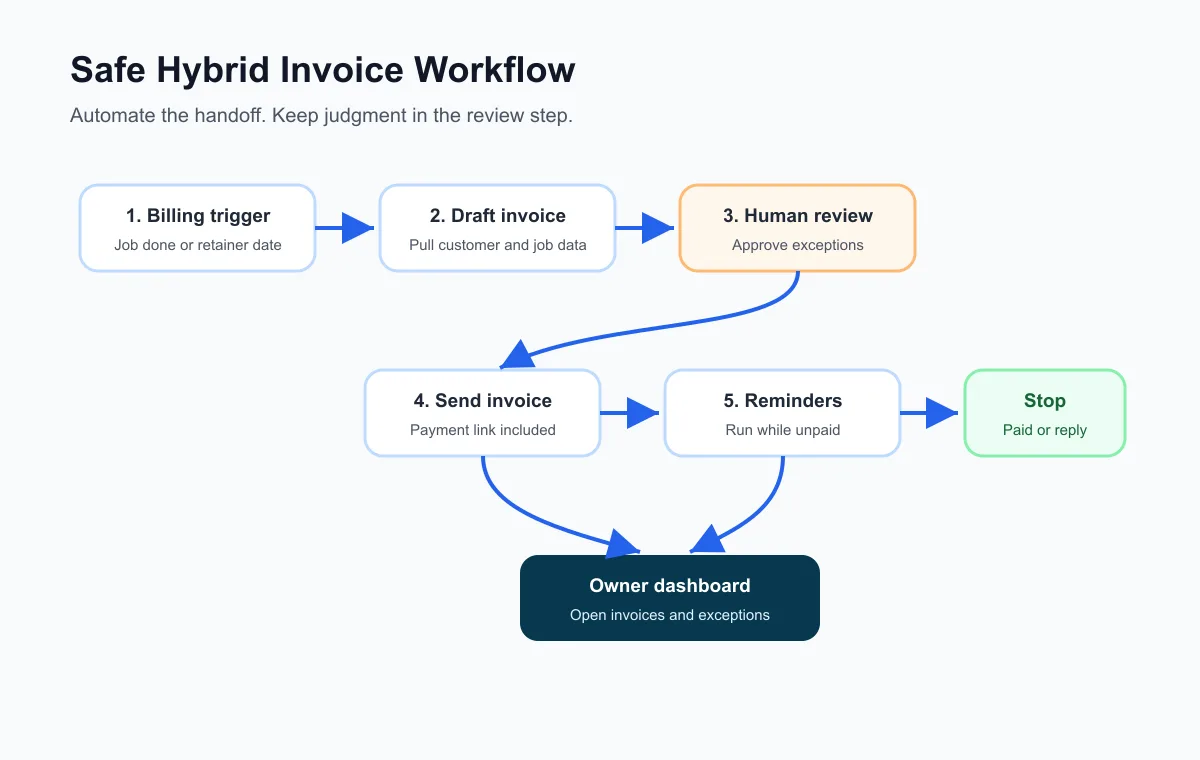
Start with this version:
- Work is marked complete, a retainer date arrives, or an estimate is accepted.
- The workflow gathers customer, job, amount, tax, terms, and notes.
- AI drafts a plain invoice description from approved job notes.
- The system creates a draft invoice.
- Exceptions go to a person before sending.
- Approved invoices send with a payment link.
- Reminders run only while the invoice is unpaid and undisputed.
- Replies, disputes, partial payments, and corrections pause automation.
- The owner reviews open invoices and overdue tasks weekly.
For the broader setup path, use how to automate invoicing for small business before connecting extra tools.
What to automate first
The first automation should be boring and visible. Pick one billing lane: completed service calls, accepted estimates, recurring retainers, monthly maintenance, project milestones, or overdue reminders. Do not start with every customer and every invoice type.
For many small teams, the first useful improvement is a payment reminder sequence. It is narrow, measurable, and easier to control than automatic invoice creation.
If reminders are the bottleneck, pair the workflow with invoice reminder templates so the messages stay polite, specific, and customer-safe.
Where AI helps with reminders
AI can help draft reminders, summarize prior customer replies, and prepare a human follow-up task when a customer is late. It can also help choose the right template based on whether the invoice is before due, due today, overdue, disputed, or missing payment confirmation.
The important rule is that automation should stop when the customer replies or payment status changes. A reminder that keeps going after payment damages trust and creates extra work.
For a more detailed reminder flow, compare this with how to automate invoice reminders.
Example: contractor billing
A contractor may prefer manual review because estimates, deposits, change orders, and job completion notes affect the final invoice. But the handoff from accepted estimate to draft invoice can still be automated.
The system can collect the accepted estimate, customer record, job notes, payment terms, and deposit status. It can draft the invoice and route changed-scope jobs for review. After approval, it can send the invoice and track payment status.
Contractors should also review invoice automation for contractors because the exception rules are different from a simple recurring invoice.
Example: home service business
A home service company usually has clearer triggers: appointment complete, service ticket closed, recurring visit finished, or maintenance plan billed. Those are good candidates for AI automation because the system can see when the work is ready.
Manual review may still matter for angry customers, incomplete jobs, warranty visits, commercial accounts, credits, and partial payments. The automation should route those cases to a person instead of sending automatically.
If your billing happens after field work, compare the setup with invoice automation for home services.
Mistakes to avoid
The first mistake is automating before choosing a source of truth. The workflow needs one place that owns invoice status. That may be QuickBooks, FreshBooks, Stripe, Square, Jobber, Housecall Pro, a CRM, or a carefully maintained spreadsheet.
The second mistake is letting AI guess money details. AI can summarize work, but prices, taxes, discounts, refunds, and payment terms should come from approved systems and human decisions.
The third mistake is skipping stop conditions. Paid, partially paid, disputed, corrected, voided, and replied invoices need different handling. A small business should document those rules before automating.
The U.S. Small Business Administration’s guide to AI for small business is a useful outside reference here: AI should support real business operations, not replace the owner’s judgment.
Decision scorecard
Use this scorecard to decide whether the next move should be manual cleanup, template standardization, or AI automation.
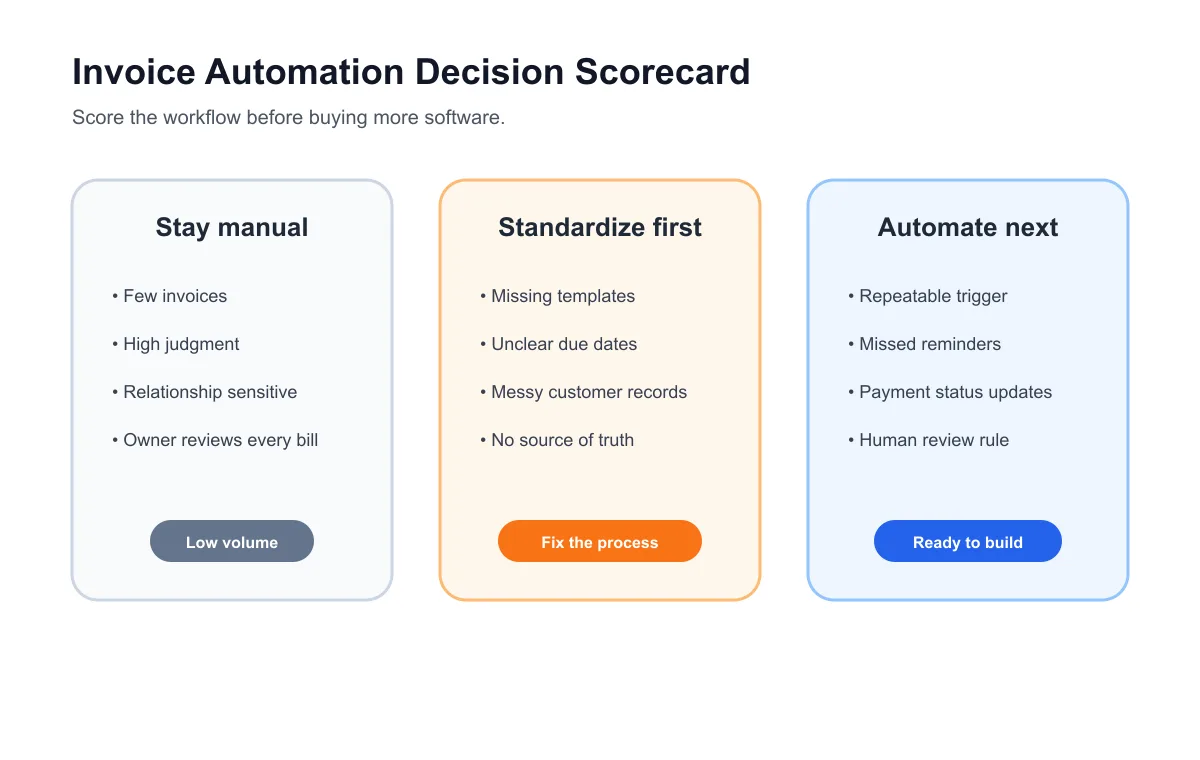
| Question | If yes, lean manual | If yes, lean automation |
|---|---|---|
| Do invoices need custom judgment every time? | Yes | No |
| Is the invoice trigger already visible in a system? | No | Yes |
| Are reminders being missed? | No | Yes |
| Does payment status reliably update somewhere? | No | Yes |
| Can exceptions be routed to a person? | Not yet | Yes |
If the answers are mixed, keep invoice approval manual and automate the pieces around it: draft creation, reminders, payment status checks, overdue tasks, and weekly owner review.
Bottom line
Manual invoicing is fine when the workload is small and the owner can keep it under control. AI automation is better when billing is repeatable, follow-up is slipping, payment status is hard to track, or the owner needs a clearer weekly view of open money.
The best small-business setup is usually a hybrid: automate the routine billing loop, keep human review for exceptions, and document the rules before expanding. If you want that built as a practical workflow, Business Boomer can start with one billing lane through its AI automation services and turn it into a tested owner/admin process.
You can also book a Free 30-Minute AI Consultation and bring one messy invoicing workflow, the tools you already use, and a few examples of invoices that get delayed.
Turn the guide into a working setup
Business Boomer sets up one invoice workflow in 7 days.
We map the billing trigger, build the invoice template, add the payment link, create the reminder sequence, test overdue follow-up, and hand you a simple owner/admin SOP.
Invoice workflow next step
Turn invoice follow-up into a working setup.
Business Boomer can map the billing trigger, payment link, reminder timing, and overdue handoff for one focused invoice workflow.
Keep building the system
Recommended next Business Boomer guides
These links are selected by topic and search intent so this guide connects to the most relevant service pages, industry pages, and supporting blog posts.
Service and setup pages
Use these when you are ready to turn the idea into an implementation path.
Industry-specific pages
See how the same workflow changes for specific business types.
Related blog posts
Read the connected guides that support this topic cluster.
Related AI automation guides
Keep going with the connected Business Boomer guides in this automation cluster.
AI automation services for local small business
Planning examples for broader automation. Compare current managed calls and reviews on the Services page; confirm other work in a separate scope.
How to automate invoices for small business
A practical guide to invoice creation, reminders, payment tracking, and cash-flow follow-up.
Best invoicing automation tools for small business
A comparison of QuickBooks, FreshBooks, Stripe Billing, Wave, Jobber, Housecall Pro, Zapier, and Make.
QuickBooks invoice automation for small business
How to use QuickBooks for recurring invoices, reminders, payment tracking, and workflow-connected billing.
FAQ
Quick answers about this guide and how to put the idea into practice.
What is the main takeaway from Manual Invoicing vs AI Automation?
Manual invoicing is better when every invoice needs judgment or the business sends only a few simple bills. AI automation is better when invoices are repeatable, late, hard to track, or dependent on reminders, payment links, and owner follow-up.
How does manual invoicing vs AI automation help a small business?
manual invoicing vs AI automation can help a small business reduce manual work, improve follow-up, organize repetitive tasks, and create a clearer operating process when it is tied to a real bottleneck.
Can Business Boomer help implement manual invoicing vs AI automation?
Yes. Business Boomer can help turn the idea into a practical workflow, page, checklist, or automation system depending on what the business needs first.
Turn invoice follow-up into a working setup.
Business Boomer can map the billing trigger, payment link, reminder timing, and overdue handoff for one focused invoice workflow.
See Invoice Automation Setup