
Best Invoice Automation Workflow for Service Businesses
The best invoice automation workflow for a service business starts when work is ready to bill, creates or drafts the invoice, adds a payment link, sends polite reminders, stops when paid, and flags exceptions for a human.


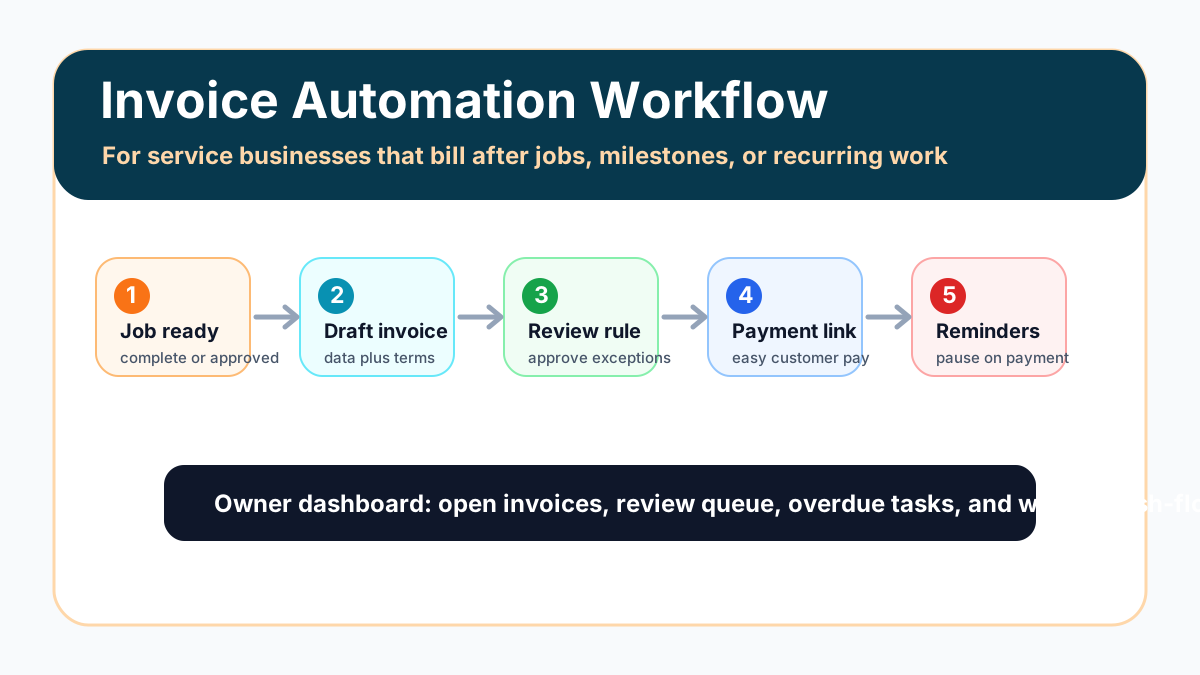
The best invoice automation workflow for service businesses is simple: define the event that means work is ready to bill, create a draft invoice, review exceptions, send the invoice with a payment link, run a polite reminder sequence, stop reminders when payment posts, and show the owner what still needs attention.
For most small service businesses, the safest first version should not send every invoice automatically. It should automate the repeatable steps while keeping a human review point for unusual jobs, disputed work, high-value customers, changed scope, or anything that could damage trust.
Search intent and top-result pattern
People searching for the best invoice automation workflow for service businesses usually want a practical setup path, not only a software list. Current U.S. results lean heavily toward invoice automation software roundups, AP processing platforms, reminder tools, payment-link products, and field-service software pages. The recurring themes are approval workflows, payment links, automatic reminders, status tracking, and integrations.
The gap is implementation detail for small service businesses that send invoices after jobs, milestones, appointments, inspections, retainers, or accepted estimates. This guide focuses on the actual workflow: what triggers the invoice, what gets reviewed, how reminders stop, and where the owner checks open money.
The best workflow in one view
The first workflow should be narrow enough to test in one billing lane. A plumbing company might start with completed service calls. A consultant might start with monthly retainers. A cleaning business might start with recurring visits. A marketing agency might start with approved milestones.
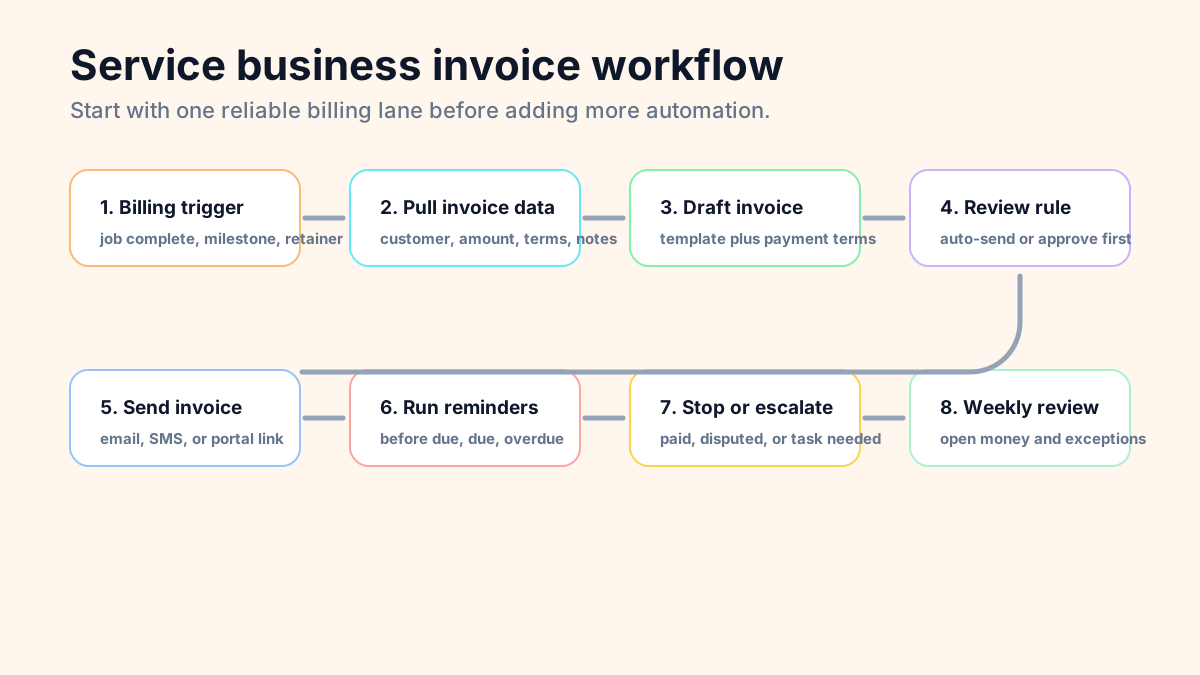
The workflow should include these steps:
- Work is marked complete or ready to bill.
- The system gathers the customer, job, price, tax, terms, and notes.
- A draft invoice is created or an invoice is prepared for review.
- Exceptions go to the owner or admin before the customer sees anything.
- The approved invoice sends with a clear payment link.
- Reminders run before and after the due date.
- Payment status stops future reminders.
- Overdue or disputed invoices create a human follow-up task.
- The owner reviews open invoices weekly.
If your team still needs the foundation, read how invoice automation works for small business before choosing tools. The trigger and review rule matter more than the automation platform.
Step 1: pick the right billing trigger
The trigger is the event that tells the workflow an invoice might be ready. Good triggers are observable in a system, not trapped in someone's memory. Examples include job marked complete, estimate accepted, appointment finished, milestone approved, monthly retainer date reached, signed proposal received, or recurring service visit closed.
Bad triggers are vague. "When the job is basically done" or "when the owner remembers" will not produce reliable billing. The system needs a source of truth: field service software, CRM, calendar, spreadsheet, accounting tool, form submission, or project management board.
If accepted estimates start your billing process, compare the plan with automating invoices from accepted estimates. Estimate-to-invoice workflows need extra care around deposits, change orders, taxes, and final approval.
Step 2: gather the invoice data before AI touches anything
Invoice automation works better when the boring data is clean first. The workflow needs customer name, billing contact, service date, line items, amount, payment terms, tax rules, purchase order number if needed, and any job notes that explain the work.
AI can help summarize job notes or draft a customer-friendly description, but it should not guess the price, invent scope, or decide whether a disputed job is ready to bill. Keep money decisions tied to the system of record and human approval.
For businesses comparing tool stacks, best invoicing automation tools for small business is the better software-first guide. This workflow can run in QuickBooks, FreshBooks, Wave, Stripe, Square, Jobber, Housecall Pro, a CRM, or a connected spreadsheet if the handoff is clear.
Step 3: use draft invoices before automatic sending
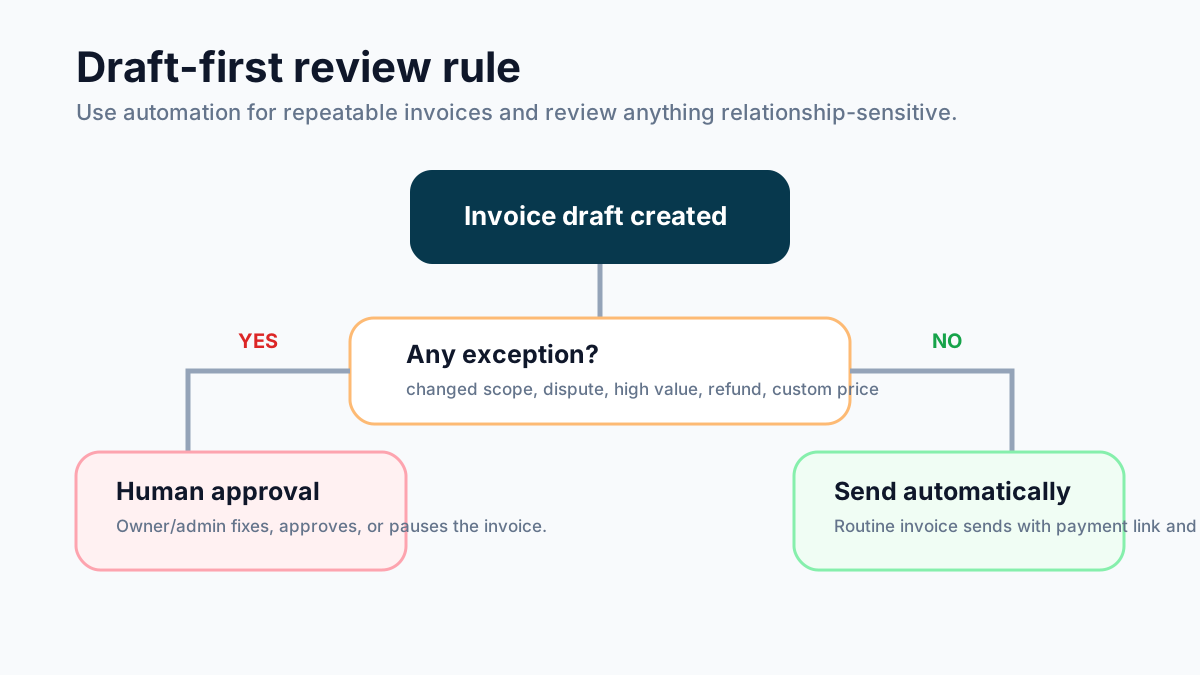
Draft-first is usually the best first version. The system prepares the invoice, then an owner or admin reviews anything unusual before sending. This creates immediate time savings without giving automation full control of customer-facing billing.
Use automatic sending only for predictable invoices: recurring retainers, fixed monthly service, routine maintenance visits, or standard jobs with clean completion status. Keep review for changed scope, partial work, refunds, credits, custom pricing, upset customers, and large accounts.
If QuickBooks is the accounting source of truth, QuickBooks invoice automation for small business can help define when QuickBooks should draft, send, remind, or simply record the invoice.
Step 4: send with a payment link and plain terms
The invoice should be easy to pay. A service business should not automate reminders while making the customer hunt for payment instructions. Put the due date, accepted payment methods, payment link, contact person, and short scope summary in the invoice email.
For small teams, the payment link is often the difference between a workflow that works and one that only creates prettier invoices. The customer can pay from the email, and the payment status can feed back into the reminder rule.
If payment links are the bottleneck, review QuickBooks payment links for small business. The important part is not the brand of link. The important part is that the link is tied to the invoice and updates payment status reliably.
Step 5: build reminders that protect trust
The reminder sequence should be firm, short, and polite. For many service businesses, a useful starting cadence is one reminder a few days before the due date, one on the due date, one a few days after, and then a human follow-up task if payment is still missing.
Do not keep sending automated reminders after a customer replies with a dispute, asks for a correction, pays through another channel, or has a relationship-sensitive issue. Those are stop conditions. The workflow should pause and create a task.
For reminder language, start with invoice reminder templates and adapt the tone to the relationship. A home service customer, a monthly retainer client, and a commercial account may need different wording.
Step 6: stop reminders when payment status changes
Payment status is the safety check. If reminders do not stop when payment is recorded, automation will annoy good customers and create support work. The workflow needs a reliable way to know whether the invoice is unpaid, partially paid, paid, voided, disputed, or written off.
That status may come from the accounting tool, payment processor, field service software, or a manual owner update. The exact source matters less than consistency. Pick one place as the truth and make the workflow listen to it.
If the main problem is overdue follow-up, use how to automate invoice reminders as a more detailed reminder setup guide.
Step 7: create an overdue task instead of endless automation
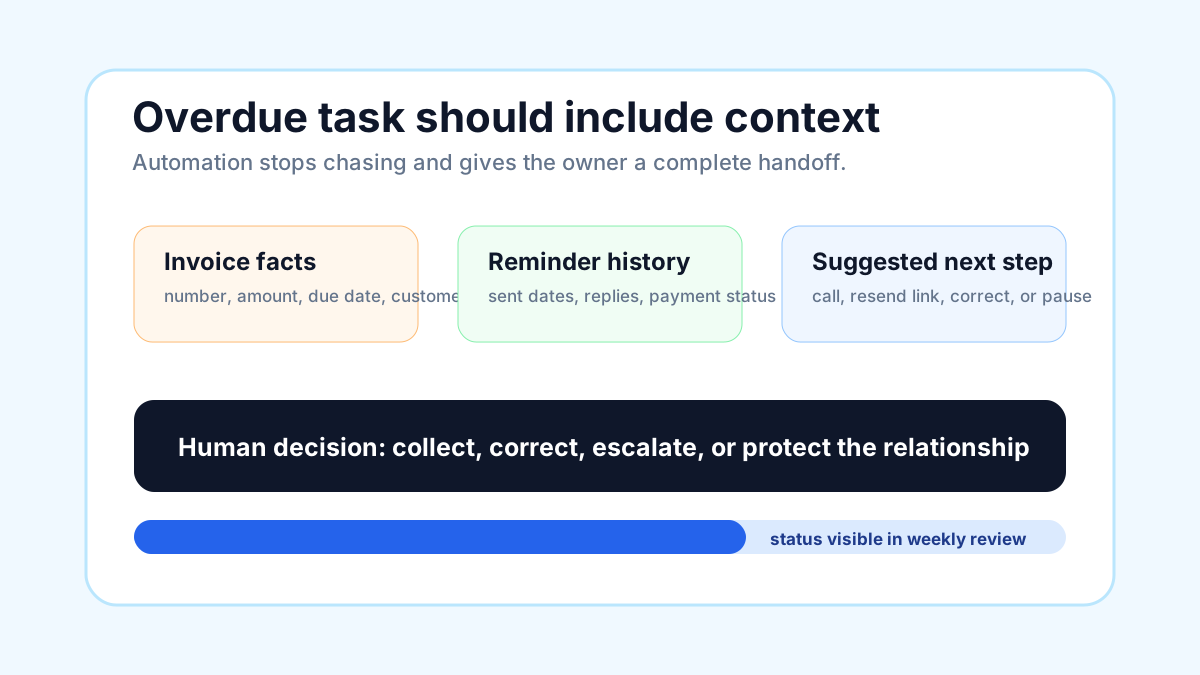
The workflow should eventually hand the invoice back to a person. A good overdue task includes invoice number, customer name, amount, due date, reminder history, payment link, recent customer replies, and suggested next action.
This is where AI can help without pretending to be the finance manager. It can summarize the history, draft a concise follow-up, and classify the issue as missing payment, dispute, wrong contact, stale card, or owner decision needed. A human should still decide how to handle the relationship.
Contractors and field teams should also check invoice automation for contractors, because job status, change orders, deposits, and field notes often affect whether an invoice is truly ready.
Example workflow: home service business
Imagine a home service company using a field service tool and QuickBooks. The technician marks the job complete. The workflow pulls customer details, job notes, line items, and the approved amount. It creates a draft invoice, then flags jobs with changed scope for review.
Once approved, the invoice sends with a payment link. A reminder goes out before the due date and again after the due date. If the customer pays, reminders stop. If the customer replies with a problem, the workflow creates an owner task with the invoice history.
For home service teams, invoice automation for home services gives more vertical examples around completed jobs, customer communication, and payment follow-up.
Example workflow: professional services firm
A consulting firm, marketing agency, bookkeeper, or design studio often needs a different trigger. The workflow may start from a signed agreement, recurring monthly date, approved project milestone, or completed deliverable. The invoice may need human review because scope and hours change.
In that setup, AI can summarize project notes into a draft invoice description, but the account owner should approve the invoice before it goes out. The reminder sequence can stay automated as long as customer replies and payment status pause it correctly.
Agencies and consultants can compare this with invoice automation for consultants, especially if retainers, deposits, and milestone billing drive the process.
What to measure after launch
Do not measure only whether the automation fired. Measure whether billing became easier to run. Useful weekly metrics include jobs waiting to be invoiced, invoices waiting on review, invoice send delay, payment-link usage, overdue invoices, reminder pauses, customer disputes, and owner/admin time spent checking status.
If you need to prioritize invoice automation against another operational project, use the invoice automation ROI calculator. Treat the result as a planning estimate, not a guaranteed savings claim.
Common mistakes to avoid
The biggest mistake is automating before the workflow is clear. If no one knows when work is ready to bill, which system owns the invoice, or who handles disputes, automation will only make confusion faster.
Other mistakes include sending every invoice automatically on day one, using reminders that do not check payment status, ignoring partial payments, leaving customer replies outside the workflow, creating duplicate customer records, and failing to document who owns exceptions.
The U.S. Small Business Administration's overview of AI for small business is a useful reminder: use AI as assistance around real operations, not as a replacement for business judgment.
A practical launch checklist
Before turning on invoice automation, confirm each item below.
| Checklist item | Pass condition |
|---|---|
| Billing trigger | The workflow starts from a real system event |
| Source of truth | One tool owns invoice status |
| Draft rule | Unusual invoices are routed for review |
| Payment link | Customer can pay directly from the invoice |
| Reminder cadence | Timing and tone are documented |
| Stop conditions | Paid, disputed, corrected, or replied invoices pause automation |
| Overdue task | A human receives context before chasing payment |
| Weekly review | Owner sees open invoices and exceptions |
| Test cases | Normal, overdue, paid, disputed, and changed-scope invoices are tested |
If you want this built instead of pieced together from software settings, Business Boomer's invoice automation setup starts with one practical billing workflow, tests it, and hands your team a simple SOP.
Turn the guide into a working setup
Business Boomer sets up one invoice workflow in 7 days.
We map the billing trigger, build the invoice template, add the payment link, create the reminder sequence, test overdue follow-up, and hand you a simple owner/admin SOP.
Invoice workflow next step
Turn invoice follow-up into a working setup.
Business Boomer can map the billing trigger, payment link, reminder timing, and overdue handoff for one focused invoice workflow.
Keep building the system
Recommended next Business Boomer guides
These links are selected by topic and search intent so this guide connects to the most relevant service pages, industry pages, and supporting blog posts.
Service and setup pages
Use these when you are ready to turn the idea into an implementation path.
Industry-specific pages
See how the same workflow changes for specific business types.
Related blog posts
Read the connected guides that support this topic cluster.
Recommended next steps
These pages connect this guide to the Business Boomer offer, related workflow, and next implementation path.
Related AI automation guides
Keep going with the connected Business Boomer guides in this automation cluster.
Invoice automation setup in 7 days
A practical guide to one billing trigger, payment link, reminder sequence, overdue task, and owner handoff.
QuickBooks invoice automation setup
Connect QuickBooks invoice drafts, payment links, reminders, and overdue follow-up to real workflow triggers.
Invoice automation for contractors
Connect completed jobs, estimates, QuickBooks, payment links, and overdue follow-up for contractor workflows.
Invoice automation ROI calculator
A conversion helper that estimates admin time saved, faster payment collection, and the value of reducing manual invoice chasing.
FAQ
Quick answers about this guide and how to put the idea into practice.
What is the main takeaway from Best Invoice Automation Workflow for Service Businesses?
The best invoice automation workflow for a service business starts when work is ready to bill, creates or drafts the invoice, adds a payment link, sends polite reminders, stops when paid, and flags exceptions for a human.
How does best invoice automation workflow for service businesses help a small business?
best invoice automation workflow for service businesses can help a small business reduce manual work, improve follow-up, organize repetitive tasks, and create a clearer operating process when it is tied to a real bottleneck.
Can Business Boomer help implement best invoice automation workflow for service businesses?
Yes. Business Boomer can help turn the idea into a practical workflow, page, checklist, or automation system depending on what the business needs first.
Turn invoice follow-up into a working setup.
Business Boomer can map the billing trigger, payment link, reminder timing, and overdue handoff for one focused invoice workflow.
See Invoice Automation Setup