
AI Automation for Recruitment Workflows
AI automation for recruitment works best when it helps a small team move candidates through a clear hiring workflow: capture applications, summarize fit, schedule interviews, draft follow-up, update records, and keep final decisions with people.


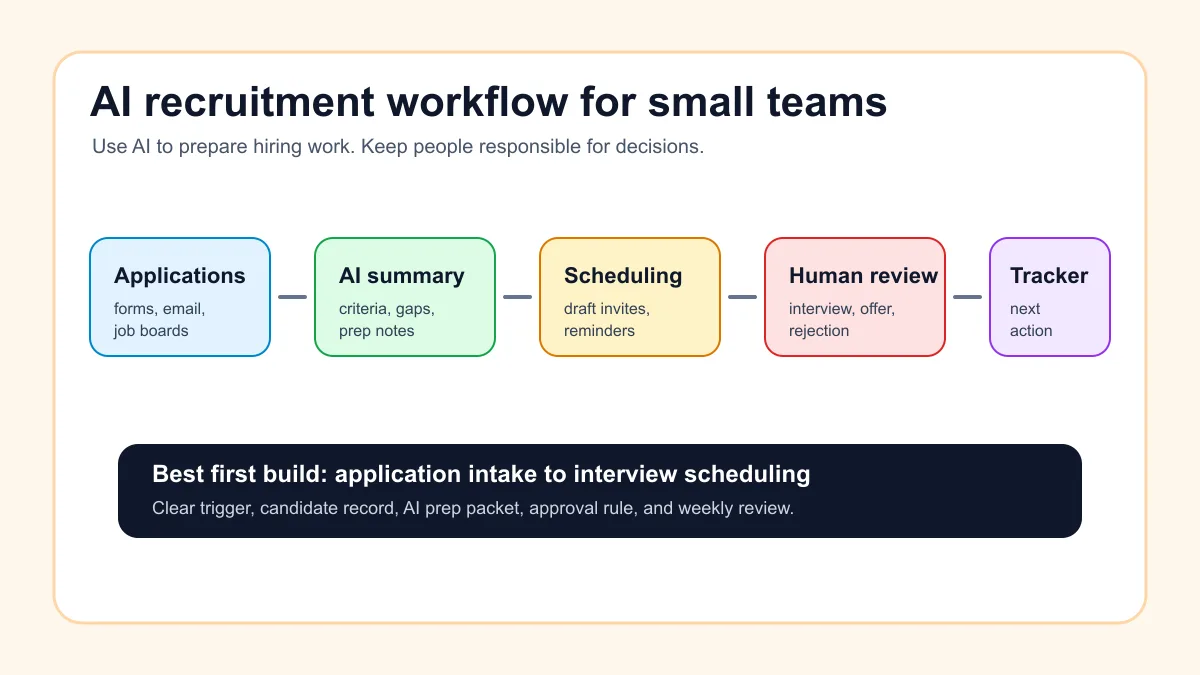
AI automation for recruitment helps small teams organize hiring work without turning hiring decisions over to software. The best first use is a workflow that captures candidate information, summarizes fit against job criteria, schedules interviews, drafts follow-up, updates the hiring tracker, and flags exceptions for a person to review.
For a U.S. service business, agency, clinic, contractor, or owner-led company, the goal is not a fully automated hiring machine. The practical goal is fewer missed applicants, cleaner handoffs, faster interview coordination, and a hiring record that stays current while managers keep judgment over selection, compensation, compliance, and final communication.
Search intent and top-result pattern
People searching for AI automation for recruitment are usually comparing recruiting tools, looking for workflow examples, or trying to understand what parts of hiring can be automated safely. Current U.S. results lean toward recruiting software roundups, vendor pages, AI recruiting tool comparisons, and workflow automation guides.
Recurring topics include candidate sourcing, resume parsing, screening, interview scheduling, candidate messaging, ATS updates, talent CRM workflows, and analytics. The content gap is that many results start with software names before helping a small team design a safe hiring process. This guide starts with the workflow and shows where AI should assist, pause, and hand off.
Where AI fits in a hiring workflow
AI fits best in the repeatable parts of hiring: reading applications, extracting details, comparing candidate notes to stated criteria, drafting interview prep, coordinating scheduling, preparing follow-up, and keeping the hiring tracker updated. Those tasks are useful, frequent, and easy to review.
That is different from asking AI to decide who should get the job. Final hiring decisions involve context, fairness, judgment, compensation, team fit, and legal risk. The U.S. Equal Employment Opportunity Commission has made clear that employment tools using AI still need to comply with federal anti-discrimination laws, so small businesses should treat AI as a workflow assistant, not an unchecked decision maker.
If the company is still choosing its first automation project, start with the broader AI workflow automation guide. A recruitment workflow should follow the same structure: trigger, source of truth, AI task, review rule, and measurable outcome.
The best first recruitment workflow to automate
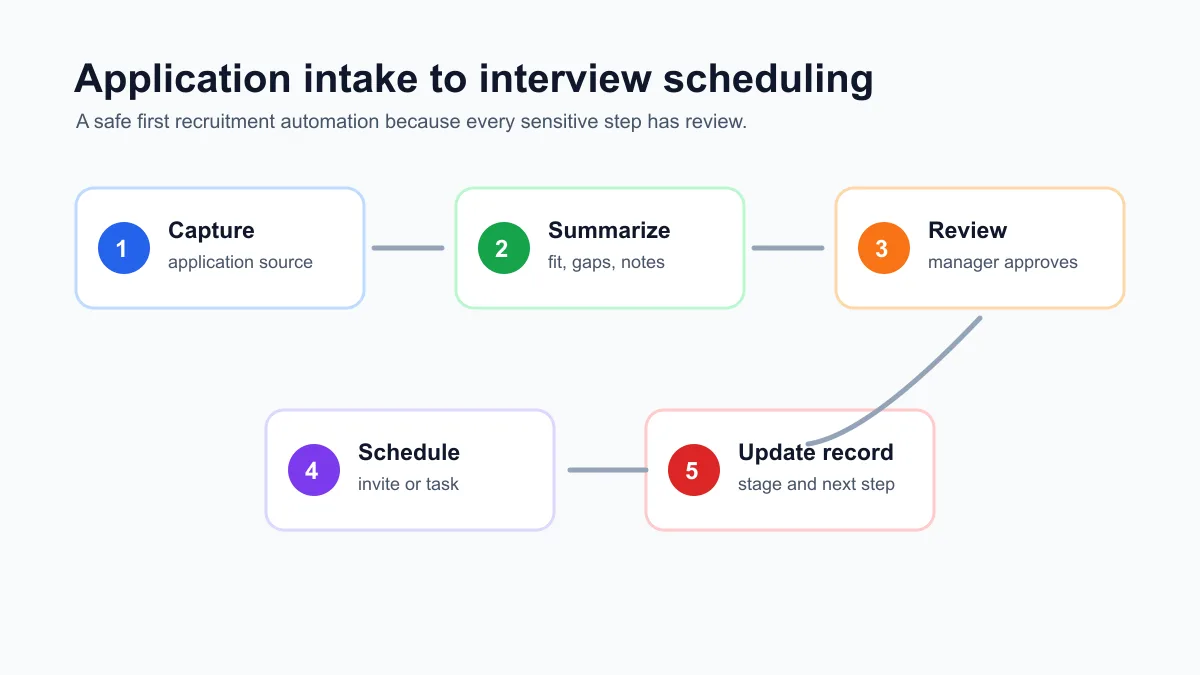
The best first recruitment workflow for a small team is usually application intake to interview scheduling. It is common, time-consuming, and visible to both the business and the candidate. It also has natural review points before anything sensitive happens.
Here is the simple version:
- A candidate applies through a form, job board, email, or referral.
- The workflow creates or updates a candidate record.
- AI summarizes the resume, notes, and application answers.
- AI checks for missing information and matches obvious requirements from the job post.
- A hiring manager reviews the summary and decides whether to interview.
- The system sends a scheduling link or drafts a reply for approval.
- The candidate record is updated after each step.
This is a better starting point than fully automated sourcing or ranking because the business can test it against real applications and keep the manager in control.
If the team needs more examples before choosing the first hiring workflow, the AI automation examples for small businesses guide shows how to compare workflow candidates by frequency, risk, and review needs.
What to automate and what to keep human
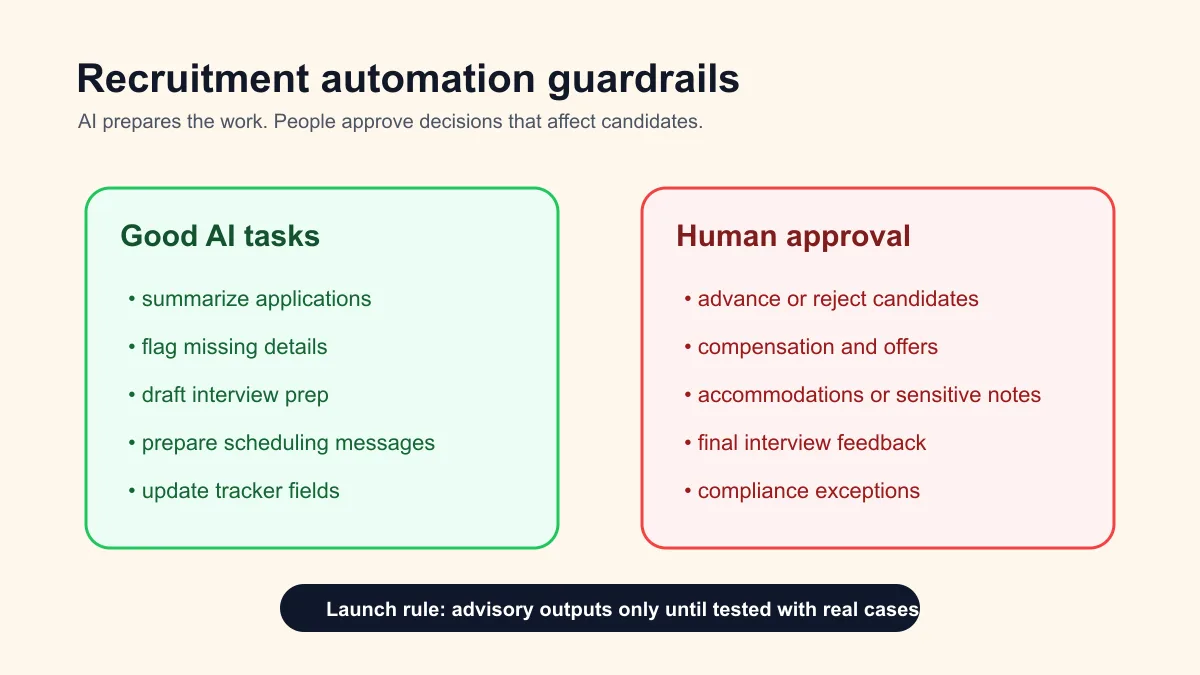
Small teams should draw a clear line between workflow support and employment judgment. AI can make the process easier, but the business should still own the decision.
| Hiring step | Good AI task | Keep human |
|---|---|---|
| Application intake | Create candidate record, extract contact details, summarize documents | Decide whether the candidate advances |
| Resume review | Compare stated experience to written job criteria | Interpret unusual background or career changes |
| Screening questions | Summarize answers, flag missing information | Judge communication quality and fit |
| Interview scheduling | Draft scheduling messages, send approved links, update calendar | Handle special accommodations or sensitive constraints |
| Interview prep | Build a prep brief from the role, resume, and notes | Choose questions and assess answers |
| Candidate follow-up | Draft status updates and reminders | Send rejections, offers, pay details, or sensitive feedback |
| Hiring tracker | Update stage, notes, owner, and next action | Approve final status and close the role |
The safest rule is simple: let AI prepare the next step, but keep people responsible for decisions that affect a candidate's opportunity, pay, privacy, or reputation.
Practical examples for service businesses
A home services company hiring technicians can use AI to summarize applications, extract certifications mentioned by candidates, draft interview prep, and remind the manager when a strong candidate has not been contacted. The manager still decides whether the candidate meets licensing, safety, experience, and customer-service expectations.
A med spa or clinic can use AI to organize applications by role, identify missing credential details, prepare interview packets, and route candidates to the right reviewer. The workflow should avoid automated judgments about medical qualifications without human review.
A local agency can use AI to compare portfolios against a role checklist, summarize writing or design samples, and prepare structured interview notes. If the same team also needs better lead handling, the lead follow-up workflow guide is a natural companion because hiring and sales both depend on fast, clean handoffs.
A contractor or property services business can use the workflow to track referrals, seasonal applicants, subcontractor outreach, and interview follow-up in one place. If appointment coordination is the bottleneck, the appointment scheduling automation guide shows the same scheduling logic in a customer-facing workflow.
A small-team recruitment automation stack
Most small businesses do not need an enterprise recruiting platform first. They need a clean system of record, a way to capture applicants, and a few reliable automations around the hiring stages.
The stack can be simple:
- Application source: website form, job board email, referral form, or shared inbox.
- Candidate record: ATS, CRM, spreadsheet, Airtable, Notion, or project board.
- AI support layer: summarization, classification, missing-field checks, draft messages, interview prep.
- Calendar layer: scheduling links, interview reminders, manager notifications.
- Review layer: hiring manager approval before interview invites, rejections, offers, and sensitive messages.
If the team already uses a CRM or project board, build around that before adding another hiring tool. If the team needs a broader assistant for owner notes, recurring reviews, and internal follow-up, OpenClaw onboarding can support the operating layer after the first hiring workflow is defined.
For teams that want a private assistant around hiring notes, owner tasks, and recurring operations reviews, OpenClaw operator setup is usually a better fit than a standalone recruiting chatbot.
Candidate communication should be consistent
Candidate communication is one of the best reasons to automate carefully. Applicants notice silence, delays, confusing instructions, and last-minute scheduling changes. AI can help draft clearer status updates and reminders, but the business should approve messages that involve rejection, offer terms, accommodations, or sensitive feedback.
A useful candidate communication workflow might include:
- Confirmation that the application was received.
- A manager task to review the candidate summary.
- A draft interview invitation if the manager approves.
- A reminder when the candidate has not picked a time.
- A post-interview next-step task for the manager.
- A draft status update that waits for human approval.
This is the same practical pattern behind lead response automation: respond faster, keep records clean, and avoid promises the business has not approved.
Compliance and bias checks matter
Recruiting automation deserves more caution than a normal admin workflow because it can affect employment opportunities. AI should not silently screen out candidates, invent qualification gaps, or use criteria that were never in the job requirements.
The Department of Labor's AI best-practices guidance for employers emphasizes worker well-being, transparency, governance, and monitoring when AI is used in the workplace. For a small employer, that translates into practical rules: write the job criteria before using AI, document what the system checks, keep human review, test outputs, and retain enough history to explain what happened.
Use this guardrail checklist before launch:
| Check | Why it matters |
|---|---|
| Written job criteria exist | AI should compare against known requirements, not vague preferences |
| AI output is advisory | The tool summarizes and flags; it does not make the hiring decision |
| Review owner is named | A person is accountable for advancing, rejecting, or pausing candidates |
| Sensitive messages require approval | Rejections, offers, compensation, and accommodations stay human |
| Test cases include edge cases | Career gaps, nontraditional backgrounds, missing fields, and duplicate applicants are checked |
| Records are retained | The business can audit what happened if a decision is questioned |
This is not legal advice, but it is a practical operating standard. When in doubt, get HR or legal guidance before automating anything that directly affects candidate selection.
How to measure whether it works
A recruitment automation workflow should be judged by operational improvement, not by how impressive the AI summary sounds.
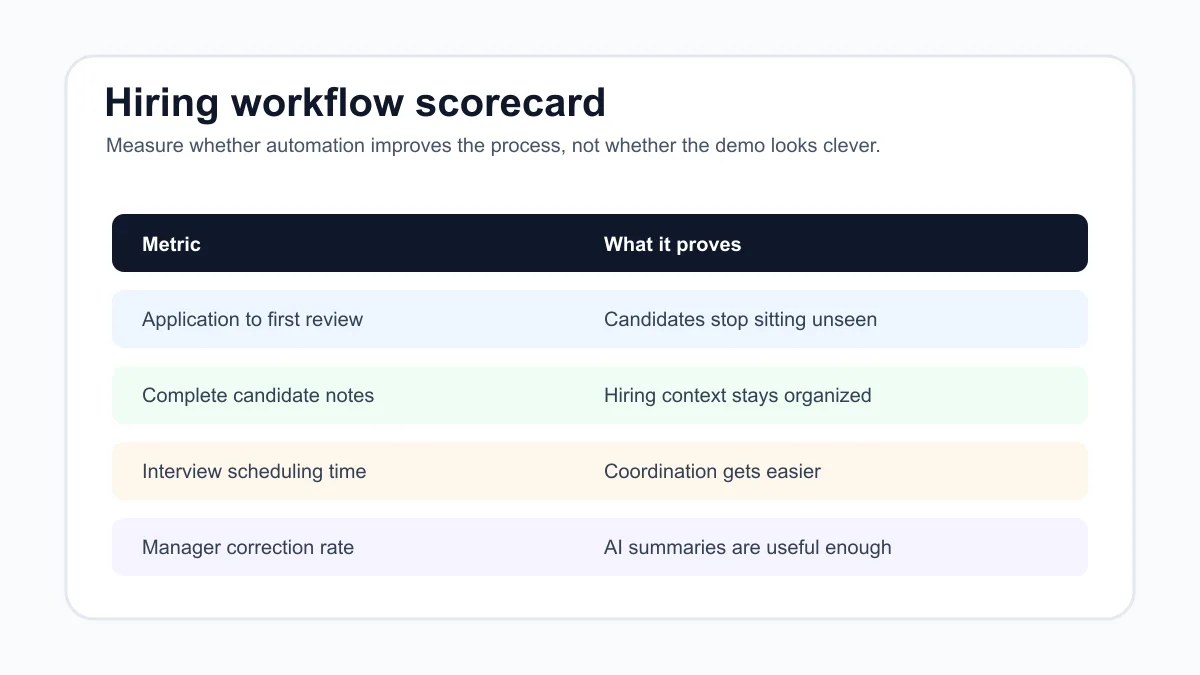
Track a few simple metrics:
| Metric | What it shows |
|---|---|
| Time from application to first human review | Whether candidates stop sitting unseen |
| Percent of candidate records with complete notes | Whether the system improves hiring visibility |
| Interview scheduling time | Whether coordination is getting easier |
| Follow-up tasks completed on time | Whether candidates get clearer communication |
| Manager rework rate | Whether AI summaries are useful or need too much correction |
| Exception count | Whether the workflow is surfacing edge cases instead of hiding them |
Review these weekly for the first month. If summaries are wrong, criteria are unclear, or managers ignore the tracker, fix the workflow before expanding automation.
The same measurement habit applies outside recruiting. The benefits of AI automation for small business guide explains why speed, completeness, review quality, and owner visibility are better proof points than vague productivity claims.
Common mistakes to avoid
The first mistake is buying a recruiting automation tool before the hiring process is written down. If the business cannot describe the role stages, review owner, candidate record, and approval rules, software will only make the confusion faster.
The second mistake is letting AI create hidden rankings. A candidate score may look objective, but it can hide unclear assumptions. Small teams are usually better served by plain-language summaries, missing-field flags, and structured review checklists.
The third mistake is automating rejection or offer messages too early. Those communications carry reputational and legal risk. Use drafts first, then decide later whether any low-risk status updates can be sent automatically.
The fourth mistake is disconnecting hiring from the rest of operations. A recruiting workflow should connect to onboarding tasks, manager reminders, equipment prep, payroll setup, or training checklists when a candidate is hired. If the bigger goal is an operations system, compare this workflow with business automation for small business.
Another mistake is asking a general agent to run hiring without a process around it. The best AI agents for business automation guide is useful when the team is deciding whether it needs a recruiting workflow, an operations agent, or a narrower scheduling assistant.
A practical starter build
A focused starter build can be small enough to test in a week:
- Pick one open role.
- Write the required and preferred criteria in plain English.
- Choose the candidate tracker.
- Connect one application source.
- Create an AI summary format with required fields, missing details, and a review note.
- Draft approved message templates for confirmation, interview invitation, reminder, and manager follow-up.
- Require approval for interview decisions, rejections, offers, and compensation.
- Test with past applications before using it on active candidates.
- Review errors and manager feedback before expanding.
If the team wants implementation help instead of tool research, use the AI automation services page to compare the first workflow build with broader automation work.
For buying help, the AI automation company checklist gives a practical way to evaluate providers.
If recruiting is only one of several operating problems, AI automation consulting can help decide whether hiring, lead follow-up, scheduling, billing, or reporting should come first.
Bottom line
AI automation for recruitment is most useful when it helps a small team run a cleaner hiring workflow: application capture, candidate summaries, interview coordination, follow-up drafts, tracker updates, and human review. It should reduce administrative drag without hiding judgment, bias checks, privacy concerns, or final decisions.
Business Boomer helps small businesses turn messy workflows into practical AI-assisted systems. If recruitment is one of several bottlenecks, start with the services page so the first build is narrow, testable, and safe to run.
You can also book a Free 30-Minute AI Consultation and bring one messy hiring workflow, the tools you already use, and a few real candidate examples.
Next step
Find the workflow worth fixing first.
Use the Free 30-Minute AI Consultation to map where leads, invoices, notes, or follow-ups are slipping and choose the smallest useful system.
Keep building the system
Recommended next Business Boomer guides
These links are selected by topic and search intent so this guide connects to the most relevant service pages, industry pages, and supporting blog posts.
Service and setup pages
Use these when you are ready to turn the idea into an implementation path.
Industry-specific pages
See how the same workflow changes for specific business types.
Related blog posts
Read the connected guides that support this topic cluster.
Related AI automation guides
Keep going with the connected Business Boomer guides in this automation cluster.
AI automation services for local small business
Planning examples for broader automation. Compare current managed calls and reviews on the Services page; confirm other work in a separate scope.
Lead follow-up automation for small business
Turn form fills, missed calls, quote requests, emails, and voice notes into reply drafts, CRM updates, reminders, and next steps.
Invoice automation for contractors
Connect completed jobs, estimates, QuickBooks, payment links, and overdue follow-up for contractor workflows.
How to automate invoices for small business
A practical guide to invoice creation, reminders, payment tracking, and cash-flow follow-up.
FAQ
Quick answers about this guide and how to put the idea into practice.
What is the main takeaway from AI Automation for Recruitment Workflows?
AI automation for recruitment works best when it helps a small team move candidates through a clear hiring workflow: capture applications, summarize fit, schedule interviews, draft follow-up, update records, and keep final decisions with people.
How does AI automation for recruitment help a small business?
AI automation for recruitment can help a small business reduce manual work, improve follow-up, organize repetitive tasks, and create a clearer operating process when it is tied to a real bottleneck.
Can Business Boomer help implement AI automation for recruitment?
Yes. Business Boomer can help turn the idea into a practical workflow, page, checklist, or automation system depending on what the business needs first.
Find the workflow worth fixing first.
Use the Free 30-Minute AI Consultation to map where leads, invoices, notes, or follow-ups are slipping and choose the smallest useful system.
Book a Free 30-Minute AI Consultation