
Best Creator Business Tools in 2026: Build Audience, Email, Community, and Revenue
The best creator business stack in 2026 starts with content and owned audience. YouTube Studio, CapCut, Canva, Descript, beehiiv, Kit, Circle, Patreon, Kajabi, Gumroad, Fourthwall, and Stripe each support a different creator-business layer.


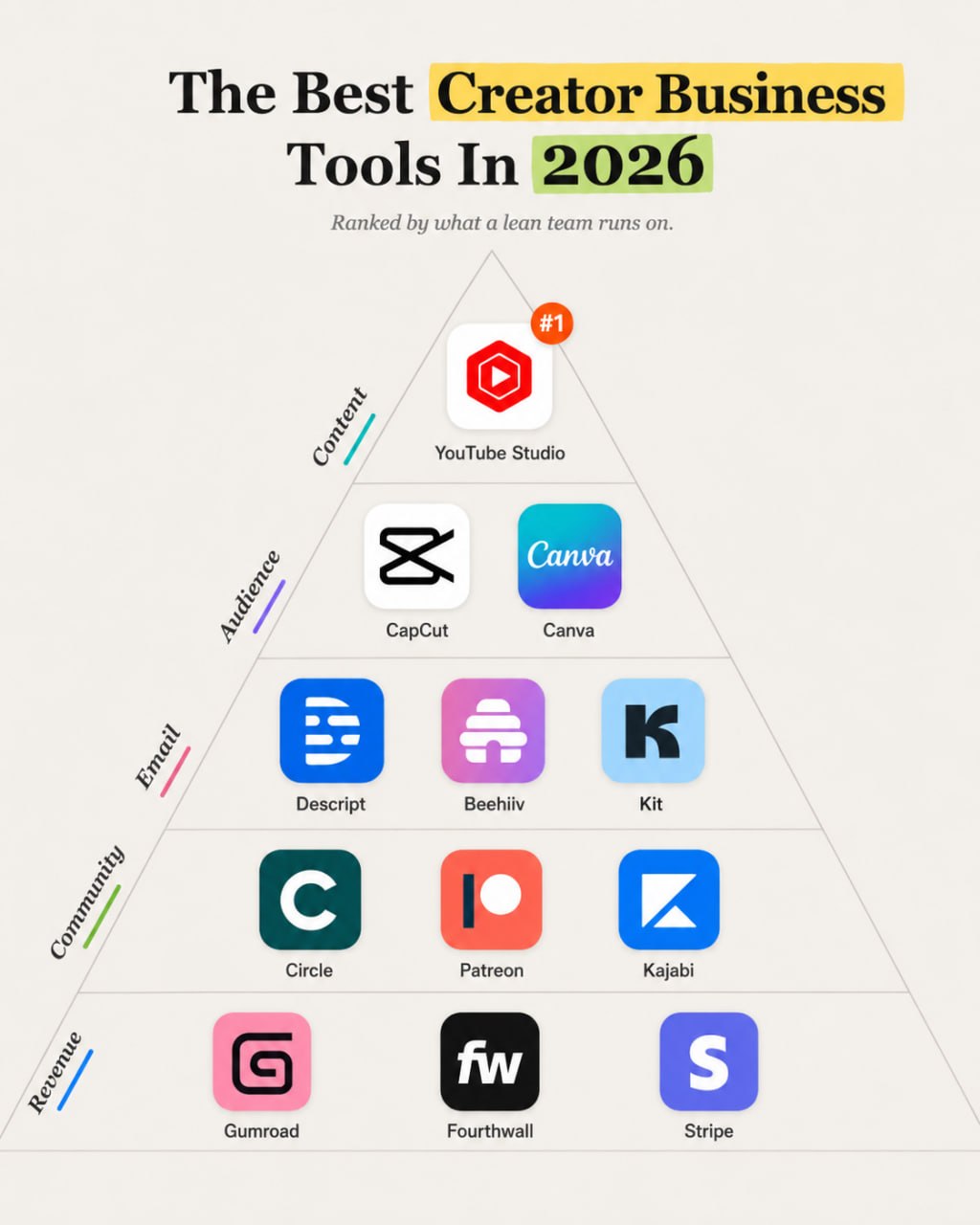
Creator businesses fail when the audience lives only on rented platforms. The right stack helps you publish, package content, capture email, build community, sell products, and collect payments.
Quick answer: Most creators should start with YouTube Studio or their main platform analytics, CapCut or Descript, Canva, beehiiv or Kit, Gumroad or Kajabi, and Stripe. Add Circle, Patreon, or Fourthwall when community, memberships, or merch become real revenue lines.
This guide ranks tools by workflow fit, output quality, ease of use, integrations, value, and reliability. Pricing changes often, so check current vendor pricing pages before you buy.
If you are building the broader stack, compare this guide with AI SEO tools, content marketing tools, and startup growth tools.
Quick verdict
| Need | Best first choice |
|---|---|
| Best overall content hub | YouTube Studio |
| Best mobile-first editing | CapCut |
| Best design tool | Canva |
| Best editing and repurposing | Descript |
| Best newsletter-first business | beehiiv |
| Best creator email and automations | Kit |
| Best community layer | Circle |
| Best memberships | Patreon |
| Best course business | Kajabi |
| Best simple digital products | Gumroad |
| Best merch | Fourthwall |
| Best payments backbone | Stripe |
Best tools at a glance
| Tool | Best for | Category | Starting price | Key strength | Main limitation |
|---|---|---|---|---|---|
| YouTube Studio | video publishing and audience analytics | Content platform | Free | Direct platform data for YouTube creators | Platform-dependent |
| CapCut | short-form editing | Editing | Free and paid plans | Fast editing for social video | Less suited to complex professional editing |
| Canva | thumbnails, carousels, and simple assets | Design | Free and paid plans | Easy packaging for non-designers | Templates can make brands look generic |
| Descript | podcast, video, and transcript editing | Editing | Free and paid plans | Text-based editing and repurposing | Needs cleanup for polished final work |
| beehiiv | newsletter growth and publishing | Free and paid plans | Newsletter-first growth features | Less broad than a full creator commerce stack | |
| Kit | email, automations, and creator commerce | Free and paid plans | Creator-focused email workflows | Can feel narrow if the team needs broad CRM | |
| Circle | community and memberships | Community | Paid plans | Polished community spaces | Needs active moderation and programming |
| Patreon | membership monetization | Memberships | Platform fees | Built-in membership marketplace expectations | Platform dependency and fee structure matter |
| Kajabi | courses and knowledge commerce | Course platform | Paid plans | Bundles courses, site, email, and payments | Can be expensive before revenue |
| Gumroad | simple digital products | Commerce | Platform fees | Fast product launch | Less control for complex businesses |
| Fourthwall | merch and creator storefronts | Commerce | Free to start / platform fees | Creator merch workflows | Best when merch has demand |
| Stripe | payments infrastructure | Payments | Usage-based | Reliable payment backbone | Requires setup and compliance care |
How we evaluated the tools
We evaluated each tool as part of a real operating workflow, not as an isolated feature list.
| Criterion | Weight |
|---|---|
| Use-case fit | 25% |
| Capability and output quality | 20% |
| Ease of use | 15% |
| Integrations and workflow fit | 15% |
| Price-to-value | 15% |
| Scalability and reliability | 10% |
A complete platform can own several workflow layers. A specialist tool should earn its place by solving one painful job better than the default stack. Supporting tools belong lower in the stack unless the workflow depends on them every week.
The best creator business tools in 2026
YouTube Studio: Best for best creator content command center
YouTube Studio gives creators performance data, audience behavior, retention, revenue, and publishing tools for YouTube. Choose it when YouTube is the core channel. Avoid treating it as your whole business because YouTube controls reach and monetization rules. Closest alternative: native analytics on your primary platform.
Key capabilities usually include setup, workflow ownership, integrations, review, and reporting. The best choice depends on team size, existing stack, data quality, and budget.
CapCut and Descript: Best for best editing layer for lean creators
CapCut is fast for short-form clips and mobile-first editing. Descript is better for transcript editing, podcasts, screen recordings, and repurposing. Choose based on the content format. Avoid over-editing if the bottleneck is posting consistently. Closest alternative: Premiere Pro or DaVinci Resolve for advanced editors.
Key capabilities usually include setup, workflow ownership, integrations, review, and reporting. The best choice depends on team size, existing stack, data quality, and budget.
Canva: Best for best packaging tool for creators
Canva helps creators make thumbnails, carousels, lead magnets, course slides, and simple brand assets. Choose it when packaging speed matters. Avoid using generic templates without brand cleanup. Closest alternative: Figma for more control.
Key capabilities usually include setup, workflow ownership, integrations, review, and reporting. The best choice depends on team size, existing stack, data quality, and budget.
beehiiv and Kit: Best for best owned-audience layer
beehiiv is strong for newsletter-first creators who care about publishing, referrals, growth, and sponsorship workflows. Kit is strong for creator email lists, automations, products, and segmentation. Choose one email home. Avoid splitting the list across too many tools. Closest alternative: MailerLite for lower-cost email.
Key capabilities usually include setup, workflow ownership, integrations, review, and reporting. The best choice depends on team size, existing stack, data quality, and budget.
Circle and Patreon: Best for best community and membership layer
Circle gives creators a branded community space. Patreon gives a familiar membership model. Choose Circle when community programming matters and Patreon when membership tiers and patron expectations fit the audience. Avoid starting a community before you can host it. Closest alternative: Discord for informal communities.
Key capabilities usually include setup, workflow ownership, integrations, review, and reporting. The best choice depends on team size, existing stack, data quality, and budget.
Kajabi and Gumroad: Best for best product revenue layer
Kajabi fits creators building courses, coaching products, funnels, and knowledge commerce. Gumroad fits simple digital products, templates, files, and early offers. Choose Gumroad for speed. Choose Kajabi when the product line gets more serious. Avoid paying for a large platform before the offer sells.
Key capabilities usually include setup, workflow ownership, integrations, review, and reporting. The best choice depends on team size, existing stack, data quality, and budget.
Fourthwall and Stripe: Best for best merch and payments layer
Fourthwall helps creators sell merch and physical products without building the whole operations layer. Stripe powers payments for custom stores, subscriptions, and services. Choose Stripe when you need control. Choose Fourthwall when merch is the product. Avoid adding commerce before demand is proven.
Key capabilities usually include setup, workflow ownership, integrations, review, and reporting. The best choice depends on team size, existing stack, data quality, and budget.
Recommended stacks by team type
Solo creator
Use YouTube Studio, CapCut, Canva, beehiiv, Gumroad. This keeps the stack focused while giving each workflow layer a clear owner.
Newsletter creator
Use beehiiv or Kit, Canva, Stripe, sponsorship tracker. This keeps the stack focused while giving each workflow layer a clear owner.
Course creator
Use Kajabi, Canva, YouTube Studio, Stripe. This keeps the stack focused while giving each workflow layer a clear owner.
Community creator
Use Kit, Circle, Stripe, YouTube or podcast platform. This keeps the stack focused while giving each workflow layer a clear owner.
Merch-heavy creator
Use YouTube Studio, Canva, Fourthwall, Stripe. This keeps the stack focused while giving each workflow layer a clear owner.
How to choose the right tool
Start with the workflow. A small team should not buy a platform because it looks impressive in a comparison table. Ask what job breaks today: research, creative production, conversion, analytics, lifecycle, support, automation, or reporting.
Team size matters. A solo operator needs fewer tools and more defaults. A startup with engineers can handle deeper instrumentation. An agency needs repeatable workflows across clients. A mid-market team needs governance, permissions, and reporting.
Budget matters too. Free and entry-level plans can cover early workflows, but paid plans become worthwhile when the tool saves labor, reduces mistakes, or improves decisions. Switching costs rise when tools hold customer data, content libraries, automations, analytics events, or payment history.
Check integrations before buying. A tool that does not connect to your CRM, website, analytics, email platform, or data warehouse may create another manual process. Also check data ownership, export options, security posture, and approval controls before connecting sensitive workflows.
Tools we considered but did not rank
- Substack because it is strong for newsletters but less flexible for broader creator commerce.
- Discord because it is useful but harder to shape as a polished paid community.
- Shopify because it is strong ecommerce but too broad for many creators starting out.
- Memberful because it is credible but narrower than the default stack.
Final recommendation
Start with content, email, and one revenue path. Use YouTube Studio, CapCut or Descript, Canva, beehiiv or Kit, Gumroad or Kajabi, and Stripe. Add Circle, Patreon, or Fourthwall only when community, memberships, or merch have real pull.
The right stack should make the workflow easier to run next week. If a tool creates more meetings, more dashboards, or more cleanup than decisions, it belongs on the waitlist.
AI automation next step
Find the workflow worth fixing first.
Use the Free 30-Minute AI Consultation to map where leads, reviews, content, or follow-ups are slipping and choose the smallest useful next step.
Sources to check before purchase
- Official product websites and pricing pages for the tools above
- Current documentation for integrations, data handling, API access, and usage limits
- Recent customer reviews on G2, Capterra, Trustpilot, Reddit, or category-specific communities
Ready to build a practical AI growth stack?
AI Business Boomer helps lean teams turn scattered tools into working systems. Book a workflow audit and we will map the stack around your actual bottleneck.
FAQ
Quick answers about this guide and how to put the idea into practice.
What is the best creator business tool in 2026?
There is no single best tool. YouTube Studio, beehiiv or Kit, Canva, Gumroad or Kajabi, and Stripe cover the core layers for many creators.
Should creators build an email list?
Yes. Email gives creators more ownership than social platforms and helps sell products, memberships, sponsorships, and services.
Is Patreon better than Circle?
Patreon is better for membership tiers and patron payments. Circle is better for a branded community experience.
Should I use beehiiv or Kit?
Use beehiiv for newsletter-led growth and publishing. Use Kit for creator email automations and product flows.
What is the leanest creator stack?
Use your main platform analytics, CapCut or Descript, Canva, one email platform, one product platform, and Stripe.