
Small Business Automation Audit Checklist
A small business automation audit finds repetitive tasks, lost leads, slow handoffs, and owner bottlenecks before anyone buys another tool.


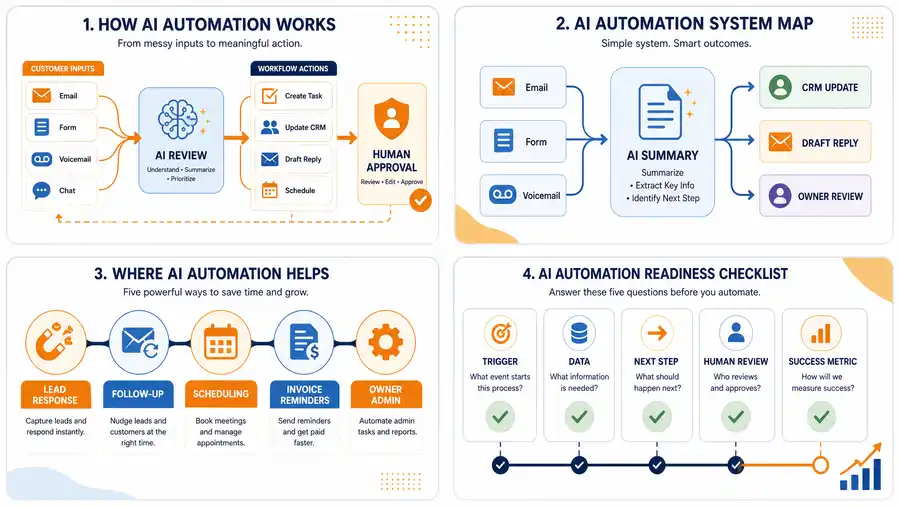
A small business automation audit shows where work gets lost between people, inboxes, tools, and memory. Before buying another AI tool, use the audit to find the first workflow that would save time or recover revenue.
The best first automation is usually close to money: missed calls, quote follow-up, appointment reminders, invoice reminders, review requests, or owner admin.
If you want help turning the audit into a build, use the AI workflow audit kit or AI automation services.
Step 1: map every lead source
List every place a new customer can enter the business.
| Lead source | What to check |
|---|---|
| Website form | Does someone answer same day? |
| Phone calls | What happens after a missed call? |
| Google Business Profile | Who responds to messages and reviews? |
| Are quote requests tracked or buried? | |
| Social DMs | Do they enter the main follow-up system? |
| Referrals | Is there a clear owner and next step? |
If leads arrive in five places and only one gets tracked, the automation opportunity is obvious.
Step 2: inspect response time
Ask three questions:
- How fast does the business reply to new leads?
- Who owns the first response?
- What happens if that person is busy?
If the answers depend on memory, build lead follow-up automation first.
Step 3: find manual quote work
Many service businesses lose time before the quote is even written. The owner has to ask for photos, measurements, address, timing, job details, budget, or access information.
The audit should identify which information should be collected before a human spends time reviewing the lead.
Step 4: review scheduling and no-shows
Scheduling gaps show up as double booking, missed confirmations, forgotten reminders, slow reschedules, or customers asking the same questions before appointments.
Simple automation can send confirmations, collect missing details, and remind customers before the appointment.
Step 5: check invoice follow-up
Invoice follow-up is one of the highest-signal audit areas because the money is already earned.
| Billing question | Risk |
|---|---|
| Are invoices sent when work is complete? | Delayed cash flow |
| Are payment links included? | Extra friction |
| Are reminders automatic? | Owner memory becomes the system |
| Are overdue balances visible? | Late payments stay hidden |
| Does someone own exceptions? | Awkward follow-up never happens |
Use invoice automation if this section is weak.
Step 6: look at review generation
Local businesses need reviews, but most ask inconsistently. A good review workflow sends a request after a completed job, appointment, or successful customer interaction.
Do not blast every customer. Route unhappy or unresolved customers to a human follow-up path first.
Step 7: identify owner-only tasks
Some tasks need the owner. Many do not. The audit should separate judgment from admin.
| Owner task | Automation support |
|---|---|
| Approve price | Prepare lead summary and context |
| Decide schedule | Collect timing and urgency |
| Follow up on quote | Draft reminder and create task |
| Review open invoices | Summarize overdue list |
| Answer repeated questions | Draft approved replies |
Step 8: score the first automation
Use a simple score:
| Factor | Score 1-5 |
|---|---|
| Close to revenue | |
| Happens every week | |
| Clear trigger | |
| Clear owner | |
| Low compliance risk | |
| Easy to verify |
Pick the workflow with the highest score. Do not start with the most complex AI idea.
Bottom line
A useful automation audit does not produce a giant software wishlist. It produces one first workflow, one owner, one trigger, one output, and one way to know whether the system worked.
Next step
Find the workflow worth fixing first.
Use the Free 30-Minute AI Consultation to map where leads, invoices, notes, or follow-ups are slipping and choose the smallest useful system.
Keep building the system
Recommended next Business Boomer guides
These links are selected by topic and search intent so this guide connects to the most relevant service pages, industry pages, and supporting blog posts.
Service and setup pages
Use these when you are ready to turn the idea into an implementation path.
Industry-specific pages
See how the same workflow changes for specific business types.
Related blog posts
Read the connected guides that support this topic cluster.
Related AI automation guides
Keep going with the connected Business Boomer guides in this automation cluster.
AI automation services for local small business
Planning examples for broader automation. Compare current managed calls and reviews on the Services page; confirm other work in a separate scope.
Lead follow-up automation for small business
Turn form fills, missed calls, quote requests, emails, and voice notes into reply drafts, CRM updates, reminders, and next steps.
How to automate invoices for small business
A practical guide to invoice creation, reminders, payment tracking, and cash-flow follow-up.
Best invoicing automation tools for small business
A comparison of QuickBooks, FreshBooks, Stripe Billing, Wave, Jobber, Housecall Pro, Zapier, and Make.
FAQ
Quick answers about this guide and how to put the idea into practice.
What is a small business automation audit?
A small business automation audit reviews where leads, tasks, appointments, invoices, reviews, and owner decisions get stuck so the business can choose the first workflow to automate.
What should a business automate first?
Most small businesses should automate the workflow closest to revenue leakage first, such as missed calls, lead follow-up, quote reminders, appointment reminders, or invoice follow-up.
Do you need AI for every automation?
No. Many useful automations need simple forms, reminders, CRM tasks, payment links, and owner approval rules. AI helps when the workflow needs summaries, draft replies, classification, or research.
Find the workflow worth fixing first.
Use the Free 30-Minute AI Consultation to map where leads, invoices, notes, or follow-ups are slipping and choose the smallest useful system.
Book a Free 30-Minute AI Consultation