
Invoice Automation Examples for Small Business Workflows
Invoice automation examples work best when they start from a real trigger: completed job, accepted estimate, recurring service date, overdue invoice, or customer reply.


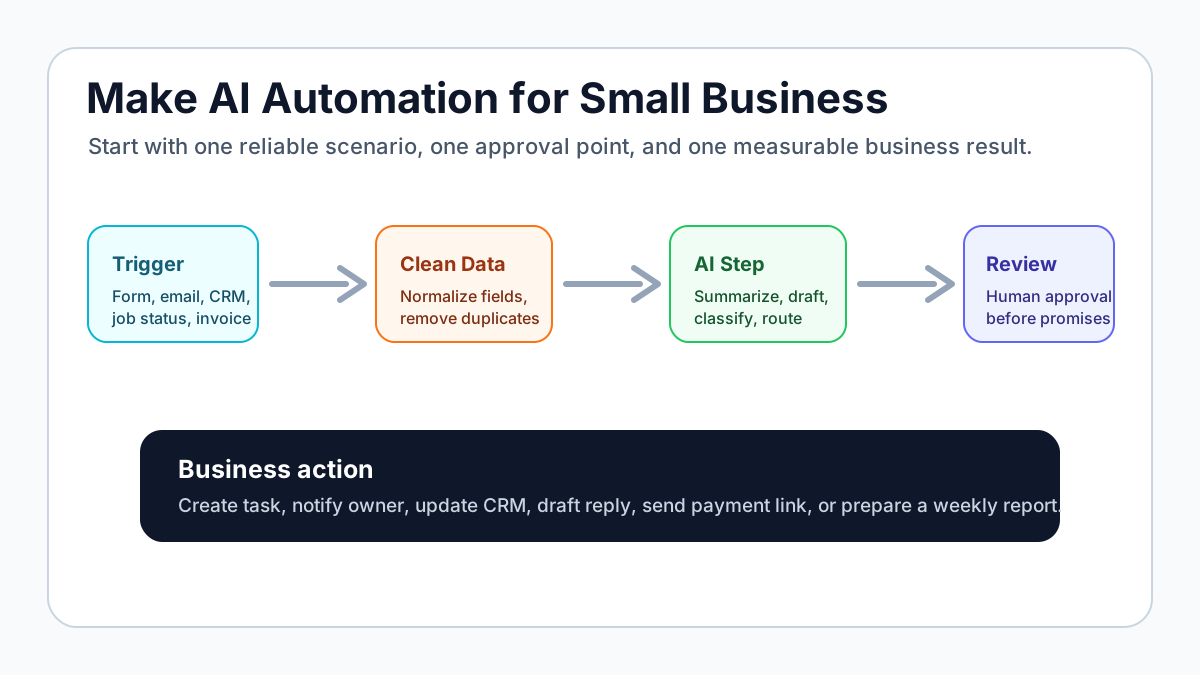
Invoice automation examples should start with a real business trigger. A completed job, accepted estimate, recurring service date, overdue invoice, or customer reply should start the workflow. The automation should then create or update the invoice, include a payment link, send reminders, and create a human follow-up task when needed.
Make can handle invoice automation, but this page is broader than Make. The goal is to choose the workflow first, then decide whether Make, Zapier, QuickBooks, Stripe, Jobber, Housecall Pro, or a custom setup fits.
Practical invoice automation examples
| Workflow | Trigger | Automation | Review rule |
|---|---|---|---|
| Job complete to invoice draft | Job marked complete | Create QuickBooks draft with customer and service details | Admin approves before sending |
| Accepted estimate to deposit invoice | Estimate accepted | Create deposit invoice and payment link | Owner checks scope and amount |
| Monthly service invoice | Calendar date or recurring schedule | Send recurring invoice | Review only for exceptions |
| Overdue invoice task | Invoice unpaid after due date | Create owner task and draft reminder | Owner reviews before final notice |
| Paid invoice handoff | Payment received | Send thank-you note and update CRM/job record | No review unless customer note is attached |
| Customer reply triage | Customer replies to reminder | Pause automation and route reply | Human reviews dispute or question |
For the complete service workflow, use invoice automation setup.
For a plain-English setup guide, use how to automate invoicing.
Where Make fits
Make is useful when the workflow has multiple branches. For example, a completed job might need different invoice line items depending on service type, location, materials, or approval status. Make can route the scenario, format fields, and send records to the right tool.
Use Make when:
- the invoice data needs cleanup before it reaches accounting
- several tools need updates
- the workflow has if/then paths
- errors should be logged in a separate place
- the owner wants a visual scenario map
Use a simpler native integration when the workflow only needs one trigger and one action.
Example: job complete to QuickBooks draft
- Job is marked complete in the field-service tool.
- Make checks customer, job type, amount, and payment terms.
- QuickBooks invoice draft is created.
- Admin gets a review task.
- Approved invoice sends with payment link.
- Reminder schedule starts.
- Overdue invoice creates a human follow-up task.
This setup avoids two common problems: invoices created late and reminders left to memory.
Example: overdue invoice summary
A weekly automation can pull open invoices, group them by age, and create a short owner report:
| Invoice age | Action |
|---|---|
| 1-7 days overdue | Friendly reminder |
| 8-21 days overdue | Human follow-up task |
| 22+ days overdue | Owner review before any message |
This is where AI can help safely. AI can draft a reminder or summarize exceptions, but the system should keep invoice status in the billing tool.
Invoice workflow next step
Turn invoice follow-up into a working setup.
Business Boomer can map the billing trigger, payment link, reminder timing, and overdue handoff for one focused invoice workflow.
Keep building the system
Recommended next Business Boomer guides
These links are selected by topic and search intent so this guide connects to the most relevant service pages, industry pages, and supporting blog posts.
Service and setup pages
Use these when you are ready to turn the idea into an implementation path.
Industry-specific pages
See how the same workflow changes for specific business types.
Related blog posts
Read the connected guides that support this topic cluster.
Recommended next steps
These pages connect this guide to the Business Boomer offer, related workflow, and next implementation path.
Related AI automation guides
Keep going with the connected Business Boomer guides in this automation cluster.
Invoice automation setup in 7 days
A practical guide to one billing trigger, payment link, reminder sequence, overdue task, and owner handoff.
QuickBooks invoice automation setup
Connect QuickBooks invoice drafts, payment links, reminders, and overdue follow-up to real workflow triggers.
Invoice automation for contractors
Connect completed jobs, estimates, QuickBooks, payment links, and overdue follow-up for contractor workflows.
Invoice automation ROI calculator
A conversion helper that estimates admin time saved, faster payment collection, and the value of reducing manual invoice chasing.
FAQ
Quick answers about this guide and how to put the idea into practice.
What is a good first invoice automation example?
Start with a completed job or accepted estimate that creates an invoice draft, adds a payment link, and schedules reminders.
Should invoice automation use Make or Zapier?
Use Make when the workflow needs more branching or data shaping. Use Zapier when the workflow is simple and the connected apps already support the needed actions.
Should invoice automation send invoices automatically?
Only send automatically when amounts and terms are predictable. If scope or price changes, create a draft and require owner or admin review.
Turn invoice follow-up into a working setup.
Business Boomer can map the billing trigger, payment link, reminder timing, and overdue handoff for one focused invoice workflow.
See Invoice Automation Setup