Make AI Automation: Small Business Workflow Ideas and Setup Tips

Author
Sam MonacFounder, Business Boomer | AI Operator & Growth Strategist
Sam Monac is a product and AI operator who helped scale Token Metrics to $7M+ ARR and supported more than $6M in capital raises. Through Business Boomer and his portfolio of AI-enabled businesses, Sam writes from hands-on experience building automation systems, growth workflows, and practical AI tools for real operators.

Fact Checked By
S. VishwaSEO Specialist & Blog Writer, Business Boomer
S. Vishwa is an experienced SEO specialist and blog writer with 10+ years of experience across digital marketing and fintech. He is passionate about crafting high-quality content that informs and engages readers in the finance and marketing sectors.
Make AI automation is useful when a small business needs to connect everyday tools, add an AI step, and keep humans in control of customer-facing decisions.
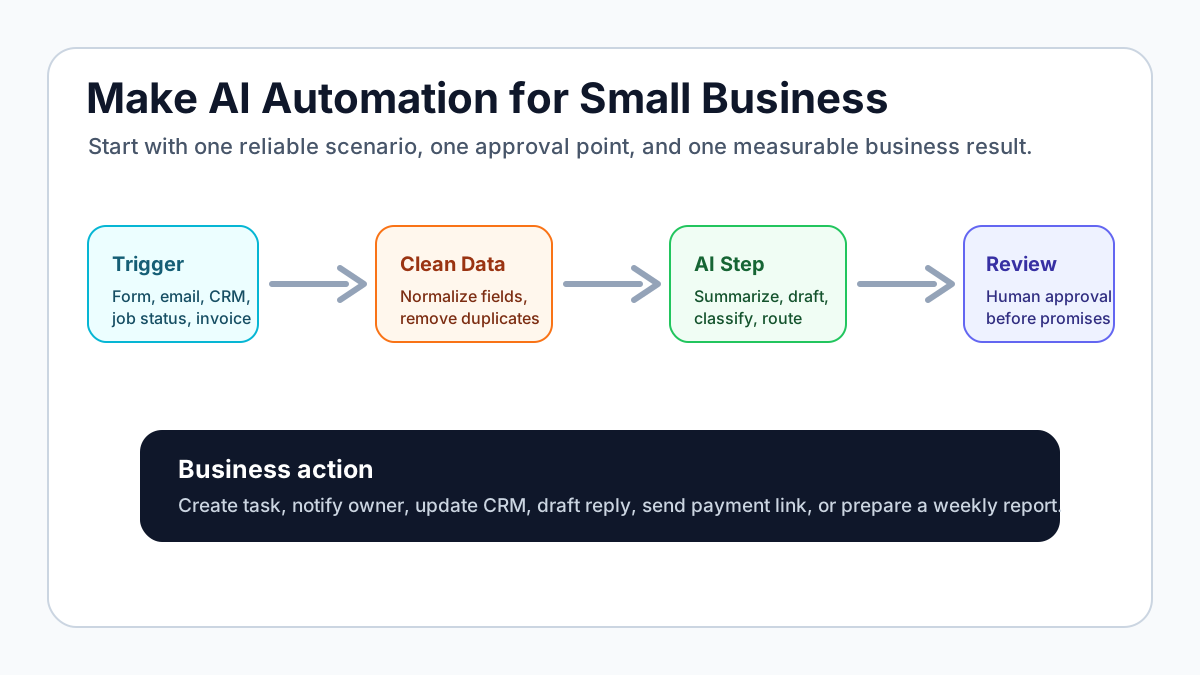
Make AI automation is a practical way for a small business to connect everyday tools, add an AI step, and move work forward without asking the owner to manually copy information between apps. The best first use is not a giant AI agent. It is one narrow scenario: capture a trigger, clean the data, ask AI to summarize or draft, route the result to a person, and create the next business action.
For most U.S. service businesses, Make is strongest when the workflow already has a clear trigger: a new lead, a booked appointment, a completed job, an overdue invoice, a support email, or a weekly report. Use AI for fuzzy work like classification, summarizing, drafting, and extracting details. Keep pricing, promises, refunds, legal language, medical details, and billing exceptions under human review.
Search intent and top-result pattern
People searching for Make AI automation usually want a workflow tutorial, tool evaluation, or examples they can adapt. Current U.S. results lean toward Make's own AI automation pages, Make templates, YouTube tutorials, beginner no-code guides, Reddit discussions about Make versus n8n or Zapier, and general small-business AI workflow articles.
Recurring headings include use cases, templates, triggers, AI agents, app integrations, tutorials, examples, and setup steps. The gap is that many results show what Make can connect, but fewer explain what a small service business should automate first, where the human approval point belongs, and how to avoid turning one messy process into a fragile scenario.
What Make AI automation actually does
Make is a visual automation builder. It connects apps, moves data between them, applies rules, and can call AI tools or Make AI features as part of a scenario. In plain English, a scenario is a chain of steps that starts when something happens and ends when the right person, system, or customer gets the next useful action.
If you are still sorting out the broader category, start with the AI workflow automation guide. Make is one possible automation layer inside that larger workflow map.
The AI part matters when the input is messy. A normal automation can copy a form field into a CRM. An AI-assisted automation can summarize a long inquiry, classify the service type, extract a deadline, draft a reply, or turn notes into a task. That is useful, but it should not replace a clear workflow owner.
Make's own AI automation page is useful for seeing the platform's current AI direction, including AI steps, agents, and business workflow orchestration. For a small business, the decision is simpler: use Make only where the process has a repeatable trigger and a result worth checking.
The best first Make workflows for small businesses
The best Make workflow is the one that removes a repeated handoff the team already understands. A home service company might automate lead intake. A consultant might automate meeting notes into tasks. A med spa might prepare appointment briefs. A contractor might automate quote follow-up. An agency might generate weekly client status summaries.
For a broader list of use cases before choosing one, compare this with practical AI automation examples for small businesses. The examples help separate attractive ideas from workflows that are actually worth building.
Use this quick filter:
| Workflow | Good Make trigger | Useful AI step | Human review point |
|---|---|---|---|
| Lead intake | Website form, missed call transcript, ad lead, email | Summarize need, classify urgency, draft reply | Pricing, fit, unusual requests |
| Appointment prep | Booking form, calendar event, intake submission | Create a visit brief and missing-info checklist | Sensitive customer notes |
| Invoice follow-up | Invoice overdue, job complete, payment status changed | Draft reminder, summarize account status | Disputes, changed terms, refunds |
| Support triage | New inbox message or ticket | Label topic, sentiment, urgency, suggested response | Angry customers, policy exceptions |
| Weekly reporting | CRM, sheet, task board, invoice tool update | Summarize activity and blockers | Final owner decisions |
Do not build all five at once. Pick the workflow where the trigger is obvious and the business can inspect whether the result helped.
Start with one scenario, not a platform rebuild
A good first scenario should fit on one page. It should name the trigger, source of truth, AI job, rules, review point, output, and proof metric. If the scenario needs ten branches before it creates value, it is probably too big for version one.
For lead-heavy businesses, a first scenario might capture a website form, summarize the request, create a CRM task, notify the owner, and draft an acknowledgment. The detailed build map in how to build an AI lead follow-up workflow follows the same logic.
For invoice-heavy businesses, a first scenario might watch for a completed job or overdue invoice, draft a payment reminder, create a follow-up task, and alert the owner if the balance is still open after a set number of days. If billing is the main pain, the invoice automation setup page is the more direct commercial path.
How to design a Make AI automation workflow
The simplest reliable design has six parts.
1. Trigger
The trigger is the event that starts the scenario. Examples include a new Typeform submission, Gmail message, HubSpot contact, Airtable record, Google Sheet row, Calendly booking, QuickBooks invoice, Stripe payment, Jobber status change, or Housecall Pro job update.
If you are not sure whether the business needs AI or ordinary automation, use the AI vs automation guide before adding model calls. Many workflows only need rules, reminders, and clean handoffs.
2. Source of truth
The source of truth is where the real record lives. It might be a CRM, spreadsheet, accounting tool, project board, or booking system. Make should not create five competing records unless the scenario has a clear sync rule.
Small businesses that still track leads in scattered inboxes should tighten the CRM layer first. The guide to what a CRM does for small businesses is a useful checkpoint before building lead routing in Make.
3. Data cleanup
Data cleanup is where many Make scenarios either become reliable or break. Normalize phone numbers, split names, remove duplicate records, check required fields, format dates, and handle missing values before asking AI to do anything important.
This step matters because AI can produce polished output from bad inputs. If the lead has no email address, the invoice has no due date, or the appointment has no service type, the workflow should stop and ask a person for the missing detail instead of guessing.
4. AI step
Use AI for a clearly defined job. Good AI jobs include summarizing an inquiry, extracting service type and urgency, drafting a follow-up email, turning call notes into tasks, categorizing a support request, or preparing a weekly owner summary.
For generative AI guardrails and practical business uses, compare the setup with generative AI for business automation. The prompt should tell the AI what to output, what not to decide, and when to escalate.
5. Review and approval
Human review is not a weakness. It is what makes the first version safe enough to launch. In Make, review can be a draft email, task approval, Slack message, owner notification, CRM note, or manual status change before the customer-facing step runs.
If the workflow touches appointments, customer expectations, or a service visit, connect the review point to the business's scheduling rules. The guide to appointment scheduling automation shows where booking, reminders, and intake should stay predictable.
6. Result and measurement
Every scenario needs a result. A useful result might be a CRM record, reply draft, owner alert, invoice task, appointment brief, weekly report, or dashboard update. The proof metric should be just as clear: response time, tasks created, invoices followed up, missing fields caught, or reports prepared.
If the business wants a bigger operating layer after the first scenario works, OpenClaw onboarding can help turn owner notes, recurring reviews, and follow-up tasks into a more durable AI operator process.
Practical Make workflow ideas
Here are Make AI automation ideas that fit real small-business operations without starting too broad.
Lead intake and response
Trigger: a website form, ad lead, email inquiry, or missed-call transcript arrives. Make creates or updates the lead record, sends the text to an AI step, and asks for a short summary, urgency label, missing information, and safe next action.
The output can notify the owner, create a CRM task, and draft a short acknowledgment. Keep the message simple: confirm receipt, set expectations, and offer a booking link or next question. For timing and tone, pair this with how to follow up with leads for small business.
Appointment prep
Trigger: a new appointment is booked. Make pulls the intake form, prior notes, service type, location, and calendar details. AI creates a brief for the person handling the call or visit.
The result might be a task that says what the customer needs, what details are missing, and what to review before the appointment. This is especially useful for clinics, consultants, home services, salons, and local operators where prep quality affects trust.
Invoice reminder workflow
Trigger: an invoice becomes due soon, due today, or overdue. Make checks the payment status, drafts a reminder, adds the payment link, and creates a task if the invoice needs personal follow-up.
Invoice automation is a strong starting point because the trigger is visible and the result is easy to inspect. For a more billing-specific setup, use the invoice automation workflow guide for service businesses.
Review request workflow
Trigger: a job is marked complete or a customer has a positive support outcome. Make waits the right amount of time, checks whether the customer should receive a request, and drafts a short review message.
Keep this respectful. Do not spam every customer, do not pressure unhappy customers, and do not ask AI to invent praise. The scenario should make a normal follow-up easier, not manipulate the customer relationship.
Weekly owner report
Trigger: every Friday morning. Make pulls new leads, open tasks, booked calls, overdue invoices, and stuck items from the systems the business already uses. AI summarizes what happened, what is blocked, and what needs attention next week.
This is useful when the owner is the bottleneck. It turns scattered operational data into a short review. If reporting is part of a broader operations cleanup, compare it with AI for business process automation.
Content and marketing handoffs
Trigger: a new customer question, sales call note, review, or service update is added to a sheet or CRM. Make sends the source note to AI, which drafts a social post, FAQ idea, blog outline, or customer email for review.
This works best when the owner approves the output and the brand has clear rules. For marketing-specific workflow ideas, use AI marketing automation for small business.
Make versus Zapier, n8n, and AI agents
Make is usually a good fit when the business wants a visual builder, flexible branching, many app connections, and scenarios that non-developers can inspect. Zapier is often simpler for straightforward app-to-app automations. n8n can be attractive when a team wants more control or self-hosting. AI agent tools can help when the work involves multi-step reasoning, tool use, and approvals.
The best choice depends on the workflow, not the brand. The best AI automation tools guide compares tool categories by bottleneck if you are still deciding what to use first.
Use Make when the team can define the scenario visually and test it with real examples. Use a simpler tool when the workflow is only one trigger and one action. Use a more custom setup when the workflow needs strict data control, heavy logic, or deeper business rules.
If you are comparing platforms more broadly, Make's template library can help you see common automation patterns. Treat templates as starting points, not finished business systems.
Guardrails before launch
Make AI automation should make a business easier to run. It should not silently make sensitive decisions. Keep human approval on pricing, refunds, legal or medical language, billing disputes, angry customers, unusual service requests, and any promise the business would not want sent automatically.
The U.S. Small Business Administration's AI for small business guidance is a useful reminder that owners should understand AI risks, protect customer data, and keep humans accountable for business decisions.
Before launch, test at least three normal examples and one bad example. The bad example might have missing fields, unclear customer intent, a duplicate record, an angry customer, or a request outside the service area. The scenario should route uncertainty to a person.
Common setup mistakes
The first mistake is automating a process the team has not agreed on. If the owner, admin, and salesperson all describe the workflow differently, Make will only expose the confusion faster.
The second mistake is giving AI too much authority too early. Start with summaries, drafts, labels, and tasks. Move toward automatic sending only after the team has reviewed real examples and trusts the rules.
The third mistake is skipping failure handling. Every scenario should define what happens when data is missing, an app connection fails, an AI output is empty, a duplicate record appears, or a message should not be sent.
The fourth mistake is building without documentation. The business needs a short SOP that explains the trigger, owner, systems, review point, exception rules, and how to pause the scenario.
The fifth mistake is adding more workflows before the first one is stable. A working lead intake scenario is more valuable than five fragile demos.
A simple setup checklist
Use this checklist before building in Make:
- Name the business bottleneck in one sentence.
- Pick one trigger and one source of truth.
- List the fields Make needs before the AI step runs.
- Write the AI prompt with limits, escalation rules, and output format.
- Decide what a person must approve.
- Choose the final action: task, alert, draft, CRM update, invoice step, or report.
- Test normal, edge, and failure examples.
- Write the SOP before handing it to the team.
- Review the workflow after two weeks of real use.
That checklist keeps the project practical. It also makes the workflow easier to improve later because everyone knows what the first version was supposed to do.
When done-for-you help makes sense
Build the first Make scenario yourself if the workflow starts in one app, creates one output, and does not touch sensitive customer promises. A form-to-CRM-to-owner-alert workflow is a reasonable DIY project.
Get help if the workflow crosses several systems, affects leads or money, needs AI prompts with guardrails, touches customers, or requires staff adoption. The hard part is often not clicking the Make modules together. It is deciding what the workflow should do, what AI should not do, and how the business should review exceptions.
Business Boomer starts with one bottleneck, maps the workflow, builds the smallest useful automation, tests it with real examples, and hands the owner a simple operating process. If you want help deciding whether Make is the right layer, book a Free Bottleneck Audit.
Next step
Ready to turn this into a working system?
Get a practical review of where AI automation, lead follow-up, CRM cleanup, or invoice workflows can create the fastest win in your business.
Keep building the system
Recommended next Business Boomer guides
These links are selected by topic and search intent so this guide connects to the most relevant service pages, industry pages, and supporting blog posts.
Service and setup pages
Use these when you are ready to turn the idea into an implementation path.
Industry-specific pages
See how the same workflow changes for specific business types.
Related blog posts
Read the connected guides that support this topic cluster.
Related AI automation guides
Keep going with the connected Business Boomer guides in this automation cluster.
Best invoicing automation tools for small business
A comparison of QuickBooks, FreshBooks, Stripe Billing, Wave, Jobber, Housecall Pro, Zapier, and Make.
How to automate invoices for small business
The guide already earning Google impressions. Covers invoice creation, reminders, payment tracking, and cash-flow follow-up.
QuickBooks invoice automation for small business
How to use QuickBooks for recurring invoices, reminders, payment tracking, and workflow-connected billing.
How to follow up with leads for small business
A practical workflow for CRM stages, reminders, email, text, and human follow-up tasks.
Frequently Asked Questions
FAQ
Quick answers about this guide and how to put the idea into practice.
What is the main takeaway from Make AI Automation: Small Business Workflow Ideas and Setup Tips?
Make AI automation is useful when a small business needs to connect everyday tools, add an AI step, and keep humans in control of customer-facing decisions.
How does Make AI automation help a small business?
Make AI automation can help a small business reduce manual work, improve follow-up, organize repetitive tasks, and create a clearer operating process when it is tied to a real bottleneck.
Can Business Boomer help implement Make AI automation?
Yes. Business Boomer can help turn the idea into a practical workflow, page, checklist, or automation system depending on what the business needs first.
Want help putting this into practice?
Business Boomer helps real businesses install better systems, not just read about them.
Talk to Sam →