
AI Automation for Home Service Businesses: 7 Workflows Worth Building First
Home service businesses should automate the workflows closest to leads, jobs, cash flow, and reviews before adding complex AI tools.


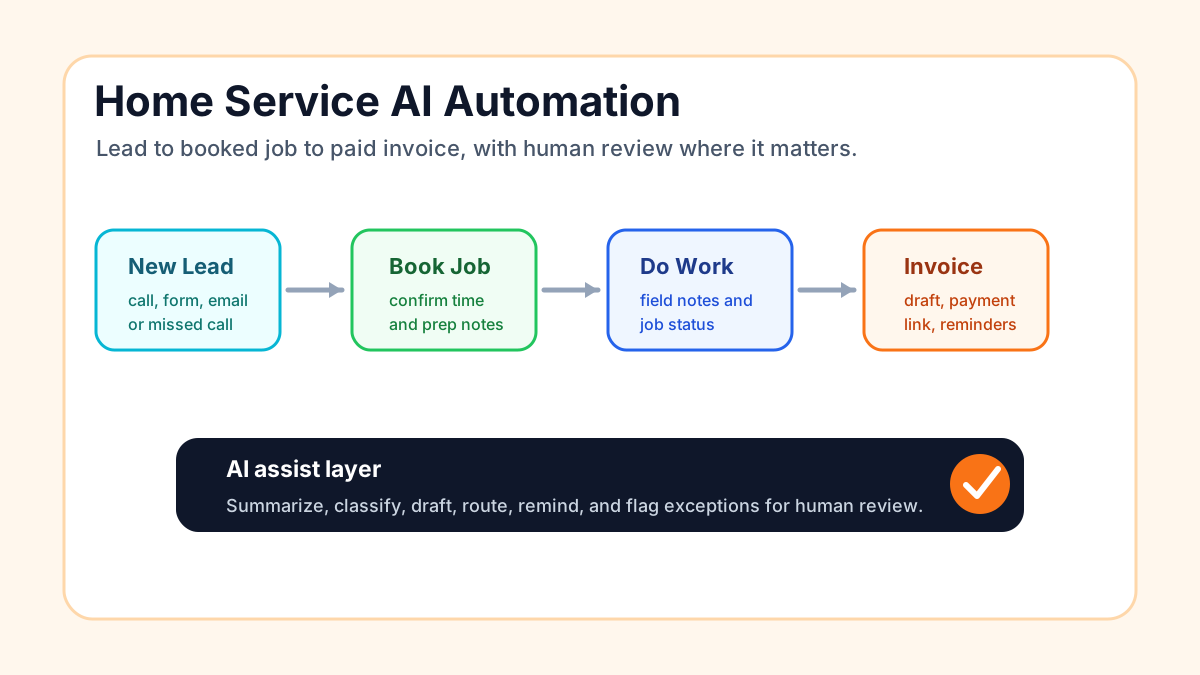
AI automation for home service businesses works best when it supports leads, jobs, billing, and reviews. The first workflow should help the business answer faster, quote cleaner, schedule better, collect payment, or ask for reviews at the right time.
Start close to revenue. Do not begin with a chatbot nobody asked for.
Business Boomer builds these through AI automation for local service businesses and AI automation services.
1. Missed call text back
Home service buyers often call while they are comparing options. A missed call text back workflow sends a fast reply, asks what they need, and creates a callback task.
This helps plumbers, HVAC companies, roofers, electricians, landscapers, cleaners, and contractors recover leads that would otherwise call the next company.
2. Quote request intake
A quote request often needs details before a human can estimate: address, service type, photos, timing, access notes, and urgency.
AI can summarize the request, ask for missing information, and create a clean record for the estimator.
3. Appointment reminders
Appointment reminders reduce no-shows and confusion. They can confirm date, time, address, access instructions, and prep steps.
Use human review when the appointment has special conditions, large scope, or sensitive access details.
4. Quote follow-up
Many home service companies send estimates and then move on to the next job. Quote follow-up automation creates reminders, drafts a check-in message, and helps the owner see which quotes still need attention.
This is often where revenue is already sitting.
5. Invoice reminders
Invoice automation connects completed jobs to invoice creation, payment links, reminders, and overdue tasks.
Use invoice automation if unpaid invoices are still tracked by memory.
6. Review requests
After a completed job, the system can ask satisfied customers for a review. The workflow should route complaints or unresolved issues to a human before asking publicly.
Review automation helps local rankings, trust, and conversion.
7. Weekly owner report
AI can summarize new leads, missed calls, booked jobs, open quotes, unpaid invoices, and review requests. This gives the owner a weekly operating view without digging through tools.
The report should include links to the source records, not just a pretty summary.
Best first workflow by business type
| Business | First workflow |
|---|---|
| Plumbing | Missed call text back |
| HVAC | Repair vs replacement intake |
| Roofing | Photo and address collection for estimate requests |
| Landscaping | Recurring service quote follow-up |
| Cleaning | Booking and reminder workflow |
| Electrical | Urgency triage and callback task |
| Painting | Estimate follow-up and photo collection |
Bottom line
Home service AI automation should make the owner faster and more organized. Build one workflow, prove it works, then add the next.
Lead follow-up next step
Stop letting leads sit without a next action.
Business Boomer can install lead capture, first-response drafts, quote follow-up reminders, and a simple owner handoff.
Keep building the system
Recommended next Business Boomer guides
These links are selected by topic and search intent so this guide connects to the most relevant service pages, industry pages, and supporting blog posts.
Service and setup pages
Use these when you are ready to turn the idea into an implementation path.
Industry-specific pages
See how the same workflow changes for specific business types.
Related blog posts
Read the connected guides that support this topic cluster.
Related AI automation guides
Keep going with the connected Business Boomer guides in this automation cluster.
AI automation services for local small business
Planning examples for broader automation. Compare current managed calls and reviews on the Services page; confirm other work in a separate scope.
AI automation for local service businesses
Practical lead, scheduling, review, CRM, invoice, and admin automation for plumbers, HVAC companies, roofers, landscapers, cleaners, contractors, and other local operators.
AI website for service businesses
Clearer service pages, lead paths, FAQs, reviews, and AI-assisted follow-up for service businesses.
Review request automation
Timely review requests, owner-approved review replies, and private service-recovery tasks after completed work.
FAQ
Quick answers about this guide and how to put the idea into practice.
What should home service businesses automate first?
Most home service businesses should start with missed call text back, quote request intake, appointment reminders, quote follow-up, invoice reminders, or review requests.
Which home service businesses can use AI automation?
Plumbers, HVAC companies, roofers, landscapers, cleaners, electricians, painters, flooring companies, power washing companies, and contractors can all use practical AI automation.
Does AI automation require replacing existing field-service software?
No. Many automations can connect to Jobber, Housecall Pro, ServiceTitan, HubSpot, QuickBooks, Google Sheets, email, calendars, and phone systems.
Stop letting leads sit without a next action.
Business Boomer can install lead capture, first-response drafts, quote follow-up reminders, and a simple owner handoff.
See Lead Follow-Up Automation