
AI Automation for Home Service Businesses: Leads, Jobs, and Billing
AI automation for home service businesses works best when it fixes the path from new lead to booked job, completed work, paid invoice, and follow-up task.


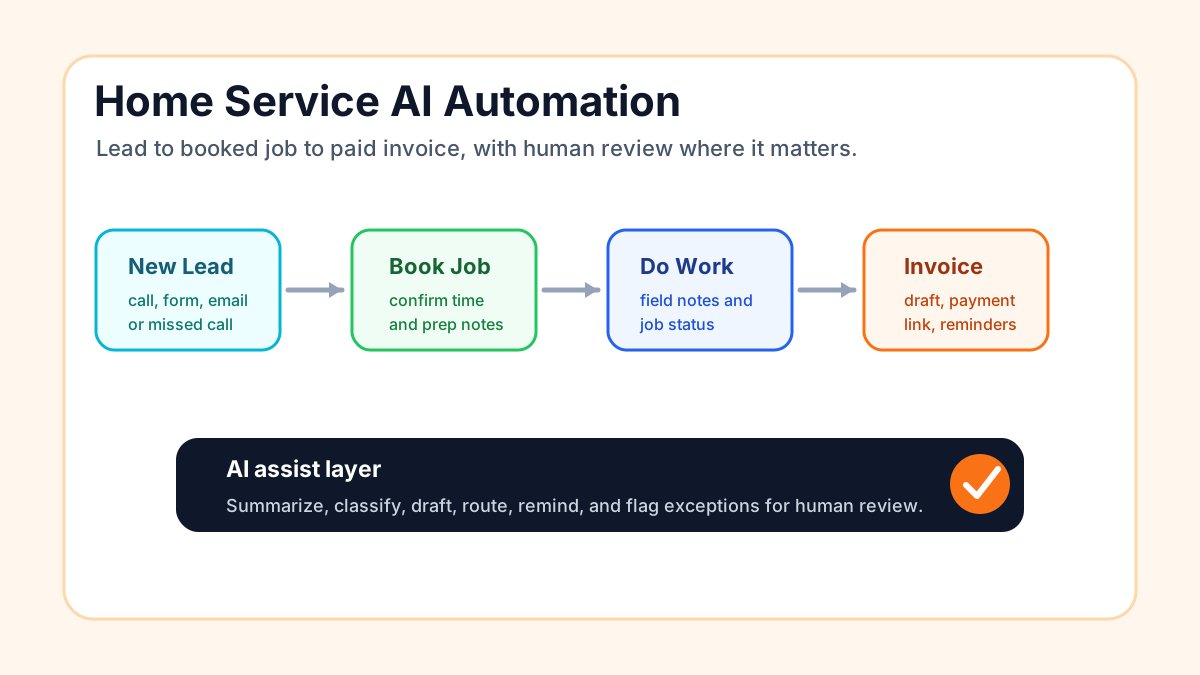
AI automation for home service businesses should make the daily operating loop cleaner: capture the lead, respond quickly, book the job, keep the office and field aligned, invoice when work is complete, and follow up without relying on memory. The best first system is usually narrow, practical, and tied to one visible bottleneck.
For plumbers, HVAC companies, electricians, landscapers, cleaners, pest control companies, roofers, remodelers, and other home service operators, AI should not be a novelty layer on top of chaos. It should help the business move real work from inquiry to paid job with fewer dropped handoffs.
Search intent and top-result pattern
People searching this topic are usually trying to understand what AI can actually do for a home service company before buying software or hiring help. Current U.S. results lean toward vendor guides, field-service software pages, AI phone agent pages, tool roundups, and industry-specific examples for contractors, plumbing, HVAC, roofing, and cleaning companies.
Recurring themes are 24/7 call answering, speed-to-lead, scheduling, dispatch, quote follow-up, technician notes, job completion, invoicing, payment reminders, review requests, and customer communication. The content gap is that many results jump straight to tools or broad promises. This guide focuses on the operating map: which workflow should come first, what AI should and should not do, and how a small team can roll out automation without losing control.
The home service automation loop
A home service business has a simple but unforgiving loop. A customer asks for help, the business responds, the job gets scoped, the appointment is booked, the field team does the work, the office sends the invoice, and someone follows up for payment, reviews, or repeat work.
The first useful AI automation project should improve one part of that loop. If leads are going cold, start with response and routing. If booked jobs are creating office confusion, start with job handoffs. If finished work is not turning into timely invoices, start with billing. The local service business automation page is the broader vertical context for choosing the first bottleneck.
Where AI helps first
Lead capture and first response
Home service leads arrive from calls, missed calls, website forms, Google Business Profile messages, referral texts, email, ads, and marketplace platforms. AI can help summarize the inquiry, classify urgency, draft a reply, create a CRM record, and alert the right person.
The goal is not to let AI sell complex work alone. The goal is to make sure a new inquiry gets acknowledged, organized, and assigned while the customer still cares. If the business does not already have a clear lead process, use the lead follow-up workflow guide before connecting more tools.
Call notes and intake summaries
Many home service owners lose time after the call, not during it. The customer explains the issue, the office writes partial notes, the technician gets vague context, and the owner has to clarify details later.
AI can turn call transcripts, form submissions, or voice notes into structured intake summaries: customer name, address, service type, urgency, access notes, photos requested, budget signals, and next step. For businesses still defining the basic concept, the lead response automation explainer is a useful foundation.
Scheduling and appointment reminders
Scheduling automation should be simple first. Confirm the appointment, send a reminder, include prep instructions, and flag exceptions. AI can help summarize special instructions or draft customer-specific reminder language, but the schedule itself should still come from the business's calendar, dispatch tool, or booking system.
For appointment-heavy companies, connect this article with the guide on automating appointment scheduling for small business. The practical rule is that AI can prepare the message, but the system of record should own the date, time, technician, and address.
A practical workflow map
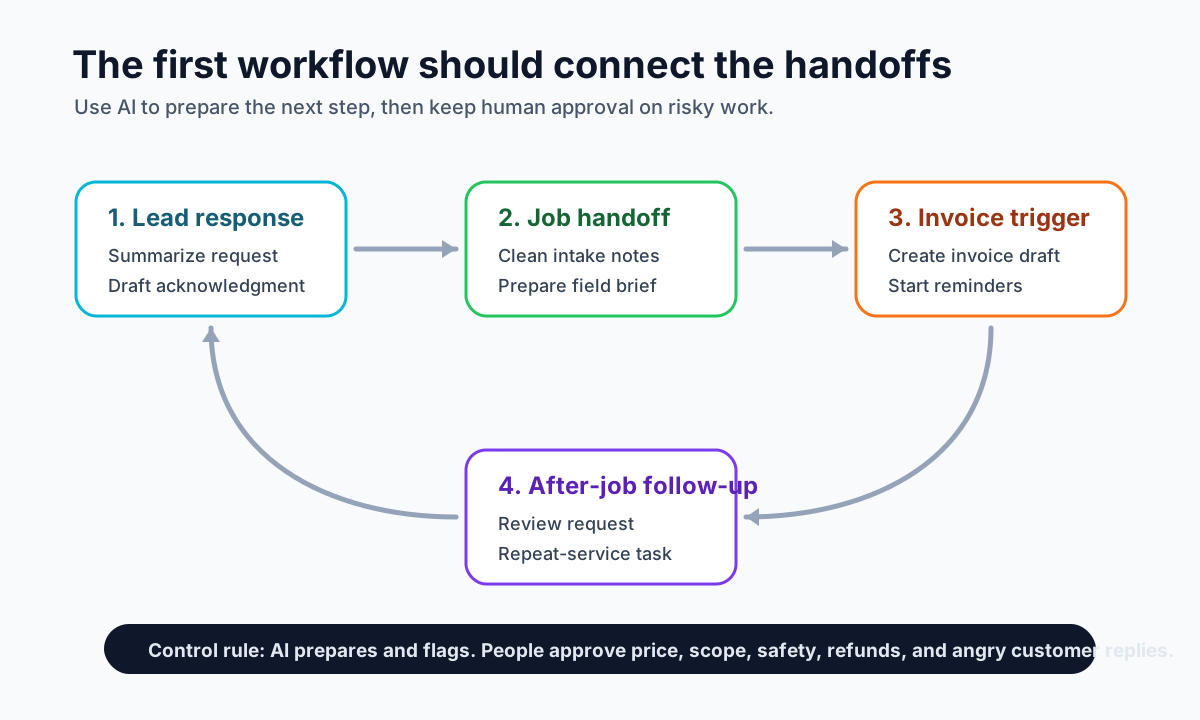
Most home service companies do not need a giant AI platform to start. They need one reliable path that makes the next action visible. The workflow below is a good first map when the business has mixed lead sources, field notes, and billing delays.
| Stage | What happens | AI role | Human control |
|---|---|---|---|
| New inquiry | Call, form, email, or message arrives | Summarize, classify, draft reply | Owner or admin approves exceptions |
| Qualification | Service need, location, urgency, photos, and access notes are captured | Ask missing-info questions or prepare a checklist | Human decides fit and pricing path |
| Booking | Appointment is created and confirmed | Draft prep instructions and reminder text | Calendar or dispatch tool owns the booking |
| Job handoff | Technician receives the scope and customer context | Turn notes into a clean job brief | Office confirms sensitive details |
| Completion | Job is marked done or needs follow-up | Summarize work completed and missing items | Technician or admin confirms accuracy |
| Billing | Invoice draft, payment link, and reminders start | Prepare invoice notes and reminder drafts | Human reviews variable pricing |
| After-job follow-up | Review request, warranty reminder, or repeat-service task is created | Draft message and timing suggestions | Business chooses when to send |
This structure keeps AI in the useful middle: it prepares, summarizes, classifies, drafts, and reminds. It does not change prices, promise arrival windows, approve refunds, diagnose safety issues, or handle angry customers without a person.
Lead response: the fastest first project
For many home service businesses, the first project should be lead response. A good first version can be as simple as:
- New website form, missed call, or email arrives.
- The system creates or updates a CRM record.
- AI summarizes the request and flags urgency.
- A confirmation text or email draft is prepared.
- The owner or office gets an alert for high-intent work.
- A follow-up task is created if the customer does not book.
This is where fast, structured follow-up helps. The business does not need to automate every sales conversation; it needs to stop letting good leads sit unnoticed. The small business lead follow-up guide gives a practical follow-up sequence when the team needs examples.
Job handoffs: reduce field-to-office confusion
Once leads are booked, the next bottleneck is usually handoff. A technician needs clear notes. The office needs job status. The customer needs a realistic next step. The owner needs fewer interruptions.
AI can help by turning messy notes into a job brief, extracting follow-up tasks from field updates, drafting customer status messages, and creating a short end-of-day summary. This is especially useful for contractor automation because estimates, change requests, and job updates often travel through too many texts and calls.
The safeguard is important: technicians and admins should review anything that affects price, scope, safety, warranty, or customer expectations. AI should organize the handoff, not invent the decision.
Billing: connect completed work to paid invoices
Billing is one of the strongest home service automation use cases because the trigger is often clear. A job is completed, an estimate is accepted, a recurring visit is done, or a milestone is approved. That event should lead to an invoice draft, payment link, reminder schedule, and overdue task.
If billing is the visible bottleneck, the better commercial path is the invoice automation setup page.
For a home-service-specific billing walkthrough, use the existing guide to invoice automation for home services.
Do not auto-send every invoice if pricing still needs judgment. A safe first workflow creates a draft with job details, service notes, payment terms, and a payment link, then asks an admin or owner to approve it. If the business already runs accounting in QuickBooks, the QuickBooks invoice automation page is the more focused setup path.
Review requests and repeat work
After the job, automation should keep the relationship moving. That may mean a review request, a maintenance reminder, a seasonal service prompt, a warranty follow-up, or a note to check in after an estimate went quiet.
AI can personalize a review request from the job type and customer context, but it should stay honest and simple. Do not invent praise. Do not pressure customers. Do not send follow-ups that ignore a bad experience. The business should use job status and human judgment to decide which follow-ups are appropriate.
For unpaid invoices, start with clear, polite language. The invoice reminder templates page gives language patterns that can be adapted before turning reminders on.
Tool stack: keep the source of truth clear
The tools do not matter as much as ownership. A home service business might use Jobber, Housecall Pro, ServiceTitan, QuickBooks, Google Workspace, HubSpot, GoHighLevel, Airtable, Zapier, Make, or a simple spreadsheet. Any of those can work if one source of truth owns the customer, job, invoice, or task.
The mistake is connecting AI to five places without deciding which place is authoritative. If a customer address changes, where should it be fixed? If a job is complete, which tool starts billing? If a lead is urgent, who gets notified? The AI automation tools simple vs overbuilt systems guide explains how to avoid building a stack that creates more admin.
What not to automate first
Do not start with broad autonomy. Do not let AI change prices, make refund decisions, approve financing, promise same-day availability, diagnose safety issues, or send sensitive customer messages without review.
Also avoid replacing the first human conversation when the job is complex, high-value, urgent, or emotionally charged. In those cases, AI should collect context and alert a person faster. The U.S. Small Business Administration's AI for small business guidance is a useful reminder that owners still need to understand how AI fits into operations, staff workflows, and risk.
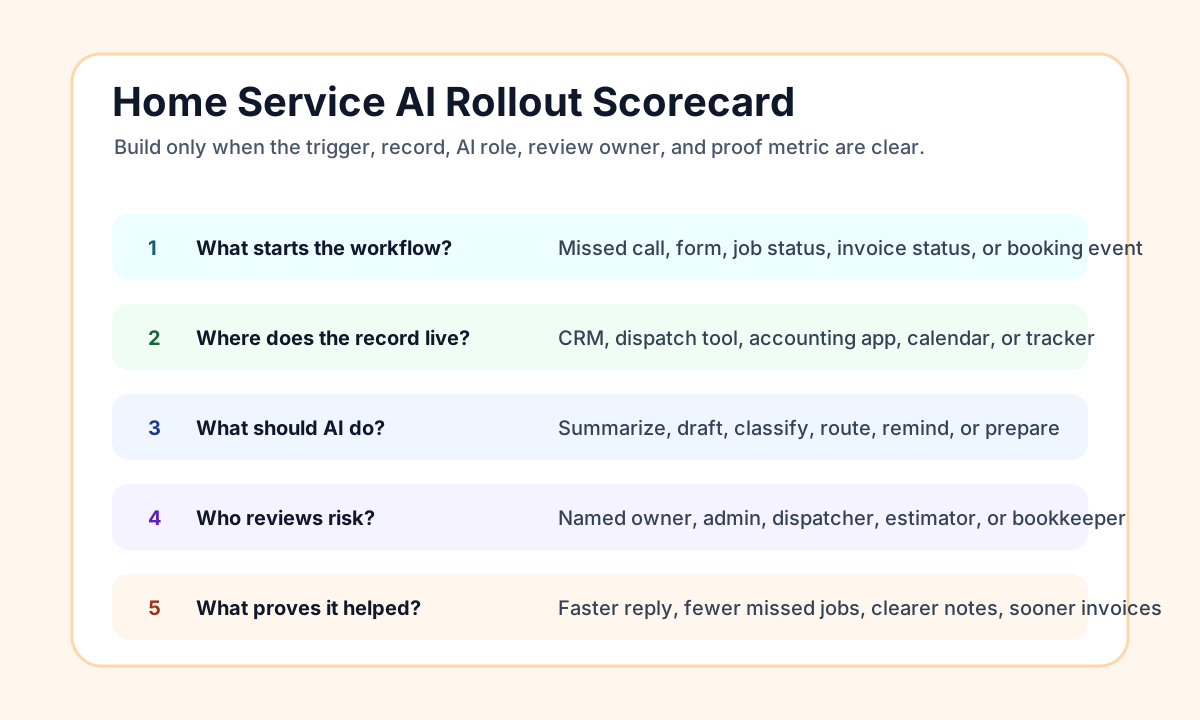
A rollout scorecard
Before buying a new AI tool or hiring an automation provider, score the first workflow. A weak answer means the business should map the process before implementing.
| Question | Strong answer | Weak answer |
|---|---|---|
| What starts the workflow? | Missed call, form, job status, invoice status, or booking event | "When someone remembers" |
| Where does the record live? | CRM, field-service tool, accounting app, calendar, or shared tracker | Personal inboxes and texts |
| What should AI do? | Summarize, draft, classify, route, remind, or prepare | Decide price, promise scope, or improvise policy |
| Who reviews risk? | Named owner, admin, dispatcher, estimator, or bookkeeper | Nobody is sure |
| What proves it helped? | Faster reply, fewer missed jobs, invoices sent sooner, fewer handoff questions | "The business feels more automated" |
This scorecard also helps decide whether the business needs a do-it-yourself setup, a software configuration project, or a hands-on implementation partner. For a wider comparison of tool categories, read best AI automation tools for small business.
First 30 days: a safe implementation plan
In week one, map the current workflow and collect real examples. Use recent leads, call notes, jobs, invoices, and follow-ups. The point is to see where work stalls today.
In week two, choose one source of truth and one trigger. For example, "new website lead creates a CRM task" or "completed job creates an invoice draft." If the workflow needs a clean map first, the AI workflow automation guide is the right starting point.
In week three, test with normal cases and edge cases. Include missing addresses, duplicate contacts, emergency requests, unclear scope, angry replies, and variable invoice amounts. Keep approval before customer-facing or money-related actions.
In week four, measure one useful result. Did response time improve? Did fewer leads get missed? Were job notes clearer? Did invoices go out sooner? Did overdue follow-up become visible? If yes, document the process and decide whether the next workflow deserves attention.
Practical examples by trade
| Business type | Good first AI automation | Why it helps |
|---|---|---|
| Plumbing | Missed-call text-back, emergency flag, booking task | Urgent leads need fast routing |
| HVAC | Seasonal tune-up reminders and no-show reminders | Repeat work depends on timing |
| Landscaping | Estimate follow-up and recurring-service notes | Jobs often stall after quote |
| Cleaning | Intake summary and recurring appointment reminders | Details and access notes matter |
| Roofing | Lead qualification and estimate follow-up | High-value jobs need clear next steps |
| Pest control | Renewal reminders and visit follow-up | Recurring service needs consistency |
| Remodeling | Change-request summaries and owner approval tasks | Scope and expectations must stay clear |
These examples are intentionally narrow. A good first workflow should be small enough to test, useful enough to notice, and documented enough that the team can keep using it.
Bottom line
AI automation for home service businesses is most useful when it fixes the path from lead to booked job, completed work, paid invoice, and follow-up. Start with the bottleneck that is already costing time or creating missed opportunities. Keep one source of truth. Use AI to prepare and organize the work. Keep humans in control of pricing, promises, scope, safety, and exceptions.
If you want a practical way to choose the first workflow, start with the 25-Minute AI Workflow Audit Kit.
You can also book a Free 30-Minute AI Consultation and bring one messy lead, job, or billing process. Business Boomer can help map the first workflow and decide whether the right next step is lead response, job handoffs, invoice automation, or a broader operating system.
Invoice workflow next step
Turn invoice follow-up into a working setup.
Business Boomer can map the billing trigger, payment link, reminder timing, and overdue handoff for one focused invoice workflow.
Keep building the system
Recommended next Business Boomer guides
These links are selected by topic and search intent so this guide connects to the most relevant service pages, industry pages, and supporting blog posts.
Service and setup pages
Use these when you are ready to turn the idea into an implementation path.
Industry-specific pages
See how the same workflow changes for specific business types.
Related blog posts
Read the connected guides that support this topic cluster.
Recommended next steps
These pages connect this guide to the Business Boomer offer, related workflow, and next implementation path.
Related AI automation guides
Keep going with the connected Business Boomer guides in this automation cluster.
AI automation services for local small business
Planning examples for broader automation. Compare current managed calls and reviews on the Services page; confirm other work in a separate scope.
Lead follow-up automation for small business
Turn form fills, missed calls, quote requests, emails, and voice notes into reply drafts, CRM updates, reminders, and next steps.
AI sales team and lead follow-up setup
Turn sales calls, form fills, quote requests, and owner notes into follow-up emails, calendar invites, CRM updates, and next-step reminders.
AI automation for local service businesses
Practical lead, scheduling, review, CRM, invoice, and admin automation for plumbers, HVAC companies, roofers, landscapers, cleaners, contractors, and other local operators.
FAQ
Quick answers about this guide and how to put the idea into practice.
What is the main takeaway from AI Automation for Home Service Businesses: Leads, Jobs, and Billing?
AI automation for home service businesses works best when it fixes the path from new lead to booked job, completed work, paid invoice, and follow-up task.
How does AI automation for home service businesses help a small business?
AI automation for home service businesses can help a small business reduce manual work, improve follow-up, organize repetitive tasks, and create a clearer operating process when it is tied to a real bottleneck.
Can Business Boomer help implement AI automation for home service businesses?
Yes. Business Boomer can help turn the idea into a practical workflow, page, checklist, or automation system depending on what the business needs first.
Turn invoice follow-up into a working setup.
Business Boomer can map the billing trigger, payment link, reminder timing, and overdue handoff for one focused invoice workflow.
See Invoice Automation Setup