
AI Automation Tools: Simple vs Overbuilt Systems for Small Business
The best AI automation tool stack for a small business is usually the simplest one that moves one real workflow from trigger to review. Overbuilt systems add dashboards, agents, and integrations before the business has a clean process.


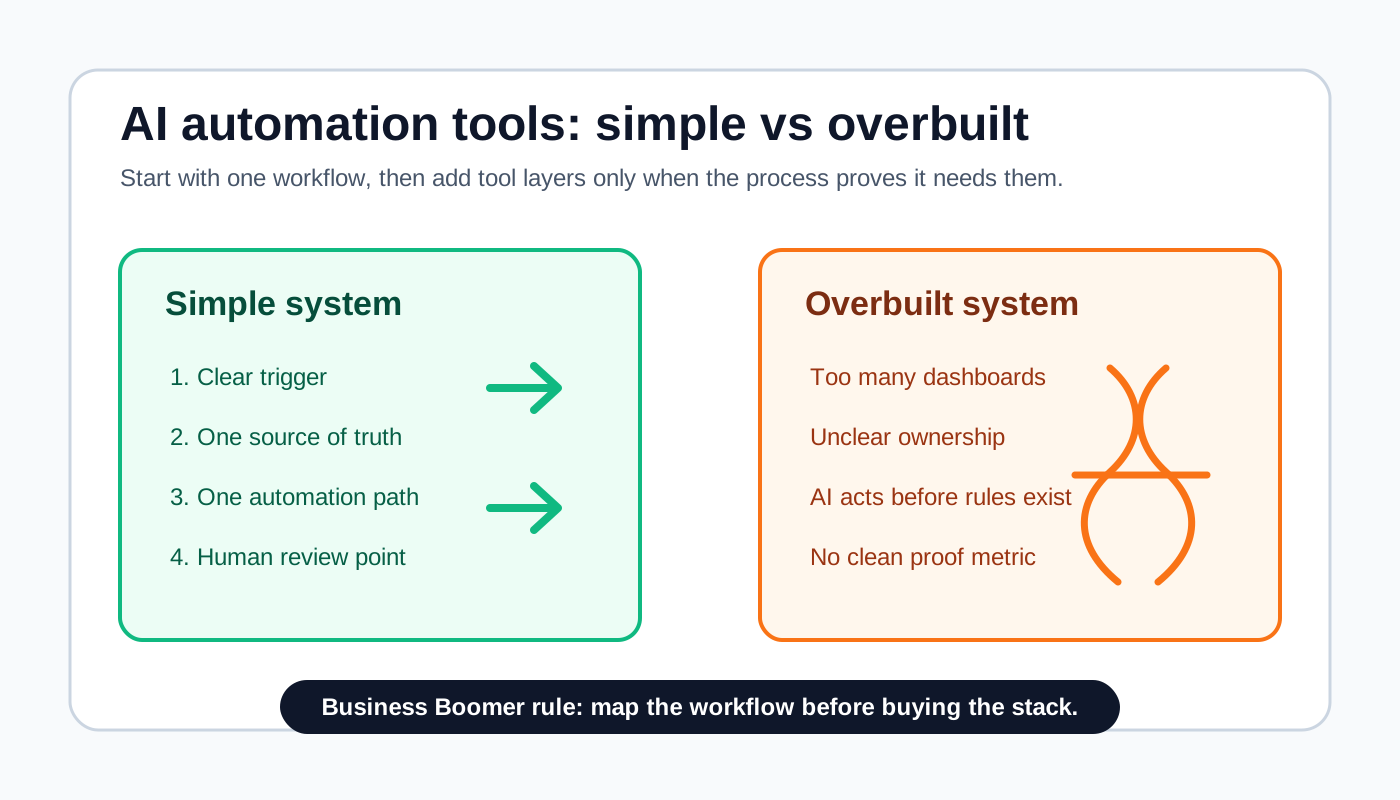
The right AI automation tools for a small business are usually the simplest tools that move one repeated workflow from trigger to next action with a clear review point. A simple system can be one form, one CRM or spreadsheet, one automation rule, one AI draft or summary step, and one person approving exceptions.
An overbuilt system adds too many apps, dashboards, agents, permissions, and reports before the business has a clean workflow. That does not make the business more automated. It usually creates more places to check, more ways for work to stall, and more maintenance for an owner who wanted less admin.
Search intent and top-result pattern
People searching for AI automation tools are usually comparing software before they buy. Current U.S. results lean toward tool roundups, vendor pages, workflow automation explainers, low-code platform comparisons, and AI agent lists. The common pattern is "best for," features, pricing, integrations, templates, use cases, and whether a tool fits beginners or technical teams.
The content gap is that many results rank tools before helping a small business decide whether it needs another tool at all. This guide focuses on the practical decision: when to keep the system simple, when to add a layer, and when a stack has become overbuilt for the workflow it is supposed to fix.
The simple answer: automate one workflow before buying a stack
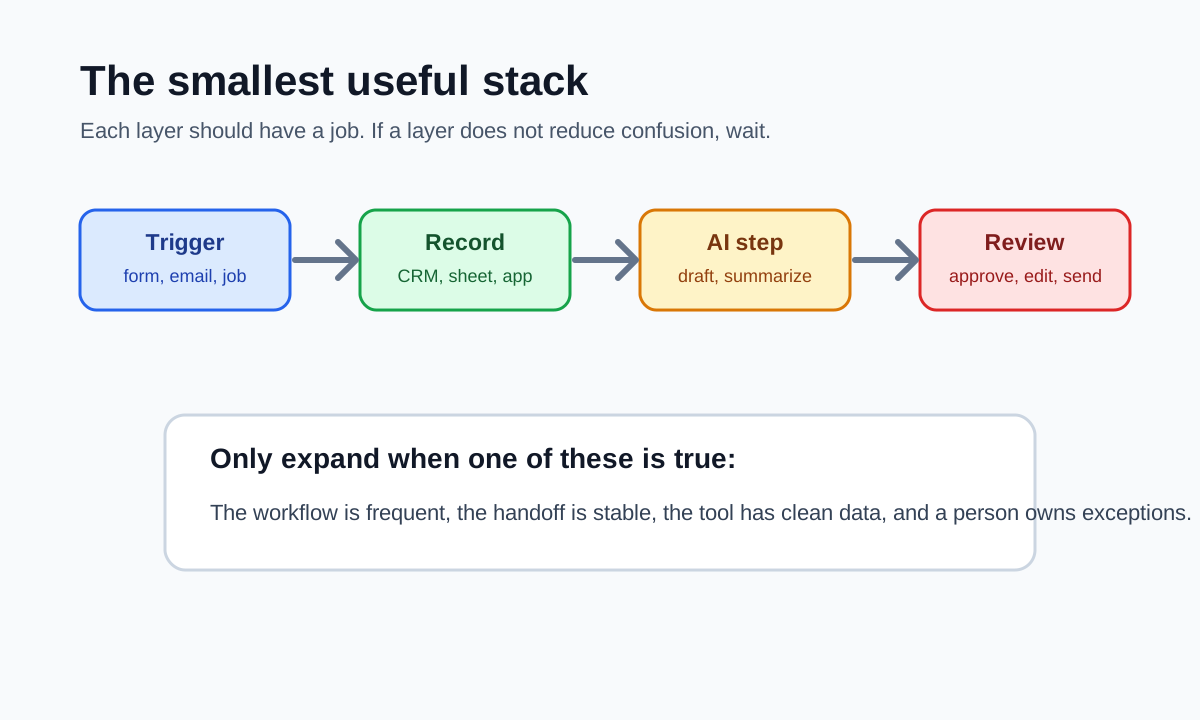
A simple AI automation system has five parts: a trigger, a source of truth, an automation action, an AI assist step, and a human review point. If those parts are clear, a small business can often start with tools it already uses: a form, email, CRM, calendar, accounting app, spreadsheet, Zapier, Make, or a built-in automation feature.
If those parts are not clear, more software usually makes the problem worse. Before comparing platforms, map the workflow using the AI workflow automation guide so the business knows what starts the process, what information matters, who owns the next step, and what should happen when the tool is unsure.
What simple looks like
A simple AI automation setup is narrow enough that the owner can explain it in one minute. For example: "When a new estimate request arrives, create a CRM record, summarize the request, draft a first reply, alert the owner, and wait for approval before sending anything." That is automation with boundaries.
For a service business, the best first system often improves lead response, intake, scheduling, invoice reminders, review requests, customer support triage, or owner admin. The AI automation examples for small businesses article is useful when the team needs to compare candidate workflows before choosing the first one.
What overbuilt looks like
An overbuilt AI automation system has more moving parts than the workflow can justify. It may include multiple AI tools, two CRMs, a project board, a database, several no-code automations, a chatbot, a reporting dashboard, and an agent that is allowed to act before the business has written the rules.
The warning sign is not the number of tools by itself. The warning sign is that nobody can answer what happens next, where the record lives, who reviews risky actions, or what metric proves the system helped. If the team is still unclear on the difference between rules-based automation and AI assistance, read the AI vs automation guide before adding another layer.
Simple vs overbuilt comparison
| Decision point | Simple system | Overbuilt system |
|---|---|---|
| Starting point | One repeated workflow | A broad tool stack with no first workflow |
| Source of truth | One trusted record | Data split across several dashboards |
| AI role | Draft, summarize, classify, route, or flag | Decide, send, change terms, or improvise policy |
| Human review | Named owner for exceptions | Review assumed but not assigned |
| Proof metric | One visible outcome | Vague promise of productivity |
| Maintenance | Owner can inspect the path | Only the builder understands it |
The simple system is not less professional. It is easier to test. A small business should prefer a boring system that actually sends the owner the right next action over an impressive demo that nobody trusts after the first edge case.
A scorecard before choosing AI automation tools
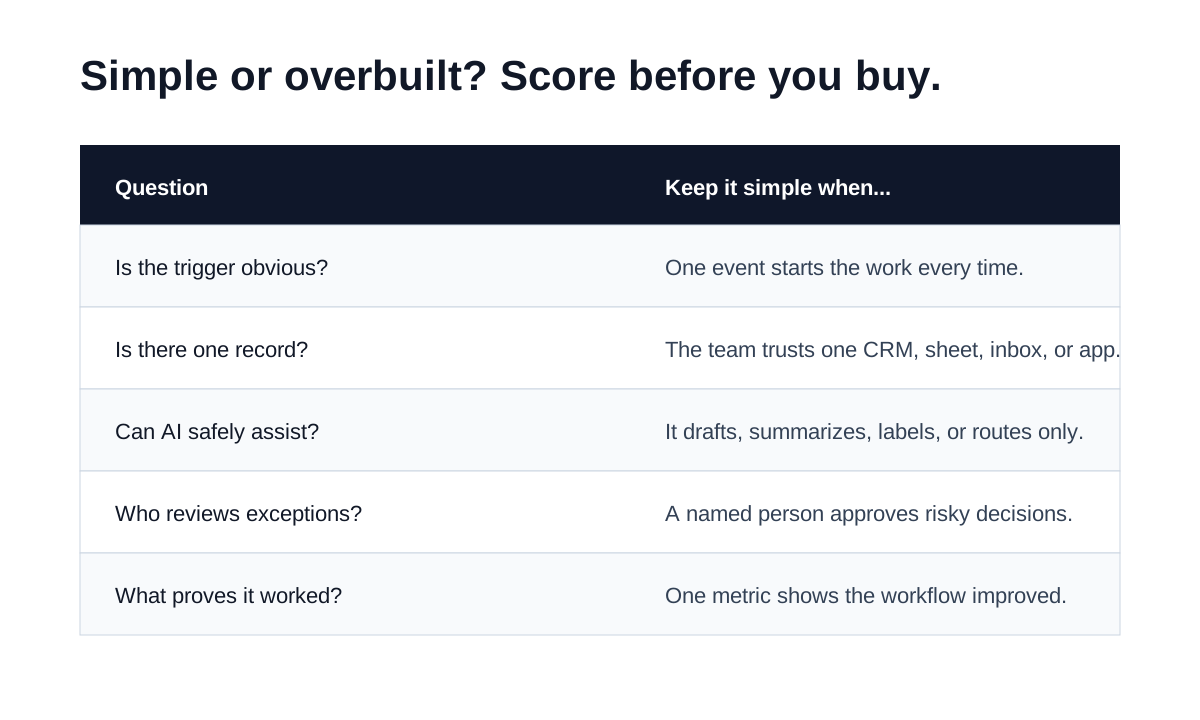
Use this scorecard before subscribing to another tool. If the answer is weak, the next step is workflow cleanup, not software shopping.
| Question | Strong answer | Weak answer |
|---|---|---|
| What triggers the workflow? | A form, email, booking, job status, invoice status, or CRM stage | "Whenever someone remembers" |
| Where is the record? | CRM, accounting app, calendar, sheet, ticket system, or project board | Personal inboxes and memory |
| What can AI do safely? | Summarize, classify, draft, route, remind, prepare | Make promises, change prices, approve exceptions |
| Who reviews risk? | Named owner, admin, salesperson, manager, or bookkeeper | Nobody is sure |
| What proves it worked? | Faster response, fewer missed tasks, cleaner invoices, fewer manual touches | "It feels more automated" |
The U.S. Small Business Administration's AI for small business guidance is a useful reminder that owners still need to understand where AI fits into operations, risk, and staff workflows.
When simple is enough
Simple is enough when the workflow is frequent, low to moderate risk, easy to test with real examples, and close to an existing tool. Most small businesses do not need a custom AI platform to start. They need a cleaner handoff.
A contractor with slow estimate follow-up may only need web form capture, CRM task creation, an AI summary, and an owner alert. If lead handling is the first bottleneck, the lead follow-up workflow guide gives a practical pattern for turning new inquiries into owner-ready next steps.
A home services business with billing delays may only need a job-complete trigger, invoice draft, payment link, reminder rule, and overdue exception list. If billing is the visible problem, the invoice automation setup page is a better path than a broad AI operations rebuild.
A solo consultant may only need meeting notes turned into tasks, follow-up drafts, and a weekly review list. If the owner wants a broader operating layer after that first workflow is clear, OpenClaw onboarding can support the next stage without pretending every task should be autonomous on day one.
When a more advanced system makes sense
A more advanced system makes sense when the workflow crosses several tools, touches customers often, has enough volume to justify maintenance, and already has clean ownership. It can also make sense when the business needs audit history, permissions, staff routing, reporting, or exception handling that a simple rule cannot cover.
For example, a property management company might need intake, maintenance triage, vendor assignment, tenant communication drafts, approval rules, and weekly owner reporting. That can justify a more connected system once the intake and handoff rules are clear. If the team is deciding whether to hire help, the AI automation company checklist can help vet whether a provider is building a system or just reselling tool advice.
A more advanced AI agent also makes sense when the task has several steps but still has human review. The AI agents for business automation guide breaks down when an agent is useful for lead follow-up, intake, support, admin, research, and billing.
Practical examples by small business workflow
| Workflow | Simple version | Overbuilt version to avoid |
|---|---|---|
| Lead response | Form to CRM, AI summary, draft reply, owner alert | Chatbot, scoring model, full sales automation, and no owner review |
| Scheduling | Booking form, intake summary, calendar reminder, prep note | Multi-agent scheduling logic before appointment rules are stable |
| Invoicing | Job complete trigger, invoice draft, reminder schedule, exception list | Finance agent with broad permissions before terms are clean |
| Support | Message label, suggested reply, escalation tag | Autonomous replies for refunds, policy disputes, or sensitive questions |
| Reporting | Weekly summary from one source of truth | Dashboard across five messy systems nobody maintains |
| Owner admin | Voice note to task list with review | Agent creating projects from incomplete notes without confirmation |
The pattern is the same in each row: make the first version useful, visible, and inspectable. A small team can always add sophistication after the workflow proves it deserves more.
Tool categories that usually stay simple
AI assistants are simple when they draft, summarize, rewrite, or prepare. They become overbuilt when the business expects a standalone assistant to know every customer, policy, invoice, appointment, and internal exception without connecting it to a trusted record.
Automation builders are simple when they move one piece of data between tools. They become overbuilt when a fragile chain of steps is used to compensate for unclear ownership. For a broader buying overview, compare categories in best AI automation tools for small business.
CRMs and task tools are simple when they become the source of truth. They become overbuilt when every team member keeps a separate system anyway. If the business still needs the plain-language foundation, the business automation guide explains how triggers, owners, records, and handoffs fit together.
Human review is part of the system
Human review is not a failure of automation. It is the control that lets a small business use AI without giving it too much authority too soon. Keep review on pricing, refunds, legal or medical language, hiring decisions, sensitive financial actions, angry customers, and anything that changes the relationship with the customer.
NIST's AI Risk Management Framework is written for broader AI governance, but the practical small-business takeaway is simple: define what the system should do, test it, monitor mistakes, and keep controls visible.
A rollout path that avoids overbuilding
Start with the smallest useful version. Run it with real examples. Fix the handoff. Then decide whether a second layer is worth adding.
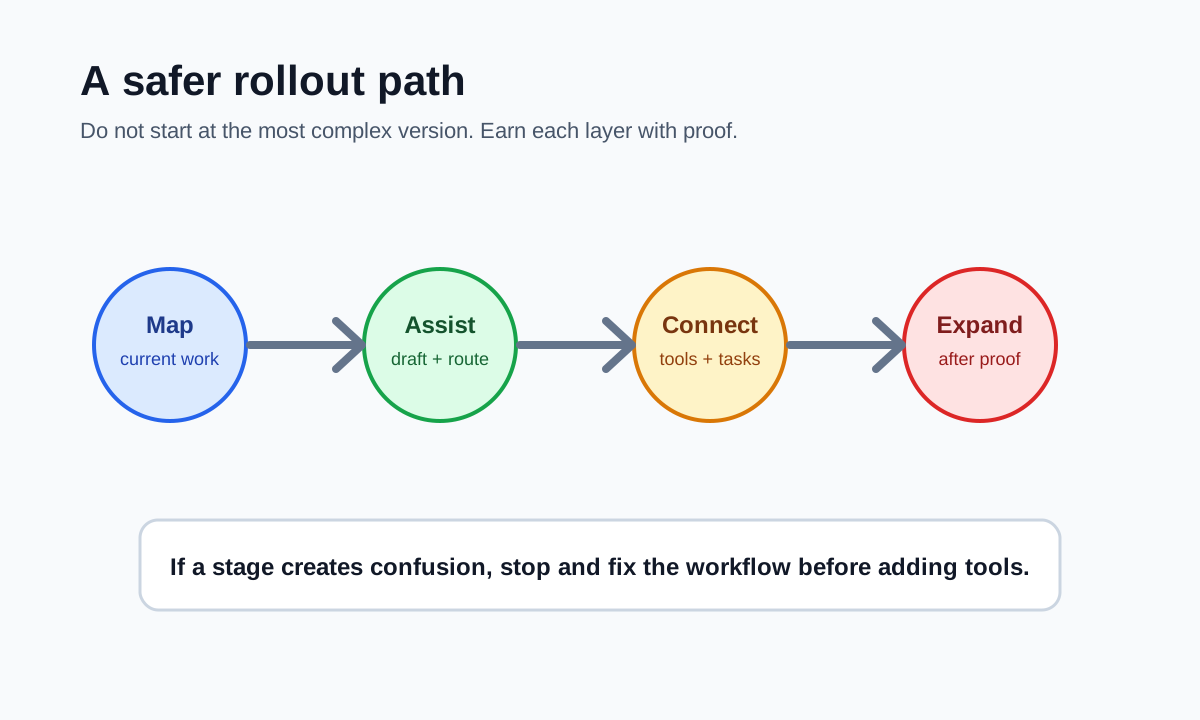
- Map the current workflow in plain English.
- Pick one source of truth.
- Choose one trigger and one next action.
- Add AI only where language, summarizing, classification, or drafting helps.
- Keep approval before customer-facing or money-related actions.
- Test normal cases, missing information, duplicates, angry replies, and edge cases.
- Track one proof metric for two to four weeks.
- Add another tool only if the metric and team behavior justify it.
This rollout also keeps implementation work commercial and practical. If the business wants help choosing the first workflow instead of comparing software lists, the AI automation services page explains the Business Boomer setup path.
Common mistakes
The first mistake is buying software before naming the bottleneck. A tool cannot fix unclear responsibility. It can only move unclear work faster.
The second mistake is treating tool access as strategy. Giving AI permission to read more systems does not make it useful unless the workflow tells it what matters.
The third mistake is skipping examples. Test with normal jobs, incomplete leads, angry customers, duplicates, overdue invoices, bad data, and edge cases before the system handles live work.
The fourth mistake is making the owner maintain something only the builder understands. A useful automation should come with a short SOP, test examples, and a clear failure path.
The fifth mistake is measuring activity instead of outcomes. Count faster lead alerts, fewer missed tasks, invoices sent on time, replies drafted, appointments prepared, or admin notes converted into assigned work.
Bottom line
The best AI automation tools for small business are the ones that make one real workflow easier to run. Start simple: trigger, record, action, AI assist, human review, proof metric. Add complexity only after the business can explain the workflow, test it, and maintain it.
If you want help choosing the first workflow, start with the 25-Minute AI Workflow Audit Kit.
You can also book a Free 30-Minute AI Consultation and bring one messy process, the tools you already use, and a few real examples. That is enough to decide whether your business needs a simple setup or a more connected system.
Next step
Find the workflow worth fixing first.
Use the Free 30-Minute AI Consultation to map where leads, invoices, notes, or follow-ups are slipping and choose the smallest useful system.
Keep building the system
Recommended next Business Boomer guides
These links are selected by topic and search intent so this guide connects to the most relevant service pages, industry pages, and supporting blog posts.
Service and setup pages
Use these when you are ready to turn the idea into an implementation path.
Industry-specific pages
See how the same workflow changes for specific business types.
Related blog posts
Read the connected guides that support this topic cluster.
Related AI automation guides
Keep going with the connected Business Boomer guides in this automation cluster.
AI automation services for local small business
Planning examples for broader automation. Compare current managed calls and reviews on the Services page; confirm other work in a separate scope.
Best invoicing automation tools for small business
A comparison of QuickBooks, FreshBooks, Stripe Billing, Wave, Jobber, Housecall Pro, Zapier, and Make.
Lead follow-up automation for small business
Turn form fills, missed calls, quote requests, emails, and voice notes into reply drafts, CRM updates, reminders, and next steps.
How to automate invoices for small business
A practical guide to invoice creation, reminders, payment tracking, and cash-flow follow-up.
FAQ
Quick answers about this guide and how to put the idea into practice.
What is the main takeaway from AI Automation Tools: Simple vs Overbuilt Systems for Small Business?
The best AI automation tool stack for a small business is usually the simplest one that moves one real workflow from trigger to review. Overbuilt systems add dashboards, agents, and integrations before the business has a clean process.
How does AI automation tools simple vs overbuilt help a small business?
AI automation tools simple vs overbuilt can help a small business reduce manual work, improve follow-up, organize repetitive tasks, and create a clearer operating process when it is tied to a real bottleneck.
Can Business Boomer help implement AI automation tools simple vs overbuilt?
Yes. Business Boomer can help turn the idea into a practical workflow, page, checklist, or automation system depending on what the business needs first.
Find the workflow worth fixing first.
Use the Free 30-Minute AI Consultation to map where leads, invoices, notes, or follow-ups are slipping and choose the smallest useful system.
Book a Free 30-Minute AI Consultation