
How I Use ChatGPT and Codex Desktop to Coordinate All My Projects
My ChatGPT and Codex Desktop system uses one conversational front door, a local WorkOS, project command centers, focused specialists, evidence, and approval gates.

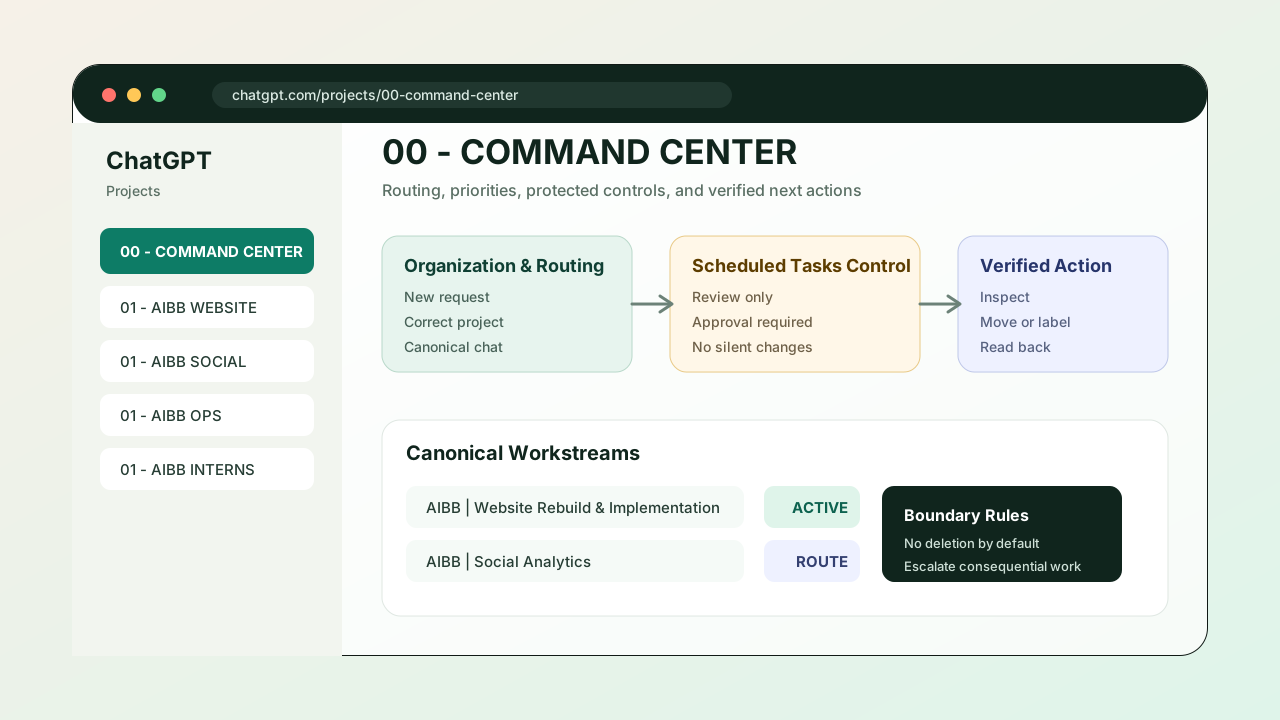
Updated August 28, 2026: My system has grown from organizing ChatGPT Projects into using a local WorkOS, explicit project commands, and bounded Codex tasks. This article replaces the older version at the same URL so there is one current guide rather than two competing posts.
My desktop app sidebar can look busy. It has Nova, a local master command, project command centers, and focused tasks. The useful part is not the number of tasks. It is that each level has one clear job.
I can begin with a plain request, typed or spoken, without deciding which folder or specialist needs it. The system routes the work, reads the correct project context, runs a bounded task, checks the result, records what matters, and returns the next decision to me.
OpenAI describes the desktop experience as one app with the familiar ChatGPT conversation experience and Codex for building, testing, and review. My setup adds an operating layer around those capabilities so useful work does not disappear inside a long list of chats.
The names Nova, Sam WorkOS, 00 - Command, and READY / BLOCKED / VERIFIED are my conventions. They are not buttons or automatic features built into ChatGPT.
Open the public Sam’s Work System Guide to see the flow, then use Build yours for the setup steps.
Nova is my front door
When I have an idea, a question, a voice note, or something I cannot place, I talk to Nova, my pinned Main Agent. I can also use the registered local Sam WorkOS / 00 - Command task. Both read the same local command layer, so I do not have to understand the filing system first. I can say:
“I want to turn my work system into a simple website. Put it in the right project and tell me when I need to review.”
Nova or the local master identifies which project owns the work, reads that project’s command pack, and dispatches a clearly bounded local worker. A second AI relay is not required.
My active command centers cover areas such as business operations, growth, social production, automations, client work, research, personal administration, and reusable skills. I can also preserve an old project as a read-only archive without treating it as a current place to start work.
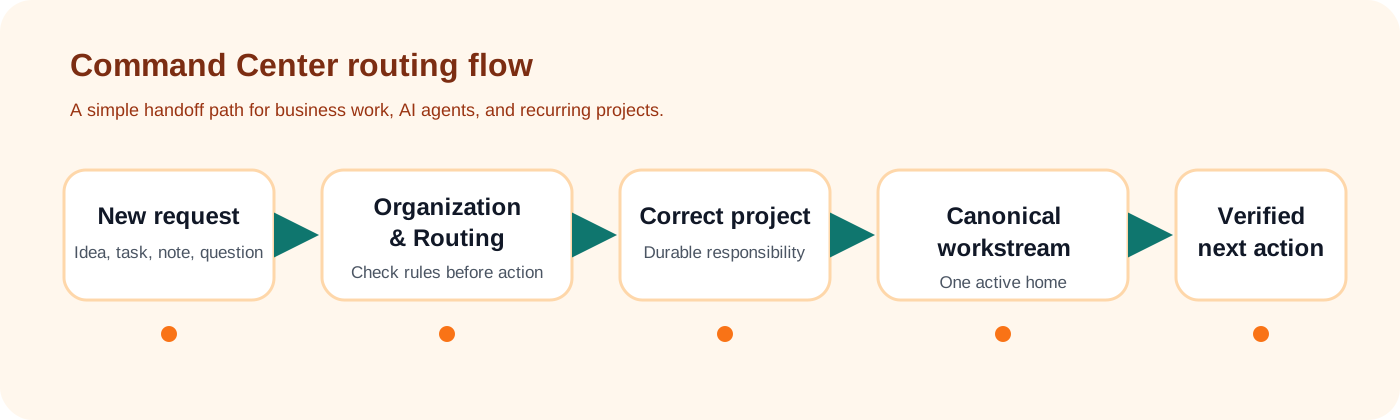
The normal path is:
Talk → route → read → work → verify → remember → approve → share when needed
“Share when needed” is deliberate. Many tasks end as a private draft, a verified local change, or a read-only report.
Each project has one coordinator
Every durable area has one local command pack in its 00 - Command folder. Nova or the local master reads that pack, then creates or continues a bounded worker when the work needs one.
The project command first reads the local records that define the work. It can then give one bounded assignment to the right specialist: research a source, prepare a strategy, write a document, design a presentation, create social content, build and test an app, review an automation, or verify a finished result.
This division prevents one enormous chat from becoming strategist, researcher, designer, developer, publisher, and memory all at once.
It also prevents a task from quietly taking ownership of unrelated work. A social-production task does not control an AIBB growth decision. A cloud chat does not automatically edit a local folder. Each handoff is explicit.
The local WorkOS is the durable memory
A chat is useful for conversation. It is not my permanent operating record.
My local WorkOS holds the rules, routing, and project memory that should survive one conversation. Every project uses the same small structure:
- WORK explains what belongs to the project and what does not.
- PROJECT_MEMORY holds current decisions, status, blockers, and the exact next action.
- SOURCES lists the documents, links, records, and evidence the project can trust.
- Current Work holds active material.
- 99 Archive preserves older work without confusing it with the current state.
Dynamic information lives in PROJECT_MEMORY only. Root-level routing documents point there instead of copying changing status into several places. That reduces the chance that two files disagree about what happens next.
When a cloud task learns something useful, it does not assume it can reach into the local WorkOS. It returns a clear update packet. The master command verifies the packet, applies it to the correct local record, and logs the change.
That manual boundary may sound less magical than “everything syncs,” but it is much easier to trust.
Specialists do bounded work
Once the project command understands the request, it can hand off a narrow assignment.
My system has work lanes for:
- research and source verification
- strategy and decisions
- documents and presentations
- social creation, review, and scheduling
- app design, build, QA, and TestFlight review
- hiring and outreach
- house research
- automation health and recovery
- weekly operating review
A specialist receives the sources, the expected output, and the stopping point. A research task should not suddenly publish a post. A writing task should not silently change a live website. A lighter model can gather or format clear information, but it stops when evidence is ambiguous or a consequential judgment is required.
A stronger reasoning model handles consequential judgment when the work requires it. The system uses the least expensive reliable route that can still be checked.
Every task returns a receipt
“Done” is not a useful status by itself. Every task returns one of three receipts:
| Receipt | What it means |
|---|---|
| READY | The draft or next action is prepared for review. |
| BLOCKED | A decision, source, permission, or piece of access is missing. |
| VERIFIED | The claimed result was checked against evidence. |
If a task says a page was published, I want the live URL and a check that the correct version appears there. If a social post was scheduled, I want the scheduled record, not an assumption based on a draft file. If an automation is marked ACTIVE, I still need evidence that it is healthy and authorized for the action it performs.
This is the same reason a practical small business automation audit starts by finding ownership and handoff gaps before buying another tool.
Different information has different homes
I use a short storage rule so each device can find the right thing:
| What it is | Where it belongs |
|---|---|
| Conversation and review | Its ChatGPT or Codex task |
| Operating rules, decisions, and current status | The local WorkOS |
| Shared source documents and finished deliverables | Google Drive |
| Website and app code | GitHub |
| Passwords, keys, and tokens | A password manager, never a chat |
| Live evidence or an approved action | The connected service |
Google Drive is for shared documents and deliverables. GitHub is the durable source for code. Gmail, Calendar, Drive, social platforms, GitHub, Vercel, and other connected services remain live evidence or action systems.
A connector being available does not mean it is constantly synchronizing. The service is read or changed when a task makes an explicit, authorized request.
Local files also stay on the computer that holds them unless I deliberately move or synchronize them. That is why the dependable entry point for my WorkOS is a registered local Codex task that can read the folder directly.
Approval is a separate step
The system can research, draft, organize, build, and verify without turning every step into a meeting. Anything external, public, paid, destructive, or irreversible waits for my approval.
That includes:
- publishing a post or website
- sending an email, message, or outreach
- spending money
- changing a live account or deployment
- deleting important work
- exposing credentials or sensitive information
Approval applies to the exact version I reviewed. If the article changes after I approve it, the approval is no longer current.
A quality score helps me judge a draft, but a high score cannot override an unsupported claim, a broken preview, duplicate content, or missing authorization. This article itself followed that rule: the first new-post draft overlapped the earlier command-center article, so the correct action was to merge and update the existing URL rather than publish a competing copy.
How to build a smaller version
You do not need my whole structure to use the pattern.
Use the Project Command System skill to let Codex guide the setup. You can also download the SKILL.md file. The public copy excludes private folders, task IDs, contacts, and credentials.
- Create one Main Agent as your front door.
- Make one local WorkOS folder for operating rules, routing, and project memory.
- Create one master command that can read that folder.
- Create project commands only for durable responsibilities.
- Give each project WORK, PROJECT_MEMORY, and SOURCES records.
- Use specialists for small, clearly bounded jobs.
- Require READY, BLOCKED, or VERIFIED receipts.
- Add connected services only after the manual routing loop works.
Start with two or three projects, not twenty. The first test is simple:
- Can you say what you need in one place?
- Can the system identify the owner?
- Can it read the current decision before doing work?
- Can it bring back evidence and one clear next action?
- Does it stop before a protected action?
If those answers are yes, the system is useful before you add a single automation.
The point is less confusion
I am not trying to make one AI task run my entire business. I want one easy place to talk, clear owners underneath it, durable memory outside the chat, focused work, and a review boundary I can trust.
The system handles routing. I keep the judgment.
If your AI work is spread across unlabeled chats, shared documents, and half-finished tasks, do not begin with another tool. Begin by deciding where a request enters, who owns it, what must be remembered, and which actions require you.
Use the AI workflow audit kit to map one workflow, or see AIBB's AI automation services if you want help building a practical system around a real business bottleneck.
Keep building the system
Recommended next Business Boomer guides
These links are selected by topic and search intent so this guide connects to the most relevant service pages, industry pages, and supporting blog posts.
Service and setup pages
Use these when you are ready to turn the idea into an implementation path.
Industry-specific pages
See how the same workflow changes for specific business types.
Related blog posts
Read the connected guides that support this topic cluster.
Related AI automation guides
Keep going with the connected Business Boomer guides in this automation cluster.
AI automation services for local small business
Planning examples for broader automation. Compare current managed calls and reviews on the Services page; confirm other work in a separate scope.
AI automation for local service businesses
Practical lead, scheduling, review, CRM, invoice, and admin automation for plumbers, HVAC companies, roofers, landscapers, cleaners, contractors, and other local operators.
AI assistant for local business
Owner-controlled AI assistants that help local businesses handle missed leads, scheduling handoffs, FAQs, reviews, CRM updates, and follow-up.
AI website for service businesses
Clearer service pages, lead paths, FAQs, reviews, and AI-assisted follow-up for service businesses.
Keep building on this guide
Practical guides, examples, and resources you can use in your own business.
FAQ
Quick answers about this guide and how to put the idea into practice.
Is a Main Agent a standard ChatGPT feature?
No. Main Agent, WorkOS, 00 - Command, and READY, BLOCKED, and VERIFIED are names I use in my own operating system. The desktop app provides ChatGPT and Codex; I added the routing, records, and approval rules.
Do separate ChatGPT or Codex tasks automatically share everything?
No. I use explicit handoffs and durable project records. A connected service can be read on request, but that is not the same as automatic synchronization.
Where should project decisions live?
The conversation can happen in a Codex task, but durable decisions, current status, blockers, and the exact next action belong in that project's PROJECT_MEMORY record.
What should stay human-controlled?
Publishing, external messages, purchases, destructive changes, credentials, and other consequential actions wait for approval of the exact action or revision.
Put an AI operator inside a real workflow.
Business Boomer can set up OpenClaw with practical prompts, approval rules, reminders, and one workflow your business can use.
See OpenClaw Operator Setup