
AI Automation in Healthcare for Small Practices
AI automation in healthcare can help small practices improve intake, scheduling, reminders, billing handoffs, and staff follow-up when privacy, review, and vendor controls come first.


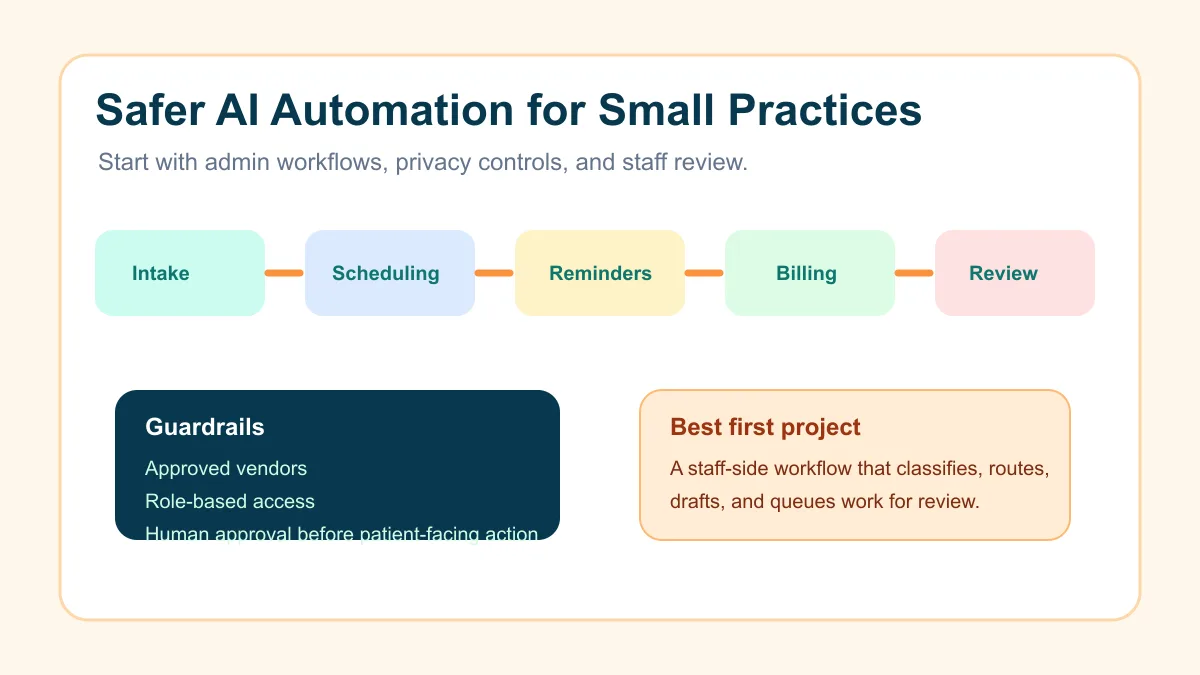
AI automation in healthcare is safest for small practices when it starts with administrative workflows, clear staff review, and careful handling of protected health information. The best first projects are not diagnosis bots or unsupervised clinical advice. They are intake routing, appointment prep, reminder workflows, referral follow-up, billing handoffs, and internal task queues that help the team move work without losing control.
For a small medical, dental, therapy, med spa, or specialty practice, the practical question is simple: where does repetitive admin work slow down patients and staff, and what can be automated without asking AI to make clinical decisions?
Search intent and SERP pattern
People searching for AI automation in healthcare usually want use cases, compliance guardrails, tool-selection advice, and workflow examples. Current U.S. results lean toward healthcare workflow automation guides, HIPAA-safe AI platform explainers, vendor lists, and articles about reducing administrative burden.
The gap for small practices is that many results talk like enterprise healthcare technology pages. A local practice does not need a giant transformation program first. It needs a short list of safe, practical workflows that reduce missed follow-up, front-desk copying, and unclear handoffs.
What safe AI automation means in a practice
Safe AI automation means the system helps move a defined workflow while the practice keeps ownership of privacy, judgment, patient communication, and final decisions. AI can summarize, classify, draft, extract, and route information. It should not silently decide care, override staff, or expose protected health information to tools that are not approved for that use.
Federal HIPAA regulations say covered entities and business associates must ensure the confidentiality, integrity, and availability of electronic protected health information.
The same federal rules define a business associate as a party that creates, receives, maintains, or transmits protected health information for covered functions or services.
That matters because a healthcare AI workflow is not just a productivity tool. It is a process design question, a vendor question, a data-handling question, and a staff-training question.
The safest first workflows
Most small practices should begin with workflows that improve operations without creating clinical-decision risk. These projects are still valuable because they remove the small delays that pile up every day.
| Workflow | Practical AI role | Human review point |
|---|---|---|
| New patient inquiry | Classify request type and draft next-step task | Front desk approves response |
| Appointment reminders | Segment reminder timing and message type | Staff reviews templates |
| Referral follow-up | Flag missing documents or next action | Coordinator confirms before outreach |
| Visit preparation | Summarize non-clinical intake notes for staff | Clinician or assistant reviews chart context |
| Billing handoff | Route claims, invoices, or payment questions | Billing lead reviews exceptions |
| Review requests | Identify completed visits ready for follow-up | Staff sends approved request |
If your practice already struggles with dropped inquiries or slow handoffs, start with the intake and follow-up logic before buying a broad platform. The same basic thinking behind AI workflow automation for small business applies here, but healthcare needs stricter controls around data, vendor access, and review.
A simple intake automation example
Picture a therapy practice that receives inquiries through a website form, phone messages, and email. The old process is manual: someone reads every message, decides whether it is a new patient, insurance question, referral, cancellation, or billing issue, then creates a task in the practice system.
An AI-assisted intake workflow can classify the message, draft a staff-facing summary, assign the right queue, and suggest the next step. The front desk still reviews the record before any patient communication goes out.
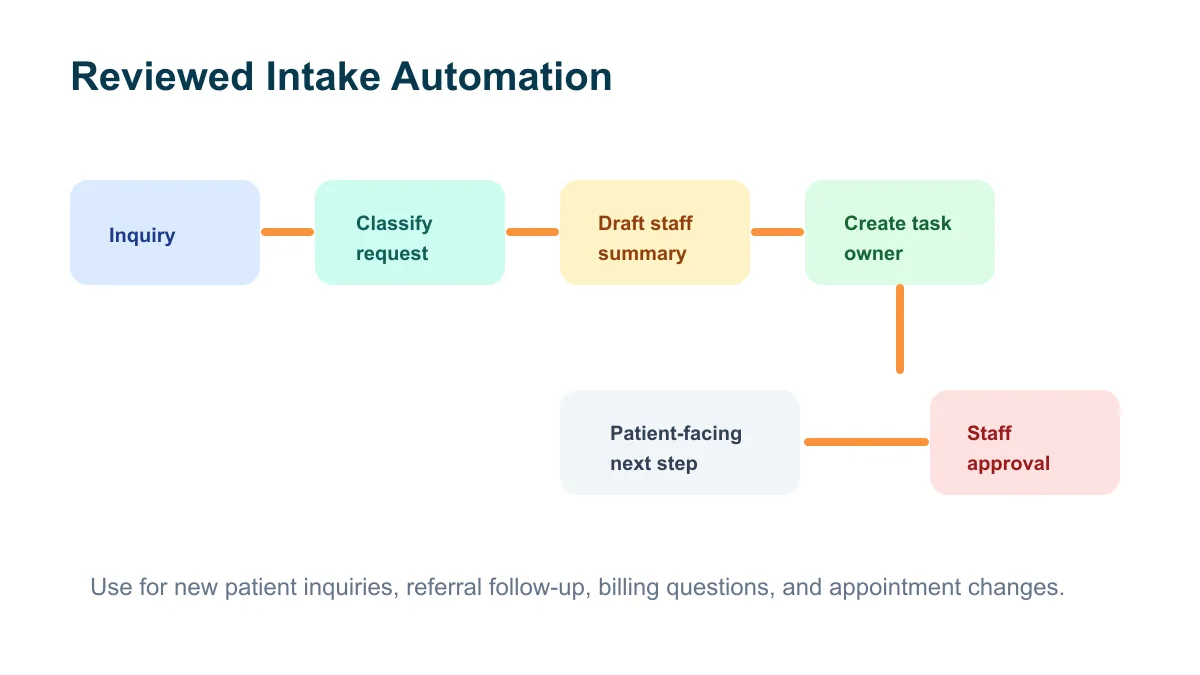
That small setup can make the first response more consistent. It also helps the owner see which inquiries are waiting, which ones need documents, and which ones are stuck because the next action is unclear. For practices that rely on web inquiries or calls, this is close to the same lead-response problem described in lead response automation for small business, with more privacy discipline added.
Where scheduling automation helps
Scheduling is usually a safer starting point than clinical automation because it is operational and rules-based. AI can help classify requests, prepare appointment notes for staff, or draft reminders, while regular automation handles calendar updates and task movement.
Good scheduling automation answers four questions:
- What type of appointment or request is this?
- What information is missing before the appointment?
- Who on the team owns the next action?
- When should a reminder or follow-up task happen?
A small practice can use the same no-show prevention logic covered in appointment no-show reduction workflows: confirm the appointment, make the next step clear, send the right reminder at the right time, and give staff a short list of exceptions to review.
Guardrails before choosing tools
Before a practice connects AI to patient-facing or patient-related workflows, it should define the guardrails in plain language. This is where many projects fail. The team buys a tool before deciding what data may enter it, who can access it, and when a human has to approve the output.
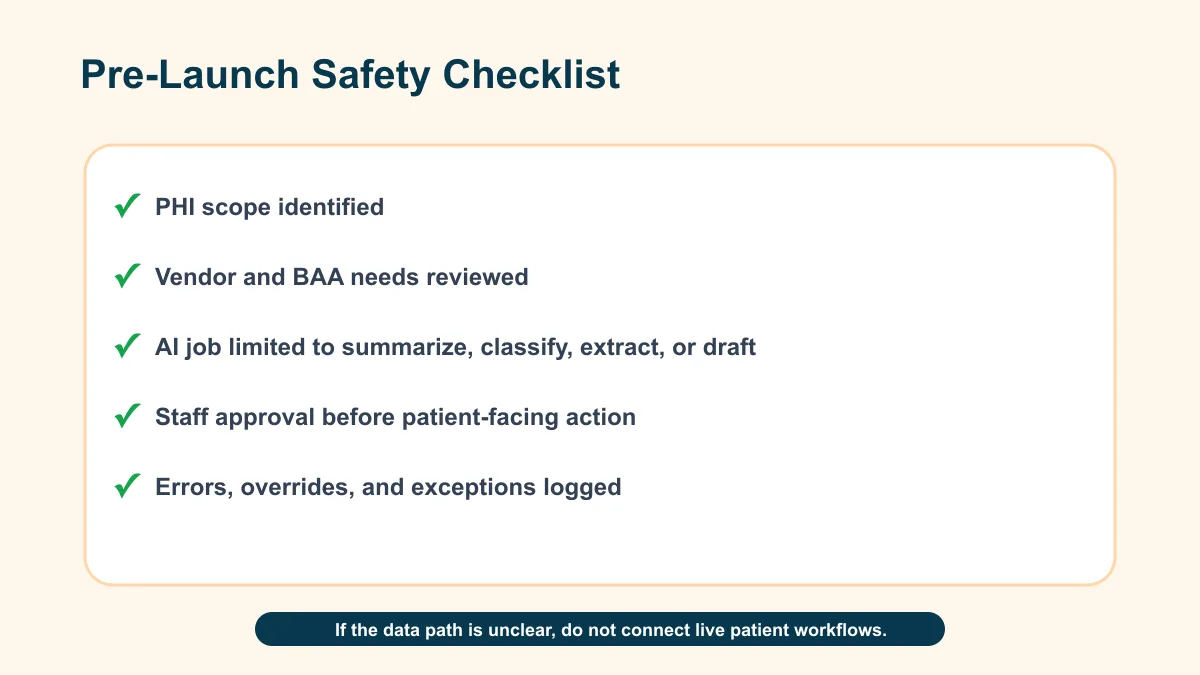
Use this checklist before implementation:
- Confirm whether the workflow touches protected health information.
- Identify every tool, database, inbox, form, and calendar involved.
- Confirm whether any vendor needs a business associate agreement.
- Limit AI to one narrow job, such as classify, summarize, draft, or route.
- Keep patient-facing messages behind staff approval until the workflow is proven.
- Log errors, exceptions, and staff overrides.
- Train staff on what should never be pasted into unapproved tools.
This is also where an implementation partner should slow down. If a vendor cannot explain where the data goes, what is stored, who can see it, and whether the setup fits your compliance obligations, the practice should not rush ahead.
What not to automate first
Small practices should avoid starting with high-risk, high-trust workflows. Do not begin with diagnosis, treatment recommendations, medication advice, unsupervised patient triage, or any workflow where an AI error could directly affect care.
Also avoid broad chatbot projects that invite patients to share sensitive details before the practice has confirmed the data path, consent language, review process, and vendor terms. A chatbot can look simple on a website while creating a messy operational and compliance problem behind the scenes.
A better first step is a staff-side system. Capture the request, classify it, create the task, draft the response, and let the team approve the final communication.
How to build the first workflow
Start with one repeated administrative pain, not a platform shopping list. A practical build can usually follow this order:
- Map the current workflow on one page.
- Mark each handoff where work gets lost, delayed, or copied manually.
- Choose one trigger, such as a form submission, missed call transcript, email, or billing status.
- Decide the AI job: summarize, classify, extract, or draft.
- Add the human review point before patient-facing action.
- Test with old examples before turning it on for live work.
- Create a short staff SOP that explains what to check each day.
For a practice owner who wants help finding the first workflow, a Business Boomer services review should focus on the bottleneck, not the AI brand name. The right first automation is the one your team can run and trust next week.
A practical workflow map
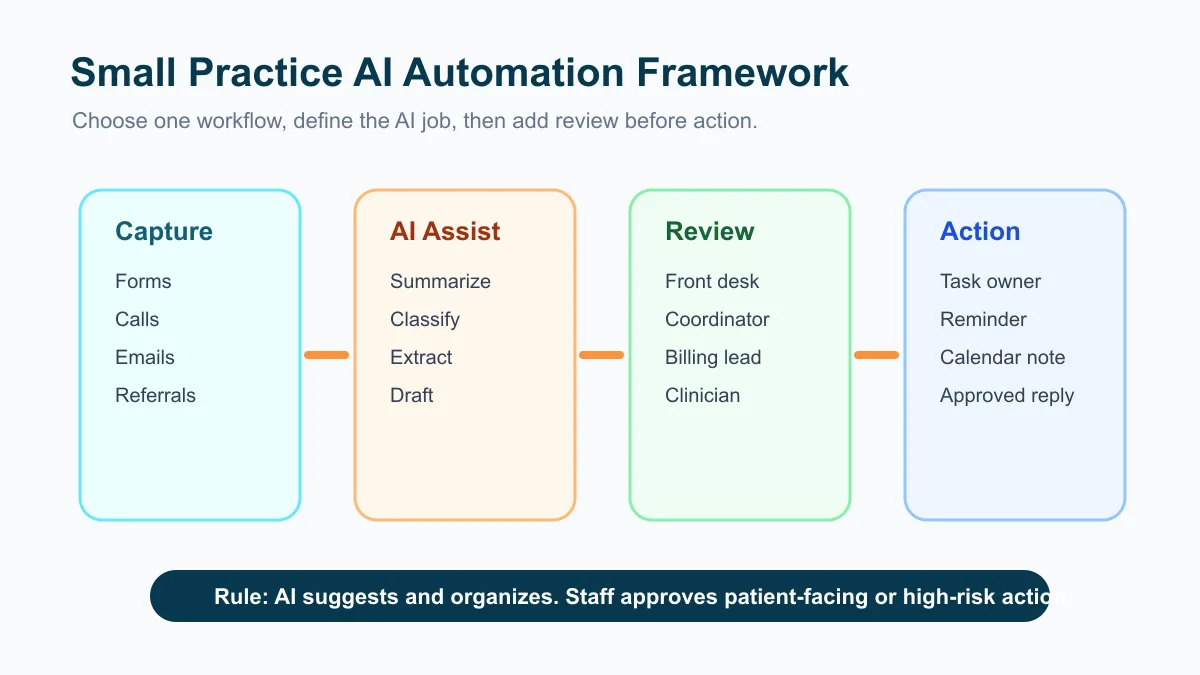
The cleanest healthcare automation has three layers: capture, review, and action. Capture brings the request into one place. Review gives the team a clear decision point. Action updates the calendar, task list, EHR-adjacent system, billing queue, or approved communication channel.
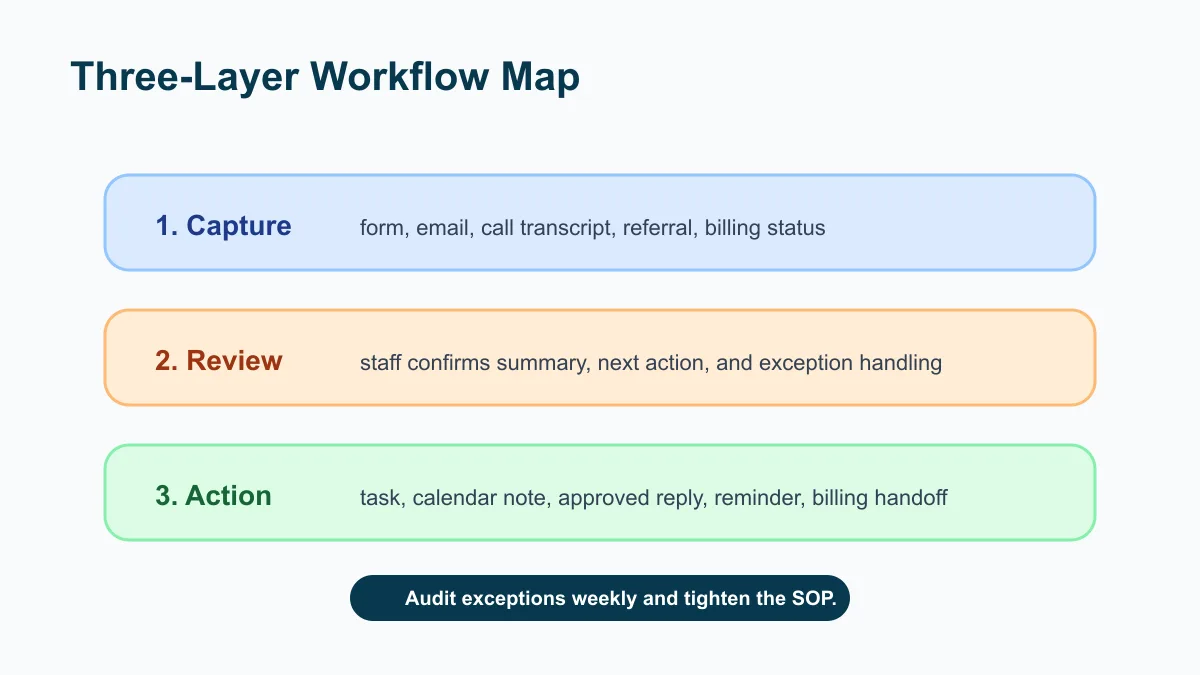
Here is a small-practice version:
| Layer | What happens | Example output |
|---|---|---|
| Capture | Form, email, voicemail, referral, or billing message enters the workflow | New task with source and timestamp |
| AI assist | AI summarizes, tags, or drafts the next internal note | "Insurance question; missing policy number" |
| Staff review | Staff confirms accuracy and approves next step | Approved callback task |
| Action | Automation updates the system or queues a message | Calendar note, task owner, reminder |
| Audit | Exceptions and corrections are logged | Weekly improvement list |
That structure also works for non-healthcare businesses, which is why a broader AI automation consulting conversation should still begin with the same workflow map. The difference in healthcare is the privacy and approval layer must be treated as core infrastructure, not a nice extra.
Tool evaluation questions
When comparing AI automation tools for a healthcare setting, ask operational questions before feature questions:
- Does this tool process, store, or transmit protected health information?
- Will the vendor sign the required healthcare agreements if needed?
- Can access be limited by role?
- Can the practice turn off model training on its data?
- Are logs, retention settings, and deletion controls clear?
- Can staff review patient-facing outputs before they are sent?
- Does the workflow fail safely if the AI output is uncertain?
If the tool cannot meet those basics, it may still be useful for non-sensitive internal work, such as drafting generic website copy or summarizing public policy updates. It should not be dropped into patient workflows just because it is convenient.
Commercially useful next step
The right first healthcare AI automation project is usually a small operational system: intake routing, appointment reminder cleanup, referral follow-up, billing handoff, or staff task triage. It should have a clear owner, a narrow AI job, a human review point, and a written SOP.
Business Boomer helps small service businesses map and install practical workflows. If you run a small practice and want a careful first project, start with an AI workflow audit kit.
You can also book a practical review through the contact page.
Next step
Find the workflow worth fixing first.
Use the Free 30-Minute AI Consultation to map where leads, invoices, notes, or follow-ups are slipping and choose the smallest useful system.
Keep building the system
Recommended next Business Boomer guides
These links are selected by topic and search intent so this guide connects to the most relevant service pages, industry pages, and supporting blog posts.
Service and setup pages
Use these when you are ready to turn the idea into an implementation path.
Industry-specific pages
See how the same workflow changes for specific business types.
Related blog posts
Read the connected guides that support this topic cluster.
Related AI automation guides
Keep going with the connected Business Boomer guides in this automation cluster.
AI automation services for local small business
Planning examples for broader automation. Compare current managed calls and reviews on the Services page; confirm other work in a separate scope.
Lead follow-up automation for small business
Turn form fills, missed calls, quote requests, emails, and voice notes into reply drafts, CRM updates, reminders, and next steps.
Invoice automation for contractors
Connect completed jobs, estimates, QuickBooks, payment links, and overdue follow-up for contractor workflows.
How to automate invoices for small business
A practical guide to invoice creation, reminders, payment tracking, and cash-flow follow-up.
FAQ
Quick answers about this guide and how to put the idea into practice.
What is the main takeaway from AI Automation in Healthcare for Small Practices?
AI automation in healthcare can help small practices improve intake, scheduling, reminders, billing handoffs, and staff follow-up when privacy, review, and vendor controls come first.
How does AI automation in healthcare help a small business?
AI automation in healthcare can help a small business reduce manual work, improve follow-up, organize repetitive tasks, and create a clearer operating process when it is tied to a real bottleneck.
Can Business Boomer help implement AI automation in healthcare?
Yes. Business Boomer can help turn the idea into a practical workflow, page, checklist, or automation system depending on what the business needs first.
Find the workflow worth fixing first.
Use the Free 30-Minute AI Consultation to map where leads, invoices, notes, or follow-ups are slipping and choose the smallest useful system.
Book a Free 30-Minute AI Consultation