
Best AI Agent Tools in 2026: Models, Orchestration, Workflows, Memory, and Monitoring
The best AI agent stack in 2026 starts with reliable models, then adds orchestration, workflow tools, retrieval or vector memory, observability, and developer tooling. OpenAI, Anthropic, LangGraph, LangChain, LlamaIndex, CrewAI, AutoGen, n8n, Make, Zapier, Pinecone, Qdrant, Langfuse, Helicone, and Cursor each fit a different layer.


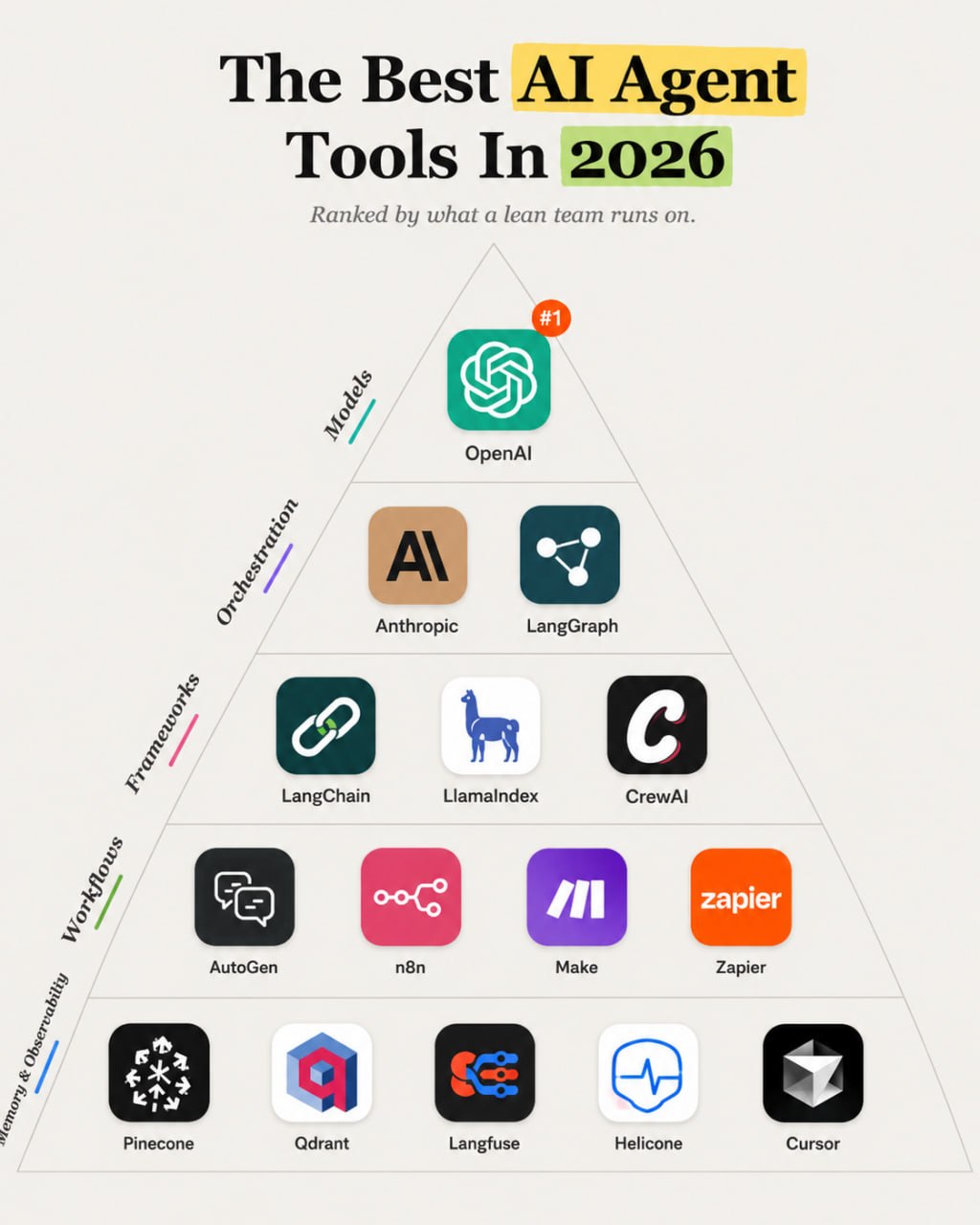
AI agent tools create value only when the job has clear inputs, tool permissions, review gates, and failure handling. Hype creates demos. Operations require models, orchestration, workflow control, memory, observability, and security.
Quick answer: Most teams should start with OpenAI or Anthropic, use n8n, Make, or Zapier for workflow automation, add LangGraph, LangChain, or LlamaIndex only when custom orchestration or retrieval is needed, and use Langfuse or Helicone before agents touch important workflows.
This guide ranks tools by workflow fit, output quality, ease of use, integrations, value, and reliability. Pricing changes often, so check current vendor pricing pages before you buy.
If you are building the broader stack, compare this guide with AI SEO tools, content marketing tools, and startup growth tools.
Quick verdict
| Need | Best first choice |
|---|---|
| Best model layer | OpenAI and Anthropic |
| Best stateful agent orchestration | LangGraph |
| Best broad agent framework | LangChain |
| Best retrieval and data framework | LlamaIndex |
| Best simpler workflow automation | n8n, Make, or Zapier |
| Best vector memory options | Pinecone or Qdrant |
| Best observability | Langfuse or Helicone |
| Best developer workspace | Cursor |
Best tools at a glance
| Tool | Best for | Category | Starting price | Key strength | Main limitation |
|---|---|---|---|---|---|
| OpenAI | frontier models and agent-capable APIs | Model platform | Usage-based | Strong model and tool ecosystem | Costs, safety, and evaluation need control |
| Anthropic | Claude models and safety-focused workflows | Model platform | Usage-based | Strong reasoning and long-context work | Tooling choices depend on stack |
| LangGraph | stateful agent orchestration | Orchestration | Open source / paid platform options | Explicit graph control | Requires engineering skill |
| LangChain | agent and LLM app framework | Framework | Open source / paid platform options | Large ecosystem | Can add complexity |
| LlamaIndex | retrieval and data-connected agents | Framework | Open source / paid platform options | Strong data and RAG workflows | Needs data quality work |
| CrewAI | multi-agent workflow experiments | Framework | Open source / paid platform options | Accessible multi-agent patterns | Needs careful scope control |
| AutoGen | multi-agent research and development | Framework | Open source | Flexible agent collaboration patterns | Engineering-heavy |
| n8n | agentic workflow automation | Workflow automation | Free self-hosted and paid cloud options | Good control for tool-connected workflows | Requires process design |
| Make | visual workflow automation | Workflow automation | Free and paid plans | Accessible workflow builder | Less code-level control than custom stacks |
| Zapier | simple app automations and AI actions | Workflow automation | Free and paid plans | Broad app coverage | Can get expensive or brittle |
| Pinecone | managed vector database | Memory | Free and paid plans | Managed retrieval infrastructure | Needs retrieval design |
| Qdrant | vector database | Memory | Open source and cloud plans | Flexible vector search | Requires setup choices |
| Langfuse | LLM observability and tracing | Observability | Open source and cloud plans | Useful traces and evaluations | Requires disciplined logging |
| Helicone | LLM observability and gateway layer | Observability | Free and paid plans | Request logging and monitoring | Not a full evaluation process by itself |
| Cursor | AI coding and agent development | Developer tool | Paid plans | Speeds developer workflows | Needs code review |
How we evaluated the tools
We evaluated each tool as part of a real operating workflow, not as an isolated feature list.
| Criterion | Weight |
|---|---|
| Use-case fit | 25% |
| Capability and output quality | 20% |
| Ease of use | 15% |
| Integrations and workflow fit | 15% |
| Price-to-value | 15% |
| Scalability and reliability | 10% |
A complete platform can own several workflow layers. A specialist tool should earn its place by solving one painful job better than the default stack. Supporting tools belong lower in the stack unless the workflow depends on them every week.
The best ai agent tools in 2026
OpenAI and Anthropic: Best for best model layer
OpenAI and Anthropic are the default model choices for many production AI agent workflows. Choose based on task quality, latency, context, tool use, pricing, and security requirements. Avoid hard-coding a single model without evaluations. Closest alternatives: Google, open-weight models, or provider-specific models.
Key capabilities usually include setup, workflow ownership, integrations, review, and reporting. The best choice depends on team size, existing stack, data quality, and budget.
LangGraph and LangChain: Best for best orchestration and framework layer
LangGraph gives developers explicit stateful graph control for complex agent workflows. LangChain gives a broader LLM app and agent ecosystem. Choose LangGraph when state, branching, retries, and review gates matter. Choose LangChain when ecosystem speed matters. Avoid either when a workflow tool can solve the job with less code.
Key capabilities usually include setup, workflow ownership, integrations, review, and reporting. The best choice depends on team size, existing stack, data quality, and budget.
LlamaIndex: Best for best data and retrieval framework
LlamaIndex helps connect agents to documents, indexes, retrieval workflows, and structured data. Choose it when the agent needs trusted knowledge. Avoid it if the data is stale, messy, or not permissioned. Closest alternative: custom retrieval with vector database and direct model calls.
Key capabilities usually include setup, workflow ownership, integrations, review, and reporting. The best choice depends on team size, existing stack, data quality, and budget.
CrewAI and AutoGen: Best for best multi-agent experimentation frameworks
CrewAI and AutoGen help teams prototype multi-agent collaboration patterns. They can be useful for research, planning, and role-based workflows. Choose them for experiments and controlled jobs. Avoid letting many agents act without clear ownership. Closest alternative: LangGraph with explicit roles and state.
Key capabilities usually include setup, workflow ownership, integrations, review, and reporting. The best choice depends on team size, existing stack, data quality, and budget.
n8n, Make, and Zapier: Best for best workflow automation layer
Many teams do not need a custom agent framework first. They need a workflow tool that can call models, move data, route approvals, and touch SaaS apps. Zapier is easiest, Make is visual and flexible, and n8n gives more ownership. Avoid granting broad tool access without approvals and logs.
Key capabilities usually include setup, workflow ownership, integrations, review, and reporting. The best choice depends on team size, existing stack, data quality, and budget.
Pinecone and Qdrant: Best for best memory and retrieval layer
Pinecone and Qdrant store vector embeddings for retrieval workflows. Use them when agents need to search a knowledge base, customer docs, product data, or support history. Avoid calling vector search memory unless you have access control, freshness rules, and retrieval evaluation. Closest alternative: keyword search or database queries for simpler use cases.
Key capabilities usually include setup, workflow ownership, integrations, review, and reporting. The best choice depends on team size, existing stack, data quality, and budget.
Langfuse and Helicone: Best for best observability layer
Agents need tracing, logs, cost monitoring, prompt/version tracking, and evaluation hooks. Langfuse and Helicone help teams see what happened when an agent made a bad call. Choose one before important workflows go live. Avoid production agents with no trace history.
Key capabilities usually include setup, workflow ownership, integrations, review, and reporting. The best choice depends on team size, existing stack, data quality, and budget.
Cursor: Best for best developer tool for agent builders
Cursor helps developers work faster across codebases, prototypes, debugging, and agent-related implementation. Choose it for engineering productivity. Avoid merging generated code without tests and review. Closest alternative: Codex, Claude Code, or IDE-native assistants.
Key capabilities usually include setup, workflow ownership, integrations, review, and reporting. The best choice depends on team size, existing stack, data quality, and budget.
Recommended stacks by team type
Non-technical operator
Use OpenAI or Anthropic, Zapier or Make, human approvals, simple logs. This keeps the stack focused while giving each workflow layer a clear owner.
Technical startup
Use OpenAI, LangGraph, n8n, Qdrant, Langfuse, Cursor. This keeps the stack focused while giving each workflow layer a clear owner.
Data-heavy team
Use Anthropic or OpenAI, LlamaIndex, Pinecone or Qdrant, Langfuse. This keeps the stack focused while giving each workflow layer a clear owner.
Agency automation team
Use OpenAI, n8n, Make, Helicone, client-specific approvals. This keeps the stack focused while giving each workflow layer a clear owner.
Enterprise team
Use multiple model providers, LangGraph, observability, security review, governed tool access. This keeps the stack focused while giving each workflow layer a clear owner.
How to choose the right tool
Start with the workflow. A small team should not buy a platform because it looks impressive in a comparison table. Ask what job breaks today: research, creative production, conversion, analytics, lifecycle, support, automation, or reporting.
Team size matters. A solo operator needs fewer tools and more defaults. A startup with engineers can handle deeper instrumentation. An agency needs repeatable workflows across clients. A mid-market team needs governance, permissions, and reporting.
Budget matters too. Free and entry-level plans can cover early workflows, but paid plans become worthwhile when the tool saves labor, reduces mistakes, or improves decisions. Switching costs rise when tools hold customer data, content libraries, automations, analytics events, or payment history.
Check integrations before buying. A tool that does not connect to your CRM, website, analytics, email platform, or data warehouse may create another manual process. Also check data ownership, export options, security posture, and approval controls before connecting sensitive workflows.
Tools we considered but did not rank
- Open-source model stacks because they matter but require a separate infrastructure discussion.
- Airtable and Retool because they can host workflows but are not core agent frameworks.
- Vector-only tools that do not solve retrieval design.
- Early agent startups with limited proof or unclear reliability.
Final recommendation
Start with a reliable model and a narrow workflow. Use n8n, Make, or Zapier before writing custom orchestration. Add LangGraph, LangChain, or LlamaIndex when complexity proves the need. Add Langfuse or Helicone before agents touch important systems.
The right stack should make the workflow easier to run next week. If a tool creates more meetings, more dashboards, or more cleanup than decisions, it belongs on the waitlist.
Sources to check before purchase
- Official product websites and pricing pages for the tools above
- Current documentation for integrations, data handling, API access, and usage limits
- Recent customer reviews on G2, Capterra, Trustpilot, Reddit, or category-specific communities
Ready to build a practical AI growth stack?
AI Business Boomer helps lean teams turn scattered tools into working systems. Book a workflow audit and we will map the stack around your actual bottleneck.
Keep building the system
Recommended next Business Boomer guides
These links are selected by topic and search intent so this guide connects to the most relevant service pages, industry pages, and supporting blog posts.
Service and setup pages
Use these when you are ready to turn the idea into an implementation path.
Industry-specific pages
See how the same workflow changes for specific business types.
Related blog posts
Read the connected guides that support this topic cluster.
Related AI automation guides
Keep going with the connected Business Boomer guides in this automation cluster.
AI assistant for local business
Owner-controlled AI assistants that help local businesses handle missed leads, scheduling handoffs, FAQs, reviews, CRM updates, and follow-up.
OpenClaw operator setup sprint
A setup page for private owner-controlled OpenClaw operators with messaging access, business context, approval rules, and one proven workflow.
Best invoicing automation tools for small business
A comparison of QuickBooks, FreshBooks, Stripe Billing, Wave, Jobber, Housecall Pro, Zapier, and Make.
Best AI automations for contractors
Field notes, estimate follow-up, scheduling, internal handoffs, and admin workflows.
FAQ
Quick answers about this guide and how to put the idea into practice.
What is the best AI agent tool in 2026?
For most teams, the best starting point is OpenAI or Anthropic plus a workflow tool such as n8n, Make, or Zapier. Custom frameworks come later.
Do I need LangChain or LangGraph?
Use them when the agent needs custom state, tools, retrieval, branching, or evaluation. Use workflow automation for simpler jobs.
What are the biggest AI agent risks?
Hallucination, excessive permissions, data leakage, insecure tool access, hidden failure, high cost, and unclear ownership are the main risks.
Do AI agents need memory?
Only when the task benefits from retrieval or persistent context. Memory needs freshness, access control, and evaluation.
What should a lean AI agent stack include?
Use one model provider, one workflow layer, clear approvals, logs or observability, and only the tools the agent needs.
Find the workflow worth fixing first.
Use the Free 30-Minute AI Consultation to map where leads, reviews, content, or follow-ups are slipping and choose the smallest useful next step.
Book a Free 30-Minute AI Consultation