
How to Build an AI Business Operator for Daily Tasks
An AI business operator is most useful when it helps capture tasks, prepare drafts, surface follow-ups, and keep a human in control of daily decisions.


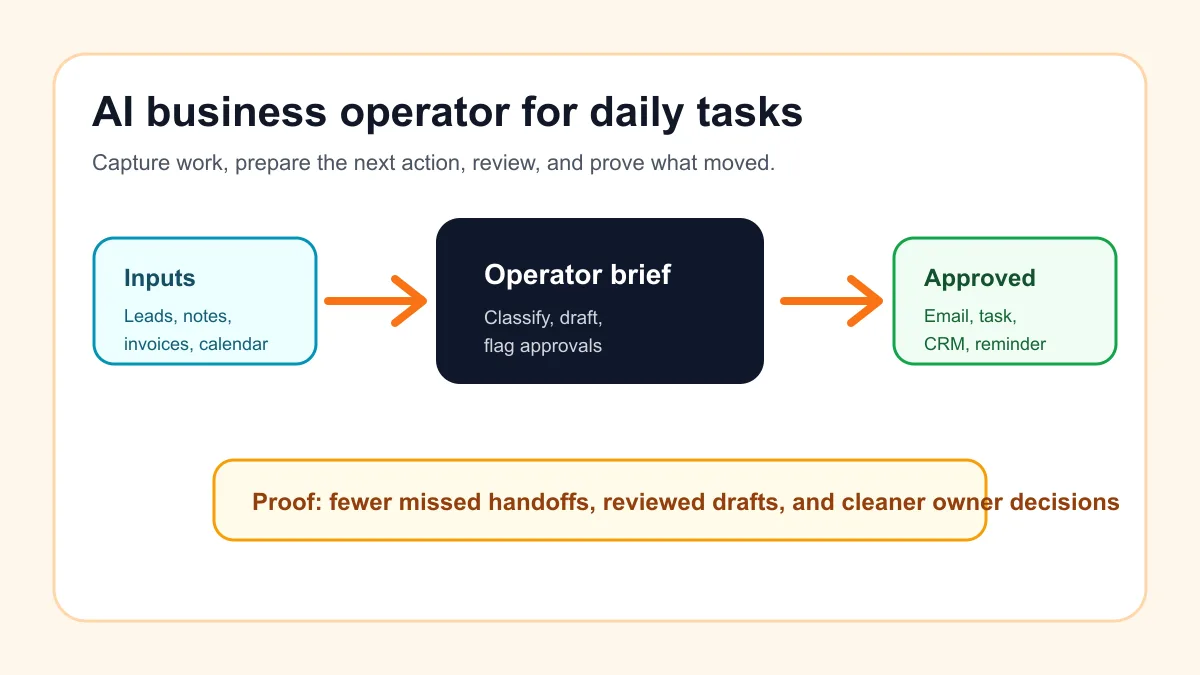
An AI business operator for daily tasks is a supervised workflow that helps a small business capture work, organize the next action, draft routine messages, remind the owner what is stuck, and prepare a simple daily brief. It should not run the business on its own. It should make repeated work easier to see, review, and finish.
The safest first version is narrow: notes, tasks, follow-ups, customer replies, meeting summaries, invoice reminders, and owner check-ins. Start with one repeatable routine, add human approval before anything customer-facing, and measure whether the operator actually reduces missed handoffs.
Search intent and top-result pattern
Current U.S. results for this topic are mostly workflow guides, small-business AI-agent explainers, daily-task automation lists, tool roundups, and practical risk guidance. The strongest pages usually explain what AI agents can do for support, scheduling, admin, sales, finance, or reporting, then list tools or examples.
The gap is implementation order. Many results say AI agents can handle daily work, but they do not show a small service business how to define the first operator, decide what needs approval, choose the daily brief format, and prove the workflow worked. This guide fills that gap with a build sequence instead of another generic list of AI tasks.
Define the operator by the job, not the tool
Do not start by asking which AI app to buy. Start by naming the daily job the operator will support. A good first operator is boring, frequent, and easy to review.
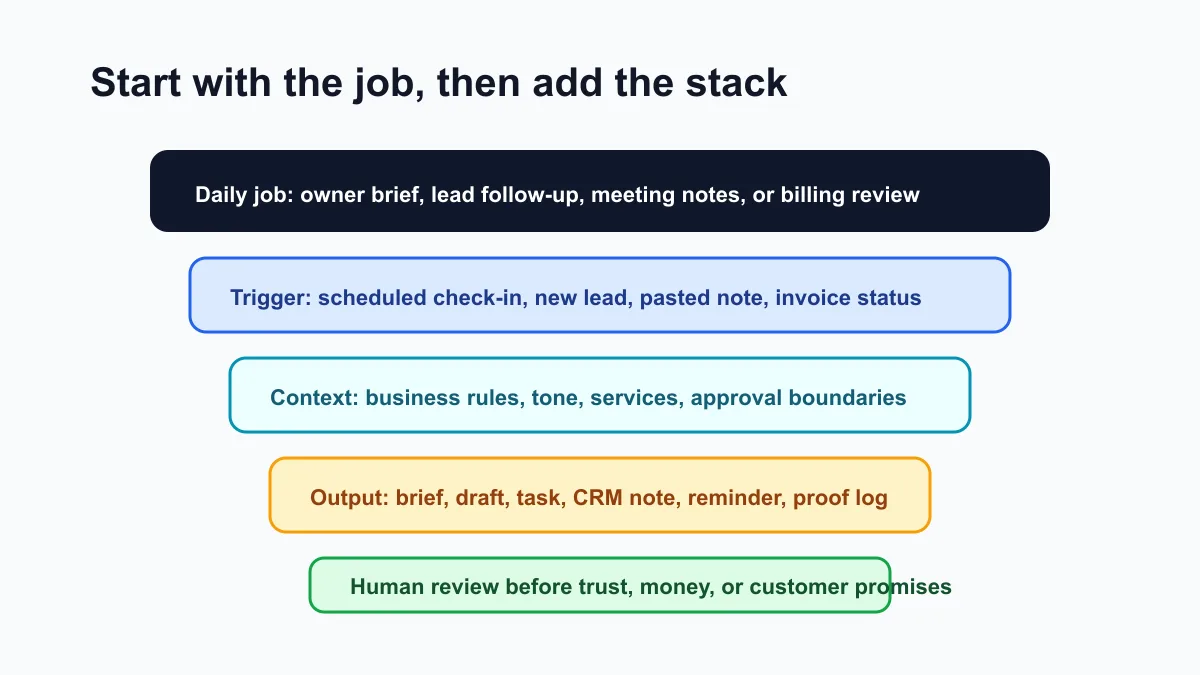
For most owner-led businesses, the first operator should help with one of these routines:
| Daily routine | What the operator prepares | Human approval point |
|---|---|---|
| Morning owner brief | Open tasks, stuck leads, appointments, unpaid invoices, decisions | Owner chooses priorities |
| Lead and estimate follow-up | Lead summary, reply draft, next reminder, CRM note | Person approves customer message |
| Meeting notes to action items | Decisions, tasks, due dates, follow-up drafts | Owner confirms assignments |
| Customer support triage | Summary, category, urgency, suggested reply | Staff approves answer |
| Billing reminder review | Friendly reminder draft, escalation note, payment link check | Owner approves tone and timing |
If the daily work is mostly lead response, pair this setup with AI sales automation for small business.
If billing is the biggest daily drag, start with invoice automation setup before building a broader operator.
Pick one daily trigger
An operator becomes useful when it knows when to run. A trigger can be manual at first. In fact, a manual trigger is often safer for the first week.
Good starter triggers include:
- "Every weekday at 8:30 a.m., prepare the owner brief."
- "When a new web lead arrives, summarize it and draft a reply."
- "After a sales call, turn notes into tasks and a follow-up email."
- "Every afternoon, review invoices that need a reminder."
- "Every Friday, summarize open work and decisions for next week."
This is where many small businesses overbuild. A calendar trigger, a saved email label, a form submission, or a pasted voice note can be enough. The goal is not full autonomy on day one. The goal is a repeatable rhythm.
For a broader workflow map, use AI workflow automation for small business as the planning layer before you connect tools.
Give the operator the right inputs
The operator needs useful context, but it does not need access to everything. Start with a short context file and a small set of inputs.
The context file should include:
- What the business sells.
- Service area and customer type.
- Common tasks and handoffs.
- Tone rules for customer communication.
- What the AI may draft or summarize.
- What always needs human approval.
- Where final work should go.
Daily inputs can be simple: pasted notes, calendar events, CRM exports, form submissions, invoice status, inbox summaries, or a shared task list. Do not connect sensitive systems until the operator has proven it can handle low-risk work.
The U.S. Small Business Administration's AI for small business guidance is a useful reminder that AI can support decisions and repetitive work, but owners still need to understand the tools and risks.
Build the daily operating loop
The daily loop should be visible enough that the owner can trust it. A useful operator does not just produce an answer. It moves a task through a reviewable sequence.
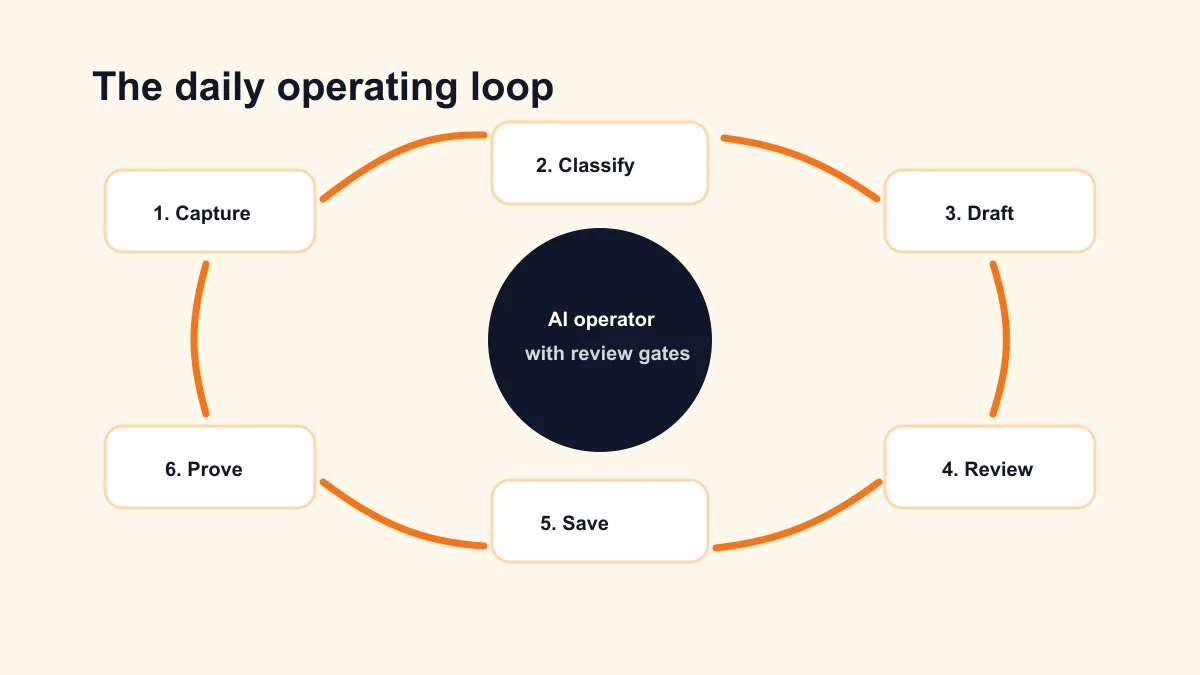
Use this loop:
- Capture: collect the note, lead, invoice, appointment, or task.
- Classify: decide whether it is a lead, customer issue, billing item, admin task, or owner decision.
- Draft: prepare the next action in a consistent format.
- Review: show the person what needs approval.
- Send or save: move the approved item to email, CRM, calendar, task list, or document.
- Prove: record what changed, what was completed, and what is still stuck.
For example, a landscaping company could paste the day's calls into the operator. The operator returns a list of urgent estimate requests, appointment changes, follow-up drafts, and invoices that need attention. The owner approves messages before anything goes to customers.
If your business already has messy handoffs between leads, jobs, and billing, compare the daily loop with the home service business automation guide.
Use a simple daily brief format
The daily brief is often the fastest way to make an AI operator feel useful. It gives the owner a single view of what needs attention without pretending AI should decide everything.
A practical daily brief can look like this:
Daily Operator Brief

1. Top three priorities
2. New leads that need a reply
3. Customers waiting on us
4. Invoices or billing items to review
5. Meetings and prep notes
6. Stuck tasks from yesterday
7. Draft messages ready for approval
8. Decisions only the owner can make
For a local service business, this might include two new leads, one quote follow-up, one unpaid invoice, one appointment reschedule, and three internal tasks. The operator is not the manager. It is the daily checklist builder.
If the business wants this kind of operator inside a messaging surface, OpenClaw operator setup is the natural implementation path.
Write approval rules before connecting actions
Approval rules are what keep the operator useful instead of risky. They should be short enough for the owner and team to remember.
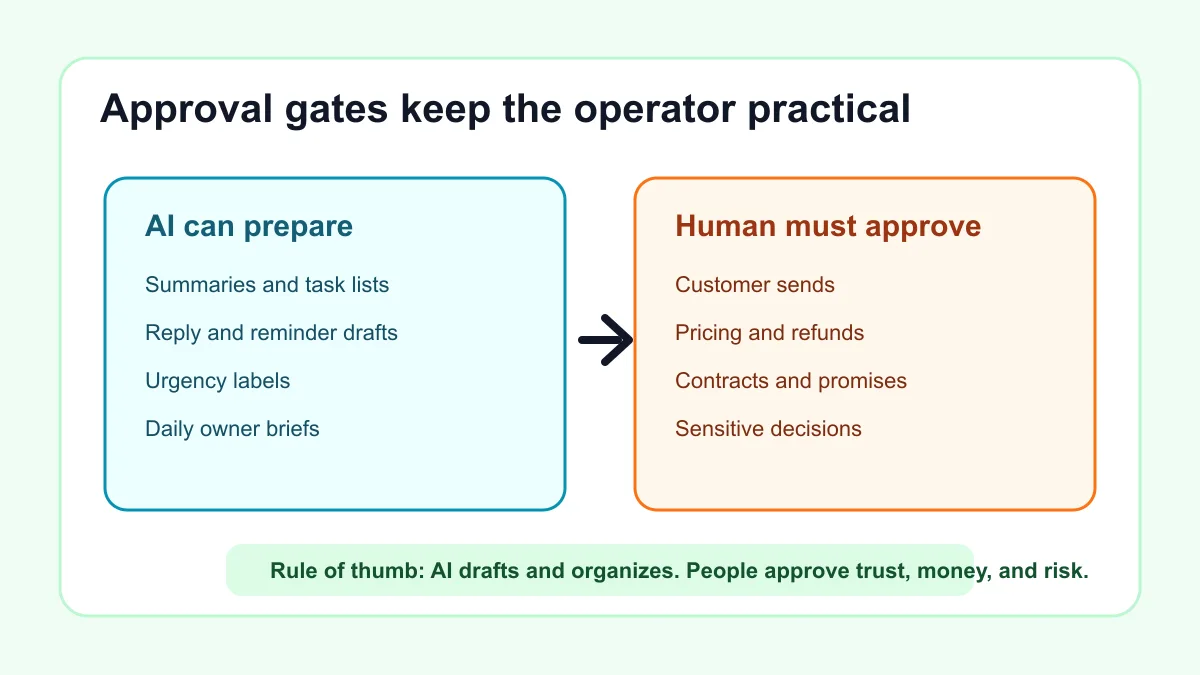
Use these default rules:
| AI can prepare | Human must approve |
|---|---|
| Summaries, task lists, draft replies, first-pass reminders, research notes | Customer sends, pricing, refunds, contracts, medical/legal claims, payment changes |
| Internal labels and urgency scores | Any unusual customer promise |
| Calendar prep notes | Schedule changes that affect customers |
| Invoice reminder drafts | Late fees, disputes, write-offs, payment plans |
This is not just about caution. Clear approval rules make the operator easier to adopt because everyone knows what it can and cannot do.
For a more formal risk lens, NIST's AI Risk Management Framework is useful. For a small business, the practical takeaway is simpler: define the system, keep review where trust or money is involved, and check the output.
Start with a one-week pilot
Do not launch the operator across every department. Run it for one week on one daily routine.
Use this pilot plan:
| Day | Setup task | Success signal |
|---|---|---|
| 1 | Choose the routine and write the approval rules | Everyone knows what the operator may do |
| 2 | Create the context file and daily brief format | Output matches the business language |
| 3 | Test with yesterday's real notes or leads | Drafts are useful after review |
| 4 | Run it live with manual copy/paste | Owner catches fewer missed tasks |
| 5 | Add one light connection, such as a form export or task list | Less duplicate entry |
| 6 | Review mistakes and update rules | Fewer corrections needed |
| 7 | Decide whether to automate the trigger | Clear proof before more access |
If the first pilot is mostly prompts and manual review, that is fine. A manual pilot teaches the business what to automate next. For teams still choosing the first workflow, the AI workflow audit kit helps score which daily task deserves the pilot.
Example: contractor daily task operator
A contractor may start every morning with calls, texts, emails, estimate requests, crew notes, supplier questions, and invoices. The operator can turn yesterday's notes into a structured brief.
The output might include:
- Two leads that need first replies.
- One estimate that needs a polite follow-up.
- One job waiting on material confirmation.
- One invoice reminder draft.
- Three owner decisions.
- A suggested schedule for the day.
The owner still approves customer-facing language and schedule changes. The operator simply makes the next actions harder to miss.
If estimate follow-up is the highest-value slice, use how to build an AI automation workflow for lead follow-up before adding the rest of the daily brief.
Example: professional service daily task operator
A professional service firm may use the operator after consultations, intake forms, or client meetings. The operator can summarize the request, list missing documents, draft a follow-up, and create internal tasks.
The approval rules matter more here. The operator should not give legal, tax, medical, or financial advice on its own. It should prepare notes and drafts for review.
For firms comparing this with broader implementation help, AI automation consulting for small business explains when it makes sense to hire support instead of wiring the system alone.
What to measure
Measure the operator by operational proof, not by how impressive the answer sounds.
Track:
- Number of daily tasks captured.
- Follow-ups drafted and approved.
- Leads or customer issues surfaced.
- Stuck tasks carried forward.
- Owner decisions clarified.
- Corrections needed per brief.
- Time from trigger to reviewed next action.
If the operator creates more review work than it removes, narrow the workflow. If the operator consistently catches missed follow-ups and creates useful drafts, then it is ready for a better trigger or one more tool connection.
Bottom line
The best AI business operator for daily tasks is a narrow, supervised workflow that captures repeated work, prepares the next action, asks for approval where needed, and proves what changed. Start with one daily trigger, one brief format, one set of approval rules, and one week of real examples.
Business Boomer can help set up that first operator without turning it into a giant software project. Start with OpenClaw onboarding for businesses or book a Free 30-Minute AI Consultation when you want the daily task workflow mapped and tested.
Operator setup next step
Put an AI operator inside a real workflow.
Business Boomer can set up OpenClaw with practical prompts, approval rules, reminders, and one workflow your business can use.
Keep building the system
Recommended next Business Boomer guides
These links are selected by topic and search intent so this guide connects to the most relevant service pages, industry pages, and supporting blog posts.
Service and setup pages
Use these when you are ready to turn the idea into an implementation path.
Industry-specific pages
See how the same workflow changes for specific business types.
Related blog posts
Read the connected guides that support this topic cluster.
Related AI automation guides
Keep going with the connected Business Boomer guides in this automation cluster.
OpenClaw operator setup sprint
A setup page for private owner-controlled OpenClaw operators with messaging access, business context, approval rules, and one proven workflow.
AI assistant for local business
Owner-controlled AI assistants that help local businesses handle missed leads, scheduling handoffs, FAQs, reviews, CRM updates, and follow-up.
AI automation for local service businesses
Practical lead, scheduling, review, CRM, invoice, and admin automation for plumbers, HVAC companies, roofers, landscapers, cleaners, contractors, and other local operators.
AI website cost for local business
Compare free previews, focused improvement sprints, full rebuilds, and AI assistant setup.
FAQ
Quick answers about this guide and how to put the idea into practice.
What is the main takeaway from How to Build an AI Business Operator for Daily Tasks?
An AI business operator is most useful when it helps capture tasks, prepare drafts, surface follow-ups, and keep a human in control of daily decisions.
How does AI business operator for daily tasks help a small business?
AI business operator for daily tasks can help a small business reduce manual work, improve follow-up, organize repetitive tasks, and create a clearer operating process when it is tied to a real bottleneck.
Can Business Boomer help implement AI business operator for daily tasks?
Yes. Business Boomer can help turn the idea into a practical workflow, page, checklist, or automation system depending on what the business needs first.
Put an AI operator inside a real workflow.
Business Boomer can set up OpenClaw with practical prompts, approval rules, reminders, and one workflow your business can use.
See OpenClaw Operator Setup