
Done-for-You AI Systems for Small Business: What’s Worth Building
Done-for-you AI systems are worth building when they fix a specific small-business bottleneck, connect tools the team already uses, and keep the owner in control of money, promises, and exceptions.


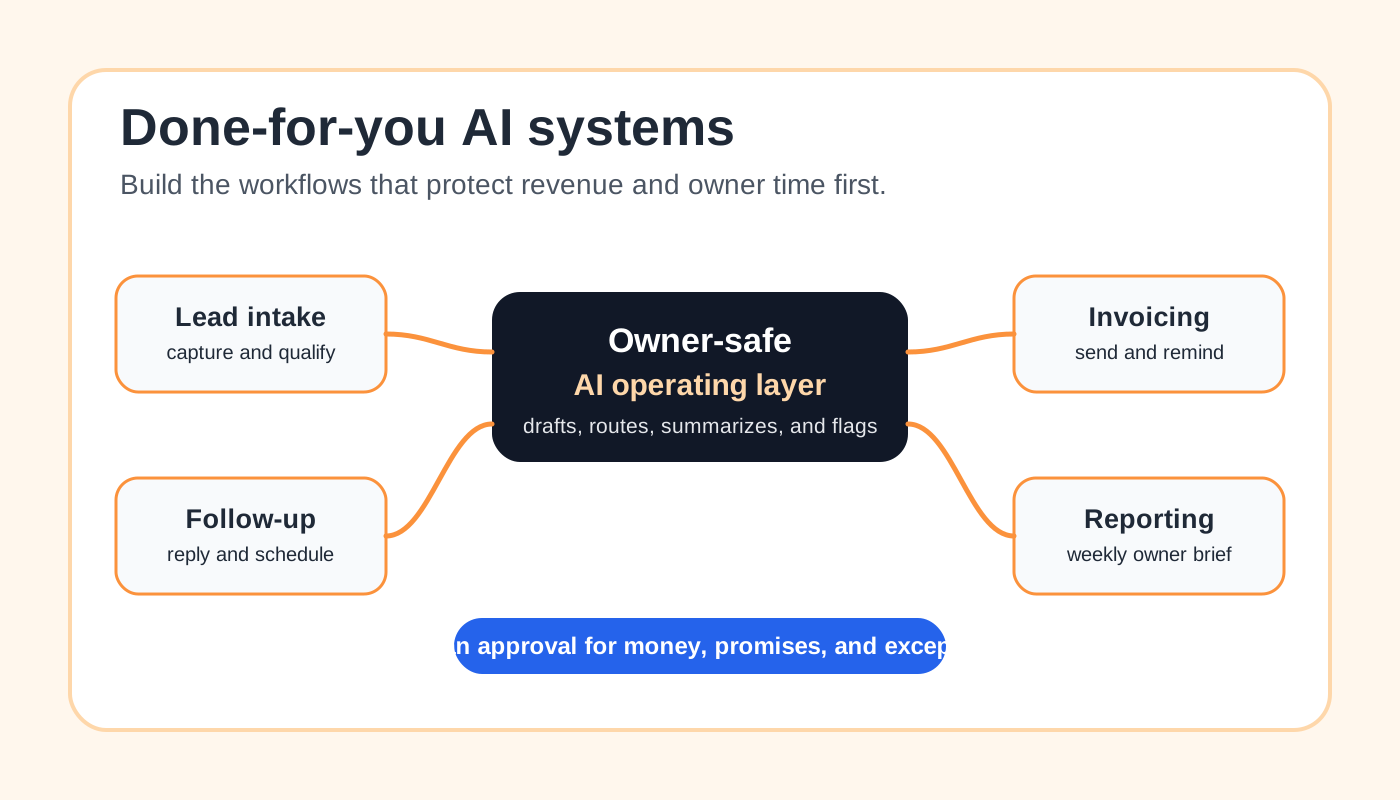
Done-for-you AI systems are worth building when they turn one expensive bottleneck into a repeatable workflow: faster lead response, cleaner intake, better follow-up, invoice reminders, weekly reporting, or customer communication triage. A small business usually does not need a giant AI transformation project first. It needs one working system that saves owner attention, protects revenue, and is easy for the team to trust.
The best first AI system is narrow, connected to tools already in use, and reviewed by a person before sensitive decisions go out. AI can draft, summarize, classify, route, and prepare next actions. It should not silently change prices, promise delivery dates, issue refunds, pressure customers, or make judgment calls that belong to the owner.
What “Done-for-You AI System” Should Mean
A done-for-you AI system should mean a practical operating workflow, not a pile of disconnected AI tools. Someone maps the process, connects the existing apps, writes the prompts or rules, tests real examples, trains the team, and leaves the owner with a way to review results.
That is different from basic AI automation consulting. Consulting can help you decide what to do. Done-for-you implementation should create the first usable workflow and hand it over with clear rules.
For a local service business, the system might connect a website form, email inbox, CRM, calendar, QuickBooks, Stripe, Jobber, Housecall Pro, Google Sheets, or a shared team inbox. The AI layer may summarize a lead, draft a reply, classify a customer message, create a follow-up task, or prepare a weekly owner brief.
What Is Worth Building First
Start with work that happens often, has clear inputs, and creates visible cost when it is slow or inconsistent. The strongest first systems usually sit close to revenue, customer response, billing, or owner reporting.
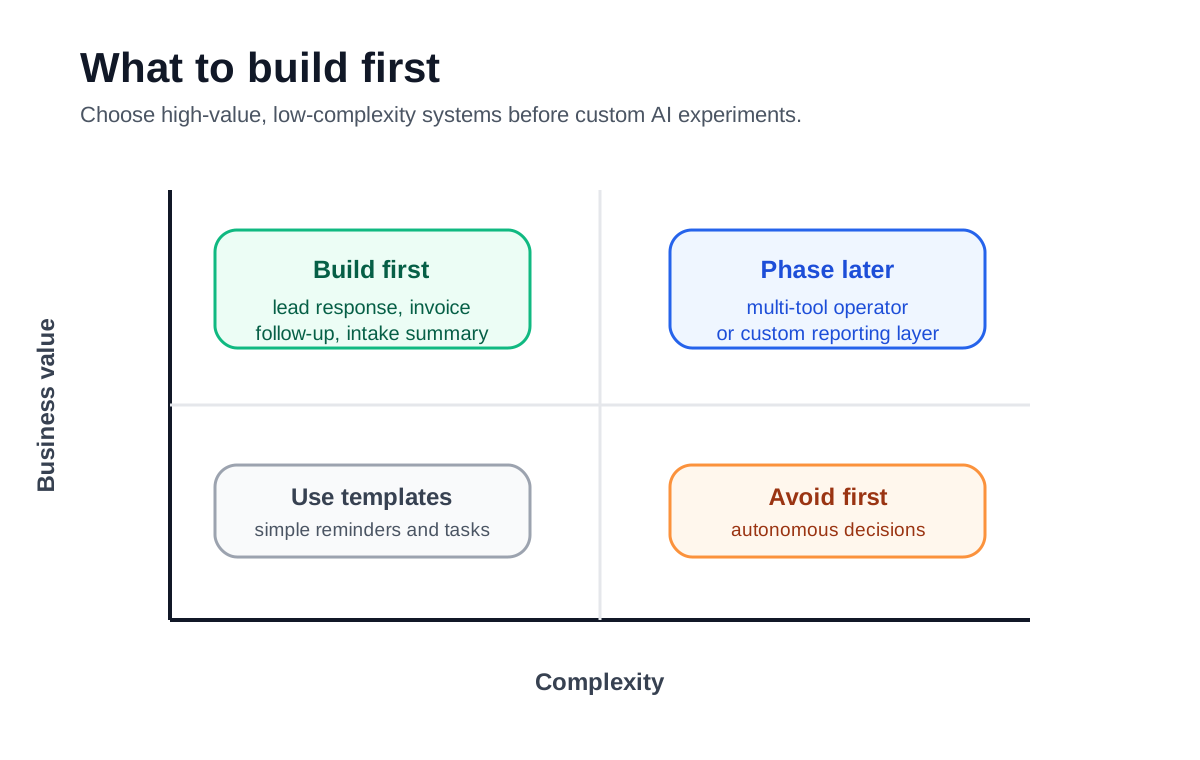
Use this order before custom experiments:
| System | Why it is worth building | What AI should do | Human control point |
|---|---|---|---|
| Lead response | Slow replies lose buyers | Summarize, qualify, draft response, route task | Pricing, promises, priority leads |
| Intake cleanup | Bad intake wastes staff time | Extract details, flag missing info, prepare visit note | Medical, legal, financial, or sensitive details |
| Estimate follow-up | Good prospects go quiet | Draft polite follow-ups and task reminders | Discounts, scope changes, urgency |
| Invoice reminders | Cash gets stuck in manual follow-up | Draft reminders, classify replies, pause on payment | Disputes, credits, relationship-sensitive accounts |
| Weekly owner brief | Owners miss trends until late | Summarize open leads, jobs, invoices, and blockers | Business decisions and client escalations |
If invoicing is the sharpest pain, the best starting point may be a focused invoice automation setup before a wider AI operating layer. If the main pain is missed leads, start with a lead response workflow instead of trying to automate every admin task.
What to Avoid Building First
Avoid a first project that depends on perfect data, too many systems, or autonomous decisions. A small business can lose trust in AI quickly if the first build sends the wrong message to a customer or creates work the team has to clean up.
Do not start with a fully autonomous sales agent, an all-purpose company chatbot, a custom dashboard with no owner habit behind it, or a workflow that touches billing and customer promises without review. These projects can work later, but they are usually better after the business has one smaller system running well.
The U.S. Small Business Administration’s AI for small business guidance frames AI as useful but requiring attention to risks and responsible use. That is the right mindset for implementation: useful first, controlled always.
The Build Workflow
A good done-for-you build should feel boring in the best way. It should have a scope, a test set, an approval rule, and a handoff process. If a provider jumps straight to tools without mapping the real workflow, the system will probably be fragile.
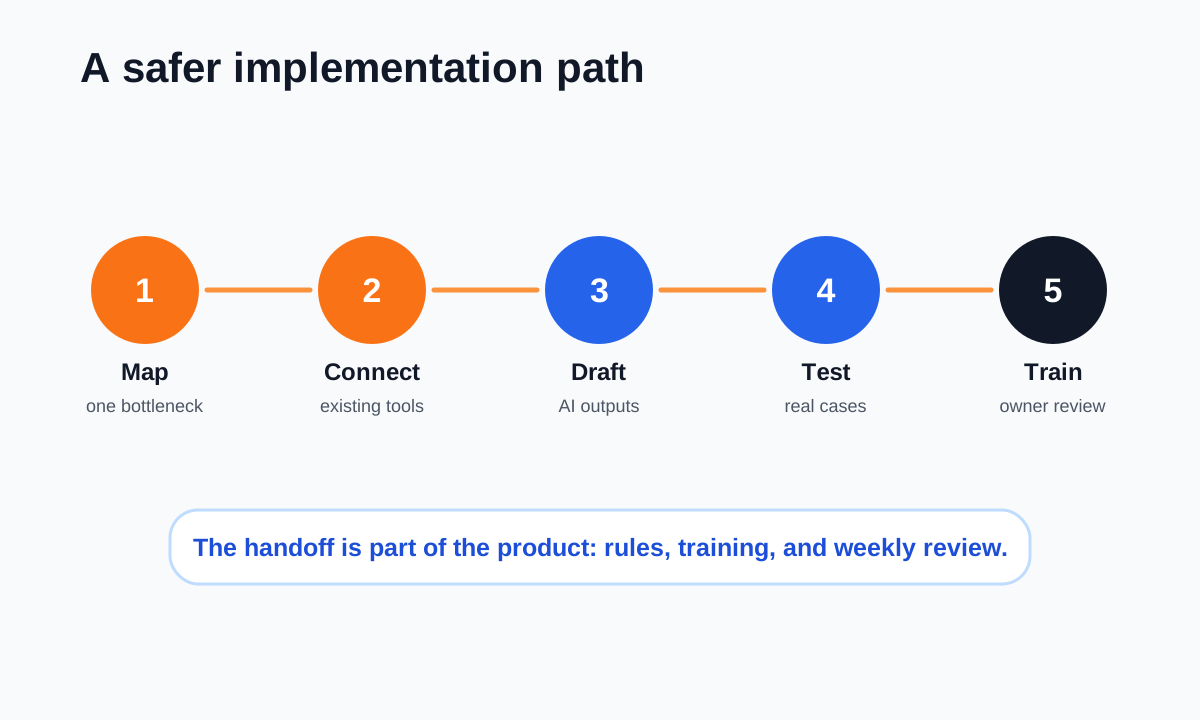
The practical build path is:
- Map one bottleneck and the current manual steps.
- Choose the trigger, source of truth, output, owner, and stop rule.
- Connect the existing tools before adding new software.
- Draft the AI instructions and fallback rules.
- Test real examples, train the team, and schedule weekly review.
This is close to a focused AI workflow automation setup, but the done-for-you version should include implementation, testing, and owner handoff, not only a plan.
Example: Lead Intake System
A lead intake system is often the cleanest first AI build for service companies. The trigger might be a form submission, missed-call transcript, website chat, email, or referral note. The system extracts the customer name, service need, location, urgency, budget clue, and missing information.
From there, AI can prepare a short internal summary, draft a reply, create a CRM note, and assign a follow-up task. The owner or office manager still approves the message if it includes pricing, scheduling promises, or a sensitive answer.
This kind of system pairs well with lead response automation because the goal is not to make the business sound robotic. The goal is to make sure every real lead gets a timely, useful next step.
Example: Invoice and Accounts Receivable System
An invoice system is worth building when the business already sends invoices but follow-up is inconsistent. The first layer can check open invoices, draft reminders, pause reminders after payment, and flag disputed or confused replies.
The AI should not invent balances or negotiate payment terms. It should read approved sources, prepare clean messages, summarize exceptions, and route the account to a person when the customer pushes back.
If the business uses QuickBooks, keep the workflow close to QuickBooks invoice automation.
If it already has overdue invoices, compare the build with automating accounts receivable with AI so the reminder logic and reply handling do not fight each other.
Example: Weekly Owner Brief
A weekly owner brief is a quiet but valuable AI system. It can summarize new leads, stalled estimates, open invoices, missed calls, appointment changes, customer complaints, and upcoming tasks into one review note.
Google’s small-business AI guide notes that AI can help organize spreadsheets, research, and business information. That is the practical lane for a weekly brief: gather scattered operating signals and make them easier for the owner to review, not replace the owner’s judgment.
For small teams, this can connect with an AI business operator or a lighter workflow that posts to email, Slack, Teams, or a shared document every Monday morning.
Where the Owner Must Stay in Control
The biggest mistake with done-for-you AI is treating handoff as an afterthought. The system needs rules for what AI may do automatically, what it may draft, what it must pause, and what a person must approve.
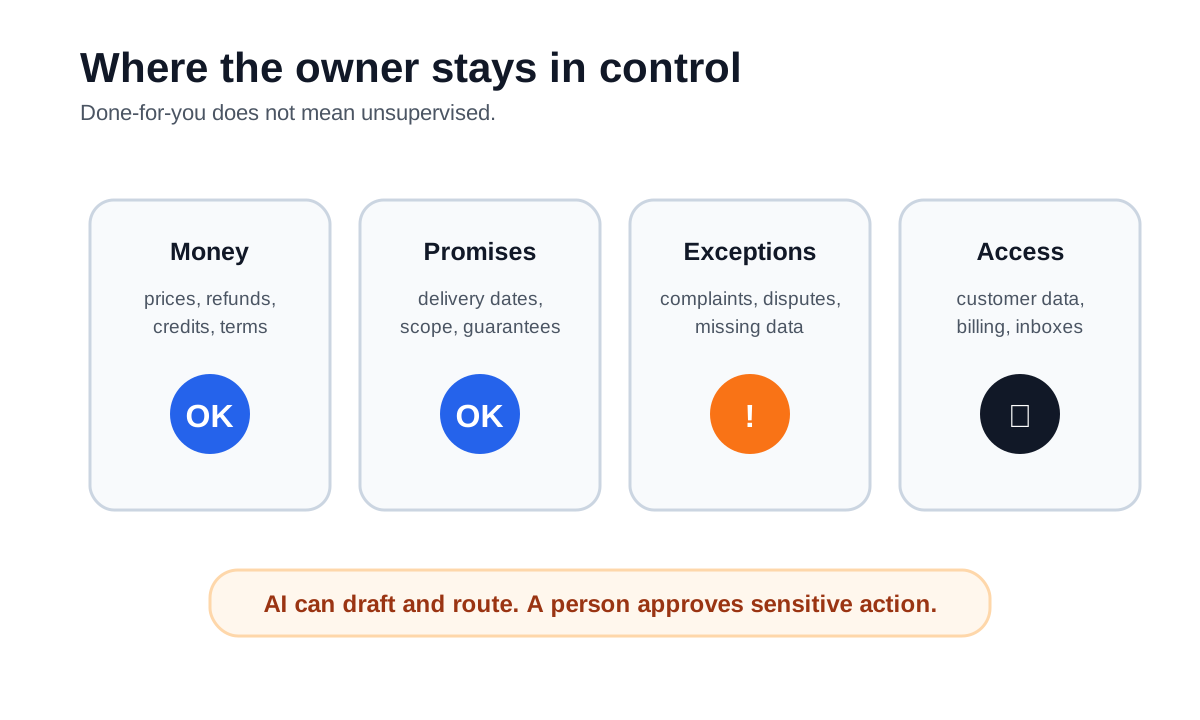
Keep human approval around four areas:
- money decisions such as refunds, discounts, credits, terms, and write-offs
- promises about timing, delivery, service scope, or outcomes
- exceptions such as complaints, disputes, missing information, or sensitive records
- access to customer data, inboxes, billing tools, and private team notes
This is why the first build should include an operating process. A provider should leave the business with a simple checklist, not just a hidden automation nobody understands.
How to Choose a Provider
The right provider should ask more questions about the workflow than the model. They should want examples of real leads, real invoices, real customer replies, and real team constraints.
Use the AI automation company checklist to compare providers. For this specific category, ask:
- What exact bottleneck will the first build fix?
- Which existing tools will it connect?
- What happens when the AI is unsure?
- What messages or actions require approval?
- How will the team test bad, messy, or incomplete inputs?
- What does the owner review weekly?
- What documentation is handed over?
Ask the provider for a written scope that names the tools, handoffs, testing and ongoing support. Business Boomer’s main service comparison covers call answering and Google review management. Confirm availability and scope separately for other project work; the examples in this guide do not establish what any provider will deliver.
Cost and Scope Expectations
The first system should usually be scoped small enough to launch, test, and improve. A practical starter build might include one trigger, one or two connected tools, one AI task, one approval path, and one reporting loop.
Large custom builds make sense when the business already has clear process volume, clean data, and a team that will use the system. If the business is still choosing tools, it may need a simpler small-business AI automation guide before paying for a custom build.
Watch for vague packages that promise “AI everywhere.” Better scopes sound like this: “new website leads become qualified follow-up tasks,” “invoice replies are classified before reminders continue,” or “the owner gets a weekly brief of open leads and unpaid invoices.”
A Simple Readiness Checklist
Before paying for done-for-you AI, make sure the business can answer these questions:
- What repetitive workflow causes the most pain right now?
- Where does the trigger happen?
- Which tool owns the truth?
- What should AI draft, summarize, classify, or route?
- What should never be automated?
- Who reviews exceptions?
- What does success look like after two weeks?
Before commissioning a system, identify one repeatable workflow, its owner, and the decisions that still need human review. Start with AIBB’s free 25-Minute AI Workflow Audit Kit.
Explore the free workflow audit kit.
Bottom Line
Done-for-you AI systems are most valuable when they make one real workflow faster, clearer, and easier to manage. For most small businesses, the best first build is not a general AI assistant. It is a lead response system, intake system, invoice follow-up workflow, or owner reporting loop with clear human approval.
FAQ
Quick answers about this guide and how to put the idea into practice.
What should a done-for-you AI proposal include?
Ask for a defined workflow, tool connections, approval rules, acceptance tests, owner training and support responsibilities. Confirm the scope in writing before commissioning the build.
Which decisions should stay with a person?
Keep people responsible for prices, refunds, delivery promises, sensitive information and disputed or unclear requests. Agree on the escalation rules before launch.
Where should I start if I cannot define the project yet?
Use the free workflow audit kit to identify one repeatable task, its owner and a useful result. Then use those notes to compare provider proposals.