
Why Small Businesses Need AI Systems to Stay Competitive
Small businesses need AI systems to stay competitive because customers, competitors, and teams now expect faster response, cleaner follow-up, better information, and fewer dropped handoffs. A reviewed operating system around repeated work gives the business the advantage.


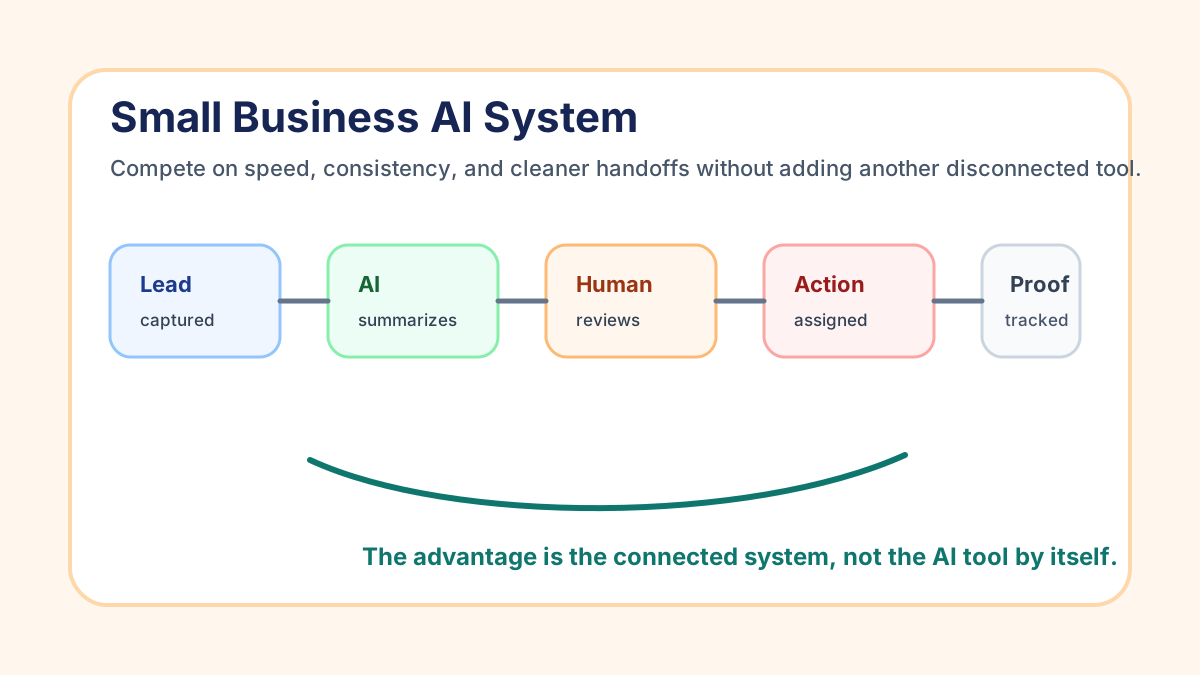
Small businesses need AI systems to stay competitive because customers, competitors, and teams now expect faster response, cleaner follow-up, better information, and fewer dropped handoffs. A reviewed operating system around repeated work gives the business the advantage.
For a U.S. service business, that usually means using AI to summarize, classify, draft, route, and flag work while automation moves the next step into the right place. The business still keeps people responsible for pricing, promises, sensitive decisions, and customer trust.
Search Intent and Top-Result Pattern
Current U.S. results for this topic are mostly broad AI benefit guides, official small-business guidance, bank and research reports, adoption-stat articles, and vendor posts about competitive advantage. The recurring themes are productivity, efficiency, customer service, cost control, adoption gaps, and worker training.
The content gap is practical implementation. Many results say that small businesses should use AI, but fewer explain what an AI system looks like inside a local service company, where human review belongs, and how to tell whether the business is becoming more competitive.
What an AI System Means in a Small Business
An AI system is a repeatable workflow where business signals turn into reviewed action. A lead arrives, a voicemail is transcribed, an estimate goes quiet, an invoice becomes overdue, a customer asks a question, or the owner records a note. AI prepares the next step. Automation moves the work. A person reviews anything that affects money, trust, scope, or risk.
That differs from opening an AI chat window. A chat tool can help with one task, but it does not know where the record lives, who owns the follow-up, whether the invoice was paid, or which customer is waiting. A system connects the AI step to the real work.
If the operating model still feels fuzzy, the AI workflow automation guide is the foundation. It explains the trigger, source-of-truth, AI task, review rule, and business action that every reliable setup needs.
Why Competitiveness Is Becoming a Systems Problem
Competition used to center on the offer, price, location, reputation, and service quality. Those still matter. The daily operating layer now matters more because customers notice slow replies, inconsistent updates, missed follow-ups, and scattered admin.
The U.S. Small Business Administration says AI can help small businesses improve efficiency, save time, support customer service, create marketing content, analyze data, and stay competitive when costs and labor pressure rise: AI for small business.
JPMorgan Chase Institute's small-business AI research also notes that adoption has accelerated quickly and that advantage may depend less on whether a firm adopts AI and more on how effectively it integrates AI into operations: Understanding the use of AI among small businesses.
That last point is the practical one. The business that wins answers faster, follows up more reliably, uses cleaner information, and sees stuck work before it becomes a customer problem.
The Competitive Gap: Tools Versus Systems
AI tools are easy to try. AI systems are harder to copy because they are built around the business's customers, staff, handoffs, and rules.
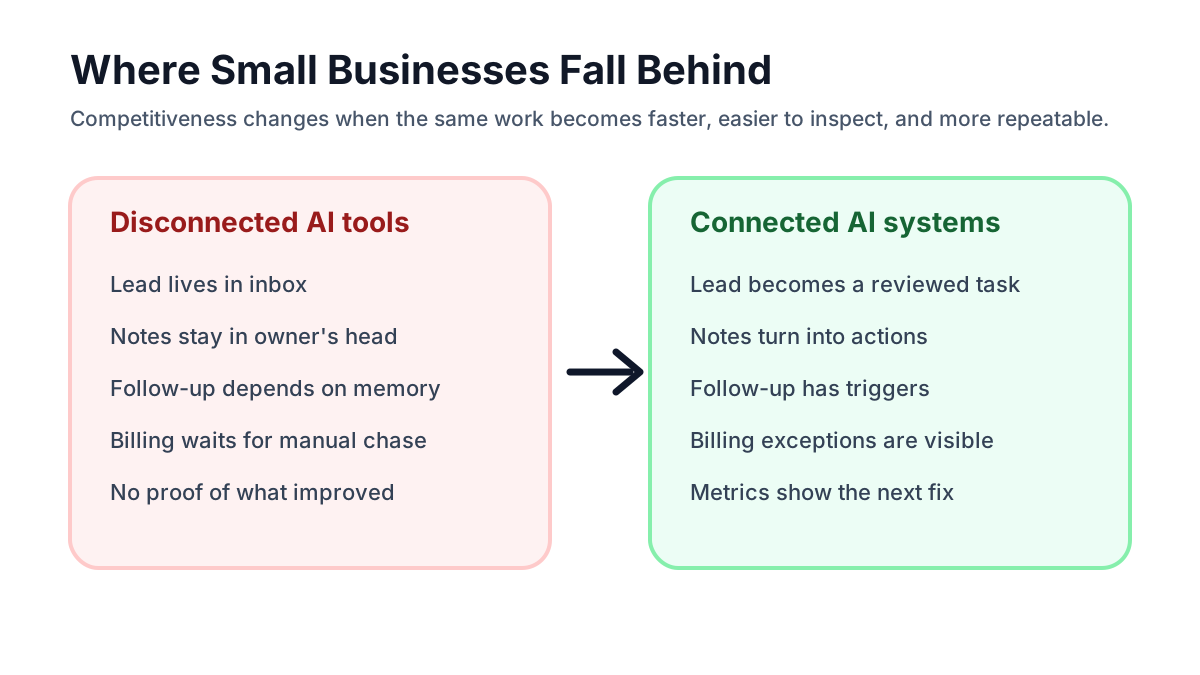
| Area | Disconnected tool use | Competitive AI system |
|---|---|---|
| Lead response | Owner asks AI to draft a reply when they remember | New inquiry creates a summary, task, and reviewed response path |
| Scheduling | Booking link sits apart from intake details | Appointment, prep notes, reminders, and next steps stay connected |
| Billing | Staff manually checks who needs a reminder | Invoice status triggers approved reminders and exception tasks |
| Customer updates | Messages depend on whoever has context | AI prepares a draft from job notes and a person approves it |
| Owner visibility | Work is scattered across inboxes and memory | Weekly brief shows stuck leads, overdue invoices, and open tasks |
If a business is still comparing software, the right first move is not buying the most advanced platform. It is naming the workflow that creates the most operational drag. The best AI automation tools guide can help with tool choice after that workflow is clear.
Five Reasons Small Businesses Need AI Systems
1. Customers expect faster response
Customers may not care whether a company uses AI, but they do care when nobody replies, a quote gets lost, or a follow-up arrives three days late. AI systems help by turning a new inquiry into a cleaner first action: summarize the request, classify urgency, create the task, draft the reply, and notify the right person.
For lead-heavy companies, that first-response gap is often the easiest place to compete. The lead response automation guide explains how to stop new inquiries from sitting in an inbox while the owner is in the field.
2. Manual admin slows down good teams
Many small teams are not short on effort. They are short on clean handoffs. The same person reads emails, rewrites notes, moves data into a spreadsheet, checks the calendar, reminds a customer, and updates the owner. AI systems reduce that drag by preparing summaries, extracting details, drafting messages, and moving work into the right tool.
The benefits of AI automation become concrete here: less blank-page work, fewer repeated explanations, and a more reliable next step.
3. Competitors can operate with smaller teams
A small company that uses AI well can act bigger than it is without pretending to be a large enterprise. It can prepare customer briefs before calls, watch overdue invoices, summarize field notes, route requests, and create owner reports without hiring a full operations department.
That matters for contractors, clinics, agencies, property managers, real estate teams, med spas, and home service companies where the owner is often the bottleneck. A focused AI automation service should make the first workflow easier to run before expanding into a broader operating layer.
4. AI search and AI-assisted buying reward clear source material
More customers are using AI-assisted search, map results, review summaries, and answer engines before they call a business. A company with vague pages, thin service descriptions, inconsistent details, and no structured process gives both humans and AI systems less to work with.
An AI system can help keep service pages, FAQs, intake answers, customer handoffs, and internal notes more consistent. The point is to turn real business knowledge into accurate source material that sales, service, and search can use. Fake proof and generic articles make the business less credible.
For marketing workflows, the AI marketing automation guide shows how to use AI without turning content into unsupported claims.
5. Owners need visibility before problems become expensive
Small businesses often discover problems too late. A lead went cold. An estimate was never followed up. A customer was waiting for an update. An invoice was overdue. A staff member had context in a text thread that nobody else saw.
AI systems can create an operating brief from real sources: CRM, email, calendar, forms, invoice status, job notes, and task lists. The best brief does not overwhelm the owner with every detail. It highlights exceptions and next actions.
If invoices are one of the biggest blind spots, invoice automation setup is often a strong first system because the trigger, source of truth, reminder rules, and payment status are easier to define than a broad company-wide automation project.
The Operating Loop That Makes AI Useful
A competitive AI system should run as a loop, not a one-time project.
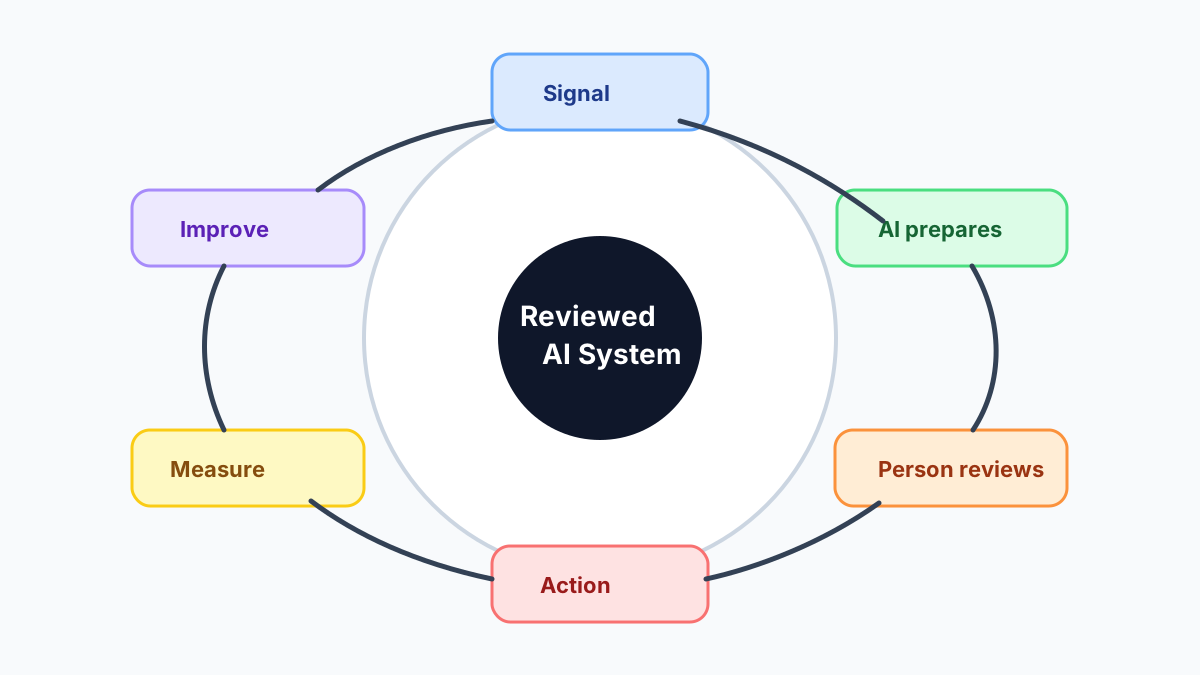
- A business signal starts the workflow.
- AI prepares a summary, classification, draft, or recommendation.
- A person reviews anything sensitive or customer-facing.
- Automation moves the approved action into the right tool.
- The business measures what improved and what still gets stuck.
This loop is why AI versus automation matters. AI handles the fuzzy part. Automation moves the predictable part. People handle judgment.
Where to Start: The First Three Systems
Most small businesses should not start by automating everything. Start with one workflow that repeats weekly, is close to money or customer trust, and is easy to review.
Lead-to-booked-call system
This system watches new forms, missed-call transcripts, email inquiries, or chat messages. AI summarizes the need, detects urgency, drafts a reply, creates a CRM task, and reminds the owner if the lead stalls.
If follow-up is the weak point after the first conversation, the lead follow-up workflow guide is the narrower build path.
Job-notes-to-customer-update system
This system turns field notes, appointment notes, or owner voice notes into a clean internal summary and a customer update draft. A person approves the message before it goes out.
For owner-led companies, this reduces the number of details trapped in memory. If voice notes are the main input, OpenClaw onboarding can be a practical way to create an AI operating layer around daily context.
Invoice-and-payment-follow-up system
This system watches completed work, draft invoices, due dates, payment links, customer replies, and overdue status. AI can prepare polite reminder language or summarize exceptions, but a person should review disputes, refunds, credits, or final notices.
For QuickBooks-heavy businesses, QuickBooks invoice automation is a more specific path than a general AI project.
What Should Stay Human
AI systems make a business more competitive only when they are trustworthy enough to run repeatedly. That means clear boundaries.
Keep people involved for pricing changes, scope promises, refunds, legal language, medical information, hiring decisions, payroll, customer complaints, sensitive personal information, and unusual exceptions. AI can prepare the work. It should not silently make relationship-sensitive decisions.
This human-in-the-loop structure lets a small business use AI in real operations without turning every output into a risk.
A 90-Day Rollout Plan
The safest rollout is narrow, measured, and tied to one business bottleneck.
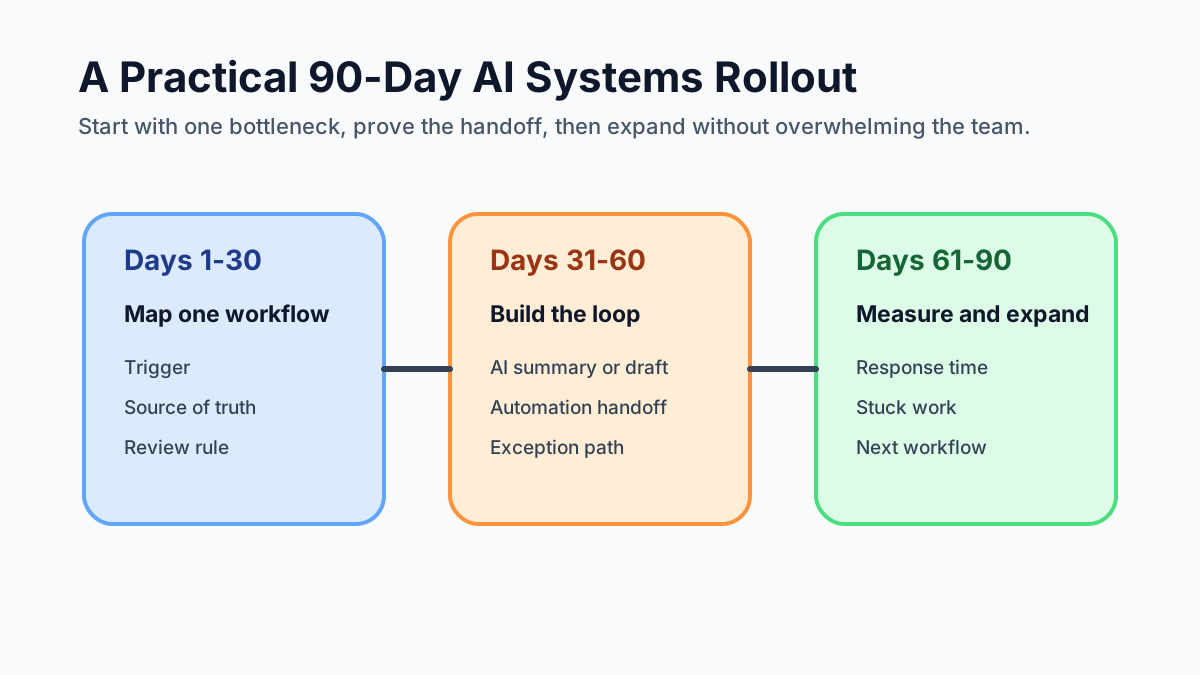
| Window | Main job | Deliverable |
|---|---|---|
| Days 1-30 | Map one repeated workflow | Trigger, source of truth, review rule, success metric |
| Days 31-60 | Build the smallest useful loop | AI summary or draft, automation handoff, exception path |
| Days 61-90 | Measure and decide the next workflow | Response time, stuck work, review quality, next build |
Do not measure success by whether the automation exists. Measure whether the business became easier to run. Good first metrics include first-response time, overdue invoices with next action, estimates with follow-up scheduled, appointments with prep complete, and customer updates sent after review.
For a broader menu of possible first projects, use AI automation examples for small businesses and choose the workflow with the clearest pain.
Common Mistakes That Erase the Advantage
The biggest mistake is confusing AI access with AI capability. Anyone can open a tool. Fewer businesses can define a repeatable workflow, connect it to real records, review outputs, and measure whether the handoff improved.
Other mistakes include:
- buying too many tools before mapping the process
- letting AI send customer messages without approval
- using private chat history as the source of truth
- automating a broken workflow without fixing ownership
- skipping error handling when an integration fails
- measuring novelty instead of business usefulness
If the team is choosing an outside partner, the AI automation company checklist can keep the proposal grounded in workflows, review points, and proof.
Bottom Line
Small businesses need AI systems to stay competitive because the operating standard is rising. Customers expect speed. Teams need cleaner handoffs. Owners need visibility. Competitors can use AI to run leaner, respond faster, and reduce manual drag.
Pick one repeated workflow, define the trigger, connect the source of truth, let AI prepare the next step, keep human review where judgment matters, and measure whether the business is easier to run.
Business Boomer helps small businesses map that first bottleneck and turn it into a reviewed AI system. Start with a Free 30-Minute AI Consultation.
Next step
Find the workflow worth fixing first.
Use the Free 30-Minute AI Consultation to map where leads, invoices, notes, or follow-ups are slipping and choose the smallest useful system.
Keep building the system
Recommended next Business Boomer guides
These links are selected by topic and search intent so this guide connects to the most relevant service pages, industry pages, and supporting blog posts.
Service and setup pages
Use these when you are ready to turn the idea into an implementation path.
Industry-specific pages
See how the same workflow changes for specific business types.
Related blog posts
Read the connected guides that support this topic cluster.
Related AI automation guides
Keep going with the connected Business Boomer guides in this automation cluster.
What is lead response automation?
Why response speed matters and how small businesses can stop leads from slipping away.
What is a CRM for small business?
How a simple CRM supports better lead tracking, follow-up, sales visibility, and customer handoff.
AI automation services for local small business
Planning examples for broader automation. Compare current managed calls and reviews on the Services page; confirm other work in a separate scope.
AI automation for local service businesses
Practical lead, scheduling, review, CRM, invoice, and admin automation for plumbers, HVAC companies, roofers, landscapers, cleaners, contractors, and other local operators.
FAQ
Quick answers about this guide and how to put the idea into practice.
What is the main takeaway from Why Small Businesses Need AI Systems to Stay Competitive?
Small businesses need AI systems to stay competitive because customers, competitors, and teams now expect faster response, cleaner follow-up, better information, and fewer dropped handoffs. A reviewed operating system around repeated work gives the business the advantage.
How does why small businesses need AI systems to stay competitive help a small business?
why small businesses need AI systems to stay competitive can help a small business reduce manual work, improve follow-up, organize repetitive tasks, and create a clearer operating process when it is tied to a real bottleneck.
Can Business Boomer help implement why small businesses need AI systems to stay competitive?
Yes. Business Boomer can help turn the idea into a practical workflow, page, checklist, or automation system depending on what the business needs first.
Find the workflow worth fixing first.
Use the Free 30-Minute AI Consultation to map where leads, invoices, notes, or follow-ups are slipping and choose the smallest useful system.
Book a Free 30-Minute AI Consultation