AI Automation in Finance: Safer Workflows for Business Teams

Author
Sam MonacFounder, Business Boomer | AI Operator & Growth Strategist
Sam Monac is a product and AI operator who helped scale Token Metrics to $7M+ ARR and supported more than $6M in capital raises. Through Business Boomer and his portfolio of AI-enabled businesses, Sam writes from hands-on experience building automation systems, growth workflows, and practical AI tools for real operators.

Fact Checked By
S. VishwaSEO Specialist & Blog Writer, Business Boomer
S. Vishwa is an experienced SEO specialist and blog writer with 10+ years of experience across digital marketing and fintech. He is passionate about crafting high-quality content that informs and engages readers in the finance and marketing sectors.
AI automation in finance works best when it helps business teams capture records, flag exceptions, draft follow-up, and keep humans in control of payment and policy decisions.
AI automation in finance is most useful when it makes routine finance work easier to review, not when it quietly makes money decisions by itself. For small and mid-sized business teams, the safest first projects are accounts payable intake, invoice follow-up, receipt routing, reconciliation prep, collections drafts, cash-flow summaries, and exception alerts that keep a human approver in the loop.
The practical goal is simple: use AI to summarize, extract, classify, compare, and draft. Keep payment releases, bank-detail changes, refunds, pricing exceptions, tax judgment, and financial promises under owner, controller, bookkeeper, or manager review.
Search intent and top-result pattern
People searching for AI automation in finance usually want use cases, workflow examples, tool guidance, risk controls, or a plain-English explanation of where AI fits inside finance operations. Current U.S. results lean toward finance automation explainers, accounts payable and receivable workflow pages, AI use-case lists, compliance and governance articles, and vendor guides for AP, reporting, anomaly detection, and finance operations.
Recurring themes include invoice processing, fraud detection, reconciliation, reporting, cash management, compliance monitoring, and approval workflows. The gap for small business teams is that many pages speak to enterprise finance departments or financial institutions. A local service business, agency, practice, contractor, or professional firm usually needs a narrower answer: which finance workflow should be safer, faster, and easier to inspect this month?
What AI automation in finance should do first
The first finance automation project should reduce manual copying and improve review quality. It should not ask AI to become the CFO, controller, tax advisor, or final payment approver.
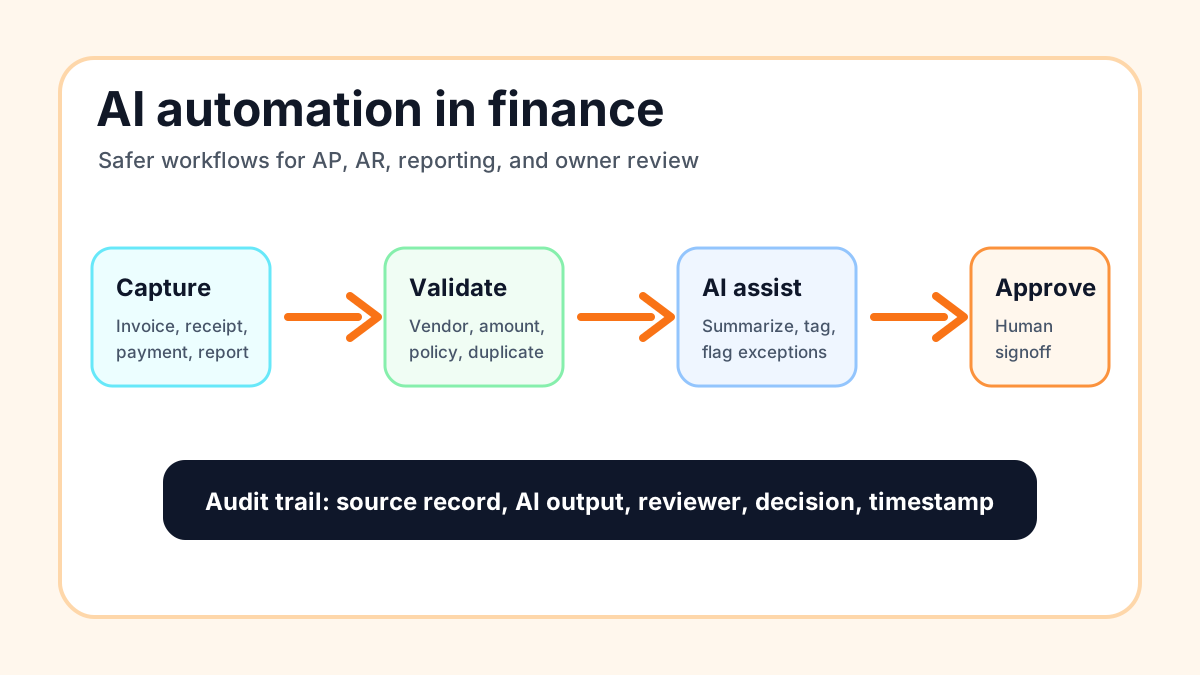
For most business teams, AI is strongest at messy information work. It can read an invoice, summarize a vendor email, label a payment question, compare fields, draft a reminder, explain a variance, or prepare an owner summary. Regular automation can then route the task, update the system, create the reminder, or add the draft to the right queue.
If you are still deciding whether the company needs rules-based automation or AI assistance, start with the AI vs automation guide. A lot of finance cleanup is ordinary automation with a few AI steps added where the inputs are inconsistent.
Start with safer finance lanes
Use three lanes before building anything: automate, assist, and escalate. This keeps the project practical and prevents the team from treating every finance task the same way.
| Lane | Use it when | Example finance work |
|---|---|---|
| Automate | Rules are clear, low risk, and reversible | Route receipts, create invoice reminders, tag expense categories for review |
| Assist | Judgment is needed but a person approves | Draft collections emails, summarize cash-flow changes, prepare reconciliation notes |
| Escalate | Money, policy, or trust risk is high | New vendor bank details, refunds, disputes, write-offs, unusual payment requests |
That lane decision matters more than the tool. A simple reminder can run automatically. A polite overdue-invoice draft can be reviewed before sending. A request to change ACH details should be escalated and verified outside the email thread.
Accounts payable is a strong first workflow
Accounts payable is often the cleanest starting point because the documents, systems, and risks are visible. The business already receives invoices. Someone already checks whether the vendor is real, the amount is expected, the work was done, and the payment should be made. AI can make that review easier without owning the decision.
For example, an AI-assisted AP workflow can extract vendor name, invoice number, due date, total, purchase order, job name, and payment instructions. It can compare the invoice to prior records, flag missing fields, identify possible duplicates, and write a short note for the reviewer.
If invoice admin is already a pain point, compare this with the invoice automation services guide. That guide covers what a service business should expect when someone else sets up the workflow.
If the business is still choosing its billing system, the QuickBooks vs FreshBooks invoicing comparison can help separate tool choice from workflow design.
Accounts receivable and collections need tone control
Accounts receivable automation can help business teams follow up without sounding scattered or harsh. The safest version checks invoice status, payment link, age, prior messages, customer type, and open disputes before drafting the next reminder.
AI can help summarize the account and draft a message. The human review point should catch anything sensitive: a good client with a known delay, a disputed job, a changed payment term, or a customer who needs a phone call instead of another email.
For a billing-specific setup, use the AI billing systems guide alongside this finance article. It is more focused on cash-flow follow-up, reminders, and owner review.
If the immediate problem is overdue outreach, the invoice reminder automation guide is the narrower playbook.
Reporting and cash-flow summaries are good low-risk wins
Many owners do not need more dashboards. They need a short weekly summary that explains what changed, what is late, what needs attention, and which numbers should be reviewed.
AI can turn data from QuickBooks, Stripe, spreadsheets, CRM activity, and task systems into a plain-English finance brief. The output might include open invoices, large upcoming payments, unusual expense categories, expected deposits, missing receipts, and stuck approvals.
The workflow should show its sources. A finance summary is only useful if the owner can click back to the record, invoice, report, or task behind it. If the business wants broader weekly operating summaries, the AI business process automation guide uses the same trigger, review, and action logic outside finance.
Reconciliation prep can catch messy handoffs
Reconciliation is not always hard because the math is hard. It is often hard because receipts are missing, deposits are unclear, payment processors batch transactions, and customer names do not match the accounting record.
AI can help classify unclear transaction descriptions, group likely matches, summarize what is missing, and create a short exception list. The bookkeeper or finance owner still decides how the transaction should be recorded.
For service businesses, this can connect directly to the way invoices are created in the first place. Cleaner invoice triggers, payment links, and customer records make reconciliation easier later. The best invoice automation workflow guide is a useful companion if invoices are the root of the mess.
It also helps to compare manual invoicing vs AI automation before deciding how much of the finance workflow should change at once.
Fraud and anomaly detection should explain the flag
Finance AI is valuable when it catches patterns people might miss, but the flag has to be explainable. "High risk" is not enough. The reviewer needs to know whether the issue is a changed bank account, a duplicate invoice number, a new vendor, a weird amount, a rushed payment request, or a mismatch against the job record.
The Association of Certified Fraud Examiners has long highlighted how expensive occupational fraud can be for businesses, and invoice and billing schemes are a familiar risk category. That does not mean every small business needs enterprise fraud software. It does mean finance workflows should treat changed payment details, urgency pressure, missing records, and duplicate invoices as review triggers.
IBM's finance automation explainer is a helpful high-level reference for how automation and AI can support finance processes such as analysis, decision support, and operational workflows.
Guardrails before connecting finance tools
Before a business connects AI to finance systems, write down the rules. The rules should be boring, specific, and easy for the team to audit.
Use this checklist before launch:
- Name the source of truth for invoices, payments, customers, vendors, and receipts.
- Define what AI is allowed to do: summarize, extract, classify, compare, or draft.
- Define what AI is not allowed to do: approve payments, change bank details, issue refunds, promise terms, or make tax decisions.
- Require human approval for customer-facing collections messages until the workflow is proven.
- Log the source record, AI output, reviewer, decision, and timestamp.
- Test normal examples, messy examples, duplicates, missing fields, and suspicious payment requests.
- Create a pause procedure so the team can stop the workflow quickly.
The U.S. Small Business Administration's AI for small business guidance is a useful general reminder to protect business data, understand risks, and keep people accountable for AI-assisted decisions.
What not to automate first
Do not start with autonomous payments, bank-account changes, tax positions, credit decisions, payroll exceptions, refund approvals, collections threats, or anything that would create legal, customer, or cash risk if the AI misunderstood the context.
Also avoid broad "finance chatbot" projects that invite employees to paste sensitive records into tools without clear data rules. A safer first version is staff-side: AI prepares a summary or draft, the reviewer checks it, and the automation records what happened.
If the business needs a general map before choosing a finance workflow, use the AI workflow automation guide to define triggers, systems, approvals, and outputs first.
A practical rollout plan
Start with one workflow and one measurable result. Good first results include fewer missing receipts, faster invoice review, fewer overdue invoices without a next action, cleaner weekly finance summaries, or fewer manual copy-and-paste steps between systems.
A simple rollout can look like this:
- Map the current finance workflow on one page.
- Mark the handoffs where work waits, gets copied, or becomes unclear.
- Pick one trigger, such as a new invoice, overdue invoice, payment received, missing receipt, or weekly report date.
- Decide the AI job in one sentence.
- Add the human approval point.
- Test with real examples from the last 30 to 90 days.
- Launch with a small group and review exceptions weekly.
- Write the SOP before expanding the workflow.
For teams that want help choosing the first workflow, the 25-Minute AI Workflow Audit Kit is a practical starting point. It helps separate attractive AI ideas from work that is actually repeated, painful, and safe enough to improve.
Tool choices matter less than control points
QuickBooks, Stripe, FreshBooks, Wave, Jobber, Housecall Pro, Google Sheets, Airtable, Zapier, Make, n8n, and custom scripts can all sit inside finance workflows. The more important question is where the control points live.
Before buying another tool, answer these questions:
- Where does the official record live?
- Who approves exceptions?
- What happens when AI is uncertain?
- Can the team see why something was flagged?
- Can the owner pause the workflow?
- Does the workflow make the next action clearer?
If the answer is fuzzy, the business needs workflow design before platform shopping. The best AI automation tools guide can help compare tool categories once the bottleneck is clear.
For a broader scoping conversation, AI automation consulting should start with finance controls, review points, and adoption before any tool recommendation.
When done-for-you setup makes sense
Build it yourself if the workflow is simple, low risk, and easy to review. A weekly missing-receipts report or internal invoice summary is a reasonable first DIY project.
Get help if the workflow touches customer payments, vendor approval, multiple finance systems, exception handling, staff adoption, or customer-facing AR messages. The build is not just connecting apps. It is deciding what AI can do, what it must never do, and how the team will review edge cases.
Business Boomer helps small and service businesses map one finance bottleneck, build the smallest useful workflow, test it with real examples, and hand the team a simple SOP. If finance admin is slowing down follow-up or cash flow, start with the invoice automation setup page.
You can also book a workflow review through the contact page.
Next step
Ready to turn this into a working system?
Get a practical review of where AI automation, lead follow-up, CRM cleanup, or invoice workflows can create the fastest win in your business.
Keep building the system
Recommended next Business Boomer guides
These links are selected by topic and search intent so this guide connects to the most relevant service pages, industry pages, and supporting blog posts.
Service and setup pages
Use these when you are ready to turn the idea into an implementation path.
Industry-specific pages
See how the same workflow changes for specific business types.
Related blog posts
Read the connected guides that support this topic cluster.
Related AI automation guides
Keep going with the connected Business Boomer guides in this automation cluster.
How to automate invoices for small business
The guide already earning Google impressions. Covers invoice creation, reminders, payment tracking, and cash-flow follow-up.
Automatic invoicing setup for business
A focused setup page for the query closest to page-one range: trigger, template, payment link, reminders, overdue task, and testing.
Best invoicing automation tools for small business
A comparison of QuickBooks, FreshBooks, Stripe Billing, Wave, Jobber, Housecall Pro, Zapier, and Make.
QuickBooks invoice automation for small business
How to use QuickBooks for recurring invoices, reminders, payment tracking, and workflow-connected billing.
Frequently Asked Questions
FAQ
Quick answers about this guide and how to put the idea into practice.
What is the main takeaway from AI Automation in Finance: Safer Workflows for Business Teams?
AI automation in finance works best when it helps business teams capture records, flag exceptions, draft follow-up, and keep humans in control of payment and policy decisions.
How does AI automation in finance help a small business?
AI automation in finance can help a small business reduce manual work, improve follow-up, organize repetitive tasks, and create a clearer operating process when it is tied to a real bottleneck.
Can Business Boomer help implement AI automation in finance?
Yes. Business Boomer can help turn the idea into a practical workflow, page, checklist, or automation system depending on what the business needs first.
Want help putting this into practice?
Business Boomer helps real businesses install better systems, not just read about them.
Talk to Sam →