
AI and the Future of Work for Small Business
AI will change small-business work by moving repeatable tasks into reviewed systems, not by removing the need for owners, managers, and staff judgment.


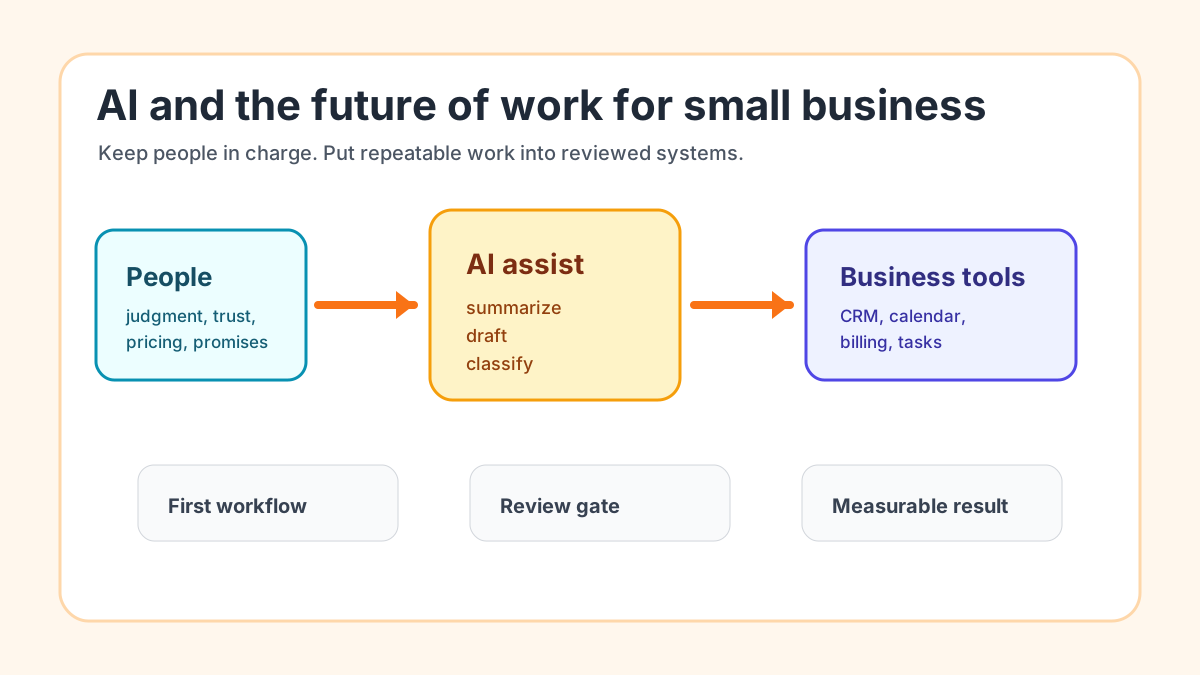
AI will change the future of work for small businesses by turning repeatable tasks into reviewed systems. The best move right now is not to replace people or buy every new tool. It is to pick one workflow, decide what AI should prepare, decide what automation should route, and keep people responsible for judgment, trust, pricing, and customer promises.
For a local service business, the first practical AI project is usually lead follow-up, intake summaries, appointment prep, estimate follow-up, invoice reminders, review requests, or owner admin capture. Start where work already stalls, test with real examples, and expand only after the team can see a cleaner handoff.
Search intent and top-result pattern
People searching this topic usually want a plain-English beginner guide, a trend explanation, or a practical list of what small companies should do next. Current U.S. results include broad future-of-work articles, vendor small-business AI guides, trend reports, and tool/use-case roundups.
Recurring themes include productivity, customer service, automation, staffing pressure, skills, and competitive pressure. The gap is implementation order. A contractor, med spa, agency, property manager, law firm, or home service company does not need a sweeping prediction. It needs a small operating plan that says which task changes first, what stays human, and how the business measures whether AI actually helped.
What the future of work means for a small business
For small businesses, the future of work is less about futuristic offices and more about daily handoffs. A new inquiry arrives. A customer reschedules. A technician leaves notes. An invoice becomes overdue. A prospect asks the same question for the fifth time this week.
AI is useful when it helps the team read, summarize, classify, draft, or explain that work faster. Automation is useful when it moves the result into the right place: CRM, calendar, email, billing system, task list, or weekly owner report.
That is why a practical AI workflow automation setup matters more than a loose collection of AI tools. The business needs a trigger, a source of truth, an AI task, a review rule, an action, and a simple measurement plan.
The owner should not start with a tool list
Tool lists are tempting because they feel quick. The problem is that a tool list does not know where your business loses time, drops leads, delays invoices, or repeats the same admin work.
Start with the work instead. Write down one workflow in plain English: what starts it, who touches it, where information gets copied, where customers wait, and what final action should happen. Then decide whether the problem needs AI, basic automation, a better template, or a clearer staff rule.
If you are still comparing categories, the best AI automation tools guide is useful after the workflow is clear. Tools should fit the work, not become the strategy.
Sort tasks into three buckets
Small businesses can make better AI decisions by sorting work into three buckets: AI helps, automation routes, and people decide.
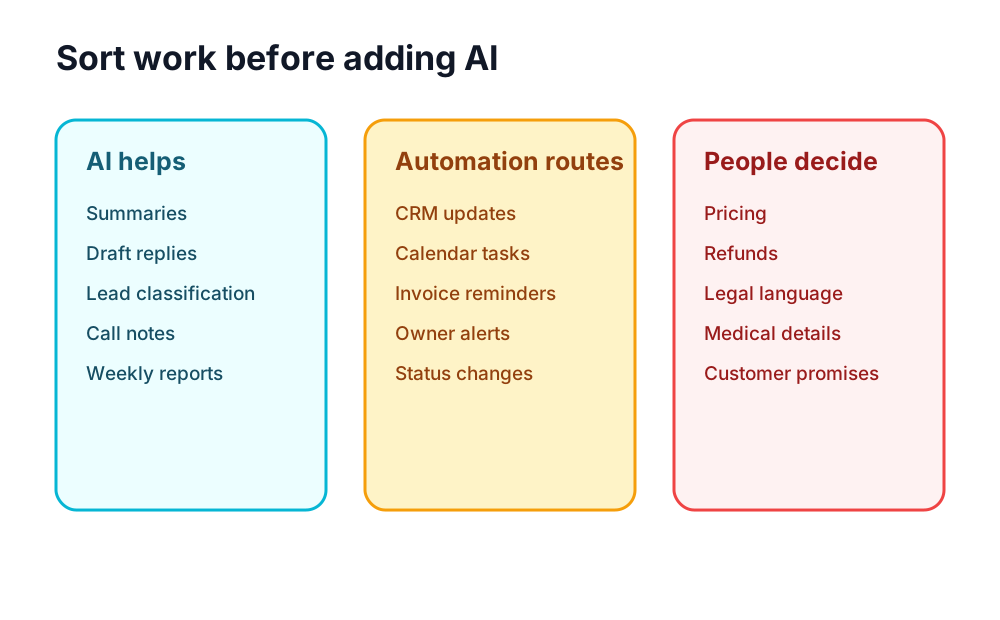
| Bucket | Good examples | Keep in mind |
|---|---|---|
| AI helps | Summaries, first drafts, lead classification, call notes, weekly explanations | AI output still needs review when trust, money, or sensitive details are involved |
| Automation routes | CRM updates, calendar tasks, invoice reminder queues, owner alerts, status changes | The workflow needs a clean source of truth |
| People decide | Pricing, refunds, legal language, medical details, hiring, customer promises | The business should not outsource judgment to a model |
This separation keeps AI practical. A salon can let AI summarize intake notes, but a person should decide the service recommendation. A contractor can let AI draft estimate follow-up, but a person should approve pricing and scope. A law firm can use AI to organize intake details, but legal judgment stays with the professional.
Start with work that repeats every week
The best first workflow is frequent, visible, and easy to review. It should happen often enough that the team notices the improvement, but narrow enough that mistakes are easy to catch.
Good first candidates include:
- new lead summaries and reply drafts
- missed-call follow-up tasks
- estimate follow-up reminders
- appointment prep notes
- invoice reminder queues
- customer review request workflows
- owner voice notes turned into tasks
- weekly exception reports
If you want a broader menu before choosing, the AI automation examples guide shows common small-business workflows and where each one usually fits.
Lead-heavy businesses often start with lead response automation because the pain is obvious: inquiries arrive from forms, voicemail, email, ads, referrals, and texts, then wait for someone busy to respond.
If the lead handoff is already the first priority, this lead follow-up workflow guide can help turn the idea into a concrete sequence.
If billing is the clearer bottleneck, invoice automation setup may be the better first move. Invoicing has cleaner rules, fewer vague inputs, and a direct connection to cash-flow follow-up.
For a narrower payment workflow, the invoice reminder automation guide explains how to queue reminders without letting AI make sensitive account decisions.
What employees should learn now
The most valuable small-business employees will not be people who blindly paste prompts into a chatbot. They will be people who understand the work well enough to supervise AI output, spot missing context, and improve the process.
That means training should focus on business judgment, not just tool tricks. Staff should learn what a good lead summary looks like, when a customer message needs escalation, which fields matter in the CRM, and what the company will never let AI send without approval.
The U.S. Small Business Administration notes that AI can help small businesses with efficiency, customer service, marketing, cybersecurity, and other operations, while owners still need to understand risks and review outputs: AI for small business.
Use AI to prepare work, not hide work
Bad AI adoption makes work feel invisible. A task disappears into a tool, nobody knows whether it was checked, and customers only notice when something sounds wrong.
Good AI adoption makes work easier to inspect. The system shows the original input, the AI summary or draft, the review decision, the final action, and the owner metric. That is especially important for service businesses where trust matters more than speed alone.
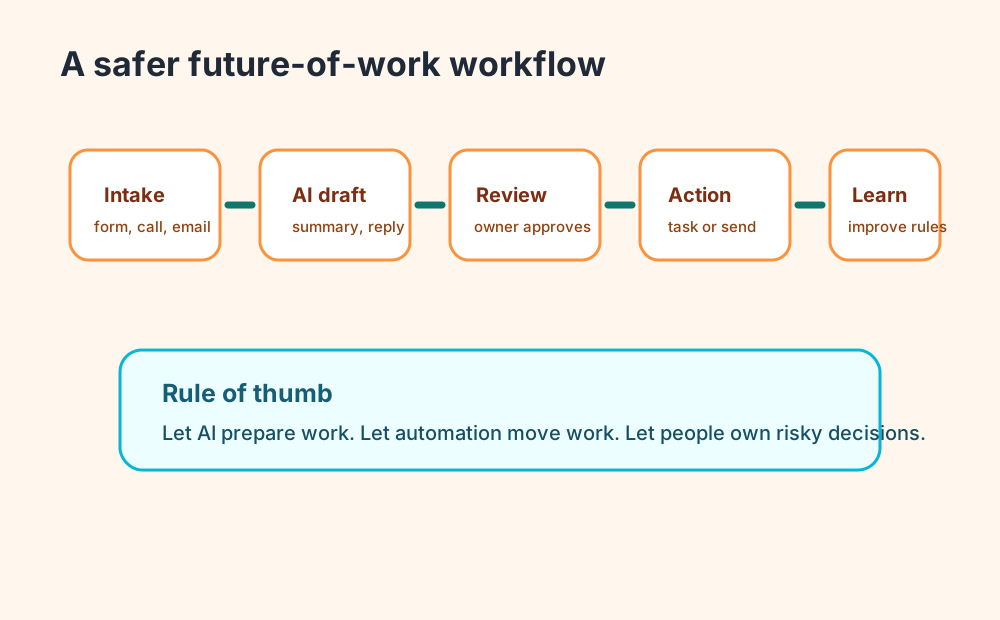
This is where the difference between AI and automation matters. AI can draft the note. Automation can put it in the task queue. A person should approve the decision when the message affects price, scope, timing, refunds, legal risk, medical details, or an important customer relationship.
For a deeper breakdown, the AI vs automation guide explains when a simple rule-based workflow is enough and when language support is worth adding.
If the main issue is messy language inside otherwise repeatable work, the generative AI business automation guide shows how to use AI for summaries, drafts, and classifications inside reviewed systems.
Practical examples by business type
Contractor or home service company
A contractor can use AI to summarize web forms, missed-call transcripts, field notes, and estimate requests. Automation can create the CRM record, assign a follow-up task, and remind the owner when an estimate has not been answered.
The human review point is scope and price. AI can prepare the first draft, but a person should approve anything that changes the promise to the customer. If the company already has too many manual handoffs, start with the contractor automation guide.
Med spa or appointment business
An appointment business can use AI to summarize intake forms, flag missing information, prepare appointment notes, and draft reminder messages. Automation can connect forms, calendar events, and follow-up tasks.
The review point is anything sensitive. AI should not make medical, legal, or financial decisions. If no-shows and booking friction are the main issue, appointment scheduling automation may be the first workflow.
Agency, consultant, or professional service firm
An agency or consultant can use AI to summarize discovery calls, turn meeting notes into tasks, draft follow-up emails, prepare proposals, and identify stalled opportunities. Automation can update the CRM and remind the owner when a proposal needs follow-up.
The review point is positioning, scope, and pricing. If the main bottleneck is pipeline movement, the AI sales automation guide gives a practical path from lead to follow-up.
Property management or local operator
A property manager can use AI to triage tenant messages, summarize maintenance requests, prepare vendor notes, and write owner updates. Automation can route urgent items and create tasks in the right system.
The review point is urgency and responsibility. AI can make the message clearer, but the business should define which requests require human attention before any customer-facing response goes out.
A 30-day plan for adopting AI at work
Use a short rollout instead of a vague transformation plan.
- Pick one workflow that repeats every week.
- Collect 20 to 50 real examples from that workflow.
- Write the ideal output in plain English.
- Decide what AI prepares and what a person approves.
- Connect the workflow to the tool where work already lives.
- Test with internal review before customer-facing use.
- Track the same metric for 30 days.
- Keep, improve, or stop the workflow based on results.
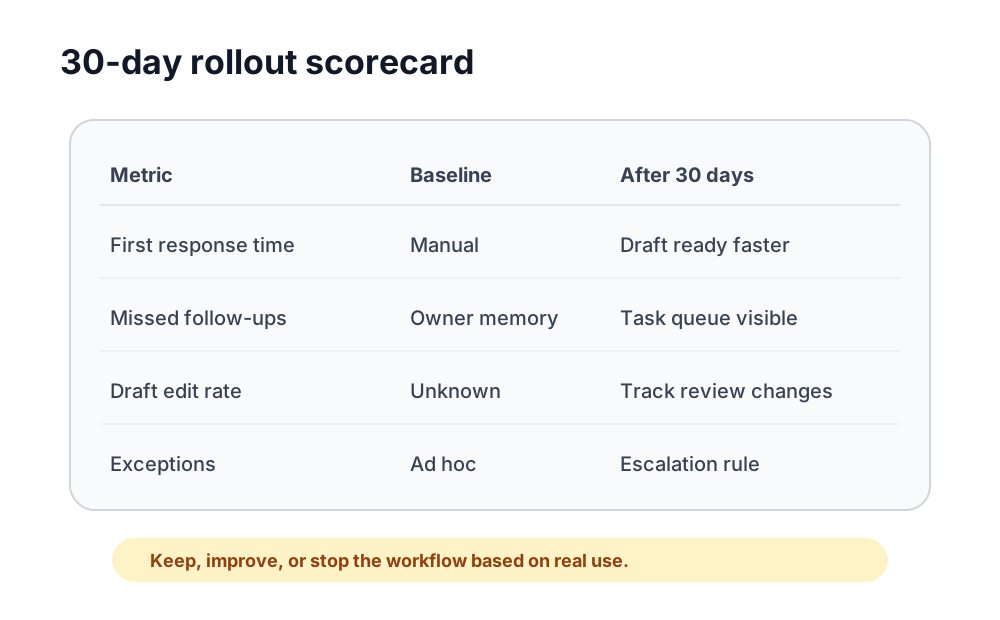
The metric does not need to be complicated. Track first-response time, missed follow-ups, invoices sent on time, draft edit rate, customer questions resolved, or owner admin tasks created from notes.
If you want help choosing the workflow before building, a focused AI automation service should map the current process, define review points, connect the tools, and leave the business with a system it can actually run.
What not to automate yet
Do not automate work the business cannot explain. If the current process is unclear, AI will add speed before it adds reliability.
Avoid early automation for:
- pricing decisions without clear rules
- refunds or customer disputes
- medical, legal, tax, or insurance judgment
- hiring or firing decisions
- sensitive personal information without a clear policy
- promises that affect scope, timeline, or contract terms
- public claims that need proof
The National Institute of Standards and Technology's AI Risk Management Framework is more formal than most small businesses need day to day, but the practical lesson is useful: know what the system is supposed to do, test it, monitor it, and manage risk over time.
How to know the workflow is working
A good AI workflow should make the next action clearer. The team should know what happened, what AI prepared, who reviewed it, what changed, and what the customer or owner sees next.
Useful signs include faster first replies, fewer forgotten follow-ups, cleaner appointment prep, more consistent invoice reminders, fewer blank-page drafts, and better weekly visibility for the owner.
The clearest benefits of AI automation for small business show up when a repeated handoff gets faster, easier to inspect, and safer to repeat.
Bottom line
AI and the future of work for small businesses should be practical. Start with one repeated workflow, use AI to prepare the work, use automation to move it, and keep people responsible for decisions that affect money, trust, and customer relationships.
The goal is not an AI tool for every corner of the business. The goal is a cleaner operating system: fewer dropped tasks, faster follow-up, better handoffs, safer review, and a team that can see the work before it slips.
If you want help finding the first workflow, Business Boomer can map the bottleneck, choose the safest starting point, and build the first reviewed system. Start with a Free 30-Minute AI Consultation.
Next step
Find the workflow worth fixing first.
Use the Free 30-Minute AI Consultation to map where leads, invoices, notes, or follow-ups are slipping and choose the smallest useful system.
Keep building the system
Recommended next Business Boomer guides
These links are selected by topic and search intent so this guide connects to the most relevant service pages, industry pages, and supporting blog posts.
Service and setup pages
Use these when you are ready to turn the idea into an implementation path.
Industry-specific pages
See how the same workflow changes for specific business types.
Related blog posts
Read the connected guides that support this topic cluster.
Related AI automation guides
Keep going with the connected Business Boomer guides in this automation cluster.
AI automation services for local small business
Planning examples for broader automation. Compare current managed calls and reviews on the Services page; confirm other work in a separate scope.
QuickBooks invoice automation for small business
How to use QuickBooks for recurring invoices, reminders, payment tracking, and workflow-connected billing.
How to follow up with leads for small business
A practical workflow for CRM stages, reminders, email, text, and human follow-up tasks.
What is lead response automation?
Why response speed matters and how small businesses can stop leads from slipping away.
FAQ
Quick answers about this guide and how to put the idea into practice.
What is the main takeaway from AI and the Future of Work for Small Business?
AI will change small-business work by moving repeatable tasks into reviewed systems, not by removing the need for owners, managers, and staff judgment.
How does AI and the future of work for small businesses help a small business?
AI and the future of work for small businesses can help a small business reduce manual work, improve follow-up, organize repetitive tasks, and create a clearer operating process when it is tied to a real bottleneck.
Can Business Boomer help implement AI and the future of work for small businesses?
Yes. Business Boomer can help turn the idea into a practical workflow, page, checklist, or automation system depending on what the business needs first.
Find the workflow worth fixing first.
Use the Free 30-Minute AI Consultation to map where leads, invoices, notes, or follow-ups are slipping and choose the smallest useful system.
Book a Free 30-Minute AI Consultation